- License
- 6 months ($20 Starter / $40 Community Pro)
Why XenSocial?
Having built and managed online communities since the bulletin board days of the mid-1980s, I've watched user habits completely transform. Today, when someone discovers your community via Facebook, Instagram, X, or Reddit, handing them an old-school thread listing can be a jarring experience.
Modern users - especially younger demographics - expect a continuous, single-page scroll where they can do everything without clicking around. More importantly, they want to scroll through actual topics and content rather than guessing what a discussion is about from a vague or poorly written title. XenSocial puts an end to that friction. It doesn't replace your forum; it adds a modern front door that bridges the gap between classic community building and modern social media expectations, converting casual visitors into engaged participants.
The Problem XenSocial Solves
Traditional forums ask users to browse a list of topic titles, click into individual threads, navigate through multiple pages of replies, and then click back to find the next conversation.
That workflow was fine in 2005 - but today's users have been trained by Facebook, X (Twitter), Reddit, and Instagram to expect a continuous, scrollable feed where they can read, react, and participate without ever leaving the page.
XenSocial bridges that gap. It gives your XenForo community a familiar social media layout - an infinite-scroll feed where members can read full posts, reply inline, react, vote in polls, and create new topics - all without navigating away from a single, fluid page.
Your existing forum structure stays intact. XenSocial simply adds a modern front door that makes participation effortless, especially for the casual visitors and new members who are most likely to bounce from a traditional thread listing.
Feature Overview
For Your Community Members
 Familiar Social Feed Layout
 Inline Replies Without Leaving the Feed
 Threaded Reply-to-Reply
Auto-Display Recent Replies
 Inline Reactions
 Inline Polls
 Full Rich-Text Composer
Create new threads right from the top of the feed with a familiar "What's on your mind?" prompt. The full-featured composer includes:
 Attachment Support
 Read More / Content Truncation
 Infinite Scroll with Load More
 Dual Feed Modes
 Legacy View Bridge
View on Social Feed Button
 Full Dark Mode Support
 Guest Participation
 Quick Edit Access
For Administrators
 Full AdminCP Configuration
All settings are managed from a single options page in the XenForo AdminCP:
 Granular Permissions
Three dedicated XenSocial permissions, configurable per user group:
These work alongside XenForo's existing forum-level permissions.
A user needs both the XenSocial permission AND the underlying forum permission to perform an action.
 Forum Filtering
Fine-grained control over which forums appear in the feed:
 Moderation Integration
 Navigation
For Revenue: In-Feed Advertising (Community Pro)
 Responsive Image Ads
When both desktop and mobile images are set, XenSocial uses the HTML
 Custom Ad Code (HTML/JS)
Paste any ad network code directly into the AdminCP - Google AdSense, Media.net, affiliate banners, or any custom HTML/JavaScript. If an image ad is also set, the image takes priority.
 Configurable Ad Frequency
Licensing
XenSocial is available in two tiers:
License status, tier, and expiration are displayed directly in the AdminCP options page with a one-click Refresh button to instantly re-validate after an upgrade.
Technical Requirements
Having built and managed online communities since the bulletin board days of the mid-1980s, I've watched user habits completely transform. Today, when someone discovers your community via Facebook, Instagram, X, or Reddit, handing them an old-school thread listing can be a jarring experience.
Modern users - especially younger demographics - expect a continuous, single-page scroll where they can do everything without clicking around. More importantly, they want to scroll through actual topics and content rather than guessing what a discussion is about from a vague or poorly written title. XenSocial puts an end to that friction. It doesn't replace your forum; it adds a modern front door that bridges the gap between classic community building and modern social media expectations, converting casual visitors into engaged participants.
The Problem XenSocial Solves
Traditional forums ask users to browse a list of topic titles, click into individual threads, navigate through multiple pages of replies, and then click back to find the next conversation.
That workflow was fine in 2005 - but today's users have been trained by Facebook, X (Twitter), Reddit, and Instagram to expect a continuous, scrollable feed where they can read, react, and participate without ever leaving the page.
XenSocial bridges that gap. It gives your XenForo community a familiar social media layout - an infinite-scroll feed where members can read full posts, reply inline, react, vote in polls, and create new topics - all without navigating away from a single, fluid page.
Your existing forum structure stays intact. XenSocial simply adds a modern front door that makes participation effortless, especially for the casual visitors and new members who are most likely to bounce from a traditional thread listing.
Feature Overview
For Your Community Members
Familiar Social Feed Layout- A vertically scrolling feed of thread cards - just like the social media platforms your members already use every day.
- No more hunting through topic listings. Just scroll, read, and engage.
Inline Replies Without Leaving the Feed- Reply to any thread directly from the feed.
- XenSocial uses a rich-text editor (XenForo's native Froala editor) right inside each thread card.
- Your members never need to leave the feed to participate in a conversation.
Threaded Reply-to-Reply- Reply directly to a specific comment within a thread, creating nested conversations just like modern social platforms.
- Replies are visually indented to show the conversation hierarchy.
Auto-Display Recent Replies- Thread cards can automatically show the most recent replies right on the card - no clicking needed.
- Just like Facebook and Instagram, users see the latest conversation activity at a glance.
- A "View all replies" link appears when there are more replies to load. Fully configurable (0-5 replies, default off).
Inline Reactions- React to posts and replies using XenForo's native reaction system - all from within the feed.
- Reaction counts update in real time without a page reload.
Inline Polls- Create polls directly from the feed composer.
- Members can vote on polls without navigating away, and results update live with animated progress bars.
- Options include public/private voting and multi-vote support.
Full Rich-Text ComposerCreate new threads right from the top of the feed with a familiar "What's on your mind?" prompt. The full-featured composer includes:
- Forum selection dropdown
- Thread title
- XenForo's rich-text editor with formatting tools
- File attachments (images, documents)
- Poll creation
- Guest posting support (with name field)
Attachment Support- Upload and attach files to both new threads and inline replies.
- Images display as visual previews within thread cards. Supported formats include JPEG, PNG, GIF, WebP, PDF, and more.
Read More / Content Truncation- Long posts are intelligently truncated in the feed with a "Read more" link that expands the full content in-place - no page navigation needed.
- The truncation height is fully configurable by the admin (in pixels), and setting it to 0 shows the full post without any truncation.
Infinite Scroll with Load More- As members reach the bottom of the feed, a single click loads the next batch of threads seamlessly.
- The URL and page state update silently, so the back button still works correctly.
Dual Feed Modes- Main Feed - All threads from across the community, sorted by recent activity
- My Feed - A personalized feed showing only threads from forums and users the member follows
Legacy View Bridge- Every thread card includes a "Legacy View" link that takes the member directly to the traditional XenForo thread page.
- Members can switch between the social feed and classic forum view at any time.
View on Social Feed Button- When browsing a traditional thread page, a prominent "View on Social Feed" button navigates the member back to the social feed and highlights that specific thread at the top.
- Configurable to show on all devices, mobile only, or disabled.
Full Dark Mode Support- XenSocial automatically respects XenForo 2.3's dark mode settings - whether set to Dark, Light, or System (follows OS preference).
- Every element, from thread cards to the reply editor to poll forms, is styled for comfortable reading in all lighting conditions.
Guest Participation- Unregistered visitors can read the feed, create threads, and post replies (subject to your forum permissions).
- Guest submissions enter the XenForo moderation queue with a clear on-screen message letting the guest know their post is pending approval - along with a prompt to register for faster approval.
Quick Edit Access- Members with edit permissions see an Edit link directly on their posts and replies within the feed.
- Clicking it navigates straight to XenForo's native edit page for that post - no need to first find the thread in the legacy forum listing.
For Administrators
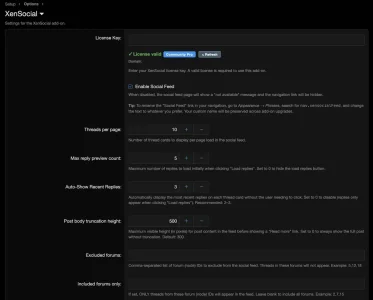
Full AdminCP ConfigurationAll settings are managed from a single options page in the XenForo AdminCP:
| Option | Description |
|---|---|
| License Key | Enter and validate your license, view tier and expiration, and force-refresh the license cache |
| Enable/Disable Feed | Toggle the social feed on or off globally with one click |
| Threads Per Page | Control how many thread cards load per batch (5-50) |
| Max Reply Preview | Set how many replies load when a user clicks "Load replies" (0-20). Set to 0 to hide the button entirely |
| Auto-Show Recent Replies | Automatically display the most recent 1-5 replies on each thread card without clicking. Set to 0 to disable |
| Post Body Truncation Height | Set the visible height (in pixels) before "Read more" kicks in (0-1,000). Set to 0 to show full posts |
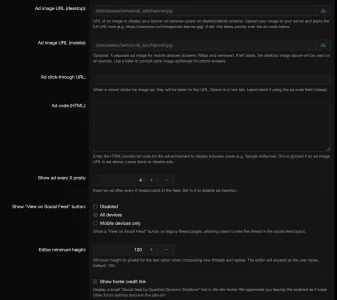
| Editor Minimum Height | Control the starting height of the text editor for new threads and replies (60-300px). The editor auto-grows as the user types |
| Excluded Forums | Comma-separated node IDs to hide from the feed |
| Included Forums | Whitelist-only mode - show threads from specific forums only |
| Feed Button Visibility | Control the "View on Social Feed" button: all devices, mobile only, or disabled |
Granular PermissionsThree dedicated XenSocial permissions, configurable per user group:
| Permission | Controls |
|---|---|
| View social feed | Access to the social feed page |
| Reply inline from feed | Ability to post replies from within the feed |
| Create threads from feed | Ability to create new threads from the feed composer |
These work alongside XenForo's existing forum-level permissions.
A user needs both the XenSocial permission AND the underlying forum permission to perform an action.
Forum FilteringFine-grained control over which forums appear in the feed:
- Exclude list: Hide specific forums (e.g., staff-only, test forums) from the social feed
- Include list (whitelist): Only show threads from specific forums - great for running a curated social feed from select community areas
Moderation Integration- XenSocial fully integrates with XenForo's native moderation system.
- Guest posts and moderated content automatically enter the standard moderation queue.
- Users receive clear, prominent feedback (an 8-second flash message) when their content is queued, and the composer resets to its default state.
Navigation- A "Social Feed" link is automatically added to your forum's main navigation.
- It's visible when the feed is enabled and hidden when disabled - no manual template edits needed.
For Revenue: In-Feed Advertising (Community Pro)
In-feed advertising features require a Community Pro license. Starter license holders see these options in the AdminCP but cannot configure them until upgrading.
Responsive Image Ads- Upload banner ad images directly from the AdminCP using XenForo's native asset upload button - the same one used for logos and style assets.
- No need to manually upload files to your server via FTP.
| Option | Description |
|---|---|
| Ad image URL (desktop) | Banner image for desktop and tablet screens. Upload directly or paste a URL |
| Ad image URL (mobile) | Optional separate image for phones (≤768px). If blank, the desktop image is used everywhere |
| Ad click-through URL | Where the ad links to (opens in a new tab) |
When both desktop and mobile images are set, XenSocial uses the HTML
<picture> element - the browser automatically downloads only the appropriate image for the device, saving bandwidth and improving load times. Custom Ad Code (HTML/JS)Paste any ad network code directly into the AdminCP - Google AdSense, Media.net, affiliate banners, or any custom HTML/JavaScript. If an image ad is also set, the image takes priority.
Configurable Ad Frequency- Set how often ads appear between thread cards (every 3 posts, every 5 posts, etc.).
- Ads are injected consistently during both the initial page load and all subsequent "Load More" batches, ensuring consistent monetization across the entire browsing session.
Licensing
XenSocial is available in two tiers:
| Feature | Starter | Community Pro |
|---|---|---|
| Social feed page | ✓ | ✓ |
| Inline replies & reactions | ✓ | ✓ |
| Thread creation from feed | ✓ | ✓ |
| Inline polls | ✓ | ✓ |
| File attachments | ✓ | ✓ |
| Auto-show recent replies | ✓ | ✓ |
| Configurable editor height | ✓ | ✓ |
| Dark mode support | ✓ | ✓ |
| Guest participation | ✓ | ✓ |
| Dual feed modes (Main / My Feed) | ✓ | ✓ |
| Forum filtering | ✓ | ✓ |
| Granular permissions | ✓ | ✓ |
| Quick edit access | ✓ | ✓ |
| Legacy view bridge | ✓ | ✓ |
| Responsive image ads (with upload) | — | ✓ |
| Custom ad code (AdSense, etc.) | — | ✓ |
| Configurable ad frequency | — | ✓ |
License status, tier, and expiration are displayed directly in the AdminCP options page with a one-click Refresh button to instantly re-validate after an upgrade.
Technical Requirements
- XenForo: 2.3.x (tested on 2.3.10)
- PHP: 8.0 or higher
- Installation: Standard XenForo add-on install via AdminCP upload
- Dependencies: None - XenSocial uses only XenForo's native systems (Froala editor, attachment manager, reaction system, permission framework, moderation queue, asset upload service)