
Yes editor vertical alignment on that block as well. Space is bigger at the bottom but top.I see it now! Okay, so it's the avatar positioning. You want it centered - correct? Somehow I just never noticed - but now I see it...

Yes editor vertical alignment on that block as well. Space is bigger at the bottom but top.I see it now! Okay, so it's the avatar positioning. You want it centered - correct? Somehow I just never noticed - but now I see it...
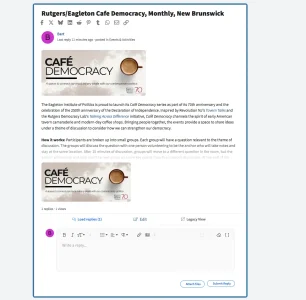

1.0.7 - Enhances the ability for XenSocial to adapt to different colors in style properties.
This is fixed in the latest version.Yes editor vertical alignment on that block as well. Space is bigger at the bottom but top.
We'll get this situated. We plan to release a new version tomorrow.Hi Sal,
I've got the image at the top of the post set to 175 px high which seems to work but we're getting a repeat of the attachments below the blurb. Can they be turned off below the blurb? Also, not all posts are showing a Read More link under the blurb. Thanks!
View attachment 337584
Thank you!Glad to see you guys are being very responsive to feedback, really appreciate it.
We've noticed that adding a few replies to each topic draws-in more participating than having it set so people need to click to view replies. You can see this here: https://genesisowners.com/genesis-forum/social-feed/The site is starting to come together, lots of content to transfer over but the layout is being tweaked and starting to work as I had hoped.
www.NJCDR.org
I'm adding this to our to do list. We'll be looking into it.@Sal Collaziano Thank you so much for wuick actions. It is much better now.
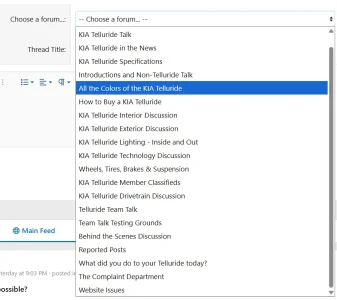
I have another question. Can you show categories here and forums under each category indented? This list view is useful but it will be a bit difficult at the large forums.
View attachment 337645

I'm not sure what you're referring to. Are you asking for nested replies within the classic forum structure in addition to XenSocial?Replies are working very nice in the social feed. But there is no nested replies if we enter threads. I know that might be not in your radar. But are you considering to add reply or nested replies in coming future for consistency?
definetely yes. this is what I mean. I know there is some additional addons but I always prefer solutions instead of seperate addons.I'm not sure what you're referring to. Are you asking for nested replies within the classic forum structure in addition to XenSocial?
That would be a pretty significant endeavor... You COULD just make XenSocial the homepage of your forum... Others have already done this...definetely yes. this is what I mean. I know there is some additional addons but I always prefer solutions instead of seperate addons.
1.0.8 - Includes further enhancements to the display of attachments in messages - including adding the option to use thumbnails or larger images in replies, added categories to the drop-down menu for easier forum selection when creating a new topic, and placed requested verbiage into the XenForo phrase system for easy updating.
xensocial_legacy_view
xensocial_attach_files
xensocial_last_reply
xensocial_attach_files
xensocial_submit_reply
The new update addresses the attachment issue you pointed out. The 'Read More' link only appears when a post's content is tall enough to require truncation. Short posts with small images won't trigger it because the full content is already visible.Hi Sal,
I've got the image at the top of the post set to 175 px high which seems to work but we're getting a repeat of the attachments below the blurb. Can they be turned off below the blurb? Also, not all posts are showing a Read More link under the blurb. Thanks!
View attachment 337584

Hi there! We're going to work on this and expect to have it ready tomorrow...Hello, working with a client on this.
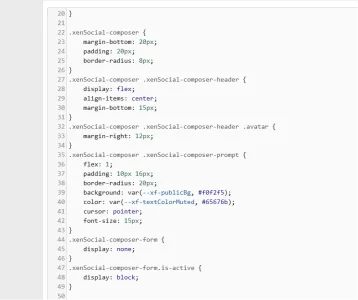
Can you utilize a LESS template and try to use style properties such as basic colors/padding/font sizes/border-radius as much as possible? You're hard-coding in so many values; adjusting this is a bit difficult.
It seems like you're just choosing random values:
margin-bottom: 20px should maybe be: margin-bototm: @xf-elementSpacer;
border-radius: 8px -> border-radius: @xf-borderRadiusLarge
font-size: 15px -> font-size: @xf-fontSizeNormal
and so on...
View attachment 337651
Thank you. I think we'll have this change ready by the end of the day tomorrow.This looks great, but I'm concerned how it works with a moderately customised default style. Seems it partly addon and partly style. I agree more style properties and fewer hard coded style aspects would be good.
Version 1.0.9 - The CSS has been moved to a LESS template (xensocial_feed.less) using XF native @xf-* style properties:
Custom themes will now automatically inherit their colors and typography.
- Colors: @xf-contentBg, @xf-linkColor, @xf-textColor, @xf-borderColor, etc.
- Font sizes: @xf-fontSizeNormal, @xf-fontSizeSmall, @xf-fontSizeLarge
- Font weight: @xf-fontWeightHeavy
- Template editable in AdminCP → Appearance → Templates → xensocial_feed.less
We use essential cookies to make this site work, and optional cookies to enhance your experience.
