[Xen-Soluce] Custom Prefixes & Banners

[Xen-Soluce] Custom Prefixes & Banners [Paid] 2.2.2 Fix 6

No permission to buy (€7.00)
On desktop view the icon is to far left instead of next to.
Screenshot_20250113_144628_Chrome.webp

On template xs_cpb_user_banner_fa.less i removed .xs-cpb-userBanner--fa and changed css under .xs-cpb-userBanner--faContent with padding-right: 3px; to fix.


And option to choose to place it left or right would also be great.
 
Last edited:
When selecting font awesome icons the solid, light and duotone icons do not show. Only in the selector not.
 
On the usergroup page, when searching a specific icon with the font awesome selector it didn't show any icon when switching to solid, light or duotone.

But it seems to be working now. It does load a little slow at times.
 
Last edited:
On the usergroup page, when searching a specific icon with the font awesome selector it didn't show any icon when switching to solid, light or duotone.

But it seems to be working now. It does load a little slow at times.
It's true that sometimes it's slow :/
I'll have to look into improving it
 
It is the other way around. Banners and icons are showing correct with this addon.

But the extra added banners from the other addon are not showing when this addon is activated.

User Banner Awards
Top #1, or Top #1, #2 and #3
 
This is exactly what I am looking for so I bought it, but when I activated it in admin console, I can't find where to actually create the prefixes? I go under thread prefixes but the option to make a new one like shown in the picture doesn't exist..I clearly need some help here
 
This is exactly what I am looking for so I bought it, but when I activated it in admin console, I can't find where to actually create the prefixes? I go under thread prefixes but the option to make a new one like shown in the picture doesn't exist..I clearly need some help here
You can select colors directly when creating a thread/resource prefix.
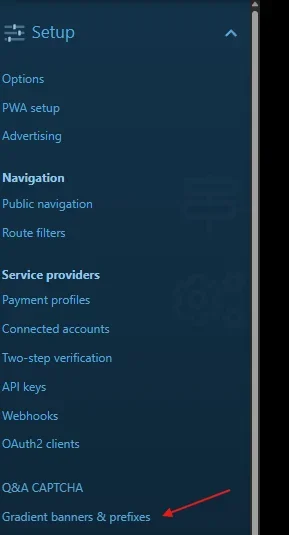
And for degraded prefixes, you'll find them here:
1769109847370.webp
 
Back
Top Bottom