TaigaChat Pro - Realtime chat/shoutbox [Deleted]

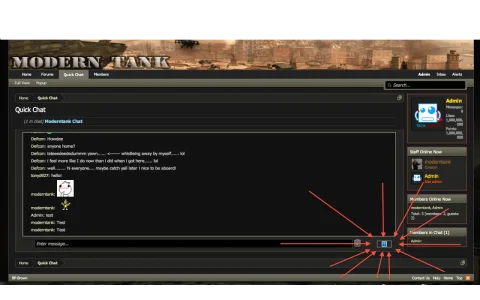
Does anyone know how i can fix the icon so that it will show the image for the smilies i checked in my FTP Server and followed the path and looked at the image and it is their and working fine when looking at the image from the FTP Server but when looking at the chat it looks how it does in the pic. Any suggestions on how to fix that?

Thanks
 

Attachments

  • Screen Shot 2013-08-15 at 11.07.43 PM.webp
    Screen Shot 2013-08-15 at 11.07.43 PM.webp
    63.1 KB · Views: 29
Does anyone know how i can fix the icon so that it will show the image for the smilies i checked in my FTP Server and followed the path and looked at the image and it is their and working fine when looking at the image from the FTP Server but when looking at the chat it looks how it does in the pic. Any suggestions on how to fix that?

Thanks


Can anyone one tell me how to fix it?
 
I'm definitely going to buy this, soon (to replace CometChat).
I said this back in 2012 (I kept using CometChat), but today I finally made the purchase, :D (going to stop using CometChat).
 
I have been testing you the demo site.

One thing I noticed, is the use of what appears to be an ALICE (AIML) bot... Is there plans to release that option? I miss my old bot..
 
Does anyone know how i can fix the icon so that it will show the image for the smilies i checked in my FTP Server and followed the path and looked at the image and it is their and working fine when looking at the image from the FTP Server but when looking at the chat it looks how it does in the pic. Any suggestions on how to fix that?

Thanks

This was resolved in 1.2.0

How do I get youtube videos to not restart every time a new message is posted?

Will look into that
 
Make sure to revert any dark_taigachat template edits
I reverted all of the dark_taigachat template edits but it is still not working also how do i fix the background so i can put my own background up because i don't want a color their?
 
What is "Ban group ID" ? thanks
It is explained below the entry box.

Enter a Group ID to have users who are banned from the shoutbox added to a specified secondary group rather than using the individual user permissions system. This option should be used if you wish to have more control over users banned from the shoutbox, for example you can easily search for users who have been added to the group.
You must create the group yourself and set the permissions on it such that shoutbox access is blocked.
Set to 0 to disable this advanced system and use the basic 'out-of-the-box' shoutbox ban system. Setting to 0 does notdisable or break the shoutbox ban functionality.
 
Is there any way to go farther back in the chat history? Scrolling up only lets you get about 30 lines and We had a live blog in there that I missed out on.
 
Is there any way to go farther back in the chat history? Scrolling up only lets you get about 30 lines and We had a live blog in there that I missed out on.

It's a site-wide configuration option. You can also archive the chat discussions to a thread and you can either make that thread publicly available or if you make it private, you can go back and copy the relevant messages into a new post manually.

-Zeras
 
Back
Top Bottom