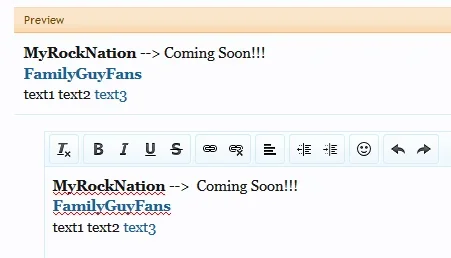
Cannot reproduce Signature / Unlink without saving

erich37

Well-known member
Licensed customer
in the Signature:

if you mark your Links in the Signature and click onto the "Un-Link"-icon it unlinks all Links in your Signature, even if you do not click onto the "Save"-button.

So you "un-link" all your links by accident, and go to some other page at the Forum.... the Links become un-linked although you did not click (confirm) via the "Save"-button.

Windows 8 / Firefox 22
 
Is this on 1.2? I can't reproduce this. Highlight a link I want to unlink, click unlink - only that link unlinked.
 
There's really no way for this to happen without you clicking save...
 
Just tested.

Went to signature...

Unlinked "FamilyGuyFans", saw it go to plain bold, did not hit save. Clicked on "Forums", navigated to a post I had, link was still there.
 
There's really no way for this to happen without you clicking save...

yeah, I can not re-produce this anymore.


However, when you have for example 3 words in your signature:

text1 text2 text3

Now you mark the word "text3" and add a link to this word, then it makes a link for all 3 words.
So the Link is not only added towards the word you are "marking", but to all words.


Try playing around with 3 different words and have a link for each of those.
Then un-link and link the 3rd word in the line several times. You will see that although you are only "marking" the last word (e.g.: "text3"), once you add a new link... it will mark all words automatically.

Probably a Firefox issue.... ?
 
Last edited:
Checked Win8 and FF22, I can't reproduce it either. A video would be useful to see what exactly you are doing there.
 
There's really no way for this to happen without you clicking save...

please remove/neglect this bug report.
I can not reproduce this anymore.

Not sure what I did there....... most probably I did something wrong with my new mouse :D
Sorry.
 
Last edited:
Back
Top Bottom