
I don't see it on your forum. Can you post a screenshot?Latest post above Navigation isn't showing for either of my styles. It also breaks the style when enabled (display behaves like a table or ad is present with a large space on the right side).

I don't see it on your forum. Can you post a screenshot?Latest post above Navigation isn't showing for either of my styles. It also breaks the style when enabled (display behaves like a table or ad is present with a large space on the right side).

Sure. It's stopping the user name suggestion from firingCan you post screenshot of problem?
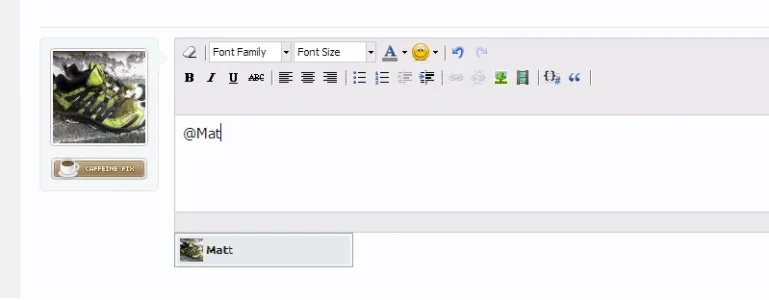
I've got this on both my live and test site. Both the same result. Responsive Design enabled, doesn't work. Disable Responsive Design, and it works again. Can give you access if you want?I don't see such problem on my test forum. Autocomplete drop down works fine when WYSIWYG editor is enabled, it doesn't work when editor is disabled. Dropdown menu is not in iframe, so it is not hidden by this add-on.
$('#headerProxy + div > div.pageWidth').parent().addClass('hasPageWidth'); XenForo.register('#content.thread_view .quickReply.message textarea', 'XenForo.bdTagMe_ProfilePostAutoComplete');
That's intended behavior. There is no place for social buttons on small devices.
You can show it by adding this to responsive_extra.cssCode:.sharePage { display: block !important; }
<div class="fb_iframe_widget"> <iframe /> </div>.fb_iframe_widget iframe { display: block !important; }

Is there any way I can install this addon without having to install the TMS addon as well? Is there a manual method of template edits?...thanks Arty
I only ask because I don't want to have to install another addon (TMS) just to use this and your great Responsive Theme has the mobile style included in it without TMS having to be installed as well


We use essential cookies to make this site work, and optional cookies to enhance your experience.


