Currently Iconic is used in the theme to overwrite most Font Awesome icons. You can turn off Iconic in the Rekt properties for now to correct the issue but we'll get a better solution for that in the future.
I have a suspicion that this should maybe be obvious to me, but does the style include the UI.X framework, or is that something I have to buy separately?
Currently Iconic is used in the theme to overwrite most Font Awesome icons. You can turn off Iconic in the Rekt properties for now to correct the issue but we'll get a better solution for that in the future.
I have a suspicion that this should maybe be obvious to me, but does the style include the UI.X framework, or is that something I have to buy separately?
I have to say this is one of the best themes from @Audentio Design. I paid extra to have it customized by @Mike Creuzer and company and they did a fantastic job. They even customized the home page for me which looks phenomenal. If you just need a basic homepage to pull new content then this style is for you. If you want to see this style in action with a working homepage check out https://www.secsport.zone Keep in mind this style had been customized for my site but you can get an idea of what it looks like in use.
Just installed this on my test board - seems that I cannot get the welcome block to display - is the latest version on audentio to download? I don't use the auto-updater, so the only option was "Initial release" for me. @Eric J.@Audentio Design
Just installed this on my test board - seems that I cannot get the welcome block to display - is the latest version on audentio to download? I don't use the auto-updater, so the only option was "Initial release" for me. @Eric J.@Audentio Design
Mike - that fixed it! Weren't aware of the permissions now. Another query I have. So the welcome image is awesome, it looks great. However, I want the site to be uniform. Is it possible to use the Welcome block for registered users too?
For example, For guests it shows " Welcome bla bla" - Sign up button. For returning visitors, It shows "Welcome, Member$ - There have been $ posts since you last visited - Check them out!" - for example. Basically, I want to retain the welcome block for registered users, but make the message relevant to them as well.
I can not get the home page to work at all, I get this message
The requested page could not be found.
I have given group permissions for all to view, checked everything I can think of but just not happening, some help would be much appreciated. www.pc-sg.uk is the address.
The page will not display as the home page, but when I go directly to the page in this case "test" it is not displaying anything about "popular" with nothing else at all http://www.pc-sg.uk/www.pc-sg.uk/test
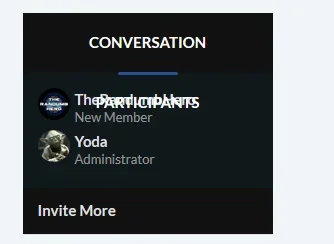
Seems to be a bug. No edits to this code. Conversation box in Conversation view does this. Browser = Latest Firefox
BUG 2
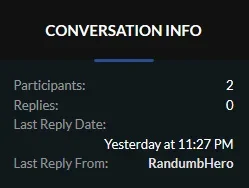
Another small design flaw.
Stock font size should cater for size / max characters in Time / Date field. Currently, pushes to a new line.
Minor, but annoying.
BUG 3
Not sure if it is a limitation of the code - when you re-size browser to a larger window on Windows, "Custom" homepage background does not extend without a full refresh (Remains white) Only does this on the Homepage.
@Thom Tyler the conversation participants part they already know about as I pointed it out after they did a major customization of this theme for me. The other I never noticed.
@Mike Creuzer@Audentio Design@Eric J. Seems to be a bug. No edits to this code. Conversation box in Conversation view does this. Browser = Latest Firefox
@Thom Tyler the conversation participants part they already know about as I pointed it out after they did a major customization of this theme for me. The other I never noticed.



 In fact you'd likely get a speed increase by turning it off.