
You are using an out of date browser. It may not display this or other websites correctly.
You should upgrade or use an alternative browser.
You should upgrade or use an alternative browser.

Prizma — Media Gallery for images, video, music, e-books, panoramas, shorts & live streams [Paid] 1.5.4
No permission to buy (€55.00)
- Thread starter erkanshi
- Start date

You're right. I was a bit concerned about that too. It was actually something Paddle required, so I opened a ticket to ask them about it and they confirmed it. I'll make the change when I get home.Isn't it a risk to offer a 14 day refund policy? Especially with a digital product?

@erkanshi
Thank you very much for taking the time to answer all of that in such detail. This was exactly the kind of response I was hoping for.
A number of your answers make me considerably more comfortable looking at Prizma seriously for the project I'm building — particularly the fact that media goes through XenForo's filesystem abstraction, the use of native content permissions, the normal XenForo search system, and the fact that the underlying data is relational rather than being stored in some proprietary format.
I also noticed that 1.1.5 has already landed with the per-media-type controls. Seeing something from that list make it into an actual release that quickly is encouraging.
I only have a few follow-up questions at this point.
On the pre-publish hook planned for 1.2, will it support a genuinely asynchronous quarantine workflow?
In other words, could another add-on allow the upload to complete but keep the media completely non-public while an external safety process runs, then programmatically approve/publish it or reject it afterward? Ideally that would apply consistently to single uploads, bulk uploads, images, video, and any other locally uploaded media type.
On the 1.4 export work, I'm very glad to hear that export to XFMG is planned. Since XFMG may not have a direct equivalent for every piece of Prizma data, are you also considering a generic/documented export format or schema so that anything XFMG cannot represent isn't simply lost during export? My main concern is having a complete exit path even if the eventual destination isn't XFMG.
One uninstall question as well: does Prizma's uninstall process currently remove the XenForo attachments/files containing the actual uploaded media, or does it only remove Prizma's own tables, columns and references? I know you mentioned uninstall documentation in 1.1.5, but I want to be absolutely clear about what happens to the physical media.
And one small roadmap clarification: in the Albums/Collections discussion you mentioned the "currently live 1.4 version," while the resource release today is 1.1.5 and the roadmap above has 1.2, 1.3 and 1.4 still ahead. Was that just a typo or a reference to an internal/development branch?
Beyond those points, you've answered most of the architectural questions I was concerned about.
The direction you're taking with Albums and Collections is interesting as well. Shared/collaborative albums in particular could become useful for one of the community structures I'm planning, so I'll be interested to see where that work goes.
Thanks again for being so open about what exists today versus what is still on the roadmap. That distinction is extremely helpful when evaluating something this central to a larger project.
Thank you very much for taking the time to answer all of that in such detail. This was exactly the kind of response I was hoping for.
A number of your answers make me considerably more comfortable looking at Prizma seriously for the project I'm building — particularly the fact that media goes through XenForo's filesystem abstraction, the use of native content permissions, the normal XenForo search system, and the fact that the underlying data is relational rather than being stored in some proprietary format.
I also noticed that 1.1.5 has already landed with the per-media-type controls. Seeing something from that list make it into an actual release that quickly is encouraging.
I only have a few follow-up questions at this point.
On the pre-publish hook planned for 1.2, will it support a genuinely asynchronous quarantine workflow?
In other words, could another add-on allow the upload to complete but keep the media completely non-public while an external safety process runs, then programmatically approve/publish it or reject it afterward? Ideally that would apply consistently to single uploads, bulk uploads, images, video, and any other locally uploaded media type.
On the 1.4 export work, I'm very glad to hear that export to XFMG is planned. Since XFMG may not have a direct equivalent for every piece of Prizma data, are you also considering a generic/documented export format or schema so that anything XFMG cannot represent isn't simply lost during export? My main concern is having a complete exit path even if the eventual destination isn't XFMG.
One uninstall question as well: does Prizma's uninstall process currently remove the XenForo attachments/files containing the actual uploaded media, or does it only remove Prizma's own tables, columns and references? I know you mentioned uninstall documentation in 1.1.5, but I want to be absolutely clear about what happens to the physical media.
And one small roadmap clarification: in the Albums/Collections discussion you mentioned the "currently live 1.4 version," while the resource release today is 1.1.5 and the roadmap above has 1.2, 1.3 and 1.4 still ahead. Was that just a typo or a reference to an internal/development branch?
Beyond those points, you've answered most of the architectural questions I was concerned about.
The direction you're taking with Albums and Collections is interesting as well. Shared/collaborative albums in particular could become useful for one of the community structures I'm planning, so I'll be interested to see where that work goes.
Thanks again for being so open about what exists today versus what is still on the roadmap. That distinction is extremely helpful when evaluating something this central to a larger project.
Thanks — and good timing: since your post, both 1.2.0 (the moderation update) and 1.2.1 (person tagging + moderation UI polish) have shipped, so a couple of these answers are now "exists today" rather than "planned".@erkanshi
Thank you very much for taking the time to answer all of that in such detail. This was exactly the kind of response I was hoping for.
A number of your answers make me considerably more comfortable looking at Prizma seriously for the project I'm building — particularly the fact that media goes through XenForo's filesystem abstraction, the use of native content permissions, the normal XenForo search system, and the fact that the underlying data is relational rather than being stored in some proprietary format.
I also noticed that 1.1.5 has already landed with the per-media-type controls. Seeing something from that list make it into an actual release that quickly is encouraging.
I only have a few follow-up questions at this point.
On the pre-publish hook planned for 1.2, will it support a genuinely asynchronous quarantine workflow?
In other words, could another add-on allow the upload to complete but keep the media completely non-public while an external safety process runs, then programmatically approve/publish it or reject it afterward? Ideally that would apply consistently to single uploads, bulk uploads, images, video, and any other locally uploaded media type.
On the 1.4 export work, I'm very glad to hear that export to XFMG is planned. Since XFMG may not have a direct equivalent for every piece of Prizma data, are you also considering a generic/documented export format or schema so that anything XFMG cannot represent isn't simply lost during export? My main concern is having a complete exit path even if the eventual destination isn't XFMG.
One uninstall question as well: does Prizma's uninstall process currently remove the XenForo attachments/files containing the actual uploaded media, or does it only remove Prizma's own tables, columns and references? I know you mentioned uninstall documentation in 1.1.5, but I want to be absolutely clear about what happens to the physical media.
And one small roadmap clarification: in the Albums/Collections discussion you mentioned the "currently live 1.4 version," while the resource release today is 1.1.5 and the roadmap above has 1.2, 1.3 and 1.4 still ahead. Was that just a typo or a reference to an internal/development branch?
Beyond those points, you've answered most of the architectural questions I was concerned about.
The direction you're taking with Albums and Collections is interesting as well. Shared/collaborative albums in particular could become useful for one of the community structures I'm planning, so I'll be interested to see where that work goes.
Thanks again for being so open about what exists today versus what is still on the roadmap. That distinction is extremely helpful when evaluating something this central to a larger project.
1. Asynchronous quarantine workflow — yes, and it shipped in 1.2.0.
Two building blocks, and your workflow uses both:
erkan_prizma_media_pre_publishis a synchronous veto: it fires during creation validation on every path (single upload, bulk upload, embeds, every media type), and a listener can reject the submission outright with its own error message.- The asynchronous part is handled by the approval-queue state machine rather than the hook itself. While a media item is in the
moderatedstate it is completely non-public: no news feed entry, no notifications, no counter changes — nothing fires until approval. Only the owner and moderators can even view it.
So the quarantine recipe for your external safety process is: revoke Submit media without approval for the relevant groups (every upload then lands in the queue — it is never public, not even for a second), listen to
erkan_prizma_media_published (fires after save for every new media item, bulk included, with attachments already associated — check $media->media_state), hand the item to your scanner, and then either publish it programmatically (set media_state to visible and save — the news feed entry, notifications and counters all fire at that moment) or reject it (delete, or leave it queued for a human). This behaves identically for single uploads, bulk uploads and every locally uploaded media type. There is also erkan_prizma_media_deleted for cleanup on your side, and all three events are documented in the docs/API.md that ships with the add-on since 1.2.0.2. Export format — yes to both halves, and one correction to what I wrote earlier.
While building the XFMG → Prizma importer I found a handful of XFMG features that Prizma didn't have — and rather than dropping that data on import, I added the features to Prizma (the five-star rating system and EXIF display are examples; some of them are admin-panel toggles you may need to switch on). So as of today there is nothing in XFMG that has no home in Prizma: an import carries all of the data.
For the 1.4 export work the same principle applies in reverse. The plan is the XFMG export for everything XFMG can represent, plus a documented schema so that nothing Prizma-specific is silently lost. The honest foundation for that already exists: Prizma stores everything in ordinary relational tables (media, comments, ratings, tags, albums, person tags) and ordinary XenForo attachments — nothing proprietary, nothing outside your server. The current
UNINSTALL.md already maps every table and where the physical files live; 1.4 will formalise that into a proper schema document, so you have a complete exit path even if your destination is not XFMG.3. Uninstall and the physical files — uninstalling never deletes your media files.
The uninstaller removes Prizma's own tables and Prizma's own auxiliary files (uploaded category icons, self-hosted embed covers, the book-reader signing key). It deliberately does not touch the XenForo attachments that contain the actual uploaded media — those rows and files stay exactly where they are. That is a conscious fail-safe: a half-finished uninstall that has already destroyed your files would be far worse than one that leaves orphaned attachments behind.
UNINSTALL.md spells out precisely what is removed, what is left, and includes a verified SQL recipe for reclaiming the disk space later, once you are certain you no longer need the content. (Deleting an individual media item inside the product is different — that removes its files, as you would expect.)4. The "currently live 1.4" line — that was simply my mistake, not a reference to an internal branch; the live version at the time was 1.1.5 (it is 1.2.1 as of today). One related heads-up: the roadmap numbering around the Albums/Collections work has shifted since that post — I will post the updated roadmap separately (and as always, it can still move as the project evolves).
Glad the shared/collaborative albums direction lines up with what you are planning — and thanks again for questions precise enough to be answered with code rather than adjectives.

Last edited:
erkanshi updated Prizma — Media Gallery for images, video, music, e-books, panoramas, shorts & live streams with a new update entry:
✔️ Prizma 1.2.0 Released 👻
Read the rest of this update entry...
✔️ Prizma 1.2.0 Released 👻
New features
- Approval queue for media and comments. Two new permissions control the flow: Submit media without approval decides whether new media and comments go live immediately or wait for review, and Approve / unapprove media and comments is the moderator side. Queued items appear in XenForo's standard approval queue with a preview; the author sees an "awaiting approval" notice on their own media and a clear message when submitting...
Read the rest of this update entry...
erkanshi updated Prizma — Media Gallery for images, video, music, e-books, panoramas, shorts & live streams with a new update entry:
✔️ Prizma 1.2.1 Released 👻
Read the rest of this update entry...
✔️ Prizma 1.2.1 Released 👻
New features
- Tag people on photos. The media owner (and moderators with Edit any content) can tag members directly on an image: choose Tag people from the viewer's "⋯" menu, click a spot on the photo and pick the member. Tags show as dots that reveal the member's name on hover; positions are stored as ratios, so they stay in place at every screen size. Tagged members get a notification (with an opt-out in their alert preferences) and can...
Read the rest of this update entry...
Thank you, Chris — and hat back on, that is kind of you.Looks promising indeed .
For my needs i had like to see rss feed import from playlists and channels from youtube , is that in the roadmap of future version?
Really like this addon . well done , hat off Chris
Short answer: yes, it is going on the roadmap, and it fits Prizma unusually well because most of the machinery already exists.

What is there today: Prizma already understands YouTube links end to end — paste a channel video or a Short into the add-media form and it resolves the video, pulls the title and picks the best available cover, and it can create media items programmatically through the same service the upload form uses (so imported items get the same permissions, approval queue and notifications as anything a member uploads). It also already runs background jobs against YouTube for the LIVE badge. What is missing is the piece you are describing: a saved feed source that is polled on a schedule.
 What I am planning: YouTube channel and playlist feed sources. In the admin panel you add a channel or playlist, choose which Prizma category (or album) the videos land in, which member they are attributed to, and whether they go live immediately or wait in the approval queue; a background job then checks the feed on a schedule and imports anything new — once, with a log so that a video you delete does not come back on the next run. It uses YouTube's own RSS feeds, so no API key is required.
 One honest limitation you should know up front: YouTube's RSS feed only exposes a channel's or playlist's most recent ~15 videos, and it cannot page further back. So the feature is designed as "follow this channel from now on", not "import a channel's entire back catalogue". A full back-fill of older videos is possible as a second step for sites that configure a YouTube API key, and I have noted that as the follow-up.
 Timing: it is scheduled as a 1.3.x update — after the 1.3.0 package that is already defined, and before the larger 1.4 work (XFMG export, video transcoding). No calendar date, as usual; the version number is the commitment.
 If your use case has a detail I should design around — for example whether videos should be imported as video or Shorts, or whether the same video appearing in both a channel feed and one of its playlists should be imported once or twice — tell me here and I will fold it into the design.
It doesn't seem like it from the demo, but is there a way that this add-on could be used to display images that are being hosted elsewhere? Without having to use Imgur. I'm currently using XenForo's Media Gallery add-on to have high quality images available for download, but I don't like having to host the images on my server. I'd like to host the images on my own image hosting account, and then just have it embedded within the gallery.
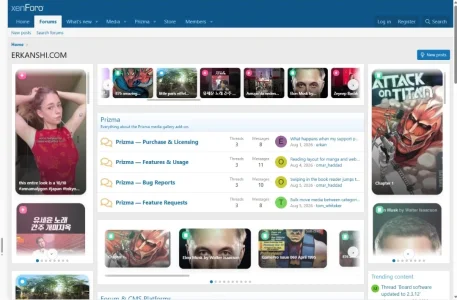
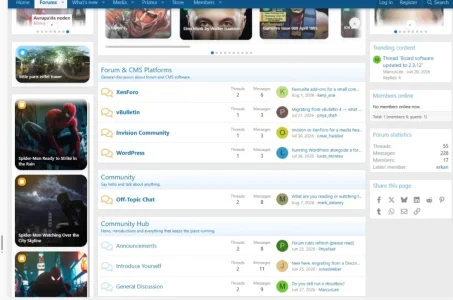
Yes — and there are two separate routes to it, one of which works today.It doesn't seem like it from the demo, but is there a way that this add-on could be used to display images that are being hosted elsewhere? Without having to use Imgur. I'm currently using XenForo's Media Gallery add-on to have high quality images available for download, but I don't like having to host the images on my server. I'd like to host the images on my own image hosting account, and then just have it embedded within the gallery.
1. Keep uploading into the gallery, but store the files off your server (works today, no add-on change needed).
Prizma stores media as ordinary XenForo attachments and goes through XenForo's abstracted filesystem, so if you point XenForo's
data and internal-data adapters at S3 / Cloudflare R2 / Backblaze B2 in config.php, every Prizma thumbnail, cover and full-size file is written to and served from there — nothing sits on your own disk. Members keep uploading exactly the way they do now, and — which matters for the "high quality images available for download" part of your setup — permissions still apply to the full-size file. The README that ships with the add-on covers this under Scale → Delivery: thumbnails, files and CDNs. If what you dislike is your server holding and serving the bytes, rather than the uploading itself, this is the route I would take.2. Paste a link to an image that lives somewhere else.
Today Prizma recognises Flickr and Imgur image links. They are not shoved into an iframe — they render in Prizma's own image stage with its zoom and lightbox, just like a locally uploaded photo. So if Flickr counts as "elsewhere" for you, that already works. A plain direct link such as
https://files.example.com/photo.jpg is not recognised yet, because link detection is host-based at the moment.That is what I am adding in 1.3.5: a direct image URL source, switchable from the admin panel and off by default, so no existing gallery changes behaviour on upgrade. Paste the direct link to a JPG/PNG/GIF/WebP sitting on your own image host and it becomes a normal gallery item — title, description, category or album, comments, tags, ratings, lightbox, all identical to an uploaded one. A small thumbnail is cached locally so the gallery grid stays fast and the lightbox opens at the correct size, while the full-size image is always fetched from your host, never from your forum.
Two honest caveats before you build a workflow on it. An image behind a plain URL cannot be permission-protected — anyone who has the link can fetch it straight from your host, whatever the gallery permissions say. And if that host starts blocking hotlinking, or goes away, the item breaks. Route 1 has neither problem, which is why I listed it first.
 One question, because it decides whether route 2 actually covers your case: which image host are you using, and does it hand you a direct file link ending in .jpg/.png, or a page link you have to open to see the image? Direct file links are what 1.3.5 handles. If yours gives page links, tell me which host it is and I will look at supporting that format as well — I would rather build it against a real host than guess.
Today Prizma recognises Flickr and Imgur image links. They are not shoved into an iframe — they render in Prizma's own image stage with its zoom and lightbox, just like a locally uploaded photo. So if Flickr counts as "elsewhere" for you, that already works. A plain direct link such ashttps://files.example.com/photo.jpgis not recognised yet, because link detection is host-based at the moment.
I did see those two options when I looked further. I definitely understand that there’s no way to carry permissions over to a direct image URL, as it’s a separate entity.
I’m actually still using ImageShack, which a lot of people used back in the olden days. I upgraded to their premium subscription years ago and I’ve kept it all this time. They do give me direct image URLs, so all files are png/jpg/jpeg/gif/etc.
Perfect — ImageShack with direct file links is exactly the case 1.3.5 covers.I did see those two options when I looked further. I definitely understand that there’s no way to carry permissions over to a direct image URL, as it’s a separate entity.
I’m actually still using ImageShack, which a lot of people used back in the olden days. I upgraded to their premium subscription years ago and I’ve kept it all this time. They do give me direct image URLs, so all files are png/jpg/jpeg/gif/etc.
I went and looked at what ImageShack actually hands out, since that decides what the parser has to accept. It offers three shapes:
imageshack.com/i/163hwaj— a page link, not usable as an image sourceimagizer.imageshack.com/a/img143/8782/name.jpg— direct fileimagizer.imageshack.com/v2/240x150q70/89/name.jpg— direct file, resized variant
/v2/ form if you ever want to point at a smaller rendition.One detail I noticed and will handle for you: the link ImageShack pre-fills in its own copy box starts with
http://. On an HTTPS forum a plain http image is mixed content — depending on the browser it is either silently upgraded or quietly blocked. Prizma will normalise those to https when the item is saved, rather than leaving you to discover it later on someone else's browser. One favour, if you don't mind: paste one live direct link from your own account (any image you are happy to have public). I would rather test against the real thing than against my reconstruction — premium accounts sometimes serve from different paths, and some image hosts refuse requests that do not come from their own site (hotlink protection). That last one is the single thing that would undermine this whole route for you, so it is worth finding out now rather than after you have moved a gallery across.
And you read the permissions point exactly right: the file is a separate entity, so the gallery controls who sees the item, not who can fetch the file. Anything you want kept behind permissions is better uploaded normally — the two approaches can live side by side in the same gallery, item by item.
Perfect — ImageShack with direct file links is exactly the case 1.3.5 covers.
I went and looked at what ImageShack actually hands out, since that decides what the parser has to accept. It offers three shapes:
The last two end in a real extension, which is what the detection keys on, so both will work — including the resized
imageshack.com/i/163hwaj— a page link, not usable as an image sourceimagizer.imageshack.com/a/img143/8782/name.jpg— direct fileimagizer.imageshack.com/v2/240x150q70/89/name.jpg— direct file, resized variant/v2/form if you ever want to point at a smaller rendition.
One detail I noticed and will handle for you: the link ImageShack pre-fills in its own copy box starts withhttp://. On an HTTPS forum a plainhttpimage is mixed content — depending on the browser it is either silently upgraded or quietly blocked. Prizma will normalise those tohttpswhen the item is saved, rather than leaving you to discover it later on someone else's browser.
And you read the permissions point exactly right: the file is a separate entity, so the gallery controls who sees the item, not who can fetch the file. Anything you want kept behind permissions is better uploaded normally — the two approaches can live side by side in the same gallery, item by item.
That sounds great. Here is an image linked from my ImageShack account: https://imagizer.imageshack.com/img921/5658/DtFqjm.png
Thanks — that settled it, and the answer is good news.That sounds great. Here is an image linked from my ImageShack account: https://imagizer.imageshack.com/img921/5658/DtFqjm.png
I fetched your image three ways: with no referrer, with a referrer from an unrelated domain, and with one from my own forum. All three returned the file — HTTP 200,
image/png, 10,575 bytes, 192×192. So ImageShack does not hotlink-protect, and this route will work for your account exactly as described.Three smaller things the test turned up, all of them useful:
- Your link is a fourth shape —
imagizer.imageshack.com/img921/5658/DtFqjm.png, with neither/a/nor/v2/in the path. This is exactly why the detection keys on the file extension rather than on the path: all four shapes work, and so will whatever ImageShack introduces next. httpandhttpsboth serve the file, and thehttpform does not redirect tohttpson its own. That confirms the normalisation is worth doing — paste either form and the item will store thehttpsone.- They send
Access-Control-Allow-Origin: *and a 30-day cache header, so browsers will cache your images properly and nothing stands in the way of the lightbox.
Thanks — that settled it, and the answer is good news.
I fetched your image three ways: with no referrer, with a referrer from an unrelated domain, and with one from my own forum. All three returned the file — HTTP 200,image/png, 10,575 bytes, 192×192. So ImageShack does not hotlink-protect, and this route will work for your account exactly as described.
Three smaller things the test turned up, all of them useful:
That is enough to build against a real host rather than a guess, which is what I wanted. Thanks for taking the time to dig the link out — it turned a "should work" into a measured "does work".
- Your link is a fourth shape —
imagizer.imageshack.com/img921/5658/DtFqjm.png, with neither/a/nor/v2/in the path. This is exactly why the detection keys on the file extension rather than on the path: all four shapes work, and so will whatever ImageShack introduces next.httpandhttpsboth serve the file, and thehttpform does not redirect tohttpson its own. That confirms the normalisation is worth doing — paste either form and the item will store thehttpsone.- They send
Access-Control-Allow-Origin: *and a 30-day cache header, so browsers will cache your images properly and nothing stands in the way of the lightbox.
I look forward to seeing 1.3.5. Thanks.
erkanshi updated Prizma — Media Gallery for images, video, music, e-books, panoramas, shorts & live streams with a new update entry:
✔️ Prizma 1.3.0 Released 👻
Read the rest of this update entry...
✔️ Prizma 1.3.0 Released 👻
New features
- Optional horizontal category bar. A new admin option (Category navigation) can replace the left sidebar with a scrollable category strip under the page title, giving the gallery the full width. Selecting a parent category reveals its sub-categories on a second strip; the Albums link moves to the gallery navigation. Existing installations keep the sidebar — nothing changes unless you switch it on. (requested by...
Read the rest of this update entry...
erkanshi updated Prizma — Media Gallery for images, video, music, e-books, panoramas, shorts & live streams with a new update entry:
✔️ Prizma 1.3.1 Released 👻
Read the rest of this update entry...
✔️ Prizma 1.3.1 Released 👻
New feature
- YouTube channel and playlist feeds. Under ACP → Prizma → Media feeds you can now follow a YouTube channel or playlist: paste the channel/playlist URL (or a bare ID), preview what would come in, choose which member the videos are imported as, the category or album, the media type (automatic — videos as video, Shorts as Shorts — or forced), the publish state (by the member's permissions, always visible, or always into the approval queue)...
Read the rest of this update entry...
erkanshi updated Prizma — Media Gallery for images, video, music, e-books, panoramas, shorts & live streams with a new update entry:
✔️ Prizma 1.3.5 Released 👻
Read the rest of this update entry...
✔️ Prizma 1.3.5 Released 👻
New sources — media that lives somewhere else
- RUTUBE and VK Video. Paste a RUTUBE or VK Video link and it becomes a gallery item like any other, with its own player, categories, comments and ratings. RUTUBE also fills in the title, description and cover automatically (it publishes an oEmbed endpoint — no API key needed); VK serves no metadata to anonymous requests, so a VK item keeps the title the member types and the cover they choose. Link formats...
Read the rest of this update entry...