
You are using an out of date browser. It may not display this or other websites correctly.
You should upgrade or use an alternative browser.
You should upgrade or use an alternative browser.
Post Ratings - taking likes to the next level [Deleted]
- Thread starter Luke F
- Start date

TPerry
Well-known member
Hello,
How can you change the colour of the green/red bar on forum bit?
Code:
.dark_postrating_bar_positive {
background: blue;
}
.dark_postrating_bar_neutral {
background: green;
}
.dark_postrating_bar_negative {
background: red;
}
Robby
Well-known member
I tried this but it doesn't change the colors of the green bar.in EXTRA.css is the way I do it. Just edit the colors to what you want.Code:.dark_postrating_bar_positive { background: blue; } .dark_postrating_bar_neutral { background: green; } .dark_postrating_bar_negative { background: red; }
TPerry
Well-known member
You may need to do an !important after it. I'll have to double check on my one of my forums that I changed it on to make sure.I tried this but it doesn't change the colors of the green bar.
EDIT:
Yep, I had to use an !important after them.
 Thanks

i already had this addon customised so that negative ratings do not get shown (permission based). Few other features as described here.
http://xenforo.com/community/threads/posting-ratings-addon-enhancements.73493/
http://xenforo.com/community/threads/posting-ratings-addon-enhancements.73493/
Robby
Well-known member
How much does that addon cost?i already had this addon customised so that negative ratings do not get shown (permission based). Few other features as described here.
http://xenforo.com/community/threads/posting-ratings-addon-enhancements.73493/
Is there not a way tot do this manually?
No there isnt. Ideally this customisation should have been in this addon, but msged luke about it and didnt get a reply hence needed to get it as, as you mentioned negative ratings creates a lot of revenge ratings.How much does that addon cost?
Is there not a way tot do this manually?
The addon is 10 or 15USD. You have to contact the developer.
There is no way to track or search for ratings that posts have received per member basis.
Like for example, i dont know which posts of mine have received the ratings and which exact rating. Is it possible to work this feature out.
Like for example, i dont know which posts of mine have received the ratings and which exact rating. Is it possible to work this feature out.
yes you need to look through the dark_postratings table i believe. Has all the info you need.There is no way to track or search for ratings that posts have received per member basis.
Like for example, i dont know which posts of mine have received the ratings and which exact rating. Is it possible to work this feature out.
yes you need to look through the dark_postratings table i believe. Has all the info you need.
May be as administrator i can, but what about normal members?
They can goto whichever post they want of theirs and click on the List link to display that information. Its permission based.May be as administrator i can, but what about normal members?
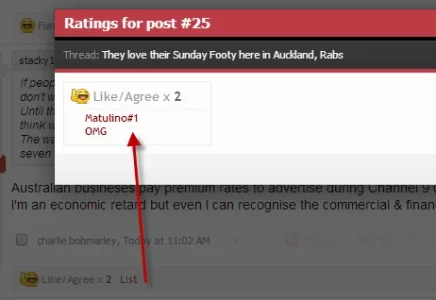


Is it possible to add a feature to limit the amount of post ratings a person can give per day?
I also haven't received the latest update; I'm wondering how I get that sent to me?
Thank you.
- That is not currently available but may be added in the future
- PM me your email used for payment or paypal transaction ID and I'll get it resent to you

Hi @Luke Foreman
I have a couple of questions:
DoN
I have a couple of questions:
- Are there any options to allow a user to include a comment with their rating?
- I have some reputations from the old MyBB software I used. The reps included giver, receiver, amount and (in most cases) post id - with this information would it be possible to import the information into the database directly (putting the rep as a basic like) and rebuild?
- Some reps don't have a post_id associated to them (MyBB allowed granting rep direct to a user), would there be anyway to import these?
DoN
They can goto whichever post they want of theirs and click on the List link to display that information. Its permission based.
View attachment 77360
That's if you know which exact post got the rating. I am trying to find the posts which have received ratings or specific rating.
http://xx/account/ratings-received
can we find the ratings based on the specific (rating id) rating?
can we find the ratings based on the specific (rating id) rating?


I just downloaded this , just a quick Newbie question - The default option in has css sprite sheet enabled >applications>ratings
Where is the sprite sheet? did it come with the download? As I am not seeing the post ratings under the forum posts
thanks
Where is the sprite sheet? did it come with the download? As I am not seeing the post ratings under the forum posts
thanks