Browser issue Member Card Style Issue

Brent W

Well-known member
Licensed customer
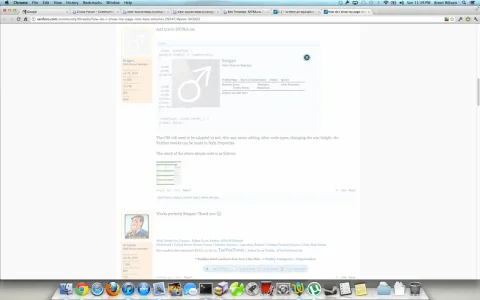
This seems to have cropped up recently in Chrome... happens on this site and all my other xenForo sites.

Notice there is no background for the member card.

Screen Shot 2012-07-29 at 11.39.55 PM.webp
 
I'm on Chrome (Linux) and can see your users member cards just fine. Must be a local issue unless you've had complaints?


Screenshot-21.webp
 
It doesn't happen every time so I can't put a consistency to it. However, this is on the latest stable chrome.
 
It does load for when when viewing it directly. What I find is that the first time it won't load, but the second time I click it it loads successfully.
 
I have had this happen to me also, using Chrome - Win7

The content seems to load fine but the card image either doesn't load or takes a while to load. It isn't always a consistent problem either.
 
This happened to me too in Chrome on Mountain Lion. Version 20.0.1132.57

Looks like a browser bug. I've opened built in dev tools, selected card background image (image that was appended by script at the end of body), in style disabled z-index, image appeared on top of card. Then I've enabled z-index and image showed up correctly behind card.

Temporary solution (append to member_card.css):
Code:
.xenOverlay.memberCard.appleEffect
{
    background: transparent none;
}
 
    .xenOverlay.memberCard.appleEffect > div
    {
        border: 1px solid rgb(68, 68, 68);
        border-radius: 10px;
        background: rgba(68, 68, 68, 0.9);
        margin: 29px;
        height: 212px;
        box-shadow: 0 0 20px rgba(0, 0, 0, 0.7)
    }

 
Same issue here, but with Chrome beta 21.0.1180.64 beta-m.

This happen on first try when attempting to access a user member card. No more issue on any other attempt.
Capture.webp

This happened to me too in Chrome on Mountain Lion. Version 20.0.1132.57

Looks like a browser bug. I've opened built in dev tools, selected card background image (image that was appended by script at the end of body), in style disabled z-index, image appeared on top of card. Then I've enabled z-index and image showed up correctly behind card.

Temporary solution (append to member_card.css):
Code:
.xenOverlay.memberCard.appleEffect
{
    background: transparent none;
}
 
    .xenOverlay.memberCard.appleEffect > div
    {
        border: 1px solid rgb(68, 68, 68);
        border-radius: 10px;
        background: rgba(68, 68, 68, 0.9);
        margin: 29px;
        height: 212px;
        box-shadow: 0 0 20px rgba(0, 0, 0, 0.7)
    }
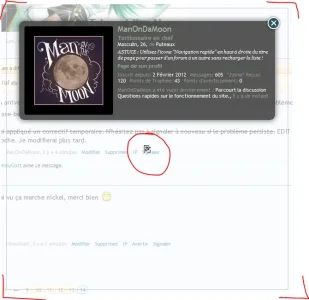
This temporary fix unfortunately adds a frame with broken image inside.
Capture2.webp
 
Jake, with the above information, can you reproduce it or understand what might be going on? If so, what do you think would be a permanent solution?
 
Jake, with the above information, can you reproduce it or understand what might be going on? If so, what do you think would be a permanent solution?

Sorry I still can't reproduce this problem myself. Nor do I understand the nature of the problem or why Arty's fix works. It just doesn't make sense to me.
 
Back
Top Bottom