
It will not be from today but from the day when your support/upgrades expired.
So this aren't start from today date? This should be start from date, when I renewing my license. Xenforo and others add-on renewal doing this.


It will not be from today but from the day when your support/upgrades expired.

So this aren't start from today date? This should be start from date, when I renewing my license. Xenforo and others add-on renewal doing this.
Completed Invoice Payment but Still showing Expired.
How can select Delete Thread or post are soft or hard delete? Can be add option move to another forum?
I am asking Can be add option dead link thread move to another forum?
The release fixes some missing files from the last package.
The new version is available for all licensed customers at
Please consider posting a review if you are using the add-on and let us and other users know how it works for you.
Thank you!
We've been having issues with missing file errors while running jobs with Link Checker, and installed the 2.6.1 today, now everywhere there was an image on our forums has a "Link Removed" caption. We need to fix this asap, what do we do?
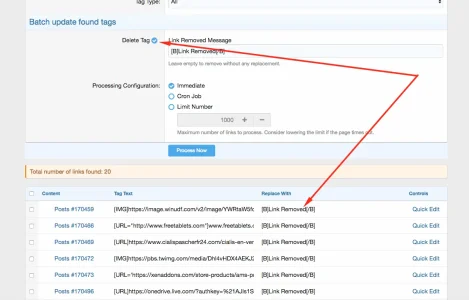

We maintain a fairly large forum with well over 500,000 posts and average about 300 posts a day. We can't simply restore a backup from 2 days ago before this happened and lose hundreds of new posts and new member registrations.
Our admins have been trying to figure this out for hours now without doing a full backup restore. Is there a set of tables for links in the database that could be restored instead of a full backup?
Fixes a bug in Admin Panel Manage Tags page:
RuntimeException: The entity handled by this page is expected to be XF:Thread
The new version is available for all licensed customers at
Thank you!

installed the AddOn, assigned rights to admin group, now I don't see a rebuild page under tools, nor are invalid links marked in the posts.
If I go to "check dead links", no links are found at all. No matter if I use internal, external, a dedicated domain - just nothing. Is there a step by step guid for dummies available ? would apprecciate it.
@JasonJaz , a simpler approach to take would be running a query to restore the content of all posts to the state they were in at the moment of the last backup. For that, you just need to restore the backup into another database and write a query that updates xf_post table of the live board with the message of xf_post table in the backup. This would not affect new posts in any way but if there are posts which were also manually edited in these two days these manual edits would be lost. A carefully written query should be enough for this approach, no need for a script that parses the message to find the removed links.
Thank you!


We use essential cookies to make this site work, and optional cookies to enhance your experience.

