XF 1.3 Images upside down

Hmm, I think it's something in my configuration. The image does upload fine here, but not on my forums.

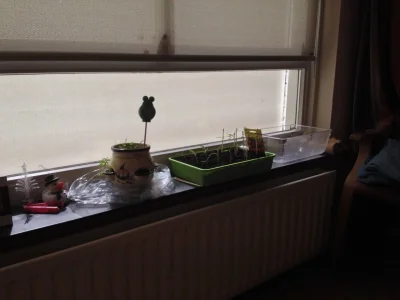
Here is the link to the original. This file will be upside down when I upload it to my forums. Using GD for images. Resizing works without any problems.
http://scooterforum.net/tmpxenforo/moestuin.JPG
 

Attachments

  • moestuin.webp
    moestuin.webp
    107.8 KB · Views: 8
That image is just under 8MP so it shouldn't be exceeding the default resize limit of 20MP. But check your library/config.php file just in case. Make sure $config['maxImageResizePixelCount'] is not set. The default is 20000000 if it's not explicitly set in the config file.

Otherwise it might be a problem with your image library, though I might normally expect an error message if there is a problem. This forum is using GD. You can try specifying a different library if available:

Admin CP -> Home -> Options -> Attachments

Screen shot 2014-04-06 at 11.34.22 AM.webp
 
The setting has not been set. I have only GD installed, so I can't use ImageMagick.

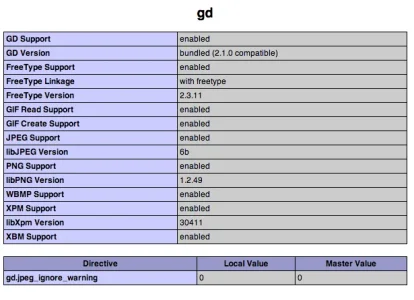
GD info:
 

Attachments

  • Screenshot 2014-04-06 20.39.34.webp
    Screenshot 2014-04-06 20.39.34.webp
    22.7 KB · Views: 5
Hi,

I understand that with 1.3 the option is implemented that images are rotated when posted on the forums. But I still have that when I post a image it doesn't rotate right?

Example:
http://scooterforum.net/threads/pro-race-rox.204021/

What do I forget or what is wrong? Is there an option to rotate afterwards?

What setting do you currently have for maximum width and height. The reason I ask is that unless the image is resized, it is not rotated. This has been recently fixed and the new code will be available in XF 1.3.1. Although I seam to recall that issue is only effecting ImageMagick.
 
I have 1600x1200 as dimensions. So the image in the example will be resized to that dimensions. Might happen with GD also then?
 
I have 1600x1200 as dimensions. So the image in the example will be resized to that dimensions. Might happen with GD also then?

No the issue I was referring to was a case when there were no maximum dimensions and the images were NOT resized.
 
Here is the link to the original. This file will be upside down when I upload it to my forums. Using GD for images. Resizing works without any problems.
http://scooterforum.net/tmpxenforo/moestuin.JPG

I tried uploading the original on XF 1.3 using GD and ImageMagick without resizing and could not get this image to show upside down. It always shows in the correct orientation.

I suggest try another image.
 
I did. I have experienced this before, but today I saw the same behaviour with an user when he was uploading images. So I decided to look into it. So I can confirm this happens to multiple images. I use a iPhone 4s with iOS7 to take the images.
 
Back
Top Bottom