XF 2.1 Image sizes - issue when uploading.

andybond

Well-known member
Licensed customer
Hi,
I need to take some advice here. I am on XF2.1

I can upload images ( JPG/JPEG/GIF ) that are anything shy of 5MB.
Soon as I get an image >=5MB It will fail to allow me to insert.
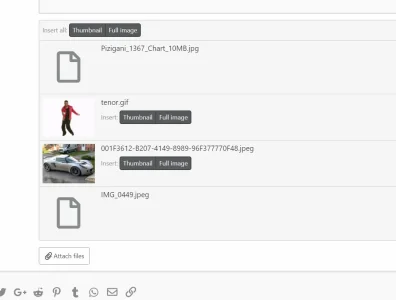
197018

I believe my admin CP values are correct :
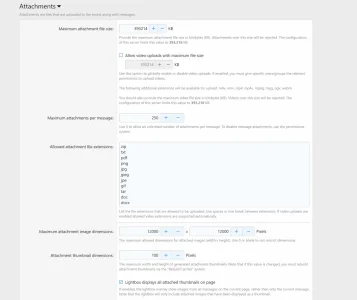
197019

I have tried to set the value of the max attachment image dimensions to null and 0 - it made no difference.

Any advice offered?
 
The limitations you set within XenForo are still limited by the PHP limitations for "php max post size" "php max file size". Check what your PHP settings are: www.your-xenforo-directory/admin.php?tools/phpinfo

If you set max upload size within XenForo to 100mb and it is set to 10mb in php, you are only going to able to upload a max of a 10mb file. XenForo settings cannot override PHP settings.
 
If you are running certain versions of web servers, such as running php-fpm with nginx, your php.ini file won't always be in the place you expect it. For example, I believe php-fpm doesn't follow the normal php.ini, but rather a www.conf located in it's conf.d directory.

Check and make sure that your configuration isn't being overridden by a separate php.ini or other config file.

There can be a chain of php settings before it gets to XenForo's settings.
 
Ok, now it gets interesting. ( everything is relative, right?! )
The image HAS uploaded to my server. It just wont let me actually INSERT the attachment.
I can right click on the attachment and open URL in new window
197022

If I grab that URL listed above and insert image it works.

I just cannot insert directly from the message window.

Files <=5MB work fine
 
If you are running certain versions of web servers, such as running php-fpm with nginx, your php.ini file won't always be in the place you expect it. For example, I believe php-fpm doesn't follow the normal php.ini, but rather a www.conf located in it's conf.d directory.

Check and make sure that your configuration isn't being overridden by a separate php.ini or other config file.

There can be a chain of php settings before it gets to XenForo's settings.

Thats a good shout - I have used centminmod and adjusted its settings. The file is actually being uploaded , but not made available.
 
This looks like a bug - I can drag and drop the image from explorer ( windows ) onto the message window and it inserts fine. It will not allow me to insert via the menu though.

197023
 
Hmmm, that's interesting. It could be a bug, but you'd think it would've shown up before and been reported.

Possibly - however I have noted that my file is large in terms of filesize , but not overly large in terms of dimensions. The image was shot with some ninja spec DSLR camera.
 
The rather knowledgeable @AndyB found me the solution.
Add :

$config['maxImageResizePixelCount'] = 100000000;

to config.ini

Works fine now.

No idea why though :D

Found it: https://xenforo.com/xf2-docs/manual/config/#other-variables

  • $config['maxImageResizePixelCount'] = 20000000;
The maximum size of an image (in total numbers of pixels) that XenForo will attempt to resize. Images larger than this will simply not be resized and thus may be rejected. This is calculated using width × height.
 
I'm running 1.5.7 and have the same problem.
I added the following line to my config.php

$config['maxImageResizePixelCount'] = 20000000;

There was no change. The 5MG+ images would not process (my attachment max is 10MB).
I wasn't sure if the line was actually doing anything, so I tried higher and lower numbers.
Increasing the value did nothing.

However, when I changed it to 200000 suddenly my large images worked.
I bumped it back up and they stopped working. I can't understand why, but I'll leave it at 200000 since it's working.
 
Back
Top Bottom