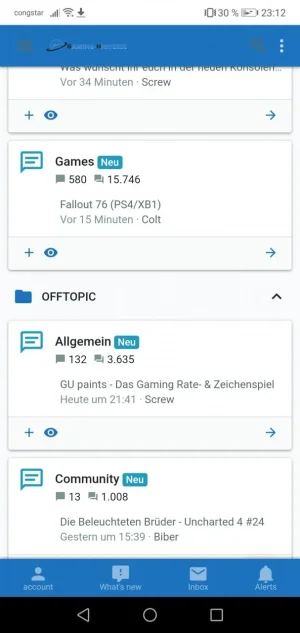
XF 2.0 How do I change header color for mobile view

mmirlach

Active member
Licensed customer
Hi there,

I would like to change the dark blue header color of the mobile view of my forum (https://www.gaming-universe.de/forum/) to a different color without changing any colors in desktop view.
How can I achieve this?

Thanks,
Matt

 

Attachments

  • IMG_20181122_181858.webp
    IMG_20181122_181858.webp
    83.4 KB · Views: 50
Hello,

You can use CSS in your template EXTRA.less with @media (max-width: @xf-responsiveMedium) , I don't have my PC for now but when I have it I will give you the CSS code if you want ! ;)

Regards, SyTry
 
Sorry, follow up question: What would be the syntax to change the icon colors for the two menu icons and search icon in mobile view as well?
 
Same code but you need to add color: #009688; for example ;)

Got it! Last question hopefully - there are three dots to the right of the search icon leading to a menu with the right sidebar - they don't change color. What would I need to add here?
Also when scrolling, the sticky menu still keeps the same colors.
I tried to add the following but it does not work:

.p-navSticky {
background: #f0f7fd;
color: xf-intensify(@xf-paletteColor2, 60%);
}

Again, any clues?
Thanks for your support!
 
Got it! Last question hopefully - there are three dots to the right of the search icon leading to a menu with the right sidebar - they don't change color. What would I need to add here?
Also when scrolling, the sticky menu still keeps the same colors.
I tried to add the following but it does not work:

.p-navSticky {
background: #f0f7fd;
color: xf-intensify(@xf-paletteColor2, 60%);
}

Again, any clues?
Thanks for your support!
Do you have a screenshot ? I will give you the code tomorrow ! ;)
 
Here you go (I might need a slightly darker blue now though ;))
Hello,

In your template EXTRA.less try this :
Code:
/*header color mobile*/
@media (max-width: @xf-responsiveMedium) {
    .p-nav {
        background: #009688;
        color: #000;
    }
    .p-nav-inner .button.uix_sidebarTrigger__component {
        color: #000;
    }
}

Replace #009688 / #000 to your need ! ;)

Regards, SyTry
 
Hello,

In your template EXTRA.less try this :
Code:
/*header color mobile*/
@media (max-width: @xf-responsiveMedium) {
    .p-nav {
        background: #009688;
        color: #000;
    }
    .p-nav-inner .button.uix_sidebarTrigger__component {
        color: #000;
    }
}

Replace #009688 / #000 to your need ! ;)

Regards, SyTry

Nearly there - icons do look good now but the background color still changes to the dark blue as soon as I'm scrolling (as in my first screenshot).

You can check out what I mean here: https://www.gaming-universe.de/forum/
 
Nearly there - icons do look good now but the background color still changes to the dark blue as soon as I'm scrolling (as in my first screenshot).

You can check out what I mean here: https://www.gaming-universe.de/forum/
Yes I see , try this please. In your template EXTRA.less try this :
Code:
/*header color mobile*/
@media (max-width: @xf-responsiveMedium) {
    .p-nav {
        background: #009688;
        color: #000;
    }
    .p-nav-inner .button.uix_sidebarTrigger__component {
        color: #000;
    }
    .uix_headerContainer .p-navSticky.is-sticky .p-nav {
        background: #009688;
        color: #000;
    }
}
 
I'd like to change to more elements in my navbar in responsive mode, please have a look at the attached file.

I tried it with the following code in my extra.less:

@media (max-width: @xf-responsiveWide) {
.uix_activeNavTitle {
color: #000;
}
.uix_sidebarCanvasTrigger .button.uix_sidebarTrigger__component {
color: xf-intensify(@xf-paletteColor2, 60%);
}

Since it's not working, does anyone (who uses UI.X2) has an idea where I'm wrong? Maybe @SyTry once more? :)
 
I'd like to change to more elements in my navbar in responsive mode, please have a look at the attached file.

I tried it with the following code in my extra.less:

@media (max-width: @xf-responsiveWide) {
.uix_activeNavTitle {
color: #000;
}
.uix_sidebarCanvasTrigger .button.uix_sidebarTrigger__component {
color: xf-intensify(@xf-paletteColor2, 60%);
}

Since it's not working, does anyone (who uses UI.X2) has an idea where I'm wrong? Maybe @SyTry once more? :)
Hello,

Can you provide a screenshot of what you want to modify please ? :)
 
Here we go :
Code:
/*color responsive*/
@media (max-width: @xf-responsiveWide) {
    .p-nav .uix_activeNavTitle {
        color: #000;
    }
    .p-nav-inner a.uix_sidebarTrigger__component {
        color: xf-intensify(@xf-paletteColor2, 60%);
    }
}

This should be good ! ;)
 
Here we go :
Code:
/*color responsive*/
@media (max-width: @xf-responsiveWide) {
    .p-nav .uix_activeNavTitle {
        color: #000;
    }
    .p-nav-inner a.uix_sidebarTrigger__component {
        color: xf-intensify(@xf-paletteColor2, 60%);
    }
}

This should be good ! ;)
My XF2.2 worked here
A friendly hug
 
Back
Top Bottom