[DigitalPoint] App for Cloudflare®

[DigitalPoint] App for Cloudflare® 1.9.8.1

No permission to download
@digitalpoint I just turned on presigned URL's to test it out again as I had some issues with it early on. All seem to work fine. What's odd though is I'm using one of @AndyB xf2add-ons.com Open PDF add-on in XF 2.3.7 which works well to open a PDF in the browser, however, with presigned URL's enabled your cloudflare add-on it downloads the PDF's instead of opening for viewing. Any ideas?

 
@digitalpoint I just turned on presigned URL's to test it out again as I had some issues with it early on. All seem to work fine. What's odd though is I'm using one of @AndyB xf2add-ons.com Open PDF add-on in XF 2.3.7 which works well to open a PDF in the browser, however, with presigned URL's enabled your cloudflare add-on it downloads the PDF's instead of opening for viewing. Any ideas?

Well, I don't know anything abut that addon, but it's super simple to tell a browser to display rather than download, by simply adding the Content-Disposition: inline HTTP header. I'm guessing they are doing it a different way though, because this addon is already picking up the Content-Disposition header that XenForo adds, and then relays that to the presigned URL request. The cleanest way to alter content disposition would be to extend the standard \XF\Http\Request::isInlineDisplaySafe() method XenForo uses to do determine if the attachment is inlineable or not.

TL;DR: The Content-Disposition header that XenForo assigns to attachments is already being relayed... so best to just extend the XenForo method if you want to make changes to it.
 
@AndyB sent me a few updates to try but nothing is working to get the PDF to open in the browser. Is this something your add-on can do @digitalpoint to recognize the media type and handle it accordingly? Maybe your add-on can get PDF's to open in the browser instead of downloading? Maybe the problem initiates with how the attachment is saved, i.e. maybe wrong media type? I don't know...didn't check R2 storage.
 
@AndyB sent me a few updates to try but nothing is working to get the PDF to open in the browser. Is this something your add-on can do @digitalpoint to recognize the media type and handle it accordingly? Maybe your add-on can get PDF's to open in the browser instead of downloading? Maybe the problem initiates with how the attachment is saved, i.e. maybe wrong media type? I don't know...didn't check R2 storage.
Again, I don't know how the addon you are using is doing it, but it's possible it's doing it in a way that's overcomplicating it. If you want PDFs to be displayed inline (with XenForo default attachments or with presigned URLs), you can just add this to your config.php file to tell XenForo that PDFs should be displayed inline like normal images, no addon needed:

PHP:
$c->extend('inlineImageTypes', function(array $imageTypes)
{
    $imageTypes['pdf'] = 'application/pdf';
    return $imageTypes;
});

Tested it by adding it to config.php file and instantly PDFs served any way (including presigned URLs) are displayed in browser rather than downloaded.

XenForo already has an internal mechanism to determine which attachments should be displayed and which should be downloaded, just add PDF to the inline group. Anything else is making things more complicated than it needs to be (unless I'm missing something, which of course is possible).
 
I'm a little confused by one thing

In settings I (think) I have blocked AI botsScreenshot 2026-01-28 at 17.57.13.webp

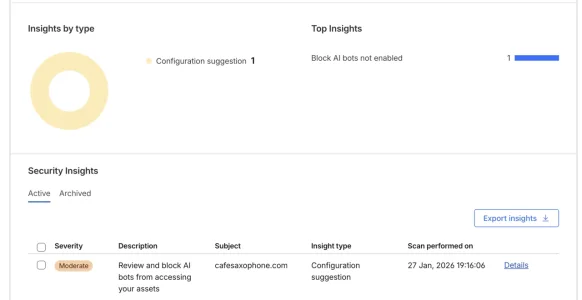
However in the CF domain list, I see security insights moderate severity Block AI bots not enabled so does that mean the addon is not communicating with Cloudflare?

Screenshot 2026-01-28 at 18.05.20.webp

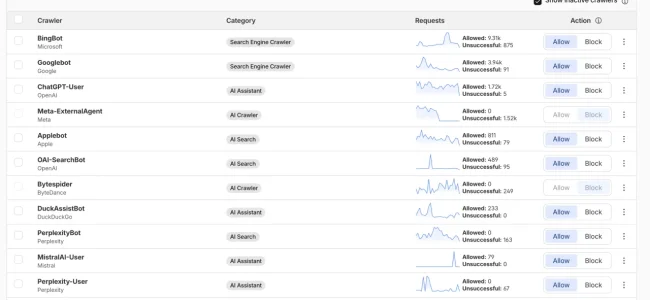
Bit then on AI Crawlo Control I see they are blocked.

Can anyone explain this, thanks.


Screenshot 2026-01-28 at 18.11.23.webp
 
I'm a little confused by one thing

In settings I (think) I have blocked AI botsView attachment 333146

However in the CF domain list, I see security insights moderate severity Block AI bots not enabled so does that mean the addon is not communicating with Cloudflare?

View attachment 333148

Bit then on AI Crawlo Control I see they are blocked.

Can anyone explain this, thanks.


View attachment 333149
The addon doesn't do anything with "insights". Check the underlying setting. That's all it does there (toggle the setting).
 
I'm a little confused by one thing

In settings I (think) I have blocked AI botsView attachment 333146

However in the CF domain list, I see security insights moderate severity Block AI bots not enabled so does that mean the addon is not communicating with Cloudflare?

View attachment 333148

Bit then on AI Crawlo Control I see they are blocked.

Can anyone explain this, thanks.


View attachment 333149

Mine does this as well, and I am not using the Cloudflare add-on, so I know it's not related to @digitalpoint add-on. It's odd, it's almost like Cloudflare is missing a toggle. Either that or it's a bug because I have everything enabled as well, and I get the same message.
 
Does anyone know if this is something that can be ignored or does it need something doing about it?
Says in your screenshot it's a "configuration suggestion". Whatever you want to do (or not do) with that info is up to you really. If you want to block more AI bots, block them. If you don't, then don't. 🤷🏻‍♂️
 
really. If you want to block more AI bots, block them. If you don't, then don't.
Yes I want to block all ai bots, hence I have ai bots blocked. The setting here implies all ai bots as there is no choice

screenshot-2026-01-28-at-17-57-13-webp.333146

Or am I misunderstanding this?
 
Yes I want to block all ai bots, hence I have ai bots blocked. The setting here implies all ai bots as there is no choice

screenshot-2026-01-28-at-17-57-13-webp.333146

Or am I misunderstanding this?
Would need to ask Cloudflare that. The settings presented in this addon are simply coming from Cloudflare's dashboard. If the setting isn't toggling in Cloudflare's dashboard when you toggle it in XenForo, I could help with. But backend tech info about about what Cloudflare is doing with their own settings, that's more of a Cloudflare question.
 
Would need to ask Cloudflare that. The settings presented in this addon are simply coming from Cloudflare's dashboard. If the setting isn't toggling in Cloudflare's dashboard when you toggle it in XenForo, I could help with. But backend tech info about about what Cloudflare is doing with their own settings, that's more of a Cloudflare question.
Thanks.

I can only ever gat a bot on the support chat but maybe I will try.

First I'll turn it off and on again
 
Back
Top Bottom