Do you remember roughly how many users on at the same time? And how much ram given that post?My largest is this one I think

[DCom] Live Content [Paid]
Just fine if you have small to medium realtime users, like 500 (consumes like Redis on CPU usage). But consumes a bit when you have 1-2k realtime online, but not too much (consumes like Mysql or a bit more on CPU usage).xenforo.com
6 Cores and 12 Threads Dedicated Server

You are using an out of date browser. It may not display this or other websites correctly.
You should upgrade or use an alternative browser.
You should upgrade or use an alternative browser.
![[DCom] Live Content](/community/data/resource_icons/8/8769.jpg?1654193883)
[DCom] Live Content [Paid] 3.5.2
No permission to buy ($30.00)
- Thread starter DimmmCom
- Start date
Realtime (per second) connected to my socket server port, 2,000–2,500 max.Do you remember roughly how many users on at the same time?
It doesn't use much RAM, but it's more CPU-intensive, somewhat equivalent to MySQL CPU usage.And how much ram given that post?

DimmmCom updated [DCom] Live Content with a new update entry:
2.1.0
Read the rest of this update entry...
2.1.0
- Added support for XenForo 2.1
- Fixing an error when creating/editing a user in the Admin Panel
- Fixed a bug with rendering of the "Typing..." block (the phrase was not translated when changing the language)
- Fixed a rare bug where when adding a message, the avatar did not change to online status
Read the rest of this update entry...
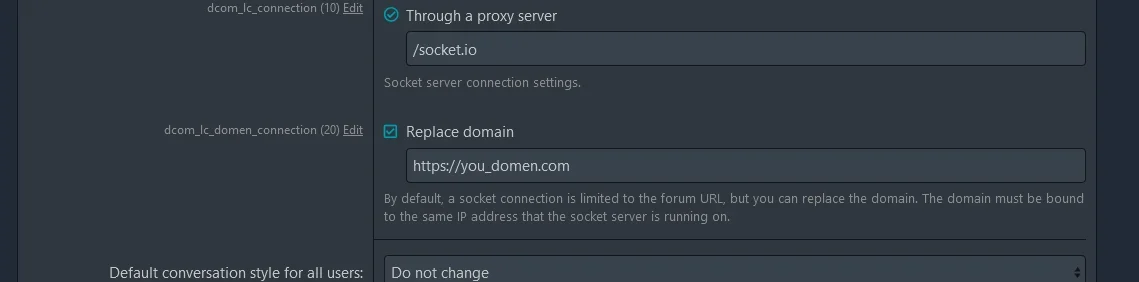
Honestly, I haven't tested it, but it should work. You may need additional configuration of the server configs. Now I will deploy a test forum not in the root directory and write.my forum is under /forum/ and not root domain.
How can this work?
Hello. Sorry for the late reply, been very busy. Yes, the plugin will work if the forum is not installed in the root directory, it just needs a bit of tweaking.my forum is under /forum/ and not root domain.
How can this work?
In the plugin settings, you must specify the domain.
Last edited:
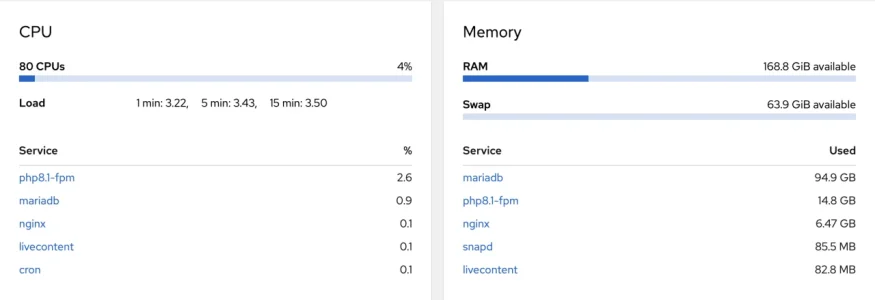
Wait so 100+ gb of ram? Am I reading that right? Holy cow.CPU and Memory usage for a 45 million post forum, with 2k connected clients ATM.
View attachment 278235

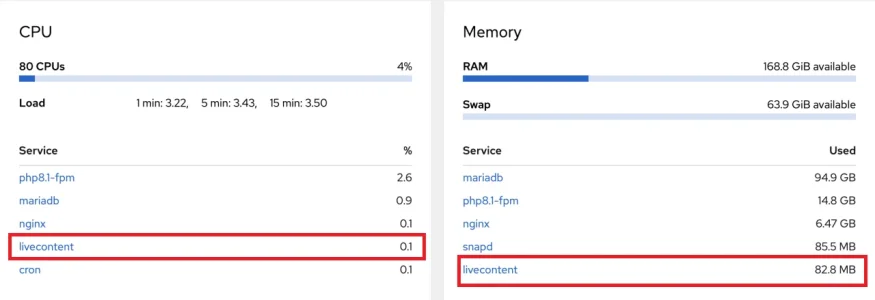
Oh hahaha then normal xenforo is taking 100+ gb ram or is he running a space ship? XD
The whole server has 256GB of RAM.Wait so 100+ gb of ram? Am I reading that right? Holy cow.
This addon service only uses 82 MB, though.
The server is for a forum with 45 million posts and a 70 GB database (the owner just want the top of the line server specs
 ).
).Holy cow I didn't know thr number of posts would increase that much ram requirement. Good to know! Look at that crazy cpu to ram ratio though hahaThe whole server has 256GB of RAM.
This addon service only uses 82 MB, though.
The server is for a forum with 45 million posts and a 70 GB database (the owner just want the top of the line server specs
DimmmCom updated [DCom] Live Content with a new update entry:
2.2.0
Read the rest of this update entry...
2.2.0
- Added support real-time alerts
Read the rest of this update entry...
The new port needs to be open for TCP_IN, TCP_OUT, or Both?DimmmCom updated [DCom] Live Content with a new update entry:
2.2.0
Read the rest of this update entry...
BothThe new port needs to be open for TCP_IN, TCP_OUT, or Both?


Yep happened to me too.Anyone having issues with "typing...." block not appearing after a while?
It's working fine when we install it but after few days it's not working anymore.
View attachment Desktop 06-01-2023 03-14-05.mp4When you go to account preferences and disable (uncheck the selection box) the show typing block option for threads/conversations it remains disabled even if you enable (check the selection box) it again.
Can someone verify that on their end.
