
You are using an out of date browser. It may not display this or other websites correctly.
You should upgrade or use an alternative browser.
You should upgrade or use an alternative browser.
![[cXF] Remove Location, Website and About you field](/community/data/resource_icons/6/6059.jpg?1632686504)
[cXF] Remove Location, Website and About you field 1.4.4
No permission to download
- Thread starter BassMan
- Start date

This happened with pixel exit styles too... so I deleted this addon.

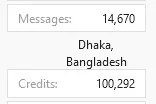

We add in a single conditional into that location for icons. I'd say the easiest approach would be to simply disable the template mod for the template "message_macros" and just disable the Location if you have it enabled here: Style properties -> Messages.
There's already a toggle for on/off for the location, I understand this add-on attempts to simply bypass that but that would be an easy fix for our styles.
There's already a toggle for on/off for the location, I understand this add-on attempts to simply bypass that but that would be an easy fix for our styles.

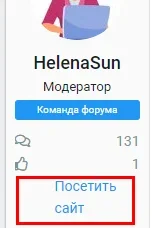
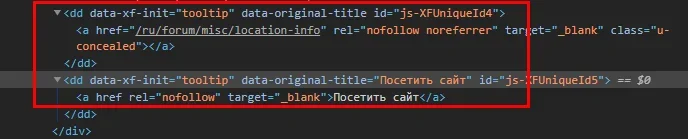

No extra links are added with this add-on.
It works.Doesnt work on XF 2.2 ... :/

Im on XF2.2, set it to "No" and in the Account details there's still the value that the user can edit.It works.
Anything Im missing? I want to remove the opinion that the user can see the website option in the Account details.
Check template modifications. Maybe your template is edited and TM's don't apply. Or you're using a 3rd party style?Im on XF2.2, set it to "No" and in the Account details there's still the value that the user can edit.
I do. I use Xenfocus themes.Check template modifications. Maybe your template is edited and TM's don't apply. Or you're using a 3rd party style?
If so how do I let this add-on do its job?
What do I looking for if it applies?As said, check template modifications if all apply to your style. But can't help much further, because I don't have that style.
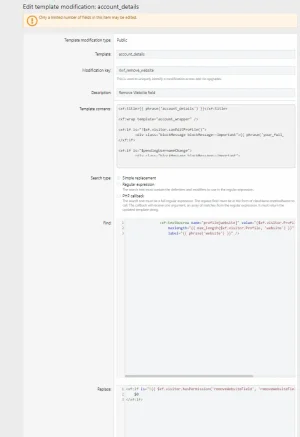
No, one step back, if all numbers are green or do you have any grey or red ones.

Any way that I modify it so it matches and works?Yes, you have a grey number. If you click on it you'll see the style names. I assume it works on default style, but not on 3rd party.
Or any way to remove the website part from the theme, even with extra.less?
If you know how to do it, then yes. Otherwise, I'll need to check it on your forum.Any way that I modify it so it matches and works?
Ok, and would you do it? If you have the time?If you know how to do it, then yes. Otherwise, I'll need to check it on your forum.
I can send you the link of my forum.
Contact me on customizexf.com for this, please.Ok, and would you do it? If you have the time?
I can send you the link of my forum.