Crazy amount of guests

After a tip on here, I downloaded the raw server logs and uploaded them to Claude to analyse. It could help if there is a specific swarm from one asn or country so you know what to block - but ultimately all it showed for me was - a lot of residential proxies from 6 main agents somewhere. Although it did give me some names to block as well.
You're asking it the wrong question. You are asking about ASN's and countries, which residential proxies, fake browser or not, subverts entirely.

You need to ask it the right question, like what are the identifying header information that separates it from real users.

Honestly, you will get the same or similar to what I have already posted. Real browsers, which means actual humans, it isn't about a referrer or type of browser, its about the components that a real installed browser has that a bot does not have. That is what you're really trying to identify in order to separate from your logs, human vs bot. If your logs are not getting that information, then you need to change what you are logging first to ensure your logs are getting the right information. Then... you can easily identify human from automation.
 
You're asking it the wrong question. You are asking about ASN's and countries, which residential proxies, fake browser or not, subverts entirely.
No. There are countries that you may not have genuine audience from (but loads of bots), there are hundreds of ASNs were never a genuine user is coming from (but legions of bots) and other patterns like that. It is not enough, but it is clearly something that can lower the amount of bots dramatically - depending from how hard you block down to a pretty low amount.

In the end detecting bots is pattern matching. Patterns can be anything from areas like

  • geography (country/region)
  • networks (ASN/network/IP)
  • request (target URL, referrer and a lot more)
  • browser environment (js, languages, claimed user agent, etc. etc.)
  • behavior (single request vs. normal browsing vs. loads of requests in no time)
  • traffic patterns (changes in i.e. number of requests to a certain URL, high number of requests to old dead threads, direct single requests to user profiles, pictures, not existing paths, loads of requests from a uncommon region or network etc. etc.)
  • historical data (has the actual pattern be seen before?)

So why limit yourself? The more patterns you use the higher the detection rate, the more if you combine them for a risk assessment. The question is: Which patterns can be detected with wich amount of effort and cost/resources and which level of reliability, how effective are they and which colateral damage can and do they create as a consequence?

Countries and ASNs can create loads of colateral damage but are simple, cheap and effective to block a very high amount of bots with very high reliability. So why not making use of it w/o limiting yourself to it?

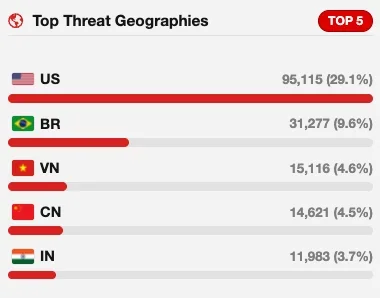
When I look at my statistics regarding country it looks like that:

Bildschirmfoto 2026-10-06 um 10.13.03.webp

I can easily block Brazil, Vietnam, China and India as a country - no genuine users coming from there to my forum. Same goes for a long list of other countries that I have blocked completely. This reduces the total amount drastically. With the US it is a tad more difficult: They are by far the biggest source of bots of all kinds: Search bots like Google and Bing but also scraper bots from data centers (easy to block via ASN) and also residential bots from dialup networks. If you don't have and don't want users from the US you can block them by ASN or at least challenge them. All of that is cheap.

Other mechanisms may come on top of that and have to. With country and ASN blocks I reduce the amount of traffic to my forum by ~50% on a ordinary day and to more than 90% during a bot wave with minimal collateral damage. What is left is dealt with by other means.

Obviously there are many ways to Rome and everyone has to figure out which works best for the own forum, depending from the individual situation and individual targets. I recommend not trusting preachers that claim to know the only right way (which is their own way and even if it was the best for them it would not automatically be the best for everyone but only for their situation and their targets).
 
I would turn on superbotfightmode if you have pro. I have botfightmode on and custom rules as well. Botfightmode is catching loads - the ones without proper headers mainly. The rest get dealt with by custom rules.
Here is what we're fighting right now.

To view this content we will need your consent to set third party cookies.
For more detailed information, see our cookies page.
 
BTW: I do see loads of bots coming from ASN AS22773 (Cox Communications Inc.) currently, way more than usual (in my forum 32% of requesting IPs during the last 24 hours). So if you are on the hunt for bots or patterns to identify bots it may be worth diving into your logs regarding traffic from this ASN.
 
Last edited:
You're asking it the wrong question. You are asking about ASN's and countries, which residential proxies, fake browser or not, subverts entirely.

You need to ask it the right question, like what are the identifying header information that separates it from real users.

Honestly, you will get the same or similar to what I have already posted. Real browsers, which means actual humans, it isn't about a referrer or type of browser, its about the components that a real installed browser has that a bot does not have. That is what you're really trying to identify in order to separate from your logs, human vs bot. If your logs are not getting that information, then you need to change what you are logging first to ensure your logs are getting the right information. Then... you can easily identify human from automation.
Hi - it was a while back now, when the swarm first hit. It was helpful initially. I did ask about headers but the vast majority, that got as far as the server, were using real up to date browsers - the sophisticated ones. Mainly the subsequent log analyses were to see if any were being blocked by the .htaccess cloudflare secret key implementation - ie to determine if any were going direct to the origin IP. Which they weren't. That is still in place though just in case.
 
Gereksizyere cpu yu tüketen siteyi yoran facebook botları robots.txt
User-agent: Meta-ExternalAgent
Disallow: /

User-agent: Meta-ExternalAgent-Fetcher
Disallow: /

Muhakkak ekle bu ikisini cloudflare den waf kuralı ekle ve engelle tektek ip adresi yazman birşey değiştirmez facebook kiralım sunucuları dahi kullanıyor sınırsız bir ip adresine sahip

Cloudflare den faebook internalhit e resimleri dosyaları css leri ve tüm siteyi cache den sun birkere link attıgında facebook a yada facebook bir kere geldiğinde sunuc a ulaşmadan cloudfalareden sunulacaktır site.
 
BTW: I do see loads of bots coming from ASN AS22773 (Cox Communications Inc.) currently, way more than usual (in my forum 32% of requesting IPs during the last 24 hours). So if you are on the hunt for bots or patterns to identify bots it may be worth diving into your logs regarding traffic from this ASN.
Seems they have now switched over to ASN AS398781 (OCULUS NETWORKS INC) - loads of requests from there now while Cox has dropped. Does not matter, both have been blocked a long time ago. ;)
 
Seems they have now switched over to ASN AS398781 (OCULUS NETWORKS INC) - loads of requests from there now while Cox has dropped. Does not matter, both have been blocked a long time ago. ;)
And they "solving" CF interactive and managed challanges.
OneCable Network LLC AS401560 is another one
 
Here is what we're fighting right now.

To view this content we will need your consent to set third party cookies.
For more detailed information, see our cookies page.
Every time he said "residential proxies" I wanted to spit 😂. So this is an apparently respectful scraper that respects robots.txt. So what do I put in Robots.txt? Drone? But - if he can do this, just think what all the dodgy people can do ..........

And yes, botfightmode and superbotfightmode aren't enough but they do catch a lot of them - the badly scripted ones that are obvious. There are still a heck of a lot get past but I think the "layers" help. More than one tool.
BTW: I do see loads of bots coming from ASN AS22773 (Cox Communications Inc.) currently, way more than usual (in my forum 32% of requesting IPs during the last 24 hours). So if you are on the hunt for bots or patterns to identify bots it may be worth diving into your logs regarding traffic from this ASN.
I was going to block Cox but I believe it includes genuine residential customers - aka potential US members - so I didn't block it.

Ultimately? We have AI to blame for all this? And there's me asking Claude who is hitting my site ......

Someone needs to legislate use of residential proxies and stop the scams where people don't know they've opted into being one.
 
Last edited:
Every time he said "residential proxies" I wanted to spit 😂. So this is an apparently respectful scraper that respects robots.txt. So what do I put in Robots.txt? Drone? But - if he can do this, just think what all the dodgy people can do ..........
Which is why IP and ASN blocking does little to nothing. Yes, there are some dedicated IP's and ASN's that do nothing but dodgy, honestly, you can still fix them with the proper header targeting and ignore blocking them.

I assume you're using Apache... whatever you're using, here is a prompt you want to give ChatGPT or such to help you fix your actual logging. You have to log the information to analyse it. By default, most logging does not capture what you actually need for automation / spam analysis.

Also note, when you capture more, it takes more room, so you will need to change your rotation IF space is an issue, otherwise you will fill your disk and crash your system.

######################################

I want to review and improve the HTTP request logging for a website running on Apache.

Do not assume there is a CDN, WAF or reverse proxy in front of Apache unless I specify one. Start with what Apache itself can observe and log, then separately explain what additional infrastructure would be needed for signals Apache cannot see.

Please analyse:

  1. What Apache captures by default
    • Exactly which request details are normally recorded in Apache access logs using the common and combined log formats.
    • Which HTTP request headers and connection details are available to Apache but are not logged by default.
  2. What additional request data should be logged
    Recommend the Apache logging configuration needed to capture the most useful signals for identifying:
    • fake or spoofed browsers
    • browser impersonation
    • bots and automated clients
    • scraping tools
    • headless browsers
    • scripted HTTP clients
    • automation frameworks
    • clients using residential or mobile proxies specifically to defeat IP, geolocation or ASN-based detection
    • Include useful HTTP headers such as User-Agent, Accept, Accept-Language, Accept-Encoding, Referer, Origin, Sec-Fetch-* headers, Sec-CH-UA/client-hint headers, Cache-Control, Connection, Upgrade-Insecure-Requests and any other headers that materially help distinguish genuine browsers from automated clients.
  3. Header consistency and browser fingerprinting
    Explain which combinations of headers can expose clients claiming to be Chrome, Safari, Firefox, Edge or mobile browsers when their request does not match the normal behaviour of that browser.

    Consider:
    • expected header presence or absence
    • header values
    • header combinations
    • header ordering, where observable
    • client hints
    • HTTP protocol behaviour
    • Identify which inconsistencies are particularly useful for distinguishing genuine browsers from HTTP libraries and automation tools.
  4. Signals beyond ordinary HTTP headers
    Explain what Apache can and cannot observe directly, and what additional telemetry would be needed to detect more sophisticated browser impersonation, including:
    • TLS fingerprints such as JA3, JA4 or newer equivalents
    • TLS cipher suites and extension behaviour
    • HTTP/2 fingerprints and SETTINGS behaviour
    • HTTP/3/QUIC characteristics
    • header ordering
    • browser client hints
    • JavaScript/browser capability checks
    • cookies and session continuity
    • navigation and request sequencing
    • timing and behavioural signals
  5. Residential proxies
    Assume IP reputation, geolocation and ASN blocking cannot be relied upon because an attacker may use legitimate residential IP addresses.

    Focus instead on identifying inconsistencies between:
    • IP/network characteristics
    • TLS fingerprint
    • HTTP protocol behaviour
    • claimed browser/User-Agent
    • request headers
    • client hints
    • cookies/session history
    • JavaScript-observed browser characteristics
  6. Practical Apache implementation
    Provide:
    • a recommended Apache LogFormat
    • explanation of every field in that format
    • example resulting log entries
    • which headers are genuinely useful and which create mostly noise
    • performance and disk-space implications
    • privacy considerations
    • log rotation considerations
    • how the captured fields could later be analysed for inconsistencies
  7. Detection strategy
    Do not recommend blocking a request merely because one header is absent or unusual.

    Instead, explain how to build a confidence score or set of detection rules from multiple independent inconsistencies.
The objective is not simply to block bots. I want sufficient logging and telemetry to investigate requests afterwards and detect cases where a client claims to be a normal browser but its HTTP, TLS, protocol and browser characteristics do not agree.

Please distinguish between:
  • signals ordinary bots frequently get wrong,
  • signals sophisticated tools can easily spoof,
  • signals that are difficult to impersonate consistently,
  • and signals Apache cannot capture without another layer or module.
 
I'm developing an online marketplace at the moment, and something I did was implement turnstile directly into search and load bearing systems, and I have to say... it would be nice if XF did this. Registration is not the problem, but bots using search is a huge issue today.

When you search for the first time, a message appears in the search field, "checking the browser" which takes about 1 second, then the results appear. It keeps login and IP for x time before the next check, so to not annoy a person legitimately searching, but keeps all the bots out of search. Solves one huge problem at the source.

That would be nice to see in a future XF version.
 
Every time he said "residential proxies" I wanted to spit 😂. So this is an apparently respectful scraper that respects robots.txt.
Well, he obviously tried to circumvent the clear wish of website owners that they do not want to provide him the information he wants to have and that do not want to get scraped plus he creates tons of traffic (and traffic cost). What would be respectful about that? He is either stupid enough to believe that these proxies are "ethically sourced" or just pretends to as othervise his project would be as dodgy as would be his promotion of the seller of residential proxies (probably with a referal link, so he earns money through promoting residential proxies). He claims the true owners of the devices the proxies run on would get paid - but at the same time praises that he had to pay just 8ct. for all the requests he created while using hundreds or thousands of requests and proxies. Obviously he did not think about how the economics could work... So he is either incredibly stupid or he just does not care - in the end he is a youtuber, so everything is show, nothing is real.

I was going to block Cox but I believe it includes genuine residential customers - aka potential US members - so I didn't block it.
There are. In the US there is an insane amount of residential proxies hidden in dialup networks. The US is not my target audience and I do only have a hand ful of members from there. So I do block dialup ASNs from there when they get nasty (while letting logged in members pass).

Which is why IP and ASN blocking does little to nothing.
You keep claiming that - it does not get more right if you repeat it constantly.
 
Last edited:
Which is why IP and ASN blocking does little to nothing. Yes, there are some dedicated IP's and ASN's that do nothing but dodgy, honestly, you can still fix them with the proper header targeting and ignore blocking them.

I assume you're using Apache... whatever you're using, here is a prompt you want to give ChatGPT or such to help you fix your actual logging. You have to log the information to analyse it. By default, most logging does not capture what you actually need for automation / spam analysis.

Also note, when you capture more, it takes more room, so you will need to change your rotation IF space is an issue, otherwise you will fill your disk and crash your system.

######################################

I want to review and improve the HTTP request logging for a website running on Apache.

Do not assume there is a CDN, WAF or reverse proxy in front of Apache unless I specify one. Start with what Apache itself can observe and log, then separately explain what additional infrastructure would be needed for signals Apache cannot see.

Please analyse:

  1. What Apache captures by default
    • Exactly which request details are normally recorded in Apache access logs using the common and combined log formats.
    • Which HTTP request headers and connection details are available to Apache but are not logged by default.
  2. What additional request data should be logged
    Recommend the Apache logging configuration needed to capture the most useful signals for identifying:
    • fake or spoofed browsers
    • browser impersonation
    • bots and automated clients
    • scraping tools
    • headless browsers
    • scripted HTTP clients
    • automation frameworks
    • clients using residential or mobile proxies specifically to defeat IP, geolocation or ASN-based detection
    • Include useful HTTP headers such as User-Agent, Accept, Accept-Language, Accept-Encoding, Referer, Origin, Sec-Fetch-* headers, Sec-CH-UA/client-hint headers, Cache-Control, Connection, Upgrade-Insecure-Requests and any other headers that materially help distinguish genuine browsers from automated clients.
  3. Header consistency and browser fingerprinting
    Explain which combinations of headers can expose clients claiming to be Chrome, Safari, Firefox, Edge or mobile browsers when their request does not match the normal behaviour of that browser.

    Consider:
    • expected header presence or absence
    • header values
    • header combinations
    • header ordering, where observable
    • client hints
    • HTTP protocol behaviour
    • Identify which inconsistencies are particularly useful for distinguishing genuine browsers from HTTP libraries and automation tools.
  4. Signals beyond ordinary HTTP headers
    Explain what Apache can and cannot observe directly, and what additional telemetry would be needed to detect more sophisticated browser impersonation, including:
    • TLS fingerprints such as JA3, JA4 or newer equivalents
    • TLS cipher suites and extension behaviour
    • HTTP/2 fingerprints and SETTINGS behaviour
    • HTTP/3/QUIC characteristics
    • header ordering
    • browser client hints
    • JavaScript/browser capability checks
    • cookies and session continuity
    • navigation and request sequencing
    • timing and behavioural signals
  5. Residential proxies
    Assume IP reputation, geolocation and ASN blocking cannot be relied upon because an attacker may use legitimate residential IP addresses.

    Focus instead on identifying inconsistencies between:
    • IP/network characteristics
    • TLS fingerprint
    • HTTP protocol behaviour
    • claimed browser/User-Agent
    • request headers
    • client hints
    • cookies/session history
    • JavaScript-observed browser characteristics
  6. Practical Apache implementation
    Provide:
    • a recommended Apache LogFormat
    • explanation of every field in that format
    • example resulting log entries
    • which headers are genuinely useful and which create mostly noise
    • performance and disk-space implications
    • privacy considerations
    • log rotation considerations
    • how the captured fields could later be analysed for inconsistencies
  7. Detection strategy
    Do not recommend blocking a request merely because one header is absent or unusual.

    Instead, explain how to build a confidence score or set of detection rules from multiple independent inconsistencies.
The objective is not simply to block bots. I want sufficient logging and telemetry to investigate requests afterwards and detect cases where a client claims to be a normal browser but its HTTP, TLS, protocol and browser characteristics do not agree.

Please distinguish between:
  • signals ordinary bots frequently get wrong,
  • signals sophisticated tools can easily spoof,
  • signals that are difficult to impersonate consistently,
  • and signals Apache cannot capture without another layer or module.
Thanks, that is useful. However, a recent Cloudflare export showed 500 events from 500 different residential IPs, all on HTTP/2. Custom logging isn't something my shared host is likely to accept though. The fake-bot block made a big difference and things are stable right now, but this could be helpful if there's another huge bot swarm. Hopefully not - my situation has been quite stable recently. The logging and Cloudflare headers is clever though.

Re ASN's - I'd take a middle ground between what you and Smallwheels say. When it's case of reducing bot numbers fast, blocking a country and ASN's for big Singapore data centres does help IMO - even if it doesn't solve the bigger picture.
 
With these residential proxies, I'm being reminded of DroneBL and IRC networks that did a port-probe + DNSBL check when you connect to an IRC network. I legitimately wonder if that could be viable when checking for residential proxies.

Granted, these residential proxies seem to hole punch and act as relays more so than actual open ports... which makes generic port scanning of common VPN ports, socks ports, and other semi-common tcp/udp ports quite difficult - if not impossible. :|
 
Custom logging isn't something my shared host is likely to accept though.
Shared hosting, you can create your own access logging and capture whatever you want, you don't need to rely on the host logging.

Put a php logger with its parameters you want to capture inside your public_html folder with xenforo, writing to a log inside your log folder, which is usually at the same level as your /public_html folder. Then you capture what you want. Use JSON.

Simply, you would have /public_html/customlogger.php which is writing to /private_logs/access_log.jsonl. Using the above prompt, as an example, the below would cover you and has nothing to do with your host provider logging. The below rotates daily, you would then just create a cron job in your shared cpanel to delete the logs after x, I would probably create a cron to compress though after 2 days, as these will get large and will need to be compressed. You need 2nd day before you can't compress the current days logs.

Something like - custom-logger.php

Code:
<?php
/**
 * Detailed HTTP request telemetry logger
 *
 * Store this file OUTSIDE public_html, for example:
 *
 * /home/CPANELUSER/private/request_logger.php
 *
 * Logs:
 * /home/CPANELUSER/private_logs/request-YYYY-MM-DD.jsonl
 *
 * Do NOT log:
 * - Cookie values
 * - Authorization
 * - passwords
 * - CSRF tokens
 * - session IDs
 * - API keys
 */

declare(strict_types=1);

$requestStart = microtime(true);

/**
 * Safely read $_SERVER value.
 */
function srv(string $key): ?string
{
    if (!isset($_SERVER[$key])) {
        return null;
    }

    $value = trim((string) $_SERVER[$key]);

    return $value !== '' ? $value : null;
}


/**
 * Convert a header name to its normal $_SERVER equivalent.
 *
 * Example:
 * Sec-Fetch-Site -> HTTP_SEC_FETCH_SITE
 */
function headerValue(string $name): ?string
{
    $key = 'HTTP_' . strtoupper(str_replace('-', '_', $name));

    return srv($key);
}


/**
 * Return only COOKIE NAMES.
 *
 * We deliberately do NOT record cookie values.
 */
function cookieNames(): array
{
    if (empty($_COOKIE)) {
        return [];
    }

    $names = array_keys($_COOKIE);
    sort($names, SORT_STRING);

    return $names;
}


/**
 * Basic request identifier.
 */
function requestId(): string
{
    try {
        return bin2hex(random_bytes(12));
    } catch (Throwable $e) {
        return uniqid('req_', true);
    }
}


/**
 * Keep line-breaking/control characters out of logs.
 */
function cleanValue(?string $value, int $maxLength = 4096): ?string
{
    if ($value === null) {
        return null;
    }

    $value = preg_replace('/[\x00-\x08\x0B\x0C\x0E-\x1F\x7F]/u', '', $value);

    if ($value === null) {
        return null;
    }

    if (strlen($value) > $maxLength) {
        $value = substr($value, 0, $maxLength);
    }

    return $value;
}


$reqId = requestId();

/*
 * Capture information that is available when the request arrives.
 */
$requestTelemetry = [

    /*
     * Identity / time
     */
    'timestamp_utc' => gmdate('c'),
    'request_id'    => $reqId,

    /*
     * Connection
     */
    'remote_addr' => srv('REMOTE_ADDR'),
    'remote_port' => srv('REMOTE_PORT'),

    /*
     * If using Cloudflare these may be extremely useful.
     *
     * Only TRUST these headers if requests cannot bypass Cloudflare.
     */
    'cf' => [
        'connecting_ip' => headerValue('CF-Connecting-IP'),
        'country'       => headerValue('CF-IPCountry'),
        'ray'           => headerValue('CF-Ray'),
        'visitor'       => headerValue('CF-Visitor'),
    ],

    /*
     * Proxy headers.
     *
     * Do not automatically regard these as trustworthy.
     */
    'proxy' => [
        'forwarded'       => headerValue('Forwarded'),
        'x_forwarded_for' => headerValue('X-Forwarded-For'),
        'x_real_ip'       => headerValue('X-Real-IP'),
    ],

    /*
     * Request
     */
    'request' => [
        'method'         => srv('REQUEST_METHOD'),
        'scheme'         => !empty($_SERVER['HTTPS']) && $_SERVER['HTTPS'] !== 'off'
                            ? 'https'
                            : 'http',
        'host'           => cleanValue(headerValue('Host'), 512),
        'uri'            => cleanValue(srv('REQUEST_URI'), 8192),
        'query_string'   => cleanValue(srv('QUERY_STRING'), 8192),
        'protocol'       => srv('SERVER_PROTOCOL'),
        'server_port'    => srv('SERVER_PORT'),
        'content_type'   => cleanValue(srv('CONTENT_TYPE')),
        'content_length' => srv('CONTENT_LENGTH'),
    ],

    /*
     * Traditional browser headers
     */
    'headers' => [
        'user_agent' => cleanValue(headerValue('User-Agent')),

        'accept' => cleanValue(
            headerValue('Accept')
        ),

        'accept_language' => cleanValue(
            headerValue('Accept-Language')
        ),

        'accept_encoding' => cleanValue(
            headerValue('Accept-Encoding')
        ),

        'referer' => cleanValue(
            headerValue('Referer'),
            8192
        ),

        'origin' => cleanValue(
            headerValue('Origin'),
            2048
        ),

        'cache_control' => cleanValue(
            headerValue('Cache-Control')
        ),

        'pragma' => cleanValue(
            headerValue('Pragma')
        ),

        'connection' => cleanValue(
            headerValue('Connection')
        ),

        'upgrade_insecure_requests' => cleanValue(
            headerValue('Upgrade-Insecure-Requests')
        ),

        'dnt' => cleanValue(
            headerValue('DNT')
        ),

        'priority' => cleanValue(
            headerValue('Priority')
        ),

        'te' => cleanValue(
            headerValue('TE')
        ),

        'upgrade' => cleanValue(
            headerValue('Upgrade')
        ),
    ],

    /*
     * Fetch Metadata.
     *
     * Extremely useful when trying to distinguish a real browser
     * navigation from a raw HTTP client merely copying a User-Agent.
     */
    'fetch_metadata' => [
        'sec_fetch_site' => cleanValue(
            headerValue('Sec-Fetch-Site')
        ),

        'sec_fetch_mode' => cleanValue(
            headerValue('Sec-Fetch-Mode')
        ),

        'sec_fetch_dest' => cleanValue(
            headerValue('Sec-Fetch-Dest')
        ),

        'sec_fetch_user' => cleanValue(
            headerValue('Sec-Fetch-User')
        ),
    ],

    /*
     * Chromium Client Hints.
     */
    'client_hints' => [
        'sec_ch_ua' => cleanValue(
            headerValue('Sec-CH-UA')
        ),

        'sec_ch_ua_mobile' => cleanValue(
            headerValue('Sec-CH-UA-Mobile')
        ),

        'sec_ch_ua_platform' => cleanValue(
            headerValue('Sec-CH-UA-Platform')
        ),

        'sec_ch_ua_platform_version' => cleanValue(
            headerValue('Sec-CH-UA-Platform-Version')
        ),

        'sec_ch_ua_arch' => cleanValue(
            headerValue('Sec-CH-UA-Arch')
        ),

        'sec_ch_ua_bitness' => cleanValue(
            headerValue('Sec-CH-UA-Bitness')
        ),

        'sec_ch_ua_model' => cleanValue(
            headerValue('Sec-CH-UA-Model')
        ),

        'sec_ch_ua_full_version_list' => cleanValue(
            headerValue('Sec-CH-UA-Full-Version-List')
        ),

        'sec_ch_ua_wow64' => cleanValue(
            headerValue('Sec-CH-UA-WoW64')
        ),
    ],

    /*
     * TLS information.
     *
     * These depend entirely on what your hosting provider exposes
     * to PHP. Often these will be NULL on shared hosting.
     */
    'tls' => [
        'https'        => srv('HTTPS'),
        'ssl_protocol' => srv('SSL_PROTOCOL'),
        'ssl_cipher'   => srv('SSL_CIPHER'),
        'ssl_session'  => srv('SSL_SESSION_ID'),

        /*
         * Placeholders. PHP ordinarily cannot calculate these itself
         * because the TLS handshake occurred before PHP was invoked.
         */
        'ja3' => headerValue('X-JA3'),
        'ja4' => headerValue('X-JA4'),
    ],

    /*
     * Cookie/session continuity.
     *
     * Names only. NEVER dump $_COOKIE wholesale.
     */
    'cookies' => [
        'count' => count($_COOKIE),
        'names' => cookieNames(),
    ],

    /*
     * Some hosting stacks expose these; others don't.
     */
    'server' => [
        'software' => srv('SERVER_SOFTWARE'),
        'name'     => srv('SERVER_NAME'),
    ],
];


/*
 * Run after PHP/XenForo finishes so we can add response information.
 */
register_shutdown_function(
    function () use ($requestStart, $requestTelemetry): void {

        $entry = $requestTelemetry;

        $entry['response'] = [
            'status' => http_response_code(),

            'duration_ms' => round(
                (microtime(true) - $requestStart) * 1000,
                3
            ),

            'peak_memory_bytes' => memory_get_peak_usage(true),
        ];

        $lastError = error_get_last();

        if ($lastError !== null) {
            $entry['php_error'] = [
                'type'    => $lastError['type'] ?? null,
                'message' => $lastError['message'] ?? null,
                'file'    => $lastError['file'] ?? null,
                'line'    => $lastError['line'] ?? null,
            ];
        }

        $date = gmdate('Y-m-d');

        /*
         * CHANGE THIS.
         */
        $logDirectory = '/home/CPANELUSER/private_logs';

        if (!is_dir($logDirectory)) {
            @mkdir($logDirectory, 0700, true);
        }

        $logFile = $logDirectory . '/request-' . $date . '.jsonl';

        $json = json_encode(
            $entry,
            JSON_UNESCAPED_SLASHES |
            JSON_UNESCAPED_UNICODE |
            JSON_INVALID_UTF8_SUBSTITUTE
        );

        if ($json !== false) {
            @file_put_contents(
                $logFile,
                $json . PHP_EOL,
                FILE_APPEND | LOCK_EX
            );
        }
    }
);

Which would output a log entry something along the lines of:

Code:
{
  "timestamp_utc": "2026-10-07T03:04:52+00:00",
  "request_id": "42bd7b4610a33b30a7bbf6fb",
  "remote_addr": "103.20.45.16",
  "remote_port": "51324",
  "request": {
    "method": "GET",
    "scheme": "https",
    "host": "example.com",
    "uri": "/threads/example.2381/",
    "protocol": "HTTP/2"
  },
  "headers": {
    "user_agent": "Mozilla/5.0 ... Chrome/140.0.0.0 Safari/537.36",
    "accept": "text/html,application/xhtml+xml,application/xml;q=0.9,image/avif,image/webp,*/*;q=0.8",
    "accept_language": "en-AU,en;q=0.9",
    "accept_encoding": "gzip, deflate, br, zstd",
    "referer": "https://example.com/forums/general/",
    "upgrade_insecure_requests": "1",
    "priority": "u=0, i"
  },
  "fetch_metadata": {
    "sec_fetch_site": "same-origin",
    "sec_fetch_mode": "navigate",
    "sec_fetch_dest": "document",
    "sec_fetch_user": "?1"
  },
  "client_hints": {
    "sec_ch_ua": "\"Chromium\";v=\"140\", \"Google Chrome\";v=\"140\", \"Not=A?Brand\";v=\"24\"",
    "sec_ch_ua_mobile": "?0",
    "sec_ch_ua_platform": "\"Windows\""
  },
  "cookies": {
    "count": 4,
    "names": [
      "xf_csrf",
      "xf_session",
      "xf_user"
    ]
  },
  "response": {
    "status": 200,
    "duration_ms": 83.214,
    "peak_memory_bytes": 12582912
  }
}
 
Got myself a new wave ripple of bots on a non-English forum, from residential proxies in US and VPN servers in US and Europe. It wasn't something major - just a couple hundred visitors hammering URL after URL. I caught it by accident not long after it started, so I could make adjustments and watch in near real time the consequences.

The VPN services lead to cloud providers from where I do not expect legitimate traffic, so the solution is to add those ASNs to the block rule. This has to be followed up, though, because once the scrapers detect that a VPN server/provider is blocked, they'll move on to another one shortly, so it's a cat and mouse game. And there are LOTS of VPN providers out there.

One odd thing that stood out was that, from some VPN providers, I'd get only HTTP/1.1 connections. This might not be a limitation of the VPN provider, but the protocol supported by whatever automated tool is performing the scraping. The protocol is not exactly deprecated; it's the fallback for compatibility reasons for HTTP/2, but it is also considered insecure and there are pleeeeenty of voices on the internet saying "HTTP/1 must die".

The residential proxies were also a bit of a whack-a-mole. They all advertised a deprecated Chrome version in user-agent; the moment I blocked it, they switched to another one. The switch was fairly quick, so I suspect there would be an automated way to detect and react to this on their end. This continued for a while, currently the filter is blocking 5 old Chrome versions. I have absolutely no remorse if these rules also catch and block legitimate users which have not kept their computer software up to date for years (and actively stopped Chrome's built-in autoupdater feature) as a minimal responsibility for being connected to the internet these days, just as I don't need to accept talking to someone who went out of the house without brushing their teeth in the morning and their words are making my eyes water.

Now it's quiet again... until the next time.

User-Agent can be easily spoofed, so those rules are absolutely temporary and as reliable as hanging a "burglars pls don't break in our home" sign on your door. Source IP of the connection cannot be altered, and that's the power of blocking IPs, subnets and ASNs. It's just that the internet is a biiiiiig space and maintaining a blacklist can become exhausting, and using others' blacklists will only encourage bad actors to find other ways to connect and evade the (now widespread) blockade.

On that point: what would be the low hanging fruit to gather some sort of daily statistics/analytics about previous day's visitors, grouped by number of requests per ASN? I'd like to be able to check in the morning if there are some new major sources of traffic from some datacenter or VPN and add it to the block rule, without digging through logs manually. I'm not a master of the free CF analytics but they'd have the ability to derive ASNs; the shared hosting has its own limitations for configuration and logging (partial anonymizing of IPs) to avoid the privacy obligations in GDPR, and a XF plugin would need to query some public service to find the ASN of every visitor's IP and still fit within the reasonable limits of a free service.
 
Last edited:
Get GPT to create a script to scrape the IP's from you logs, put it into a list on your computer, point it as the maxmind geolite2-asn and country downloads on your computer, have it sort traffic by ASN and output a list. If your logs are capturing ASN already, scrape that, easier.
 
Back
Top Bottom