Just tried to be helpful. As you do not seem to know how firewalls work (and this part of CF is a firewall) while I have a background of having built, setup and administrated somewhat complex setups of firewalls and clusters of dozens of firewalls as a profession for years (if a couple of years ago) I think I know a thing or two about how firewalls work. But as I have no practical experience with the CF firewall I can only assume that it works probably no different than others typically do. But hey: If you think you know better: So be it, I don't care. It's you having a problem, not me. A fool with a tool is still a fool.You're not on Cloudflare. Don't assume things.

You are using an out of date browser. It may not display this or other websites correctly.
You should upgrade or use an alternative browser.
You should upgrade or use an alternative browser.
Crazy amount of guests
- Thread starter Levina
- Start date
-
- Tags
- bot swarms guests
Possibly a problem with memory size for each expression. An ASN can be quite huge and consume considerable memory, depending from how CF has implemented it. The data of 100 ASNs aggregates possibly to a too huge size while splitting them into groups creates smaller chunks. In the end a question for either a CF expert or the CF support.I have a list of about 100 ASNs being blocked - not the thousands in various blocklists on the internet but still a bunch organically grown for my domain - and whenever I use "ASN Num in [long list]" it just doesn't seem to be working. But if I split it down in chunks of maybe 20 ASNs and use "ASN Num is in [group 1] OR ASN Num is in [group 2] OR ASN Num is in [group 3]" etc. then it works. What? Why?
Last edited:

The only list for free customers is an IP list. It's under Security / Settings / IP Lists. And since I rarely block an IP address, I wouldn't get much use out of it. However, an API can interface with it, so it's an interesting way to block IPs dynamically, as the API can add and remove IPs as needed.It probably works better if I define a custom list of ASNs, but that feature is reserved for paying customers.

It can get weird. Once a rule is triggered, everything else is skipped. Ordering does some weird and wonderful things. I guess it depends how complex the software running the bots is. If it gets blocked by x do y instead. They used to be simple, go do x and the response was either pass or fail, but now... they're pretty sophisticated, and worse when that runs through residential proxy network.Bots went after /misc/cookies the most. Just hammering it. It was the most requested path. So I put /misc/cookies in its own custom rule, removing it from the existing rule, so I could monitor it better. I didn't really find out anything I didn't already know, so after a week or so I put it back with the others and removed the extra rule. And to my surprise /misc/cookies is not being hammered anymore. It moved down the list. Looking at the most targeted path it's now at #10. That was unexpected. It seems to indicate that the order within custom rules also matters. /misc/cookies was first in the rule until I took it out. Putting it back in, it is now at the bottom. Does that make sense at all?
I typically have just one rule activated:
(starts_with(http.request.uri.path, "/whats-new") or starts_with(http.request.uri.path, "/search"))
and not cf.client.bot
and not http.cookie contains "xf_user="
That gets maybe 20k to 30k daily challenges with like 50 - 100 solved.
When I start getting hit with rubbish, the browser impersonator rule is activated: (((http.user_agent contains "Chrome/1" and not any(lower(http.request.headers.names[*])[*] == "sec-ch-ua"))) or (((http.user_agent contains "Mozilla/5.0" and (http.user_agent contains "Chrome/1" or http.user_agent contains "Firefox/1")) and not any(lower(http.request.headers.names[*])[*] == "sec-fetch-mode"))) or (((http.user_agent contains "Mozilla/5.0" and (http.user_agent contains "Chrome/1" or http.user_agent contains "Firefox/1")) and not any(lower(http.request.headers.names[*])[*] == "accept-language")))) and (not cf.client.bot) and (not http.cookie contains "xf_user")
(That is possibly the best rule I have ever used - 300k with 2 solved - that is an effective, targeted rule)
That is first, so it catches hundreds of thousands, the search rule stays the same. If I leave that there for a few days, the search rule gets activated more and goes over 100k.
A percentage get caught in one, so they stop using what they use to trigger it, and start getting caught in the search rule, or if things get bad, the residential proxies rule gets activated.
For me, I don't try and block everything, I opted towards a well tuned server, so I just need to keep the absolute worst offenders in check so they can't crash the server.
The best part, its all automated, a small script and timer turning rules on/off depending on server load. Makes this hands off management.
I think it depends what kind of bots they are as well as content in each rule. Eg for me, the bots hitting misc cookies can't solve challenges (or not many), whereas the bots hitting what's-new, 30% can solve challenges. At least it's down to 28% today. Not sure if that means there are different attacks from different places, or one main botmaster but some residential proxy network locations are more efficient than others.
Last edited:
That's the most sane way to go about this. In my case, the analytics chart I look at daily shows that we have no issues for now, the ratio of members to visitors is within historical ranges (about 1:2), and the lack of alerts about high server usage have stopped. I am not going to nitpick everything I find now, not unless the bots begin a new wave of attack and our server resources are taxed.For me, I don't try and block everything, I opted towards a well tuned server, so I just need to keep the absolute worst offenders in check so they can't crash the server.
We each have our own sets of rules in this thread and for me, I've found a combination of rules that is doing the job for us, many of them thanks to tips in this thread. I comment mostly on our largest site, but others on a different server have their own unique rules. So I can't just drop rules from one CF domain into another.
And while it's not directly related to bot traffic, I have the sensitive stuff handled through CF Zero Trust, so any accesses to admin areas or other sensitive pages is forbidden. If it keeps bots from trying to hammer on XF's admin and install functions, or wp-admin and other nasties in Wordpress (for example), that is also helping us.
TL;DR--I sleep at night.

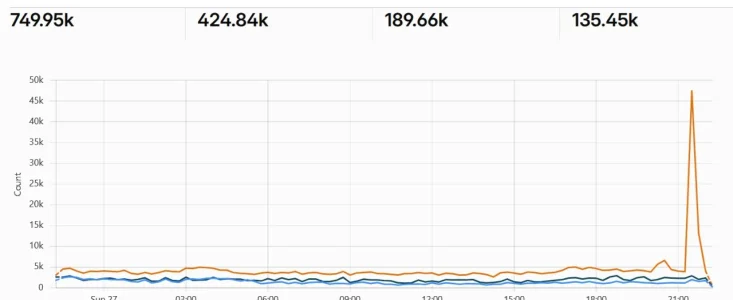
Yer, mine registered 9pm to 11pm, analysis figures a distributed proxy or botnet attack. Most of it targeted /login/keep-alive which is really just trying to bring down a server via php-fpm where other methods are blocked, BUT, if you happen to run the fake browser rule I have posted here before, none of it would have made it to your server, as analysis shows me 95%+ fell into that rule, and residential proxy rule would have picked up the straglers.
My analysis shows the primary targets were uncached php, which I guess is another attempt to cripple the server with search blocked.
Code:
# echo "=== fingerprint on cookieless keep-alive ==="
jq -r 'select(.request_uri=="/login/keep-alive" and .cookie_present=="0") | "sec_ch_ua=\(if .http_sec_ch_ua=="" then "EMPTY" else "present" end) accept_lang=\(if .http_accept_language=="" then "EMPTY" else "present" end) origin=\(if .http_origin=="" then "EMPTY" else "present" end)"' /root/spike-window.json | sort | uniq -c | sort -rn | head

echo "=== do the same IPs drive the other endpoints? ==="
jq -r 'select(.cookie_present=="0") | .request_uri' /root/spike-window.json | sort | uniq -c | sort -rn | head -8
=== fingerprint on cookieless keep-alive ===
  59745 sec_ch_ua=EMPTY accept_lang=present origin=present
   6833 sec_ch_ua=EMPTY accept_lang=present origin=EMPTY
    725 sec_ch_ua=present accept_lang=present origin=present
     16 sec_ch_ua=present accept_lang=EMPTY origin=EMPTY
      6 sec_ch_ua=EMPTY accept_lang=EMPTY origin=present
      2 sec_ch_ua=present accept_lang=EMPTY origin=present
=== do the same IPs drive the other endpoints? ===
  67327 /login/keep-alive
  10072 /webmanifest.php
   9211 /index.php?sw/cache.json
   2159 /job.php
     17 /
     11 /.well-known/passkey-endpoints
      8 /threads/witnessing-suicide.104665/reply?quote=1971186
      8 /threads/our-cats.93614/post-1861241
My analysis shows the primary targets were uncached php, which I guess is another attempt to cripple the server with search blocked.
I did employ the fake browser ruleYer, mine registered 9pm to 11pm, analysis figures a distributed proxy or botnet attack. Most of it targeted /login/keep-alive which is really just trying to bring down a server via php-fpm where other methods are blocked, BUT, if you happen to run the fake browser rule I have posted here before, none of it would have made it to your server, as analysis shows me 95%+ fell into that rule, and residential proxy rule would have picked up the straglers.
Code:# echo "=== fingerprint on cookieless keep-alive ===" jq -r 'select(.request_uri=="/login/keep-alive" and .cookie_present=="0") | "sec_ch_ua=\(if .http_sec_ch_ua=="" then "EMPTY" else "present" end) accept_lang=\(if .http_accept_language=="" then "EMPTY" else "present" end) origin=\(if .http_origin=="" then "EMPTY" else "present" end)"' /root/spike-window.json | sort | uniq -c | sort -rn | head echo "=== do the same IPs drive the other endpoints? ===" jq -r 'select(.cookie_present=="0") | .request_uri' /root/spike-window.json | sort | uniq -c | sort -rn | head -8 === fingerprint on cookieless keep-alive === 59745 sec_ch_ua=EMPTY accept_lang=present origin=present 6833 sec_ch_ua=EMPTY accept_lang=present origin=EMPTY 725 sec_ch_ua=present accept_lang=present origin=present 16 sec_ch_ua=present accept_lang=EMPTY origin=EMPTY 6 sec_ch_ua=EMPTY accept_lang=EMPTY origin=present 2 sec_ch_ua=present accept_lang=EMPTY origin=present === do the same IPs drive the other endpoints? === 67327 /login/keep-alive 10072 /webmanifest.php 9211 /index.php?sw/cache.json 2159 /job.php 17 / 11 /.well-known/passkey-endpoints 8 /threads/witnessing-suicide.104665/reply?quote=1971186 8 /threads/our-cats.93614/post-1861241
My analysis shows the primary targets were uncached php, which I guess is another attempt to cripple the server with search blocked.
 Been running for a day or so.
I just found Precursor in one of my two free CF accounts, the lower traffic one unfortunately.
What kind of rules are we using there? We are allowed three.
Unfortunately
What kind of rules are we using there? We are allowed three.
Unfortunately
cf.client.bot is not available--if we want to exclude bots, we need to do so via category. I'm not using Precursor for now, as traffic is normal, but I'm thinking of the future when our bot swarms get bad again.I just set the one rule for the main uri path that was being attacked. It has made no difference whatsoever. As far as I understand, it's not really that effective on the free plan. It needs the enterprise plan to make any real difference. With the enterprise plan you can set bot scores, and you then create a custom rule, that works with the precursor rule - the custom rule has a bot score so can actually block things below a certain score. I may have got that wrong, but all it seems to be doing is challenging and monitoring - so no real difference to a normal challenge rule. It throws challenge pages at anything suspicious but they are already being challenged anyway with the custom rules, and so the bots that can solve challenges just keep solving them.I just found Precursor in one of my two free CF accounts, the lower traffic one unfortunately.
What kind of rules are we using there? We are allowed three.
Unfortunatelycf.client.botis not available--if we want to exclude bots, we need to do so via category. I'm not using Precursor for now, as traffic is normal, but I'm thinking of the future when our bot swarms get bad again.
I took a different approach to cf.client.bot and have stopped using it, because it contains over 700 verified allowed bots (https://radar.cloudflare.com/bots/directory), most of which are just noise. Instead, I now use as my first rule:
Set to SKIP all other custom rules and bot protections.
Then my second rule is: (cf.client.bot) set to BLOCK
Then I have browser impersonators followed by search protection.
That allows all the relevant English bots access, along with AI user answers and major social media link embedding services. Everything else, blocked. Keeps that hungy META and AHREFS crap off the site, neither provide actual traffic.
Code:
cf.client.bot and (
    lower(http.user_agent) contains "googlebot"
    or lower(http.user_agent) contains "bingbot"
    or lower(http.user_agent) contains "applebot"
    or lower(http.user_agent) contains "duckduckbot"
    or lower(http.user_agent) contains "bravebot"

    or lower(http.user_agent) contains "oai-searchbot"
    or lower(http.user_agent) contains "claude-searchbot"
    or lower(http.user_agent) contains "perplexitybot"

    or lower(http.user_agent) contains "chatgpt-user"
    or lower(http.user_agent) contains "claude-user"
    or lower(http.user_agent) contains "perplexity-user"
    or lower(http.user_agent) contains "google-agent"

    or lower(http.user_agent) contains "facebookexternalhit"
    or lower(http.user_agent) contains "linkedinbot"
    or lower(http.user_agent) contains "twitterbot"
    or lower(http.user_agent) contains "telegrambot"
    or lower(http.user_agent) contains "discordbot"
    or lower(http.user_agent) contains "slackbot"
    or lower(http.user_agent) contains "bingpreview"
    or lower(http.user_agent) contains "microsoftpreview"
    or lower(http.user_agent) contains "googleimageproxy"
)
Set to SKIP all other custom rules and bot protections.
Then my second rule is: (cf.client.bot) set to BLOCK
Then I have browser impersonators followed by search protection.
That allows all the relevant English bots access, along with AI user answers and major social media link embedding services. Everything else, blocked. Keeps that hungy META and AHREFS crap off the site, neither provide actual traffic.
I have the meta ones blocked separately. I can see the point there. Rather than allow all cf.client.bot and then block the ones you don't want (which is what I've done so far).
I did similar to Levina recently, combined two of my uri path challenge rules into one (I only had them separate so I could monitor them) and it has seemed to work better for some reason. Although might just be a coincidence and the bot numbers generally lower at the moment.
So just using 3 of my 5 rules now.
1) A block rule - combining blocked countries, blocked ASN's blocked meta and blocked Fake Robots.
2) A challenge rule for different paths (whats-new, search, members, misc/cookies, threads, posts, ams). I left the referer in there in the end because it made no difference at all taking it out because the percentage that can solve challenges still get through. So the good thing there is genuine guests don't get challenged at all (or it would be rare for one to get challenged).
3) My final rule is to catch all the ones that don't go to the 6 paths challenged, and it also catches the ones with a fake referer. That is a country challenge for all countries except UK, Canada, USA and Europe. Not many of them get that far but it works quite well. When the bot numbers go high I just take the whitelisted countries out for a while or just leave the Uk whitelisted until they go down again and then put my original whitelist back. So for short periods during high bot attacks, everyone would get a challenge just about, except regular members - but rarely. It does mean that guests from most countries outside UK, US, Canada and Europe will always be challenged, but that's ok as I really don't have members from those countries, or very rarely.
Currently only 145 bots in the guest list and about 30 of those are known robots. However the bot numbers hitting cloudflare are half what they usually are right now, so it'll go up again no doubt.
I did similar to Levina recently, combined two of my uri path challenge rules into one (I only had them separate so I could monitor them) and it has seemed to work better for some reason. Although might just be a coincidence and the bot numbers generally lower at the moment.
So just using 3 of my 5 rules now.
1) A block rule - combining blocked countries, blocked ASN's blocked meta and blocked Fake Robots.
2) A challenge rule for different paths (whats-new, search, members, misc/cookies, threads, posts, ams). I left the referer in there in the end because it made no difference at all taking it out because the percentage that can solve challenges still get through. So the good thing there is genuine guests don't get challenged at all (or it would be rare for one to get challenged).
3) My final rule is to catch all the ones that don't go to the 6 paths challenged, and it also catches the ones with a fake referer. That is a country challenge for all countries except UK, Canada, USA and Europe. Not many of them get that far but it works quite well. When the bot numbers go high I just take the whitelisted countries out for a while or just leave the Uk whitelisted until they go down again and then put my original whitelist back. So for short periods during high bot attacks, everyone would get a challenge just about, except regular members - but rarely. It does mean that guests from most countries outside UK, US, Canada and Europe will always be challenged, but that's ok as I really don't have members from those countries, or very rarely.
Currently only 145 bots in the guest list and about 30 of those are known robots. However the bot numbers hitting cloudflare are half what they usually are right now, so it'll go up again no doubt.
Last edited:
Just to add - I said it's not doing anything but it might be helping a bit. I think whatever rules you set it will throw challenge pages so it's just deciding which areas to challenge maybe. The monitoring is presumably helping Cloudflare establish which are some bad bots.I just found Precursor in one of my two free CF accounts, the lower traffic one unfortunately.
What kind of rules are we using there? We are allowed three.
Unfortunatelycf.client.botis not available--if we want to exclude bots, we need to do so via category. I'm not using Precursor for now, as traffic is normal, but I'm thinking of the future when our bot swarms get bad again.
This is the rule I have set. Just did the whats-new path for now to see if it made much difference as that's the main path my bots are hitting. You can actually add Verified bot category but I think you have to name the ones you want to verify. But as it is only dealing with recognising fake bots by tracing if they're using real mouse clicks or not (or something like that). I haven't bothered. I just excluded cookie xf_user.
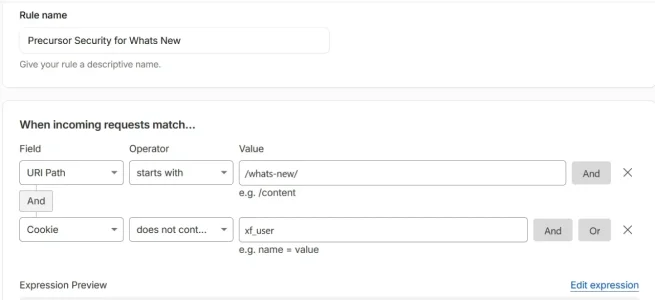
This is the expression
(starts_with(http.request.uri.path, "/whats-new/") and not http.cookie contains "xf_user")
I set it to maximum challenge. But unless it has a corresponding custom rule with a bot score level, I think it just monitors and throws challenge pages rather than stop any.
This is what comes up if you select Verified bot category - I haven't tried it myself.
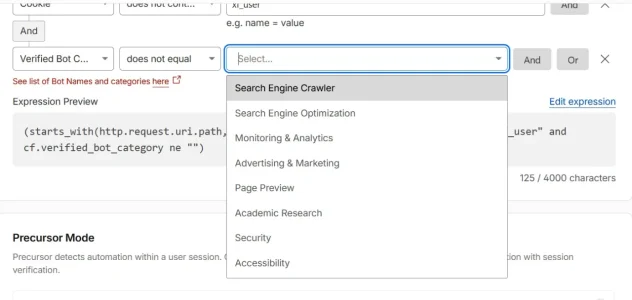
I'm not sure why three rules would help because the only options are maximise or minimise challenge. So you could do all that in two rules maybe. Unless wanting to select different parameters for one pathway eg.
It might be there for your other forums - I found it under - Domain name - Security - Settings - scroll down to precursor, toggle it on, click on the link where it says 0 rules set and it takes you to the page to set a rule.
I have minimize set for Precursor (for the whole site) and maximise set for the rule
"Precursor Rules (optional)
Precursor runs across your zone by default. Precursor Rules do not enable or disable Precursor — they determine which mode applies to each request.
For example:
- Run Minimize Friction across your site, but run Maximize Security to enforce a valid session on /checkout.
- Run Maximize Security on all pages, except your homepage"
Precursor and Challenges serve different roles:
- Challenges provide point-in-time verification
- Precursor provides continuous, session-level verification
Precursor does not replace Challenges. Instead, it strengthens them by:
- determining when additional Challenges should be required
- re-evaluating visitors after they have already passed a Challenge
- identifying automation that emerges over time"

Precursor
Client-side, session-based verification that continuously evaluates visitor behavior to identify automation.
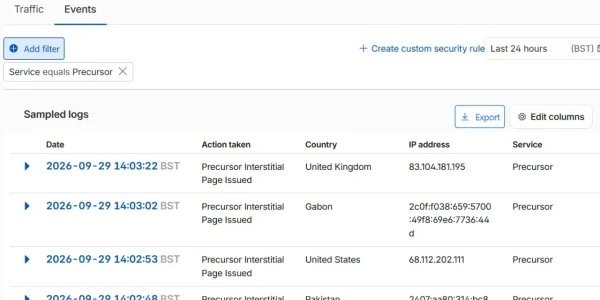
This is what shows up in Analytics - Events - Service - Precursor. a list of IP's it has thrown an interstitial challenge at. However what's good about it is it shows all the individual IP's on the right side - which may (or may not) be helpful. I gave up checking them! But the last 500 on that list were all residential proxies.
Last edited:
That is similar to my own bot whitelist.Instead, I now use as my first rule:
Set to SKIP all other custom rules and bot protections.
 It's nice to allow just the bots we want and get rid of the rest.
 Two abusive searchbots over the past 15 years were Baidu and Yandex, and I've had those blocked in a few places since that time.
Clearly, at some point whitelisting is simpler and more effective than blacklisting. However: With your selection of search engines you foster monopolies. There are quite a bunch of smaller legitimate search engines around whose bots visit regularly. With your ruleset you lock them out which not only stops you from being found through those but also makes it harder for them to compete successfully with Google/Bing/Apple. Not sure if this is really desirable.That is similar to my own bot whitelist.
Two abusive searchbots over the past 15 years were Baidu and Yandex, and I've had those blocked in a few places since that time.

Wow.
We installed anubis on top of fail2ban, have it set to a wimpy difficulty, and mostly stock.
Our guest count went from average 5k to average 500.
Just fantastic.
I also have a prototype of the backend layer that runs on a separate thread instead of inline. it does batch operations so it's super fast and also spares proxycheck.io lookups. For ****s and giggles i plan to link it in and see how poor man's cloudflare works out.
We installed anubis on top of fail2ban, have it set to a wimpy difficulty, and mostly stock.
Our guest count went from average 5k to average 500.
Just fantastic.
I also have a prototype of the backend layer that runs on a separate thread instead of inline. it does batch operations so it's super fast and also spares proxycheck.io lookups. For ****s and giggles i plan to link it in and see how poor man's cloudflare works out.
When @BrettC tested it on my test forum... it did an amazing job. Its not perfect, like all these solutions, but its pretty bloody good.Wow.
We installed anubis on top of fail2ban, have it set to a wimpy difficulty, and mostly stock.
Our guest count went from average 5k to average 500.
Just fantastic.
I also have a prototype of the backend layer that runs on a separate thread instead of inline. it does batch operations so it's super fast and also spares proxycheck.io lookups. For ****s and giggles i plan to link it in and see how poor man's cloudflare works out.

Anubis, when configured correctly, does a proper pimp-slap to the majority of fake clients. Just have to be mindful of the challenge level/difficulty. It's quite customizable and can be set to auto-bypass clients with a xf cookie active too.Wow.
We installed anubis on top of fail2ban, have it set to a wimpy difficulty, and mostly stock.
Our guest count went from average 5k to average 500.
Just fantastic.
I also have a prototype of the backend layer that runs on a separate thread instead of inline. it does batch operations so it's super fast and also spares proxycheck.io lookups. For ****s and giggles i plan to link it in and see how poor man's cloudflare works out.
Make sure you have the honeypot feature active, hook it up to Prometheus and chart it with grafana. Sit back and enjoy the ai scraper poisoning.

That may be my next move, once we change hosts. For now I want to test anubis on a smaller server so I can give it a test run.We installed anubis on top of fail2ban, have it set to a wimpy difficulty, and mostly stock.
Our guest count went from average 5k to average 500.
Just fantastic.
I'm liking this idea.Make sure you have the honeypot feature active, hook it up to Prometheus and chart it with grafana. Sit back and enjoy the ai scraper poisoning.

Similar threads
- Replies
- 6
- Views
- 189


- Replies
- 8
- Views
- 222

