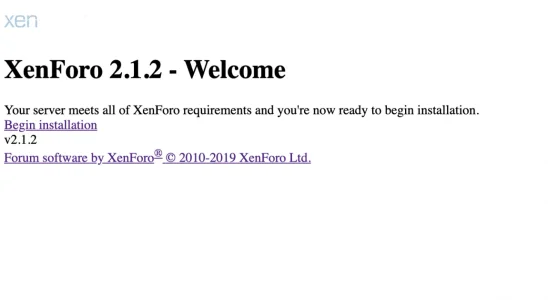
FedericoS Active member Licensed customer Oct 6, 2019 #1 Hello I am trying to install XenForo in a brand new server, but when I enter to install page, it looks like this: I have tried to remove and re-upload the files, but I have the same results. Thanks for reading
Hello I am trying to install XenForo in a brand new server, but when I enter to install page, it looks like this: I have tried to remove and re-upload the files, but I have the same results. Thanks for reading
J jeb35 Well-known member Licensed customer Oct 6, 2019 #2 Have you tired clicking on begin installation? Upvote 0 Downvote
FedericoS Active member Licensed customer Oct 6, 2019 #3 Yes, but when XenForo completes his installation, I can't do anything in the ACP because the dropdown buttons and add-on settings does not work Upvote 0 Downvote
Yes, but when XenForo completes his installation, I can't do anything in the ACP because the dropdown buttons and add-on settings does not work
J jeb35 Well-known member Licensed customer Oct 6, 2019 #4 Have you tried downloading 2.1.4? Since its the latest version. Upvote 0 Downvote
FedericoS Active member Licensed customer Oct 6, 2019 #5 I didn't renew my XenForo license at the moment. I'll do it soon Upvote 0 Downvote
P Paul B XenForo moderator Staff member Licensed customer Oct 6, 2019 #6 That indicates an underlying server issue. If you are using cloudflare, varnish, or any other type of caching, try disabling it. Upvote 0 Downvote
That indicates an underlying server issue. If you are using cloudflare, varnish, or any other type of caching, try disabling it.
FedericoS Active member Licensed customer Oct 6, 2019 #7 I just tried to clear my CloudFlare cache, but I have the same issue. I also tried to host a clean XenForo website in localhost and it works well Upvote 0 Downvote
I just tried to clear my CloudFlare cache, but I have the same issue. I also tried to host a clean XenForo website in localhost and it works well
Max Taxable Well-known member Licensed customer Oct 6, 2019 #8 FedericoGB25 said: I just tried to clear my CloudFlare cache, Click to expand... Pretty sure he means disable cloudflare while doing the install. Not just clear its cache. Upvote 0 Downvote
FedericoGB25 said: I just tried to clear my CloudFlare cache, Click to expand... Pretty sure he means disable cloudflare while doing the install. Not just clear its cache.
Max Taxable Well-known member Licensed customer Oct 6, 2019 #10 FedericoGB25 said: Yes, but when XenForo completes his installation, I can't do anything in the ACP because the dropdown buttons and add-on settings does not work Click to expand... The install is complete? Try ACP from a different browser. Upvote 0 Downvote
FedericoGB25 said: Yes, but when XenForo completes his installation, I can't do anything in the ACP because the dropdown buttons and add-on settings does not work Click to expand... The install is complete? Try ACP from a different browser.
FedericoS Active member Licensed customer Oct 6, 2019 #11 Manster54 said: The install is complete? Try ACP from a different browser. Click to expand... Same issue, I also tried to clear my main browser cache. Upvote 0 Downvote
Manster54 said: The install is complete? Try ACP from a different browser. Click to expand... Same issue, I also tried to clear my main browser cache.
P Paul B XenForo moderator Staff member Licensed customer Oct 6, 2019 #12 Which URL is it for? If it's the one registered against the license, I get a 536 error for it, which is invalid SSL cert. Ultimately the issue is something server side so you will be better off working with your host to resolve it. Upvote 0 Downvote
Which URL is it for? If it's the one registered against the license, I get a 536 error for it, which is invalid SSL cert. Ultimately the issue is something server side so you will be better off working with your host to resolve it.
FedericoS Active member Licensed customer Oct 6, 2019 #13 I am configuring it on a test Server Upvote 0 Downvote
P Paul B XenForo moderator Staff member Licensed customer Oct 7, 2019 #14 You can also try disabling mod_pagespeed if it's enabled. Without being able to inspect the page though, it's just guesswork. Upvote 0 Downvote
You can also try disabling mod_pagespeed if it's enabled. Without being able to inspect the page though, it's just guesswork.
FedericoS Active member Licensed customer Oct 9, 2019 #15 Solved reinstalling my VPS. Thanks a lot Upvote 0 Downvote