[AP] Style Suite

[AP] Style Suite [Paid] 2.16.15

No permission to buy (€15.00)
I'm having an issue similar to ones Ive reported in the past where someone must have updated their style with incorrect values and its breaking the whole website as a result.

Im having a really hard time narrowing down which user or feature it could be causing the problem. Disabling any features doesn't resolve. Only disabling the addon works. We are a very active site so when these kinds of issues pop up it gets reported quickly. But narrowing down who did what is harder.

I know there's little you can do in this case, but I have a feature suggestion that would be helpful in the case that this occurs in the future.

A general Style Suite change log would be very helpful in narrowing down which user updates are causing issues sitewide. If something like this already exists please let me know.

Edit: Was able to narrow it down to the users online within that timeframe, tagged all of them and asked if any updated their style today, one came forward and we were able to fix. The issue was an added space in the color picker for their username (they did RGB (255, 179, 198) instead of RGB(255, 179, 198)). I'm not sure if this kind of user error can be prevented by additional safeguards in the addon. I feel like a changelog would be very beneficial though!
 
Last edited:
@Empty are you running the latest version (2.16.11)? That build fixed a regression where color validation wasn't being called.
I've just tested and RGB (255, 179, 198) is correctly rejected for me.

I can try add a changelog in at some point in the future
 
@Empty are you running the latest version (2.16.11)? That build fixed a regression where color validation wasn't being called.
I've just tested and RGB (255, 179, 198) is correctly rejected for me.

I can try add a changelog in at some point in the future
I thought I was but just checked and we are one version behind! Thank you. I downloaded the latest version but must've never gotten around to uploading. You're seriously the best.
 
Hello,

We are upgrading from 2.11.9 to 2.16.12 after upgrading XF to 2.3.x. We are getting this error

Error: Call to undefined method apathy\StyleSuite\Repository\UserStyleRepository::getBackgroundImageRepeatValues() in src/addons/apathy/StyleSuite/Install/Upgrade2120030.php at line 165

I could not find this method in any of the files.
 
Hello,

We are upgrading from 2.11.9 to 2.16.12 after upgrading XF to 2.3.x. We are getting this error

I could not find this method in any of the files.

Hey, i would suggest updating the addon in steps. Maybe upgrading to 2.13.9, and then 2.16.12 would succeed.
A straight upgrade to 2.16.12 from an older version like that wont work due to the scope of the changes in between those versions.
 
Similar question to the above @apathy. Running 2.13.8 and maybe time to move to 2.16.X. Any recos so as not to lose all my custom style elements?
 
@ichpen you should be able to just make the jump to 2.16.12 if youre already on a later 2.13.X build but I'll double check over the the next few days and let you know
 
Any luck trying this out?
Yes, I just got to try it today.
I'm going to have an update out tomorrow that addresses one small issue during the 2.15.0 regarding icons, so first off I'd wait until thats out. But there's some quick steps you'll need to take to work around a filename conflict.

  • Mark board as inactive as users will otherwise see errors during the process
  • Using FTP, delete the folder src/addons/apathy/StyleSuite
  • Upload the 2.16.13 src/addons/apathy/StyleSuite
  • Delete src/addons/apathy/StyleSuite/hashes.json
  • Swap back to admin panel -> click "Upgrade"
  • Upload 2.16.13 hashes.json
Alternatively you can try upgrade in steps but I honestly think the solution above is easiest/cleanest
 
Yes, I just got to try it today.
I'm going to have an update out tomorrow that addresses one small issue during the 2.15.0 regarding icons, so first off I'd wait until thats out. But there's some quick steps you'll need to take to work around a filename conflict.

  • Mark board as inactive as users will otherwise see errors during the process
  • Using FTP, delete the folder src/addons/apathy/StyleSuite
  • Upload the 2.16.13 src/addons/apathy/StyleSuite
  • Delete src/addons/apathy/StyleSuite/hashes.json
  • Swap back to admin panel -> click "Upgrade"
  • Upload 2.16.13 hashes.json
Alternatively you can try upgrade in steps but I honestly think the solution above is easiest/cleanest

Thanks, so in summary wait for new version but follow steps above instead of a straight up archive upgrade?
 
Thanks, so in summary wait for new version but follow steps above instead of a straight up archive upgrade?
Thats right, its to avoid an issue where we renamed some files to match XF2.3s naming convention, and installing the regular way means that the old files & new files are in the folders at the same time. The old ones get cleaned up at the end of the upgrade, but we cant make it that far because it gets confused about which files to read from.

So completely replacing the folder so there's no lingering old files works around this issue completely.
 
wonderful add-on! is it natively possible with the add-on to disable username styles on specific parts of the forum? i am looking for it to only be on the user profile, no where else on the forums. thanks!
 
wonderful add-on! is it natively possible with the add-on to disable username styles on specific parts of the forum? i am looking for it to only be on the user profile, no where else on the forums. thanks!

its not exactly supported, but here's a hint to get you started if you were up for experimenting.

Edit ap_ss_user_style_username.less and wrap the <xf:foreach> loop like this:

Code:
[data-template="member_view"] {
    <xf:foreach loop="$apSsUsernameStyle" key="$userId" value="$usernameStyle" if="$apSsUsernameStyle">
        .ap-ss-usernameStyle--{$userId}
        {
            <xf:if is="in_array('bold', $usernameStyle.text_style)">
                font-weight: bold;
            </xf:if>

            <xf:if is="in_array('italic', $usernameStyle.text_style)">
                font-style: italic;
            </xf:if>

            <xf:if is="in_array('underline', $usernameStyle.text_style)">
                text-decoration: underline;
            </xf:if>

            <xf:if is="in_array('strike', $usernameStyle.text_style)">
                text-decoration: line-through;
            </xf:if>

            <xf:if is="$usernameStyle.color is not empty">
                <xf:set var="$color" value="{$usernameStyle.color}" />

                <xf:if is="$usernameStyle.color_type == 0 && $color.0 is not empty">
                    color: {$color.0};
                </xf:if>

                <xf:if is="$usernameStyle.font is not empty">
                    font-family: '{$usernameStyle.font}';
                </xf:if>
            </xf:if>

            <xf:if is="$usernameStyle.glow is not empty">
                <xf:set var="$glow" value="{$usernameStyle.glow.0}" />

                <xf:if is="$usernameStyle.glow_strength == 1">
                    text-shadow: 0px 0px 8px {$glow};
                <xf:elseif is="$usernameStyle.glow_strength == 2" />
                    text-shadow: 0 0 2px {$glow}, 0 0 2px {$glow}, 0 0 4px {$glow}, 0 0 6px {$glow};
                <xf:elseif is="$usernameStyle.glow_strength == 3" />
                    text-shadow: 0 0 2px {$glow}, 0 0 4px {$glow}, 0 0 6px {$glow}, 0 0 8px {$glow}, 0 0 10px {$glow};
                <xf:elseif is="$usernameStyle.glow_strength == 4" />
                    animation: ap-ss-animatedUsernameGlow--{$userId} 1s ease-in-out infinite alternate;
                <xf:elseif is="$usernameStyle.glow_strength == 5" />
                    text-shadow: {$glow};
                </xf:if>
            </xf:if>
        }
    </xf:foreach>
}

This will restrict basic sub-style types like color, bold/italic/underline, glows to only apply on the user profile.

Other sub-style types like sparkles & inner-text animations will not be affected by this change, but you might be able to fully restrict all the sub-styles to profiles by making a similar change in these templates:

ap_ss_user_style_text.less for Inner-Text animations / color gradients
ap_ss_asset_sparkle.less for Sparkles
ap_ss_asset_font.less for Fonts

 
its not exactly supported, but here's a hint to get you started if you were up for experimenting.

Edit ap_ss_user_style_username.less and wrap the <xf:foreach> loop like this:

Code:
[data-template="member_view"] {
    <xf:foreach loop="$apSsUsernameStyle" key="$userId" value="$usernameStyle" if="$apSsUsernameStyle">
        .ap-ss-usernameStyle--{$userId}
        {
            <xf:if is="in_array('bold', $usernameStyle.text_style)">
                font-weight: bold;
            </xf:if>

            <xf:if is="in_array('italic', $usernameStyle.text_style)">
                font-style: italic;
            </xf:if>

            <xf:if is="in_array('underline', $usernameStyle.text_style)">
                text-decoration: underline;
            </xf:if>

            <xf:if is="in_array('strike', $usernameStyle.text_style)">
                text-decoration: line-through;
            </xf:if>

            <xf:if is="$usernameStyle.color is not empty">
                <xf:set var="$color" value="{$usernameStyle.color}" />

                <xf:if is="$usernameStyle.color_type == 0 && $color.0 is not empty">
                    color: {$color.0};
                </xf:if>

                <xf:if is="$usernameStyle.font is not empty">
                    font-family: '{$usernameStyle.font}';
                </xf:if>
            </xf:if>

            <xf:if is="$usernameStyle.glow is not empty">
                <xf:set var="$glow" value="{$usernameStyle.glow.0}" />

                <xf:if is="$usernameStyle.glow_strength == 1">
                    text-shadow: 0px 0px 8px {$glow};
                <xf:elseif is="$usernameStyle.glow_strength == 2" />
                    text-shadow: 0 0 2px {$glow}, 0 0 2px {$glow}, 0 0 4px {$glow}, 0 0 6px {$glow};
                <xf:elseif is="$usernameStyle.glow_strength == 3" />
                    text-shadow: 0 0 2px {$glow}, 0 0 4px {$glow}, 0 0 6px {$glow}, 0 0 8px {$glow}, 0 0 10px {$glow};
                <xf:elseif is="$usernameStyle.glow_strength == 4" />
                    animation: ap-ss-animatedUsernameGlow--{$userId} 1s ease-in-out infinite alternate;
                <xf:elseif is="$usernameStyle.glow_strength == 5" />
                    text-shadow: {$glow};
                </xf:if>
            </xf:if>
        }
    </xf:foreach>
}

This will restrict basic sub-style types like color, bold/italic/underline, glows to only apply on the user profile.

Other sub-style types like sparkles & inner-text animations will not be affected by this change, but you might be able to fully restrict all the sub-styles to profiles by making a similar change in these templates:

ap_ss_user_style_text.less for Inner-Text animations / color gradients
ap_ss_asset_sparkle.less for Sparkles
ap_ss_asset_font.less for Fonts
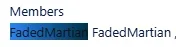
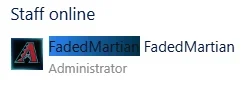
i appreciate the pointers. i have wrapped all 4 of those templates, but now that i have done, it is doing the below:

1768856841142.webp
1768856855257.webp
1768856829707.webp

any idea how to remove the remainder of the (non-linked) gradient text? so its just showing the normal username hyperlinked? thanks!
 
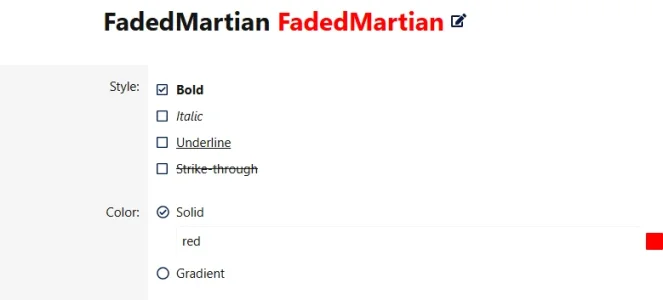
sorry, also, I noticed that while hex and HSL-type values work for colors, typing basic colors like "red" do not work... yet the color picker box to the right of the color field shows the color & in the preview of the style at the top of the style tabs does. is this as intended? is it possible to make basic colors via their words not error out?

1768860492215.webp

the error is as follows when one tries to save the color (when the color word itself is the typed value):
1768860699253.webp
 
Back
Top Bottom