
![[XenChef] Universal Translator - Automatic Post Translation](/community/data/resource_icons/10/10587.jpg?1782979096)
- Compatible XF 2.x versions
- 2.3
- Additional requirements
- DeepL API account and API key required
- License
- Commercial license
- Updates duration
- Includes 12 months of updates and support. Renewal is $20/year.
- Visible branding
- No
[XenChef] Universal Translator
Automatic post translation for multilingual XenForo communities.
Universal Translator helps your members read forum posts in their preferred language automatically. Once a member has selected their reading language, posts will be translated for them right inside the thread. No copying and pasting into another website. No browser extension. No manual translation workflow. No forcing members to leave your forum just to understand the conversation.
They open the thread, understand what people are saying, and stay involved in the conversation without leaving your forum to translate posts somewhere else. That is the whole point.
One member posts in Spanish. Another replies in French. Someone adds helpful advice in German. A Japanese member shares a detailed answer. The content may be great, but if most of the community cannot read it easily, the discussion slows down.
Universal Translator helps bring those conversations together by automatically translating forum posts into each member’s preferred reading language while leaving the original post untouched.
After their preferred reading language is set, the add-on will automatically translate visible posts in the thread. The Original / Translated view lets readers compare the translated version with the original post.
That focus keeps the add-on practical, predictable, and easier for forum owners to manage.
A separate DeepL API account and API key are required. DeepL usage is not included with the Universal Translator license.
Post text may be sent to DeepL when translation is requested or automatically performed. Machine translation is not perfect, but for many communities it is a huge improvement over forcing members to leave the forum and translate posts manually.
Automatic post translation — Members can read forum posts in their preferred language while the original post remains unchanged.
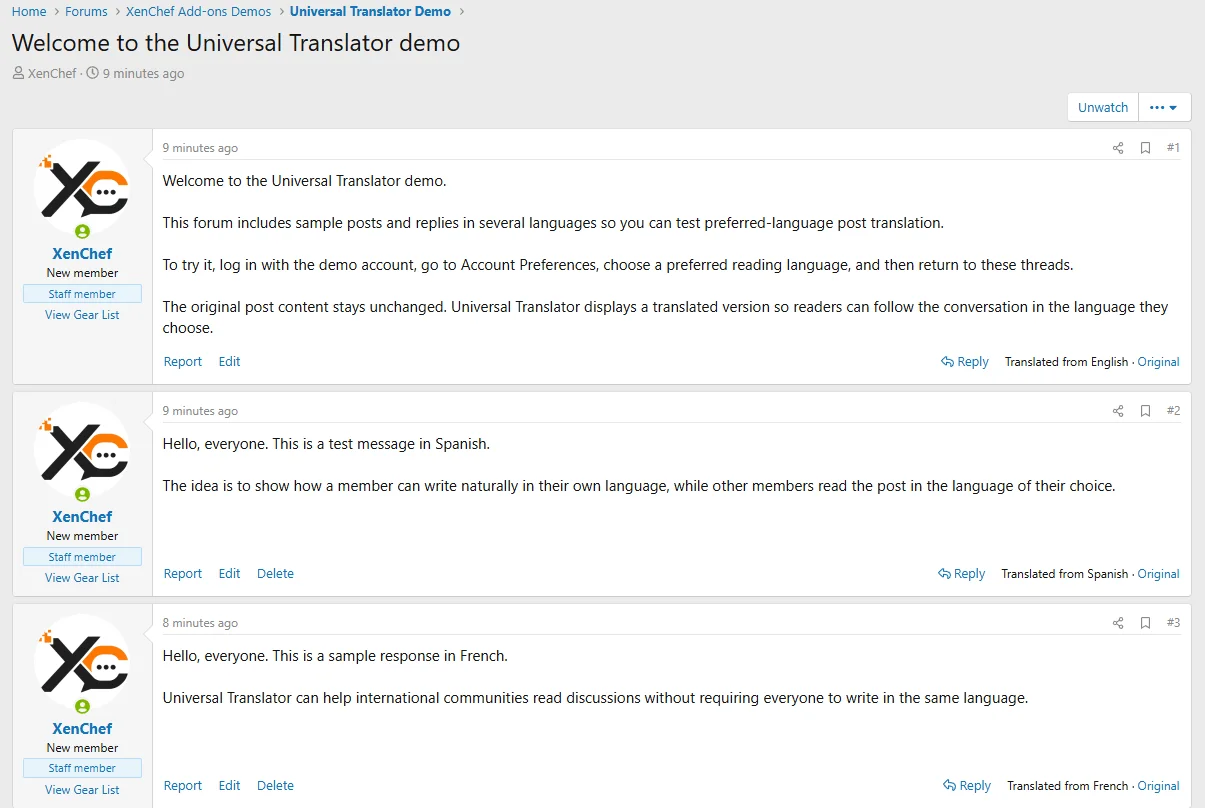
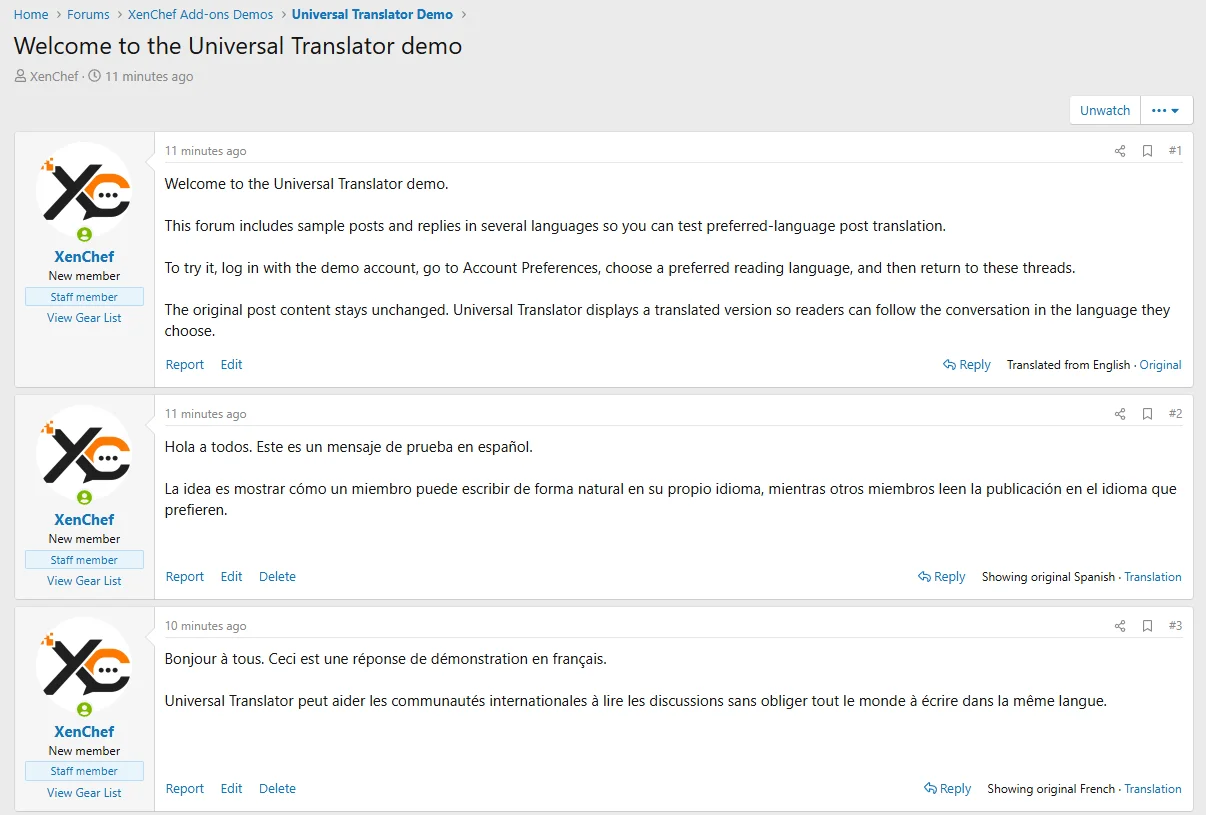
Original text is always available— Members can switch between the translated post and the original whenever they want.
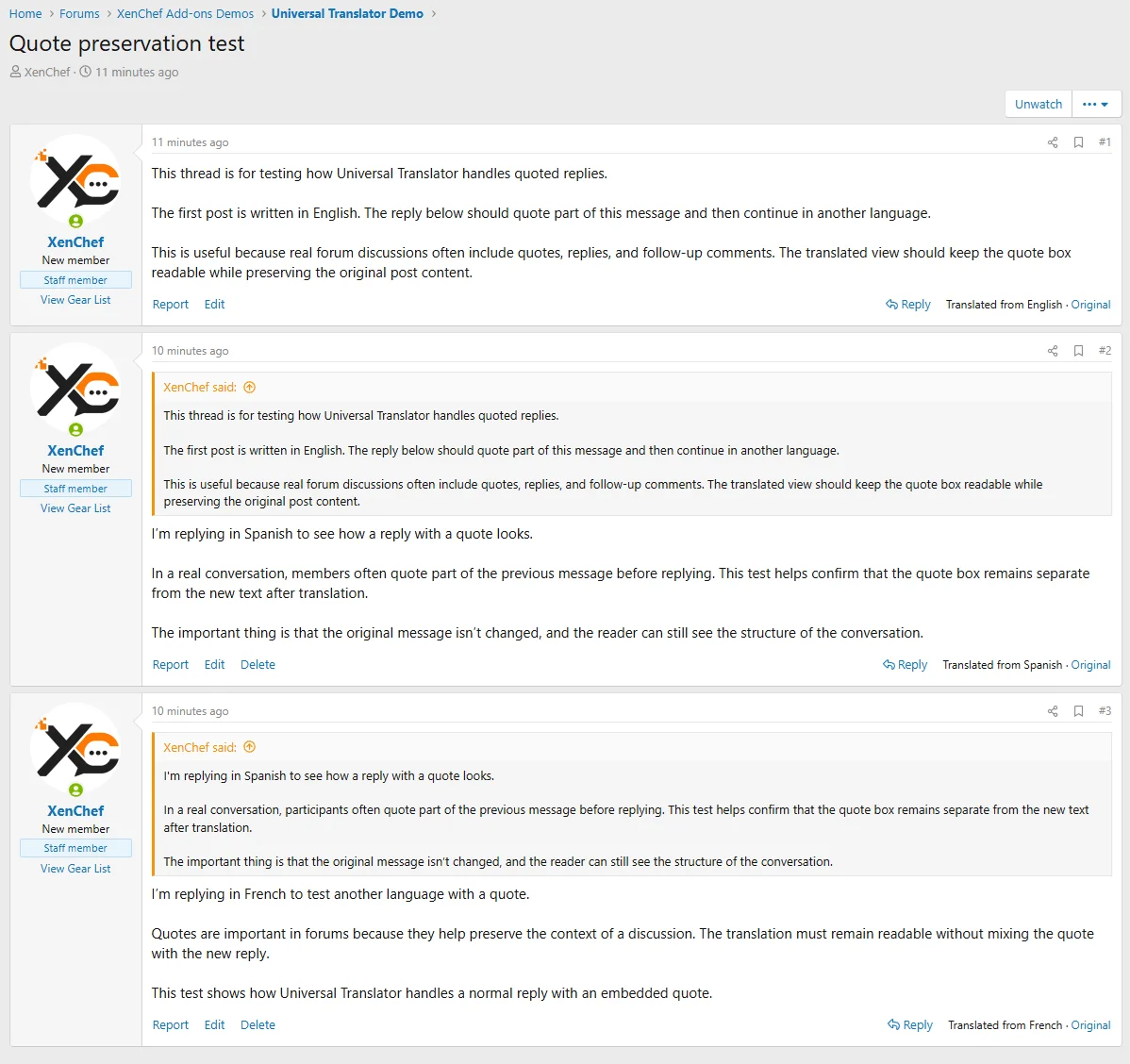
Quotes stay readable — Quoted text and replies remain separated using XenForo’s normal quote layout.
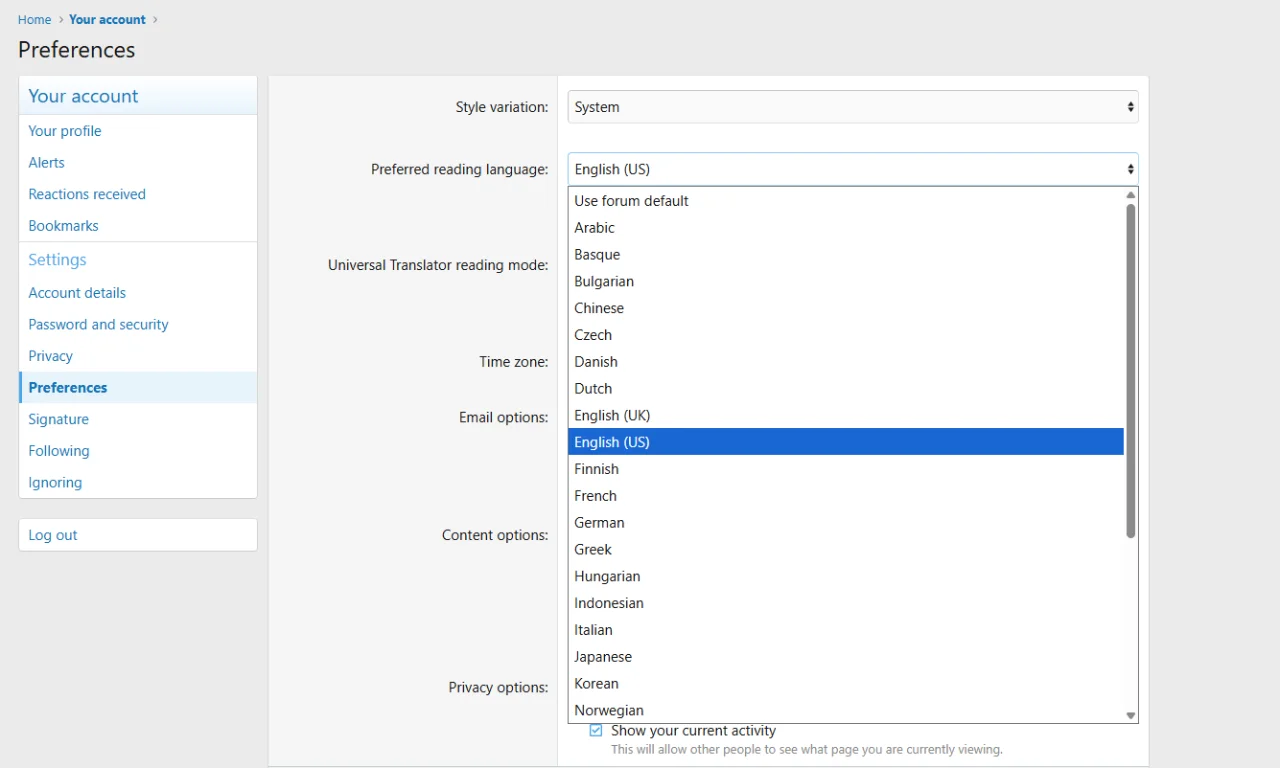
Per-user language preferences — Members choose the language they prefer to read in from their account preferences.
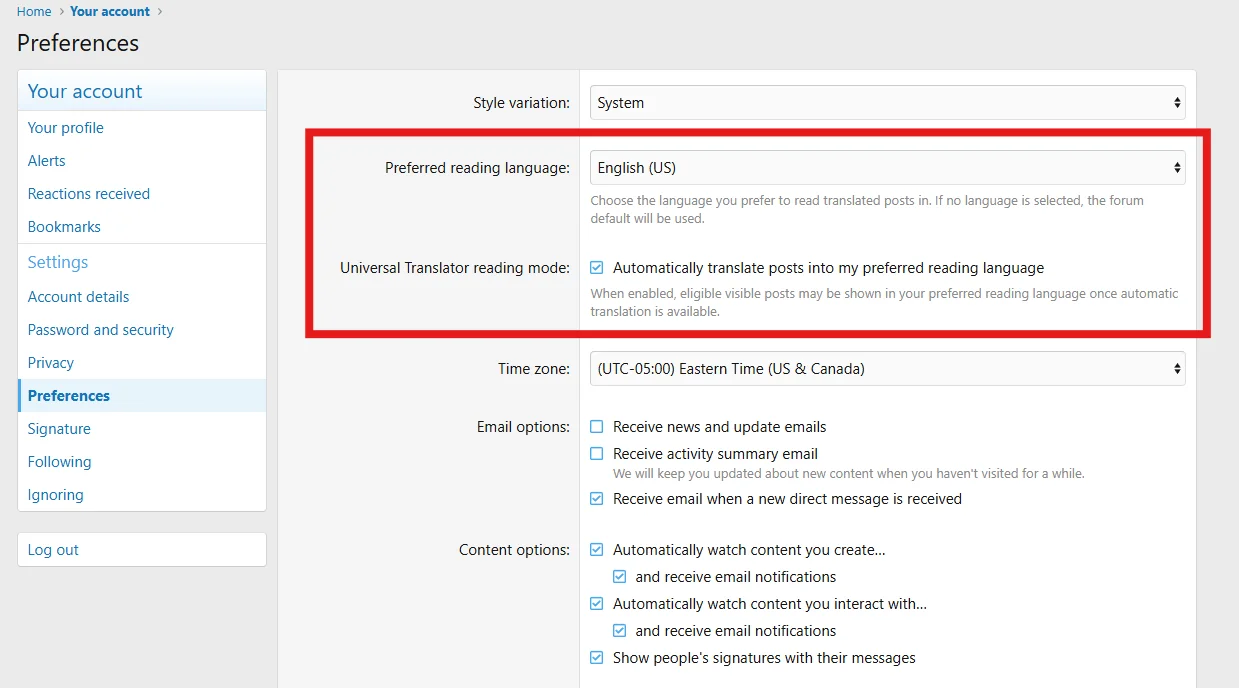
Choose from supported languages — Members can choose the language they prefer to read in, making multilingual discussions easier to follow (additional languages will be added soon).
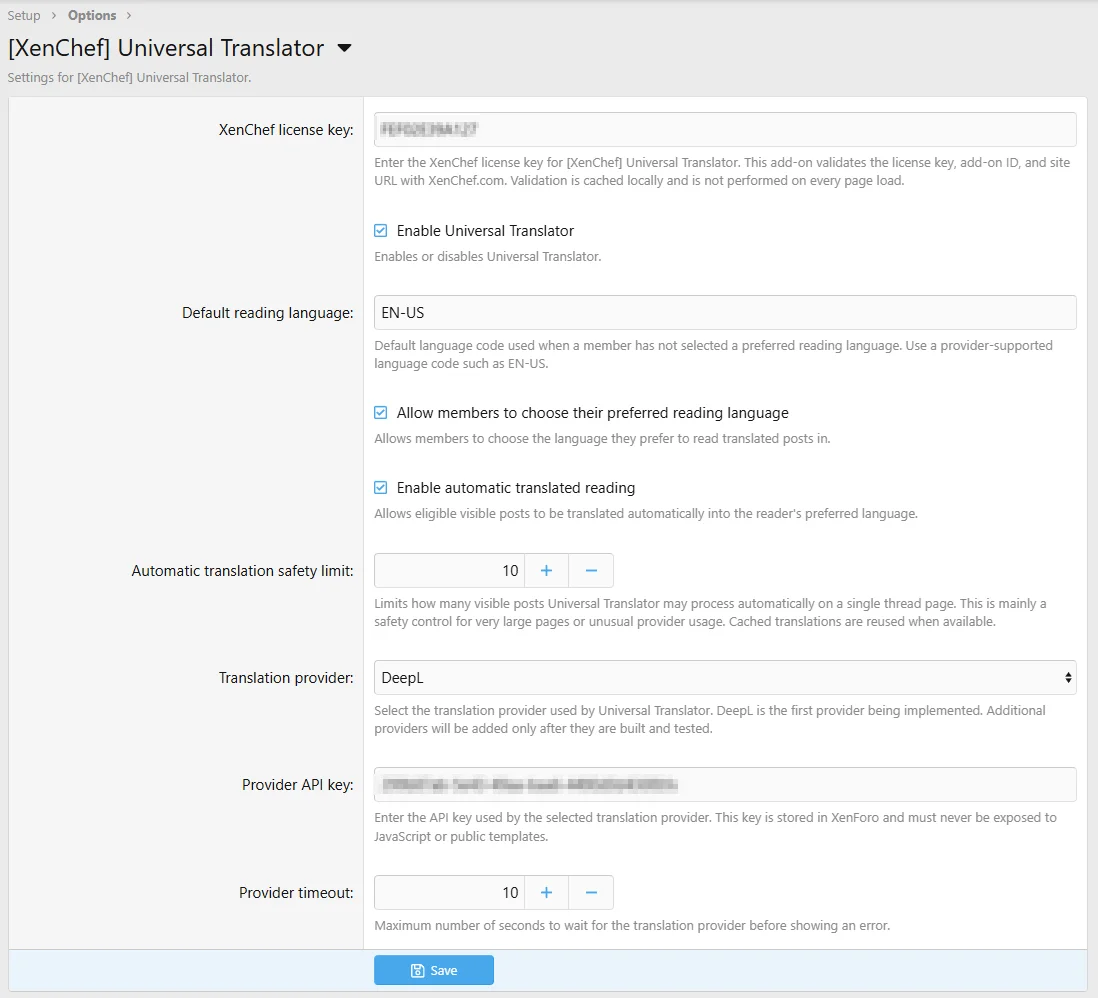
Simple admin configuration — Configure the default language, provider, automatic translation behavior, license key, and other core settings from the XenForo Admin CP.
Visit the Universal Translator demo site
View Universal Translator on XenChef.com
Automatic post translation for multilingual XenForo communities.
Universal Translator helps your members read forum posts in their preferred language automatically. Once a member has selected their reading language, posts will be translated for them right inside the thread. No copying and pasting into another website. No browser extension. No manual translation workflow. No forcing members to leave your forum just to understand the conversation.
They open the thread, understand what people are saying, and stay involved in the conversation without leaving your forum to translate posts somewhere else. That is the whole point.
Make multilingual discussions feel normal
A lot of forums already have members from different countries. The problem is that useful posts often get skipped because they are written in a language other members cannot comfortably read.One member posts in Spanish. Another replies in French. Someone adds helpful advice in German. A Japanese member shares a detailed answer. The content may be great, but if most of the community cannot read it easily, the discussion slows down.
Universal Translator helps bring those conversations together by automatically translating forum posts into each member’s preferred reading language while leaving the original post untouched.
No extra work for members
Universal Translator is designed to stay out of the way. Members do not need to copy posts into an outside translation tool. They do not need to install anything. They do not need to push a translation button every time they read a thread.After their preferred reading language is set, the add-on will automatically translate visible posts in the thread. The Original / Translated view lets readers compare the translated version with the original post.
What it does
- Automatically translates forum posts into each member’s preferred reading language.
- Keeps the original post content unchanged.
- Works directly inside XenForo thread pages.
- Supports Original / Translated viewing.
- Preserves quote boxes, paragraph breaks, inline attachments/images, and safe inline formatting.
- Uses translation caching to reduce repeated provider usage.
- Works for view-only users who can read a thread but cannot reply, making it useful for demo areas, read-only groups, restricted communities, and support-view areas.
Good fit for
- International forums.
- Product support communities with customers in different countries.
- Photography, music, travel, gaming, software, and hobby forums.
- Communities with members who speak several languages.
- Forums that want multilingual participation without splitting discussions into separate language sections.
- Support forums where helpful answers may come from users around the world.
Why this matters
The more people can understand a discussion, the more likely they are to participate. Universal Translator can help make your forum feel more welcoming to members who do not all speak the same language. It can also help older threads become more useful because valuable replies are easier for more people to read. Instead of treating language as a wall, Universal Translator makes it part of the normal forum experience.What it does not translate
Universal Translator focuses on forum post content. It does not translate the XenForo interface, menus, buttons, forum names, account pages, Resource Manager pages, private conversations, admin pages, or other site/interface text.That focus keeps the add-on practical, predictable, and easier for forum owners to manage.
DeepL powered
Version 1.0.x uses DeepL. Other translation engines will be added soon.A separate DeepL API account and API key are required. DeepL usage is not included with the Universal Translator license.
Post text may be sent to DeepL when translation is requested or automatically performed. Machine translation is not perfect, but for many communities it is a huge improvement over forcing members to leave the forum and translate posts manually.
Automatic post translation — Members can read forum posts in their preferred language while the original post remains unchanged.
Original text is always available— Members can switch between the translated post and the original whenever they want.
Quotes stay readable — Quoted text and replies remain separated using XenForo’s normal quote layout.
Per-user language preferences — Members choose the language they prefer to read in from their account preferences.
Choose from supported languages — Members can choose the language they prefer to read in, making multilingual discussions easier to follow (additional languages will be added soon).
Simple admin configuration — Configure the default language, provider, automatic translation behavior, license key, and other core settings from the XenForo Admin CP.
License validation
Universal Translator uses XenChef.com license validation. License checks may send the license key, add-on ID, and site URL/domain to XenChef Add-ons. This is used to validate the license and help protect legitimate customers.No visible branding
Universal Translator does not add public-facing XenChef branding to your forum.Try the demo
A demo site is available so you can see how Universal Translator behaves inside real XenForo threads before purchasing.Visit the Universal Translator demo site
Purchase and documentation
Purchase, documentation, support information, changelog, roadmap, FAQ, and terms are available on XenChef.com.View Universal Translator on XenChef.com
![[XenChef] Post Translator](/community/data/resource_icons/10/10570.jpg?1782246463)
![[XenChef] Gear Locker: Member Gear Lists](/community/data/resource_icons/10/10558.jpg?1782119803)
![[XenChef] Reader Controls](/community/data/resource_icons/10/10553.jpg?1782114041)
![[XenChef] ACP Editor Resizer](/community/data/resource_icons/10/10561.jpg?1782098847)
![[XenChef] XFRM Download Button Styler](/community/data/resource_icons/10/10511.jpg?1782095218)