
![[XenChef] Post Translator](/community/data/resource_icons/10/10570.jpg?1782246463)
- Compatible XF 2.x versions
- 2.3
- Additional requirements
- XenForo 2.3.x
DeepL API account/API key
Outbound HTTPS access from your server to DeepL
Outbound HTTPS access from your server to XenChef.com for license validation
- License
- Commercial license
- Updates duration
- 12 months
- Visible branding
- No
[XenChef] Post Translator adds on-demand post translation to XenForo, letting members translate forum posts without changing the rest of the page or turning the forum into a full-site translation system.
The add-on is intentionally focused. It translates post content and quoted post content only, so members can better understand conversations while the forum itself stays familiar and unchanged.
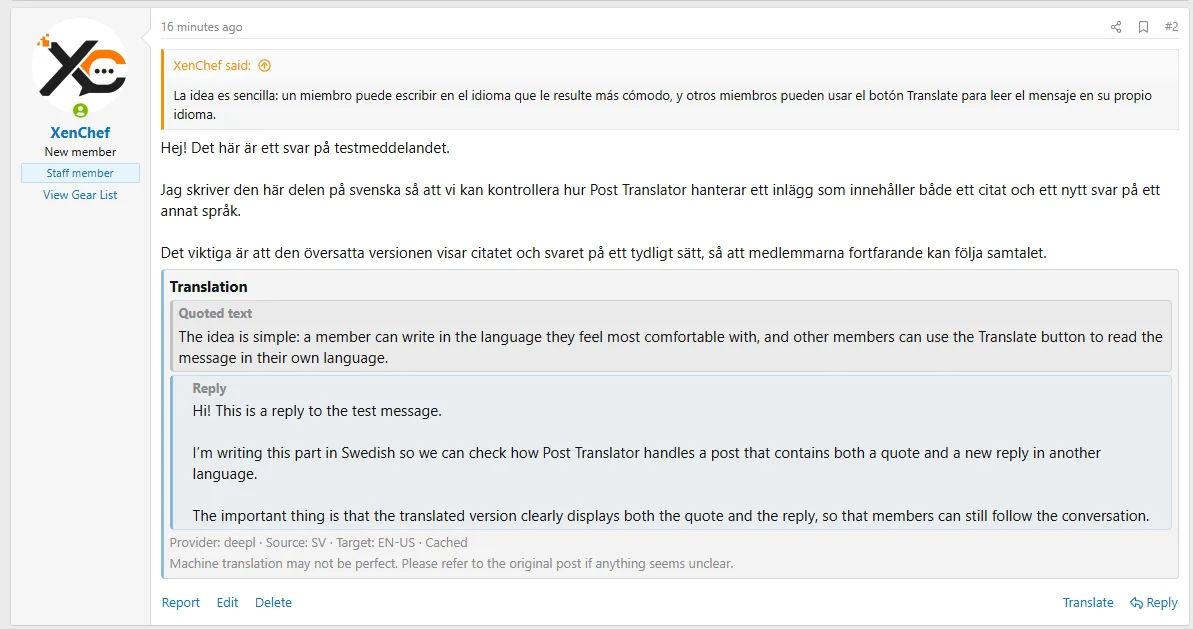
Translated quoted content and translated reply content are shown separately, making it easier to tell what was originally quoted and what was newly written. This is especially useful in longer discussions where context matters.
What it does
What it does not do
DeepL requirement
Version 1.0.1 supports DeepL only.
A DeepL API account and DeepL API authentication key are required. A regular DeepL Translator account or regular DeepL web translator subscription is not enough unless it includes API access.
The DeepL API key is entered only in the XenForo Admin CP option for this add-on. It is stored and used server-side. It should not be placed in templates, public JavaScript, screenshots, public posts, documentation examples, or shared messages.
External services and license validation
This add-on requires a valid XenChef license key and validates license status with XenChef.com. The validation request includes the add-on ID, license key, and site URL.
This add-on also requires a DeepL API account/API key. Post content and quoted post content selected for translation may be sent to DeepL for machine translation. The browser talks to XenForo, and XenForo makes the DeepL request server-side.
Usage controls
Post Translator includes controls to help admins manage translation usage:
Cache hits do not count against the add-on’s monthly provider character limit or per-user monthly character allowance.
Live demo
A public demo is available on the XenChef demo site so you can see Post Translator in action before purchasing: https://demo.xenchef.com/
Demo login:
License use
One license may be used on one production/live XenForo site plus one staging or development site for that same project.
Taxes and/or VAT may be added where applicable
Support
Support is available for installation, configuration, licensing, and confirmed add-on issues while the support period is active.
Support does not include custom development, custom provider integrations, custom styling, unrelated server problems, or setup of third-party DeepL accounts outside the add-on configuration itself.
Documentation and product page
Full product details, documentation, changelog, roadmap, FAQ, purchase information, and support links are available on XenChef.com:
https://xenchef.com/add-ons/post-translator.9
Translate visible forum posts on demand with a simple post-level Translate control.
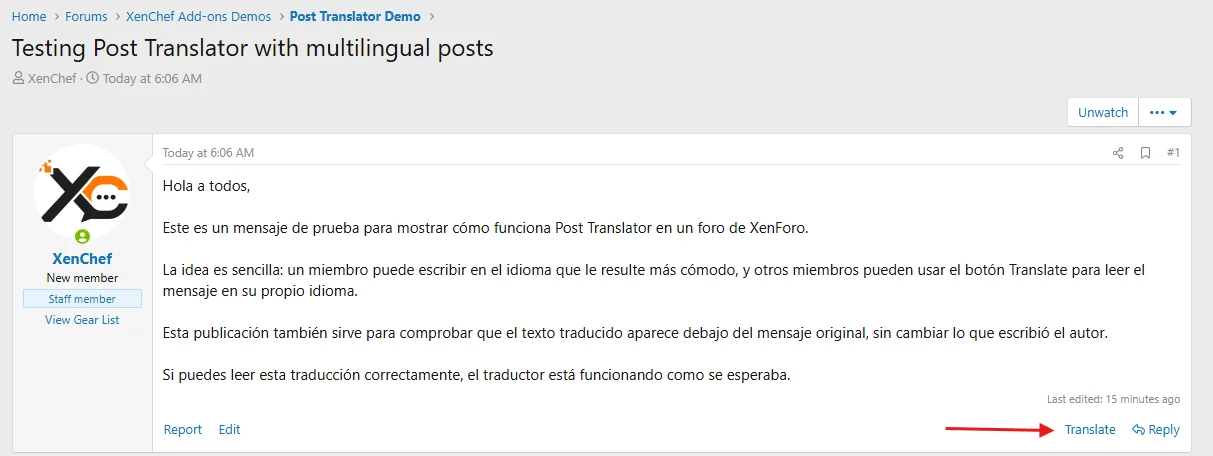
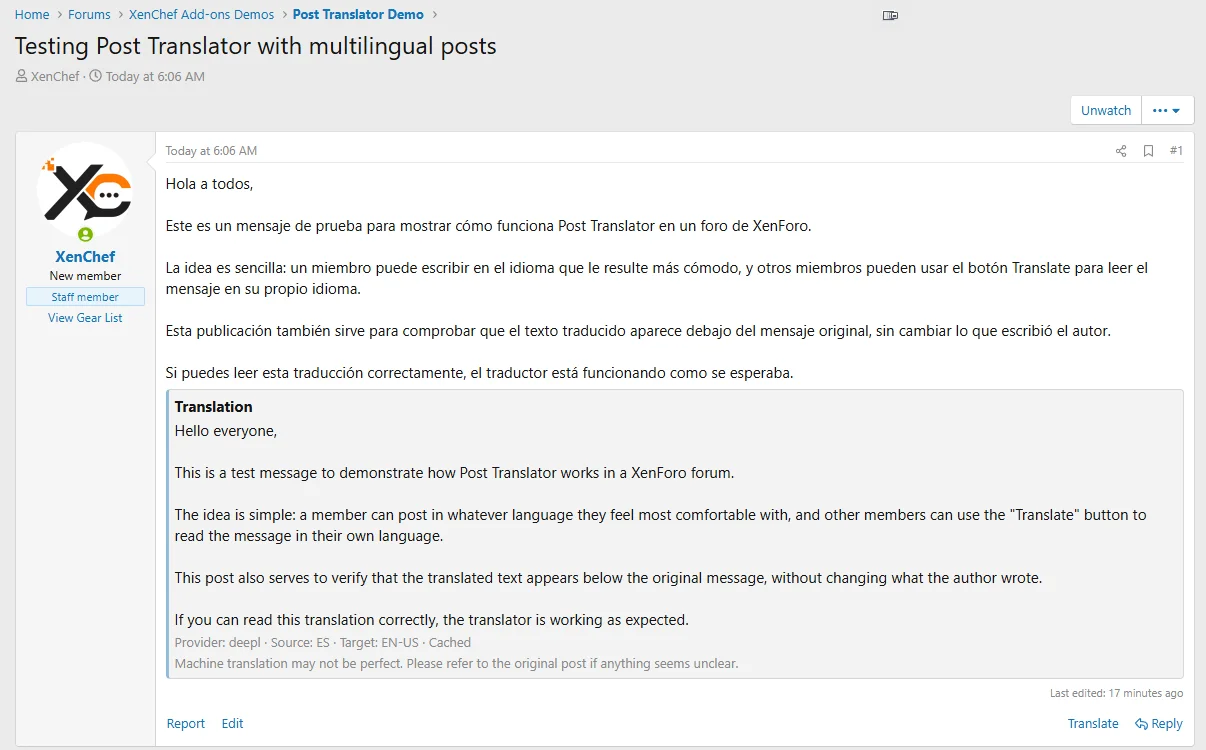
Translations appear inline below the original post without changing the author’s original message.
Quoted text and reply text are translated separately so conversations stay easier to follow.
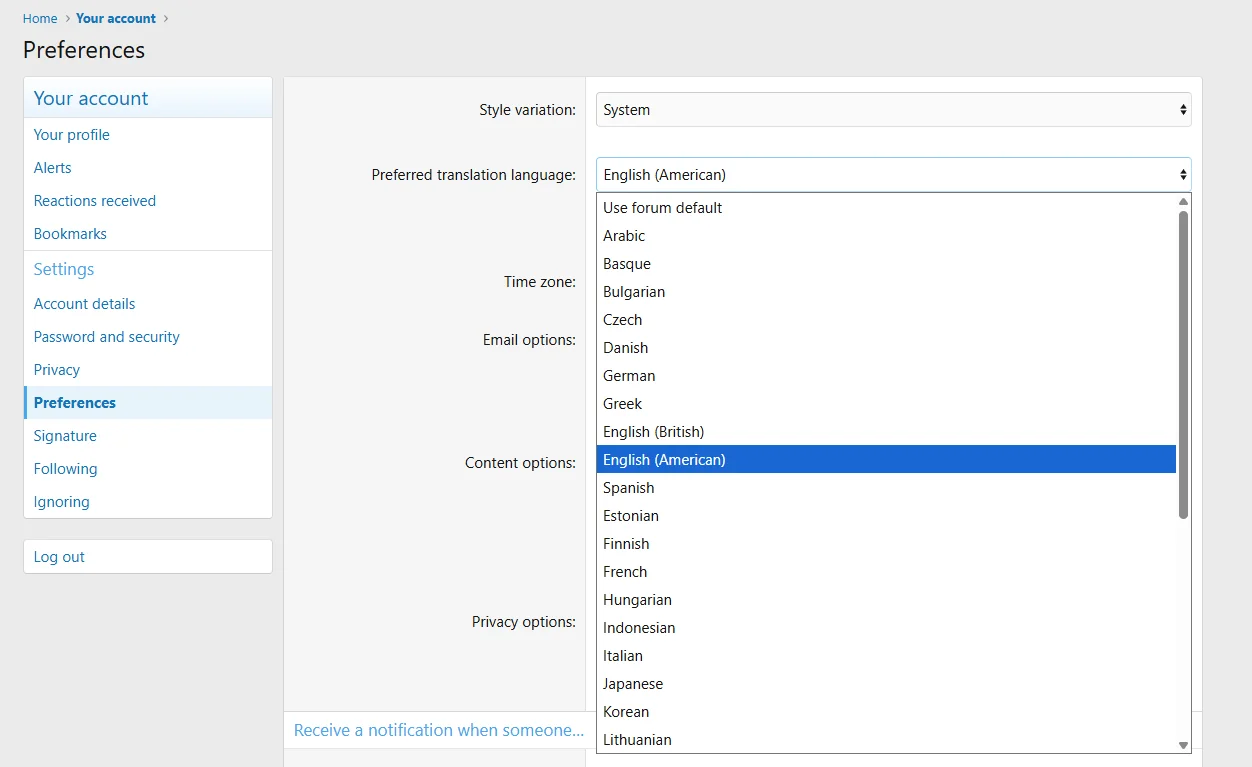
Members can choose their preferred translation language from their account preferences.
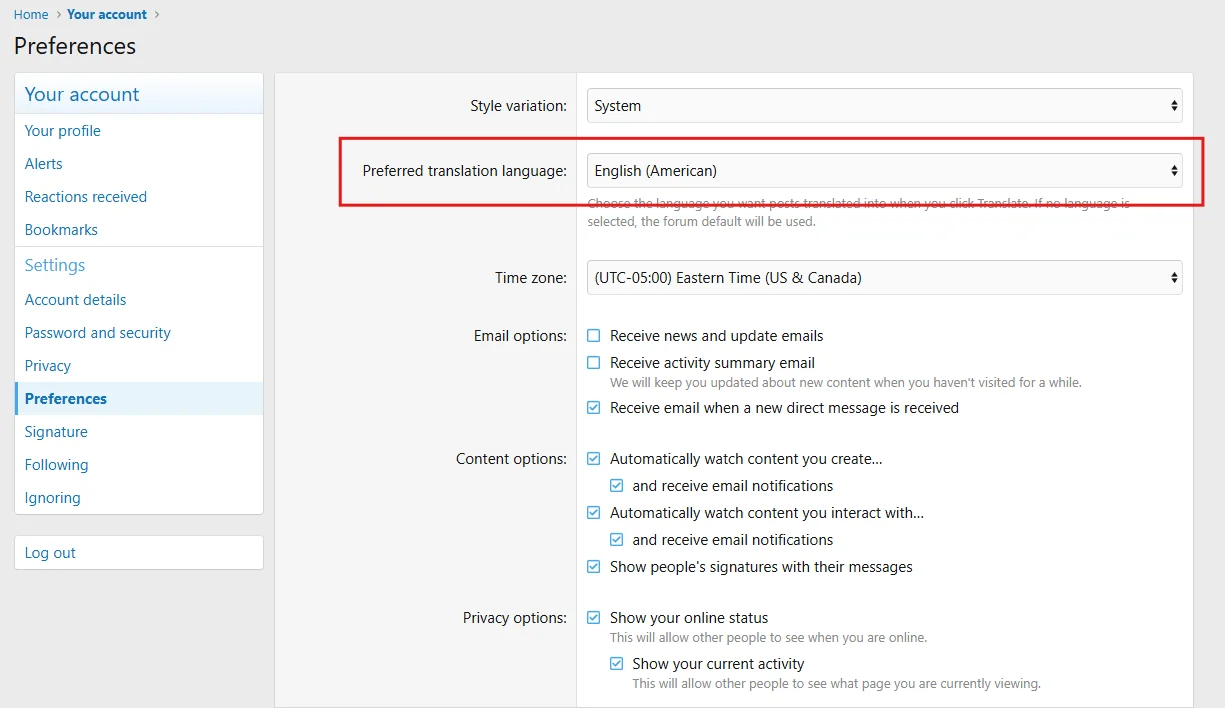
The language selector includes multiple available target languages for multilingual communities.
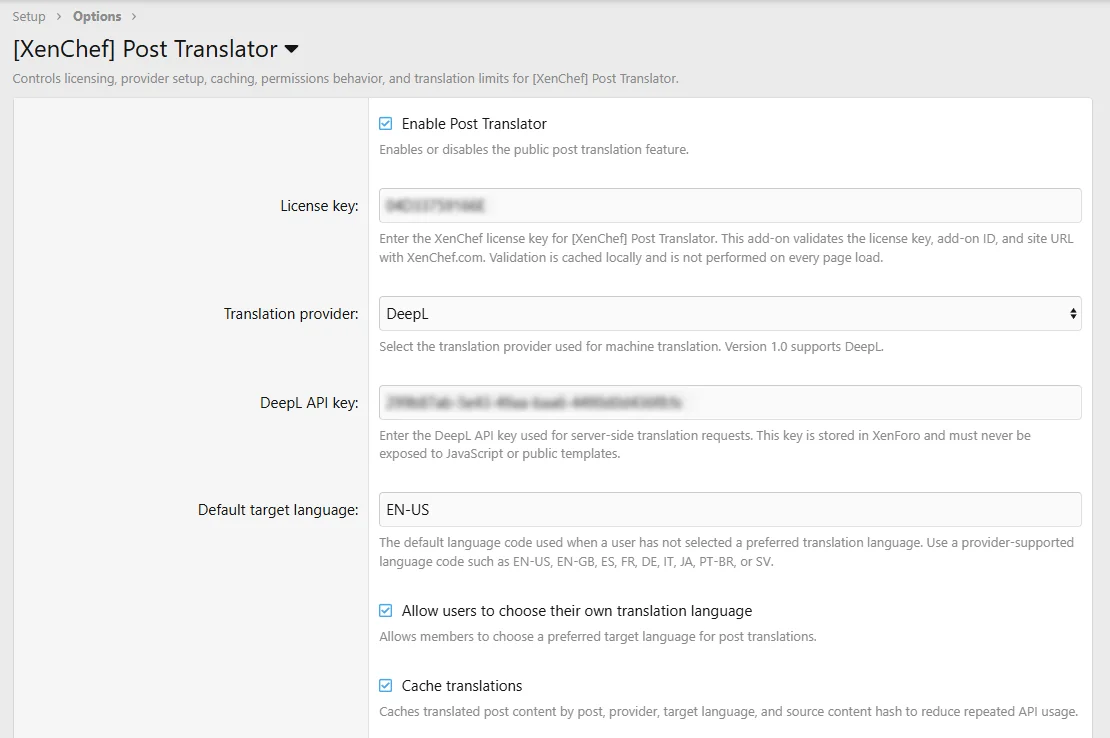
Configure the XenChef license, DeepL provider, and server-side API key from the Admin CP.
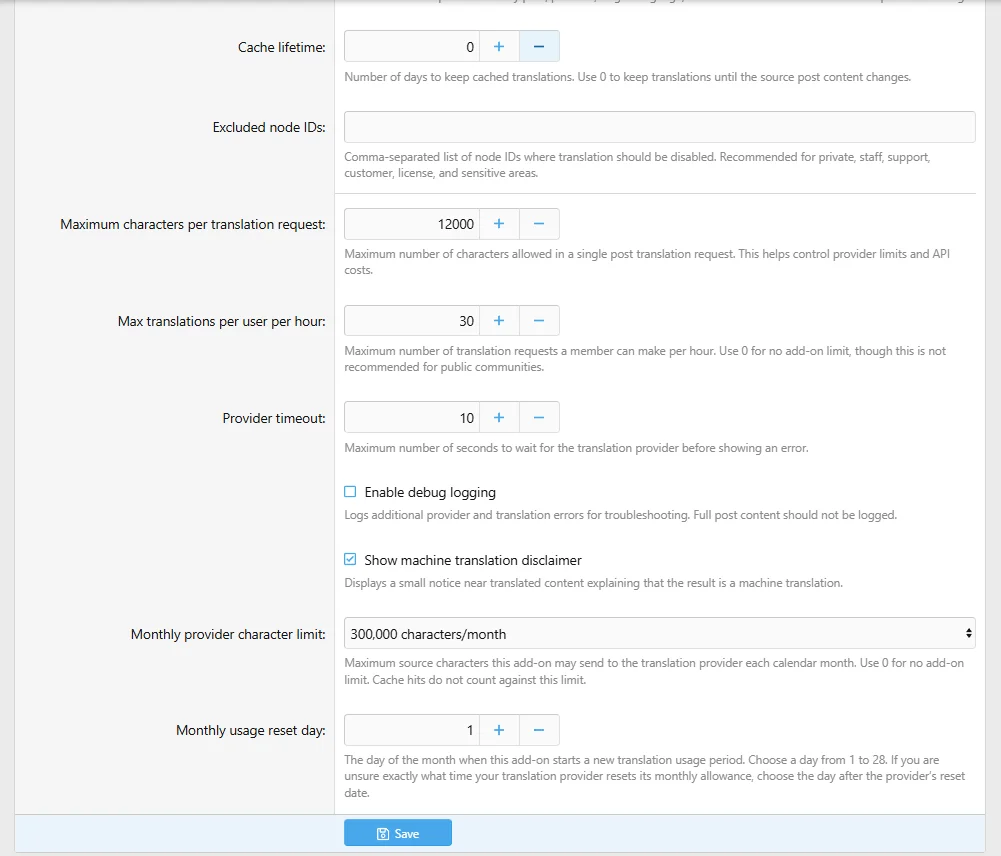
Control translation caching, usage limits, excluded forums, and machine translation notices.
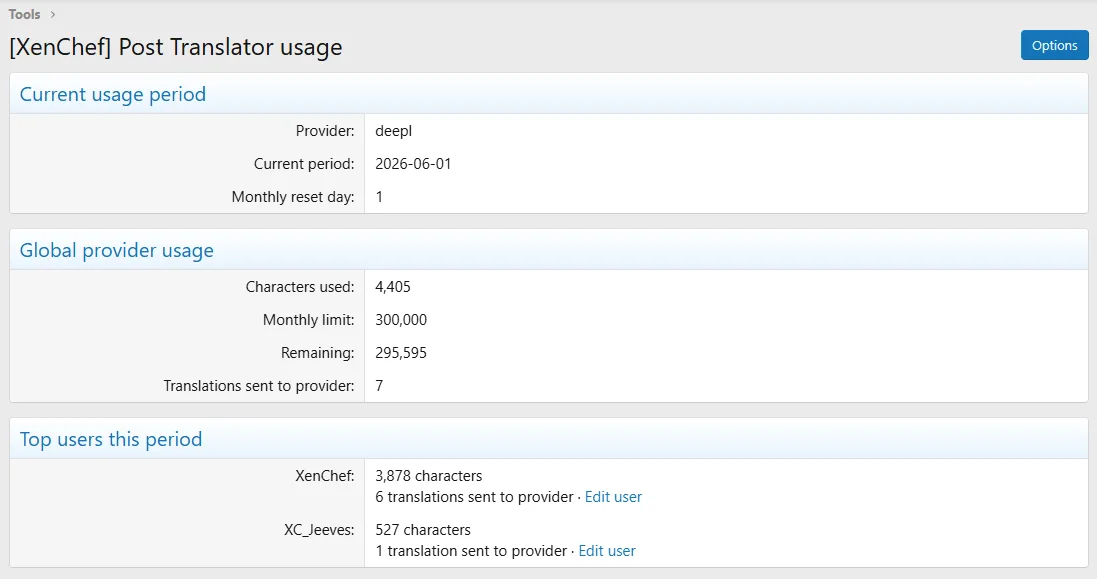
Review translation usage from the Admin CP to help monitor provider activity and limits.
The add-on is intentionally focused. It translates post content and quoted post content only, so members can better understand conversations while the forum itself stays familiar and unchanged.
Translated quoted content and translated reply content are shown separately, making it easier to tell what was originally quoted and what was newly written. This is especially useful in longer discussions where context matters.
What it does
- Adds an on-demand Translate control for XenForo posts
- Translates visible post content and quoted post content
- Shows translated quote content and translated reply content separately
- Lets users choose a preferred translation language
- Supports an optional forum default target language
- Uses DeepL through a server-side API connection
- Keeps the DeepL API key out of public JavaScript and templates
- Caches repeated translations of unchanged posts
- Includes forum-wide monthly source character limits
- Includes per-user monthly source character allowance permissions
- Includes hourly request limiting
- Includes maximum characters per translation request
- Supports excluded forum nodes
- Includes an Admin CP usage report
- Includes a machine translation disclaimer option
What it does not do
- It does not translate the entire forum interface
- It does not translate navigation, menus, or buttons
- It does not translate thread titles
- It does not translate usernames
- It does not translate signatures
- It does not translate private messages
- It does not translate admin or moderator pages
- It does not translate Resource Manager pages
- It does not replace or rewrite the original post
- It does not expose provider API keys to public JavaScript or templates
DeepL requirement
Version 1.0.1 supports DeepL only.
A DeepL API account and DeepL API authentication key are required. A regular DeepL Translator account or regular DeepL web translator subscription is not enough unless it includes API access.
The DeepL API key is entered only in the XenForo Admin CP option for this add-on. It is stored and used server-side. It should not be placed in templates, public JavaScript, screenshots, public posts, documentation examples, or shared messages.
External services and license validation
This add-on requires a valid XenChef license key and validates license status with XenChef.com. The validation request includes the add-on ID, license key, and site URL.
This add-on also requires a DeepL API account/API key. Post content and quoted post content selected for translation may be sent to DeepL for machine translation. The browser talks to XenForo, and XenForo makes the DeepL request server-side.
Usage controls
Post Translator includes controls to help admins manage translation usage:
- Translation caching
- Forum-wide monthly source character limit
- Per-user monthly source character allowance permission
- Permission to bypass per-user monthly allowance
- Hourly translation request limit
- Maximum characters per translation request
- Excluded node IDs
- Provider timeout option
- Admin usage report
Cache hits do not count against the add-on’s monthly provider character limit or per-user monthly character allowance.
Live demo
A public demo is available on the XenChef demo site so you can see Post Translator in action before purchasing: https://demo.xenchef.com/
Demo login:
- Username: Demo
- Password: demo
License use
One license may be used on one production/live XenForo site plus one staging or development site for that same project.
Taxes and/or VAT may be added where applicable
Support
Support is available for installation, configuration, licensing, and confirmed add-on issues while the support period is active.
Support does not include custom development, custom provider integrations, custom styling, unrelated server problems, or setup of third-party DeepL accounts outside the add-on configuration itself.
Documentation and product page
Full product details, documentation, changelog, roadmap, FAQ, purchase information, and support links are available on XenChef.com:
https://xenchef.com/add-ons/post-translator.9
Translate visible forum posts on demand with a simple post-level Translate control.
Translations appear inline below the original post without changing the author’s original message.
Quoted text and reply text are translated separately so conversations stay easier to follow.
Members can choose their preferred translation language from their account preferences.
The language selector includes multiple available target languages for multilingual communities.
Configure the XenChef license, DeepL provider, and server-side API key from the Admin CP.
Control translation caching, usage limits, excluded forums, and machine translation notices.
Review translation usage from the Admin CP to help monitor provider activity and limits.
![[XenChef] Universal Translator - Automatic Post Translation](/community/data/resource_icons/10/10587.jpg?1782979096)
![[XenChef] Gear Locker: Member Gear Lists](/community/data/resource_icons/10/10558.jpg?1782119803)
![[XenChef] Reader Controls](/community/data/resource_icons/10/10553.jpg?1782114041)
![[XenChef] ACP Editor Resizer](/community/data/resource_icons/10/10561.jpg?1782098847)
![[XenChef] XFRM Download Button Styler](/community/data/resource_icons/10/10511.jpg?1782095218)