- Compatible XF 2.x versions
- 2.0
- 2.1
- 2.2
- 2.3
- Additional requirements
- Need PHP version 5 or higher.
- Updates duration
- 3-6 months
- Visible branding
- No
Stop Spam Bots. Keep Signups Simple
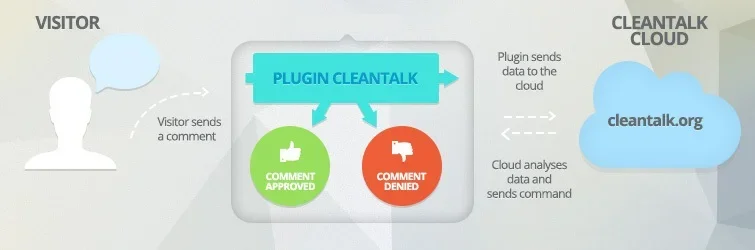
CleanTalk Anti-Spam is a cloud service and add-on that protect your XenForo forum from spam registrations, posts, and the first three private messages from each user - without CAPTCHA or puzzles. Powered by CleanTalk’s global network, it helps stop spam bots before they disrupt your community and protects more than 1 million websites.
No CAPTCHA, no questions, no counting animals, no puzzles, no math. No spambots signups, no spambots posts.
Anti-spam features:
- Stop spambots at registrations.
- Stop spambots from the posts and direct messages.
- Allow guest posting on the forum without CAPTCHA.
We have developed an anti-spam extension for XF 2 that provides maximum protection from spam. This allows you to offer your visitors a simple and convenient form for posts and registrations without the annoyance of CAPTCHA or puzzles.
We use a multi-stage spam detection test that allows us to block up to 100% of spambots.
SpamFireWall
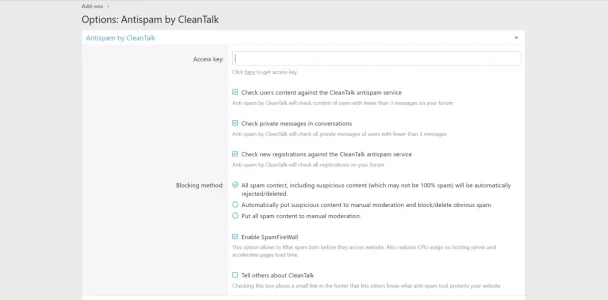
CleanTalk includes an advanced feature called SpamFireWall, which blocks the most active spambots before they even gain access to your website. It prevents the loading of pages of the website by spambots, so your web server doesn't need to perform all scripts on these pages. Also, it prevents the scanning of pages of the website by spambots. Therefore, SpamFireWall can significantly reduce the load on your web server.
SpamFireWall also makes CleanTalk a two-step protection from spambots. SpamFireWall is the first step, and it blocks the most active spambots. CleanTalk Anti-Spam is the second step, and it checks all other requests on the website at the moment before submitting comments/registering, etc.
Low false/positive rate
This extension utilizes multiple anti-spam tests to filter spambots with the lowest possible false-positive rate.
By using a multi-layered approach, the system avoids blocking real website visitors even if one specific test fails, ensuring a seamless experience for your users.
Spam attacks log
The CleanTalk service (this hook is a client application for the CleanTalk anti-spam service) records all filtered comments, registrations, and other spam attacks in the "Log of spam attacks."
The data is stored in the log for up to 45 days. By using this log, you can ensure reliable protection for your website and verify that there is no false-positive filtering.
Real-Time Email Address Existence Validation
It is crucial to ensure that users are providing real email addresses. Spambots frequently use fake or non-existent addresses, which can lead to several significant problems for website owners:
- You can never contact them by email,
- The client will never receive any notifications from you (account activation letter, password recovery, email distribution, notifications, etc.),
- If you use email marketing for your clients, then a large number of nonexistent emails in the mailing list may result in your IP address being added to various blacklists of email servers.
Blocking disposable & temporary emails
Block fake and suspicious users using disposable and temporary emails to significantly improve your email delivery rates.
Implementing this protection also prevents malicious activity, spambots, and internet trolls from engaging with your site.
Private block lists
Automatically block comments and registrations using your personal block lists for IP and email addresses.
This feature strengthens your protection against manual spam and allows you to block unwanted content from specific users. For advanced control, you can add individual IP addresses or entire IP subnets to your blacklist.
Blocking users by country
Automatically block comments and registrations from specific countries by setting a country-level ban.
This option is highly effective for enhancing security and preventing manual spam. It is particularly useful if your website is not intended for an international audience and you do not expect legitimate users or comments from outside your target regions.
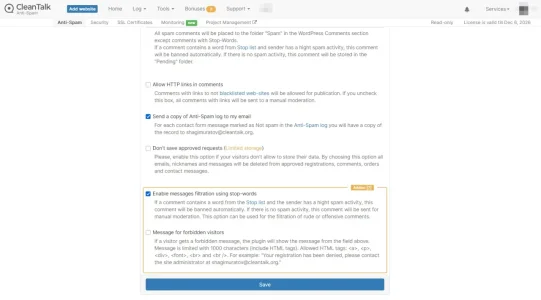
Blocking comments by "stop words"
You can block comments that contain "stop words" to enhance your spam filtering and automatically block messages containing obscene language.
You have the flexibility to add specific words or phrases tailored to your site's needs.
Reviewing the anti-spam logs directly in the XenForo Administration Dashboard
Follow this path: XenForo Administrator Panel —> Logs —> Spam trigger log to see spam activity.
Delegation option
You can create a separate CleanTalk account for your moderators and grant access to your website for them via the delegation option:
- https://cleantalk.org/help/delegation
- https://cleantalk.org/help/antispam-delegation
- https://cleantalk.org/help/monitoring-delegation
Additional features
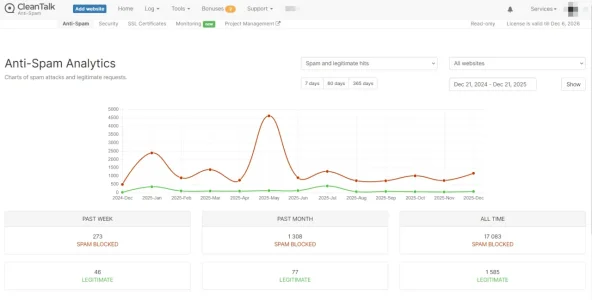
- Online, daily and weekly anti-spam reports traffic VS spam.
- Anti-spam apps for the most popular CMS on cleantalk.org.