
You are using an out of date browser. It may not display this or other websites correctly.
You should upgrade or use an alternative browser.
You should upgrade or use an alternative browser.
![[KUx] Reply Flow](/community/data/resource_icons/10/10478.jpg?1779903066)
[KUx] Reply Flow 1.1.0
No permission to buy ($39.99)
- Author Tamer
- Creation date
-
- Tags
- addon reply flow xenforo 2.3
Reply Flow 1.1.0 introduces new administration tools, improved customization options, enhanced XenForo integration, and additional maintenance capabilities.
This release adds a new Style Properties system, rebuild and maintenance tools, per-thread Reply Flow controls, Preserve Native Controls layout support, and further improvements for larger communities.
The Reply Flow overview page has also been updated with new screenshots and updated information for Reply Flow 1.1.0.
●●
Reply Flow 1.1.0
Reply Flow 1.1 introduces a new XenForo-native Style Properties system. Administrators can now customize Reply Flow directly from the XenForo style editor without manually editing templates or LESS. New Style Property sections include:
New Style Properties system
The new system follows XenForo's native inheritance, customization detection, color controls, and Revert customized value workflow.
- Mobile
- Search
- Control bar
- Icons
- Toolbar
- Pinned first post
- Motion
Reply Flow 1.1 introduces new maintenance tools for managing Reply Flow metadata. Administrators can now perform rebuild and verification operations through XenForo background jobs instead of relying on long-running administrator requests. New maintenance features include:
These improvements provide safer processing and better visibility, especially on larger communities.
- Metadata rebuilds
- Signal-based rebuild options
- Verification and repair workflows
- Rebuild progress tracking
- Persistent rebuild state
- Maintenance history
A new XenForo permission has been added: Manage the per-thread Reply Flow option
This allows administrators to control who can manage the per-thread Reply Flow setting while continuing to respect XenForo's existing permission system.
Reply Flow 1.1 adds a new thread layout mode: Preserve XenForo thread controls
This mode keeps XenForo's native thread controls and navigation while integrating Reply Flow into the existing thread structure. The existing Enhanced layout remains available for communities that prefer the full Reply Flow layout. Additional handling has been added for special thread types to prevent duplicate controls or incorrect placement.
Reply Flow 1.1 improves the interaction between search, filters, sorting, and pagination. Search and filter states are now handled more consistently during navigation and AJAX updates. Additional improvements include:
- Improved state synchronization
- More reliable search result handling
- Better compatibility with different thread layouts
Building on previous maintenance improvements, Reply Flow 1.1 further improves background processing and maintenance workflows. Heavy operations are handled through safer background processes where appropriate, reducing the risk of request timeouts on larger communities. These improvements provide a stronger foundation for future Reply Flow maintenance operations.
Reply Flow 1.1 has been tested through the 1.0.11 > 1.1.0 upgrade path. Existing customers will receive Reply Flow 1.1.0 as a free upgrade.
Reply Flow 1.1 introduces additional administration, customization, and maintenance capabilities. With the expanded feature set, the new license price for new customers is now: $39
Existing customers will continue receiving updates according to their current license.
This maintenance release fixes an issue where Reply Flow’s AJAX pagination handling could interfere with unrelated XenForo AJAX forms on long thread pages, such as creating a poll in an existing thread.
Reply Flow now limits its pagination/page-jump handling more strictly so XenForo forms can submit normally while Reply Flow pagination continues to work.

This maintenance release improves Reply Flow reliability on very large XenForo forums, especially in environments where installs, admin diagnostics, or metadata rebuilds may be affected by request timeouts or large database workloads. No public-facing Reply Flow behavior has been changed in this release.
●●
Reply Flow 1.0.10
Reply Flow’s install and upgrade process has been adjusted to avoid heavier install-time performance operations that may timeout on very large XenForo forums or XenForo Cloud / Cloudflare environments. Required Reply Flow schema and metadata setup still run normally, but optional heavy performance work is no longer performed automatically during install.
The Reply Flow Control Center has been made safer for large forums by reducing heavy live diagnostic checks during page load. Expensive global count and diagnostic operations are avoided or replaced with lighter metadata-based information where appropriate, helping the admin page load more reliably on high-volume communities.
Metadata summary rebuilds are now safer during large background rebuilds. Thread summary refreshes can update existing summary rows cleanly instead of producing duplicate-key errors when the same thread summary is encountered again during a rebuild.
This release lays the groundwork for the upcoming Reply Flow 1.1 line, which will focus further on large-forum reliability, metadata management, rebuild diagnostics, safer background processing, and performance hardening.

This update strengthens the foundation behind Reply Flow: a cleaner index structure, clearer administrator visibility, safer rebuild and cleanup workflows, and a more maintainable metadata layer for larger forums.
●●
Reply Flow 1.0.9
Reply Flow 1.0.9 introduces a cleaner internal index architecture for reply metadata. The older local index approach has been replaced with a more focused structure that separates post-level reply signals from thread-level summary data:
New tables xf_kux_reply_flow_post_signal xf_kux_reply_flow_thread_index
This is an important internal change. Reply Flow depends on metadata for filters, result counts, attachment state, media/link detection, thread starter replies, reaction-aware views, search-related behavior, and large-thread decisions. Keeping that metadata in a clearer structure makes the system easier to rebuild, easier to inspect, and easier to maintain over time. For members, the Reply Flow interface remains familiar. For administrators, the internal data layer is now more transparent and better suited for forums with larger threads and heavier long-term usage.
The previous diagnostics area has been expanded into the Reply Flow Control Center. The Control Center makes Reply Flow’s internal state easier to understand after installation, upgrade, rebuild, or cleanup. Instead of keeping index health hidden in the background, 1.0.9 gives administrators a clearer place to review the state of the system. This is especially useful after a database/index architecture update. Administrators can confirm whether the new index is ready, whether metadata has been rebuilt, and whether legacy cleanup should still be performed. The goal is simple: maintenance should be visible, controlled, and verifiable.
Reply Flow’s existing filters continue to work in the expected way, but the metadata behind them is now handled through the updated index structure. This change is mainly about consistency and reliability. Reply Flow should make server-side decisions from a clear metadata source, especially when filters, search, pagination, result counts, cache behavior, and long threads interact.
Attachment-related metadata is now maintained more carefully inside Reply Flow’s own index layer. This helps the existing Attachments filter stay accurate when attachments are added, removed, edited, or rebuilt. Reply Flow no longer has to depend only on broad post attachment counters for this part of its filtering metadata. The purpose of the Attachments filter is unchanged. What changed in 1.0.9 is the maintenance path behind it.
Reply Flow 1.0.9 includes updated CLI maintenance tools for the new index structure. After upgrading, administrators should rebuild and verify the Reply Flow index:
The rebuild command populates the new index tables. The status and size commands help confirm that the new structure is ready before any legacy cleanup is performed. For larger forums, running these commands from the command line is recommended. On very large installations, using screen or tmux is also recommended depending on the server environment.Bash:php cmd.php kux-reply-flow:rebuild-index php cmd.php kux-reply-flow:index-status php cmd.php kux-reply-flow:index-size
Reply Flow now includes a focused attachment metadata rebuild path. This is useful when attachment metadata needs to be refreshed without running a full Reply Flow index rebuild again, for example after changing the configured attachment file extension list.
This keeps maintenance more controlled for larger forums. The upgrade itself stays safe and predictable, while administrators can decide when targeted rebuild work should be performed.Bash:php cmd.php kux-reply-flow:rebuild-index --attachments-only
Reply Flow 1.0.9 includes a controlled cleanup path for older legacy index data. Legacy cleanup is intentionally not treated as a blind automatic step. The new index should be rebuilt and verified first. After that, administrators can review the cleanup using dry-run mode:
If the output looks correct and the new index is ready, cleanup can then be confirmed:Bash:php cmd.php kux-reply-flow:cleanup-legacy-index --dry-run
This workflow keeps cleanup deliberate. Older index data should only be removed after the new Reply Flow index has been confirmed as ready.Bash:php cmd.php kux-reply-flow:cleanup-legacy-index --confirm
Reply Flow’s server-side services now have a cleaner responsibility split around filter state, result metadata, index maintenance, UI state, and large-thread behavior. This helps reduce the chance of frontend state, cached state, and server-side result state drifting apart as Reply Flow continues to evolve.
Reply Flow 1.0.9 includes database and index structure changes.
After upgrading, rebuild and verify the Reply Flow index:
Bash:php cmd.php kux-reply-flow:rebuild-index php cmd.php kux-reply-flow:index-status php cmd.php kux-reply-flow:index-size
After the new index is confirmed as ready, legacy index cleanup can be reviewed and confirmed:
Bash:php cmd.php kux-reply-flow:cleanup-legacy-index --dry-run php cmd.php kux-reply-flow:cleanup-legacy-index --confirm

This maintenance release improves reply sorting consistency and refines sort wording across bundled language files while keeping the existing Reply Flow behavior stable.
●●
Reply Flow 1.0.8
Reply Flow’s Most reactions sorting has been refined for cases where sticky first post is disabled. The first post now remains as the thread opener on the first page, while the replies below it are sorted by reaction count. This makes the behavior more consistent with other reply sorting modes and keeps the original thread context easier to follow.
The wording for chronological sorting has been updated to make the behavior clearer. Oldest first and Newest first have been adjusted to better communicate that Reply Flow is sorting replies, not replacing the role of the first post as the thread opener.
The bundled language files have been reviewed and synchronized with the updated reply sorting wording. This helps keep the sorting interface more consistent across the included language packs.

This maintenance release improves SEO consistency and production package quality while keeping the existing Reply Flow behavior unchanged.
●●
Reply Flow 1.0.7
Reply Flow’s dynamic noindex handling has been refined to also include attachment-filtered reply views.
When the dynamic noindex option is enabled, attachment-based reply filters are now treated consistently with other dynamic Reply Flow views. This helps keep filtered thread views better aligned with SEO best practices while preserving the normal thread experience for visitors and search engines.
The production JavaScript asset has been rebuilt as a properly minified file. This improves package quality and ensures the distributed production asset matches the expected release structure for live XenForo installations.
Package hashes have been updated for accurate XenForo file health verification. This allows XenForo’s file health check system to correctly validate the updated Reply Flow files after installation or upgrade.
No database changes, no template changes, no breaking changes expected. Existing Reply Flow behavior remains unchanged.

Reply Flow 1.0.6 is a major quality, usability, performance, and reliability update focused on smarter filtering, attachment-aware navigation, better search behavior, mobile refinements, large-thread optimization, and cleaner internal architecture.
●●
Reply Flow 1.0.6

Reply Flow can now keep the toolbar cleaner by hiding filters that are not useful for the current thread. For example, if a thread has no media replies, no links, or no file attachments, those filters can be hidden automatically. This makes the Reply Flow toolbar feel more relevant, especially on long discussions and mobile layouts.
A new Admin CP option has been added: Smart filter visibility
Available modes:
Smart visibility is based on the thread’s overall available content, not only the current search result. This prevents filters from disappearing unexpectedly while users are searching.Code:Always show available filters Hide public filters with no thread results Hide all filters with no thread results
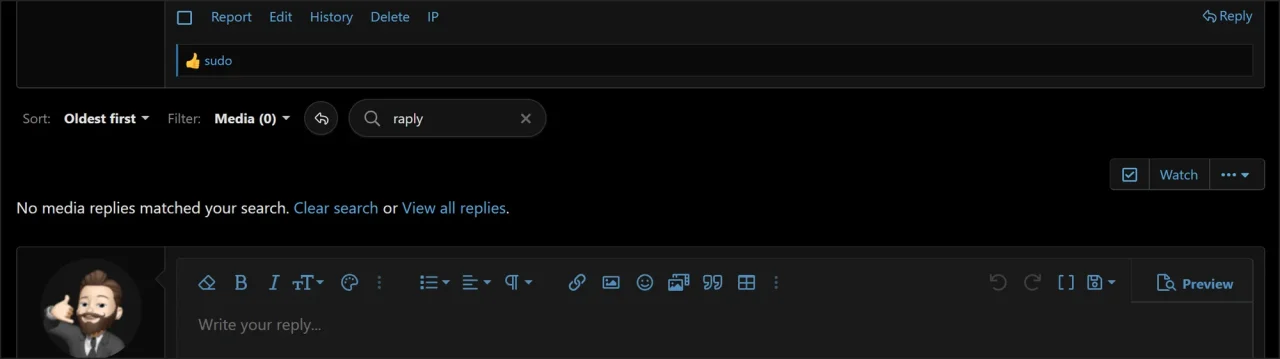
No-results states are now more useful. When a filter or search returns no matching replies, Reply Flow can provide a simple inline suggestion such as returning to all replies instead of leaving the visitor at a dead end. This creates a cleaner experience for cases such as:
The suggestion follows Reply Flow’s normal behavior and clears the current search or filter state safely.
- No media replies found.
- No attachment replies matched the current search.
- No replies matched the active filter and search combination.
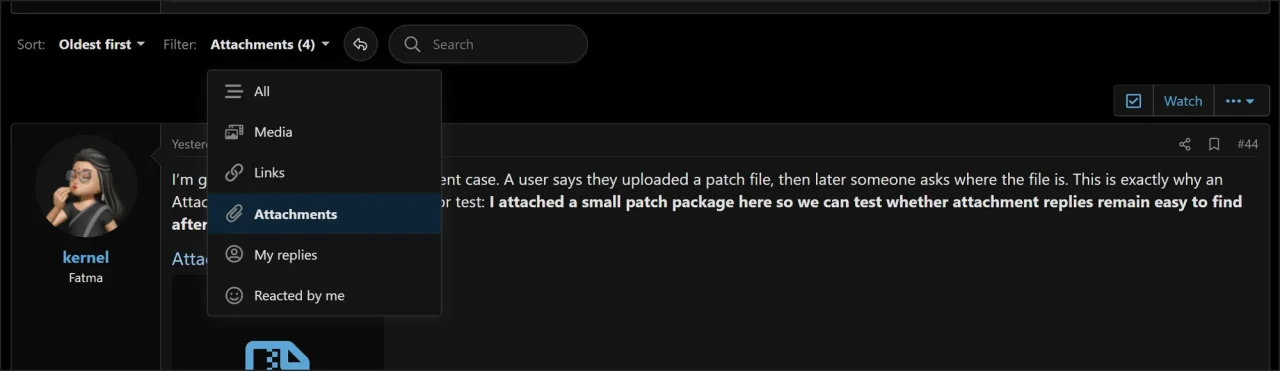
Reply Flow now includes a dedicated Attachments filter for finding replies that contain non-media file attachments. This is useful for files such as:PDF, ZIP, TXT, LOG, PATCH, DOC/DOCX, XLS/XLSX, JSON/XML, code files, archivesMedia and Attachments are intentionally treated separately.
This prevents the Attachments filter from simply duplicating the Media filter and makes file-based replies easier to find in support, development, marketplace, and bug-report discussions.Code:Media: images, videos, and media-style content Attachments: non-media file attachments such as PDF, ZIP, TXT, LOG, DOC, XLS, JSON, XML, and similar files

A new Admin CP option has been added: Attachment file extensions
Default value:pdf, zip, rar, 7z, tar, gz, txt, log, patch, diff, json, xml, csv, doc, docx, xls, xlsx, ppt, pptx, sql, php, js, css, html, py, java, cpp, c, cs, vb
The value can be customized as a comma-separated list.
Example:pdf, zip, txt, log, patch, diff, jar, apk
If attachment extension settings are changed and existing posts need to be recalculated for the Attachments filter, a targeted CLI rebuild can be used:
Bash:php cmd.php kux-reply-flow:rebuild-index --attachments-only
Reply Flow now includes improved attachment-aware metadata handling. The Attachments filter uses Reply Flow’s own index metadata instead of relying only on XenForo’s raw attachment count. This is important because XenForo’s raw attachment count can include media/image attachments, while Reply Flow separates media-style content from non-media file attachments. Diagnostics can also report indexed file attachment replies more clearly, making attachment-related behavior easier to inspect.
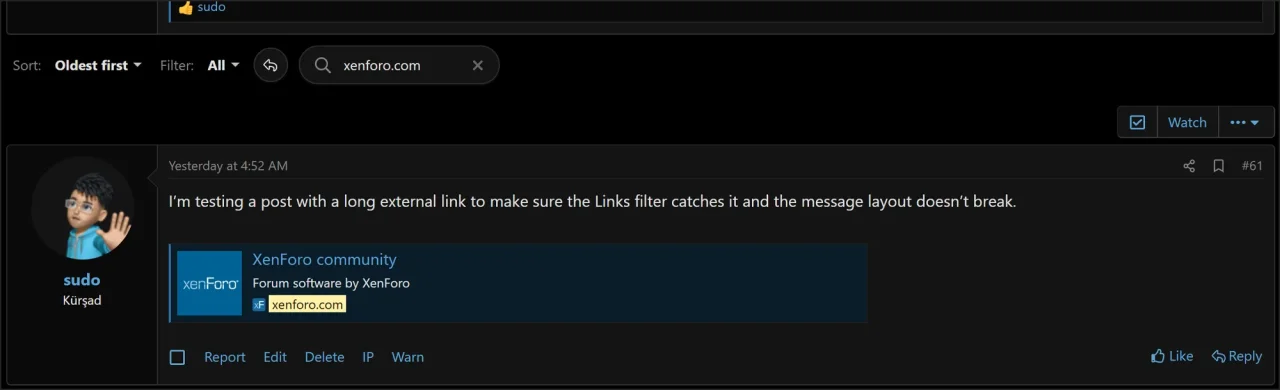
Search handling has been improved for common punctuation variations. Terms such as:reply flow, reply-flow, reply.flow, reply_flow
Can now be normalized more consistently, helping users find relevant replies even when words are written with spaces, hyphens, dots, or underscores. Search, filters, counts, and pagination have also been hardened so no-result searches remain distinct from normal thread results. This helps prevent empty searches from accidentally falling back to the full reply list.

A new Admin CP option has been added: Enable Reply Flow search shortcut
Reply Flow now supports a keyboard shortcut for focusing the Reply Flow search input.
The shortcut focuses the Reply Flow search field and can select existing text when appropriate. It is carefully guarded so it does not interfere with normal typing, editors, textareas, selects, menus, or overlays. The shortcut can also be disabled from the Admin CP.Code:Alt + S

Filter counts now behave more accurately when search is active. For example, if a thread has many replies by a member but the current search only matches a few of them, the visible count can reflect the current search context instead of the full thread count.
A new Admin CP option has also been added: Filter count mode
Available modes:
This gives administrators more control over the balance between useful counts and performance on larger threads.Code:Always show live counts Small threads only Cached counts Do not show counts

Reply Flow can now use a safer shared cache scope for user-independent result sets.
A new Admin CP option has been added: Result cache scope
Available modes:
Public-safe caching can apply to safe public filters such as All, Media, Links, Attachments, and Thread starter. It does not apply to user-specific states such as My replies, Reacted, Search, unknown filters, or unknown sorts.Code:User-scoped only Public-safe optimized
Important note:
Permission and safety context remain part of the cache logic.Code:Public-safe does not mean permission-agnostic.
Reply Flow now avoids intercepting XenForo’s native Jump to New resolver. Protected URL pattern:
/unread?new=1
This helps preserve XenForo’s expected unread navigation behavior while keeping Reply Flow AJAX pagination available for normal filter, search, and page actions.
Reply Flow 1.0.6 includes several mobile-focused layout improvements. Mobile search behavior has been refined, the remaining posts indicator behaves better on narrow screens, and compact search presentation is cleaner. These refinements help keep the Reply Flow toolbar usable on phones and tablets without making the interface feel crowded.
Reply Flow dropdown and menu panels now behave more reliably above thread content. This helps prevent cases where clicking a filter item could accidentally interact with a link, attachment, or post content underneath the menu.
User autocomplete rendering has been hardened. Usernames and labels are handled more safely, generic raw avatar HTML is not blindly injected, and XenForo avatar behavior remains supported for uploaded avatars and dynamic letter avatars. This improves safety while preserving the expected XenForo-style autocomplete experience.
Reply Flow 1.0.6 includes several improvements for large-thread behavior, filter counts, cache strategy, search fallback safety, result pagination, and index-aware filtering. The goal is to avoid expensive behavior on very large threads unless it is safe and useful, while still keeping normal and medium-sized discussions responsive and convenient.
A major part of this release is internal architecture cleanup. Reply Flow now follows a clearer separation of responsibilities:
This makes the add-on safer, easier to reason about, and easier to extend in future versions. The service layer has also been reorganized around clearer domains such as context, indexing, results, search, and UI state.Code:PHP = authority, state, strategy, permissions, and performance decisions Templates = prepared render layer JavaScript = user intent, interaction, and UI updates
The setup and upgrade structure has been cleaned up, internal development upgrade steps have been consolidated into a cleaner public upgrade path, and language files have been synchronized against the master phrase set. Language exports include phrases for Attachments, Smart Filter Visibility, No-results suggestions, diagnostics, search shortcut, filter count mode, result cache scope, AJAX pagination, and related options. The release package has also been cleaned for better file health and a more professional public build.
This release also includes improvements and fixes around:
Reply Flow 1.0.6 is recommended for all installations, especially active forums, long-thread communities, support forums, development communities, and sites using Reply Flow filtering or search heavily.
- Attachment live indexing.
- Attachment metadata updates when attachments are added or removed.
- Search, filter, count, and pagination state handling.
- No-result search behavior.
- Filter dropdown behavior.
- Mobile search placeholder behavior.
- Large-thread strategy handling.
- Diagnostics output.
- Template and LESS cleanup.
- Language phrase synchronization.
- Package/hash cleanup.


Reply Flow 1.0.5 is a maintenance and polish release focused on improved filtered pagination, cleaner frontend output, mobile usability refinements, and updated documentation for administrators.
●●
Reply Flow 1.0.5
Filtered pagination behavior has been improved to better reflect the active Reply Flow filter. Previously, filtered views could still rely too heavily on the original thread page count. This release improves that behavior so pagination is more closely aligned with the currently selected reply filter. This creates a clearer browsing experience, especially on longer threads where only a smaller number of replies match the active filter.
- Improved pagination behavior for filtered reply views.
- Better page count handling when filters are active.
- Cleaner navigation experience on filtered results.
- Reduced confusion when filtered results contain fewer replies than the original thread.
Reply Flow frontend output has been refined to keep the rendered markup cleaner and more focused. The frontend now exposes only the necessary UI and runtime data required for Reply Flow behavior. This helps reduce unnecessary output and keeps the thread page cleaner from a markup and maintenance perspective.
Related improvements include:
- Cleaner rendered Reply Flow markup.
- Reduced unnecessary frontend data exposure.
- Improved separation between backend state and frontend runtime data.
- More maintainable frontend output structure.
The mobile Reply Flow interface has been refined for a cleaner experience on smaller screens. Spacing and sizing around the search area and reply controls have been improved to make Reply Flow easier to use on mobile devices.
Related improvements include:
- Improved mobile spacing around Reply Flow controls.
- Improved sizing behavior for smaller screens.
- Cleaner search and control layout on mobile.
- Better visual consistency across responsive layouts.
Search bar behavior has been refined for a smoother and cleaner user experience. The search placeholder and compact layout behavior have been adjusted to work more consistently across desktop and mobile views.
Related improvements include:
- Improved search placeholder behavior.
- Cleaner compact search layout handling.
- Better search bar presentation on smaller screens.
- More consistent search UI behavior across devices.
The Reply Flow resource FAQ has been updated with clearer technical notes for administrators. The updated FAQ now includes more detailed information about database changes, stored data, performance considerations, and caching recommendations.
View the updated FAQ
This should make it easier for site owners to understand how Reply Flow stores its internal data, how it behaves on larger communities, and how caching setups such as Redis can be used effectively alongside XenForo.
After upgrading to Reply Flow 1.0.5, it is recommended to check the following:
- Test Reply Flow on a multi-page thread.
- Apply a few reply filters and confirm pagination updates as expected.
- Check the search bar on both desktop and mobile views.
- Review the updated FAQ for database and performance notes.
This release also includes general polish and consistency improvements across Reply Flow pagination, search behavior, frontend output, and responsive layouts. Thank you to everyone who shared feedback and helped improve Reply Flow.

This update focuses on search usability improvements, mobile experience refinements, metadata maintenance, stronger state-aware handling, and overall Reply Flow stability improvements.
●●
Reply Flow 1.0.4
Metadata consistency and maintenance handling have been improved for Reply Flow indexing operations. Reply Flow 1.0.4 introduces additional handling for orphaned metadata table states and improves internal metadata validation behavior. These changes help keep Reply Flow indexing operations cleaner and more predictable during long-term usage and maintenance scenarios.
Related improvements include:
- Improved orphan metadata handling.
- Additional metadata consistency checks.
- Cleaner metadata maintenance behavior.
Search interactions should feel cleaner, faster, and more predictable across all devices. This release improves Reply Flow search behavior and user interaction consistency. Autocomplete requests are now delayed until at least 2 characters are entered, reducing unnecessary requests while improving usability for larger communities. The “no results found” state has also been visually refined to improve spacing consistency and eliminate layout issues during empty search states.
Related improvements include:
- Autocomplete now requires a minimum of 2 characters.
- Improved search request efficiency.
- Fixed no-results spacing and padding inconsistencies.
- Cleaner empty-state rendering behavior.
Reply Flow continues to improve the browsing experience on smaller devices.
Reply Flow 1.0.4 adds additional mobile-focused interface refinements for filtering and search behavior. Active filter counts are now visible on mobile layouts, making filter states easier to understand during navigation. A new compact search mode has also been introduced for mobile devices to improve usability and reduce interface clutter in constrained layouts.
Related improvements include:
- Added mobile filter count indicators.
- Added compact mobile search mode.
- Improved responsive search interactions.
- Cleaner mobile filtering experience.
Reply Flow behavior should remain aligned with the current thread state and visibility conditions. This release improves Reply Flow handling around thread title and status-sensitive scenarios. Frontend actions now react more consistently to thread state conditions, helping prevent invalid or inconsistent interaction states.
Related improvements include:
- Improved title and status-aware handling.
- Better frontend state consistency.
- Safer interaction handling for restricted states.
Internal behavior has been further refined to improve stability and reliability across Reply Flow operations. Reply Flow 1.0.4 includes additional security hardening work, improved validation behavior, and several internal refinements focused on long-term stability and predictable frontend behavior.
Related improvements include:
- Additional security hardening improvements.
- Improved validation behavior.
- Better frontend stability.
- General performance and reliability refinements.
This release also includes general usability, validation, and frontend consistency improvements across Reply Flow search, filtering, navigation, and state-aware behavior.

This update focuses on remaining posts navigation, optional SEO control for dynamic Reply Flow URLs, improved user search and autocomplete behavior, cleaner Admin CP option organization, and more consistent permission-aware feature handling.
●●
Reply Flow 1.0.3

Long threads are easier to continue reading when members can clearly see that more replies are available. Reply Flow 1.0.3 adds remaining posts navigation support for long discussions. This helps members continue browsing additional replies without losing the current thread context. The remaining posts link follows the selected pagination behavior:
This keeps the browsing experience consistent with the forum’s configured navigation mode while making larger threads easier to move through.
- When AJAX pagination is enabled, remaining posts navigation uses the AJAX Reply Flow behavior.
- When AJAX pagination is disabled, it falls back to native XenForo navigation.
Dynamic sorting, filtering, and search URLs can now be handled more strictly when needed. Reply Flow already preserves XenForo’s canonical thread URL behavior. This means dynamic Reply Flow URLs continue to point search engines back to the base thread URL as the preferred version.
For communities that want stricter crawler handling, the existing Noindex dynamic results option now applies only to dynamic Reply Flow result URLs. When enabled, dynamic Reply Flow URLs receive:
Code:X-Robots-Tag: noindex, follow

Finding replies from a specific member should be fast, predictable, and permission-aware. This release improves username autocomplete behavior inside Reply Flow user search tools. User-focused searching is now more reliable and follows the configured Reply Flow options and XenForo permissions more consistently.
This is especially useful in long support threads, release discussions, marketplace topics, question threads, and active community conversations where replies from a specific member are important.
Reply Flow options are now easier to scan, configure, and maintain. The Admin CP options page has been reorganized into clearer sections so administrators can understand the available controls more easily. The option structure now follows a more practical configuration flow:
- General behavior
- Reply View & Filtering
- Search
- Pagination & Navigation
- SEO & Crawling
- Cache & Performance
- Metadata Index
- Forum Restrictions
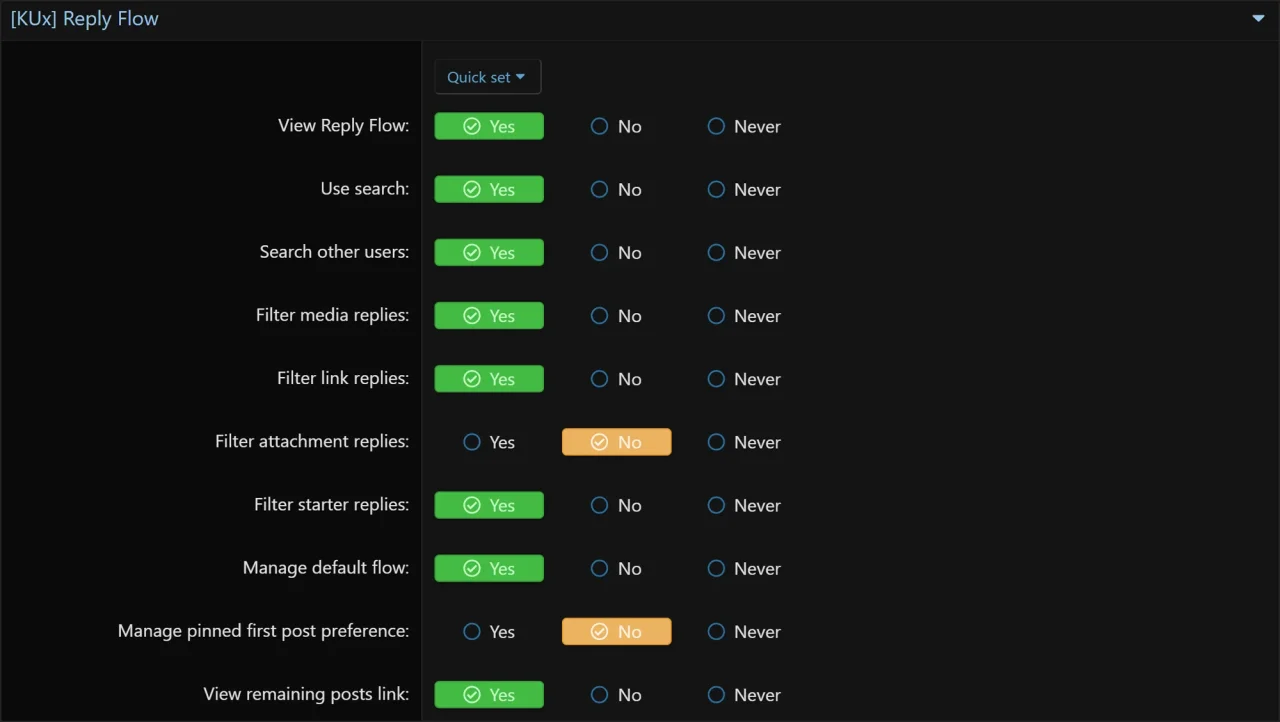
Feature availability should follow the controls set by the administrator. Reply Flow 1.0.3 improves consistency around permission-aware access and feature-level controls. Permissions, Admin CP options, and user preferences now behave more predictably together. For example, if a global Admin CP feature is disabled, user-level preferences should not continue forcing that behavior on the frontend. This helps administrators keep Reply Flow behavior aligned with their site configuration.
Related improvements include:
- Improved permission-aware access behavior.
- Improved consistency between Admin CP options and frontend behavior.
- Improved first-post pin behavior when disabled globally.
- Better alignment between feature toggles, user preferences, and visible Reply Flow controls.
This release also includes internal consistency improvements for navigation, frontend visibility, search behavior, and admin-side configuration.