[XTR] IP Threat Monitor

[XTR] IP Threat Monitor [Paid] 1.1.6

No permission to buy ($30.00)
All is well today but I have a question about the IP Threat Monitor cleanup cron job.

I wasn't sure it was working so I ran it manually. It cleared out the stale entries in challenged but the expired ones in blocked are a couple days old.

Is this how it is supposed to work?
Yes, that is exactly how it is designed to work, Elisabeth!

The challenged entries are temporary verification attempts; if someone abandons them for more than 15 minutes, the cron purges them immediately so dynamic IPs aren't trapped.

For blocked entries, once the blocked_until time expires, the IP is no longer restricted and can freely access the site again. However, the record itself is kept in your log table as a historical audit record so you can track past threats and statistics. Those are retained according to your Log Retention setting (default is 30 days, which you can adjust in the add-on options or clear via the Prune tool).

 
Is it possible to change the time the cleanup cron job runs? It won't let me change it and 8:00 PM removes things I still want to see. I'm in GMT -7. In the next release, maybe keep the 3:00 AM time the same but have it based on local time, not UTC?

Thanks!

1792816714164.webp
 
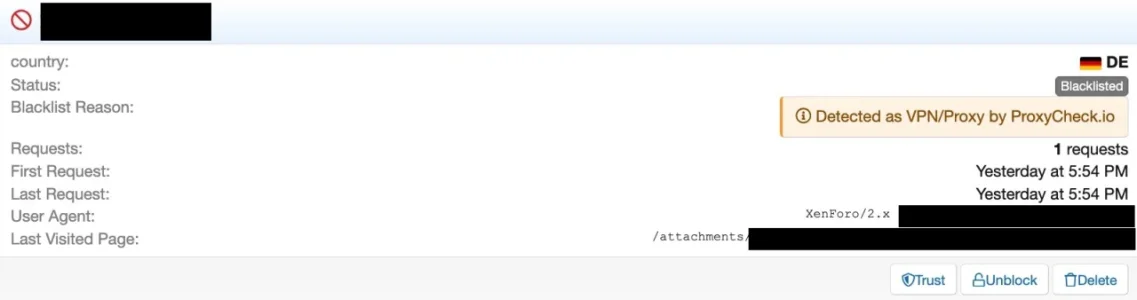
@Osman : I think we might need another update that needs some rework: I am currently preparing moving my forum to a VPS and did install a clone of my forum there for testing purposes. Much to my surprise some time later I found the IP of that VPS in the dashboard of Proxycheck, declared as VPN (which it clearly isn't), and, as a consequence, also blacklisted in IP Threat Manager:

Bildschirmfoto 2026-10-27 um 14.55.05.webp

What had happened is that I clicked on a thread in the cloned forum and this thread had a quote with a picture inside. The link in that quote to that picture used the full original URL and so there was a request sent from the VPS to my original forum. I asked the proxycheck support why my IP was falsely declared as a VPN and and on which foundation these declarations are made, given that the VPS had been set up freshly, had no history, the declaration of proxycheck came in real time when the request happened with the according date stamp for the declaration and there was no interaction with the VPS from proxycheck. The answer left me somewhat baffled:

When it comes to our v2 API, all hosting IP’s have been set as VPN’s.

This seems a bit of a bummer, leading potentially to quite a bunch of false positives. Though the reasoning behind it is somewhat understandable:

This is because when the v2 API was launched around 10 years ago our thought process was, if an IP is interacting with your website or service from a datacenter IP, it’s very (extremely likely) to be a VPN or a bot performing automated actions. Bot things undesirable if you want to block VPN’s you likely want both of those blocked.

But clearly, this seems quite some cheating, claiming to have exact information when in fact there is none at all. However, there is a way out:

Now though, in our newer v3 API which launched in a public beta in August 2025 and went stable in June this year, it has the capability to show both hosting and VPN’s separately and we no longer upgrade hosting addresses to VPN’s in the response, instead we only list an IP as a VPN if we’re 100% certain it’s a VPN, whether it’s also a hosting address or not.

Our own webpages (Web interface, lookup page, homepage etc) all now use our v3 API since the beginning of this year which is why there is a discrepancy when checking this IP address. In addition the v3 API gives a lot of VPN specific information now like who is actually operating the address behind the VPN.
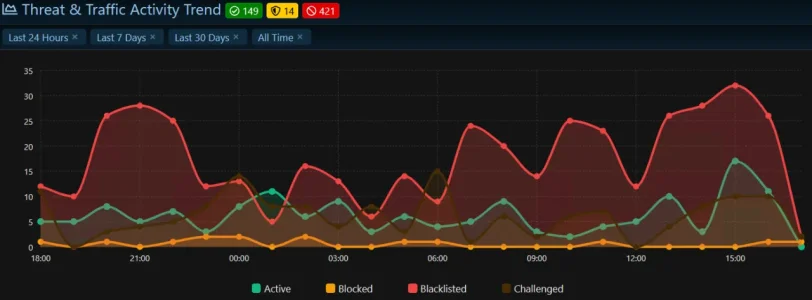
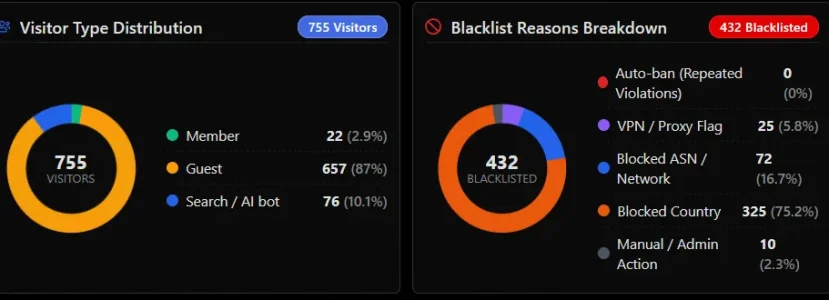
So it would possibly be good to switch IP Threat Monitor from Api V2 to V3 and make use of the new possiblities. One question would be how to deal with unknown hosting IPs, that are not verified to be a Proxy/VPN/whatever in future.

On the other hand: I do effectively and deliberately block most server ranges with very few exceptions anyway. No complaints so far since using IP Threat Monitor. So probably not really a huge problem, especially given the exceptions IP Threat Monitor offers for Search Engines, Social Networks and logged in Users. I would not have noticed the issue it if not my own server was affected. Still, I find the "VPN" statement really misleading.
 
Last edited:
I think this tool is the solution for my forum, but I can not buy this.
Because paying with PayPal is not possible.
 
I have several countries in the blocked country list that also have multiple blocked ASNs. India, for example, is a blocked country with at least 6 blocked ASNs that still gets through and show up in my active list 5 to 10 times a day even with a blocked ASN. Indonesia is similar.

When I see India, Indonesia or Pakistan in my active list, I verify their corresponding ASN is also blocked. When it is and there's nothing else to left to do, I manually blacklist the offending IP address. I am manually blacklisting blocked countries and ASNs in this scenario 10 to 18 times a day.

I hope this the right way to go about this?

When I see other blocked countries show up in the active list, I check to see if their ASN is also blocked and if not add it to the list. In the last several days, I've added 20 new ASNs to the prohibited list from blocked countries that find their way through.

Site traffic has been low, under 1000 visitors/24 hours for the last few days so we aren't getting hammered like we were last week. I still think IP Threat Monitor is doing a fantastic job and keeping most of the unwanted things out of my forum. I cannot imagine being without it.

Last 24 hours
1793146327509.webp
1793147009705.webp
10 manual blacklists from blocked countries with blocked ASNs
 
Can the IP Threat Monitor be used to determine whether—and, if so, which—users are making an unusually high number of requests, such as viewing other users' profile information?
 
I am sorry for the delayed update. Version 1.1.2 will be released very soon. Thank you all for your valuable feedback; we have been working thoroughly on each of the points you raised.

Is it possible to change the time the cleanup cron job runs? It won't let me change it and 8:00 PM removes things I still want to see. I'm in GMT -7. In the next release, maybe keep the 3:00 AM time the same but have it based on local time, not UTC?

Thanks!

View attachment 348200
@Elisabeth_K (Regarding Cleanup Schedule):
Thank you so much for bringing this up. You were completely right; having the cleanup locked to UTC caused it to delete logs during the evening in your timezone (GMT -7), right when you were still reviewing them.

In version 1.1.2, we have added new settings under the options page that allow you to choose both your preferred cleanup time and your local timezone. You can now set it to run at 3:00 AM in your own local time, so your logs will not disappear while you still need them.


@smallwheels (Regarding ProxyCheck v2 vs v3 & VPN False Positives):
Thank you for sharing such detailed feedback and reaching out to the ProxyCheck team. You described the issue perfectly.

In version 1.1.2, we have completely upgraded our integration from ProxyCheck API v2 to API v3. With this upgrade, datacenter and hosting servers are recognized separately from actual VPNs. Hosting IPs will no longer be falsely flagged as VPNs, which will prevent false alarms on your own servers and testing environments.


@Elisabeth_K (Regarding Blocked Countries & ASNs in the Active List):
Having to manually blacklist IPs 10 to 18 times a day from countries you have already blocked is definitely frustrating and not how it should work.

In version 1.1.2, we have completely reworked the entry checks. Blocked countries and blocked ASNs are now stopped at the very front door the second they touch the site. They will no longer slip past to appear in your active visitors list, and you will not need to manually blacklist them anymore. The system will handle them automatically from now on.


@rhs (Regarding High Request Users & Profile Viewing):
Hello Reinhard, thank you for the question.

In the upcoming 1.1.2 version, you can already identify members making a high volume of requests:
  1. In the IP Threat Log, you can filter by User Type: Member to immediately see members with unusually high request counts and the last pages they visited.
  2. If a user exceeds the request threshold within a short time window, the system Rate Limiter will step in automatically.

While we already have a dedicated detector for rapid thread scraping, adding a specific detection rule targeted at mass profile viewing and profile scraping is a great idea, and we will consider including it in the 1.1.3 release.
 
Hosting IPs will no longer be falsely flagged as VPNs, which will prevent false alarms on your own servers and testing environments.
As in the past there did not occur major issues or negative effects with this (it took me more than eight months to recognize it at all and that was only by coincidence) while possibly there might be negative effects when in future no longer blocking server ranges automatically: Will we be able to identify server IP in the logs in future and possibly to have a setting for IP Threat Monitor to optionally act as with the old API in case the new API's outcome does work worse than the old one in terms of proteciton? I obviously don't know if this will be the case but in case it is it would be good to be able to fall back to the old behaviour.
 
@smallwheels:
You raised a very fair point, and I completely understand your concern.

The good news is that this is already built into 1.1.2!

In the options, we added a dedicated "Block Hosting / Datacenter Networks" toggle. If you prefer the old strict behavior, simply keep that option turned ON. It will continue to block server ranges just like before, but this time in the logs it will be accurately labeled as "Hosting / Network Provider" rather than a misleading "VPN".

So you won't lose any protection and you'll have full control over it!
 
Osman updated [XTR] IP Threat Monitor with a new update entry:

1.1.2

This release completely rethinks how the add-on distinguishes genuine threats from innocent visitors, while bringing the responsiveness, stability, profile management, and localization of the admin control panel to the highest level. Our goal is not simply to create harsher barriers, but to make fewer wrong decisions—protecting your community while keeping panel management effortless and reliable.

Verification applies only to the individual: Passing a robot challenge now grants access...
Read the rest of this update entry...
 
Thanks for the hard work put into this release and for including requested changes.

It seems users getting a challenge are stuck in a loop? I've tried hCaptcha with and without a site/secret key and Turnstile.

The only one that kind of works is hCaptcha without a key. With a key for hCaptcha and Turnstile I click the I am not human box and get a success message, then click to continue and the whole I am human process starts over again (and over and over and over) Forum access is not granted

1793583310979.webp

hCaptcha without site and secret key is the only one that somewhat works and brings up a picture challenge that can be solved that seems to be different on desktop and mobile although both are very difficult to solve for various reasons. Solving this type of challenge does allow access to the forum. Turnstile and hCaptcha with site and secret keys continually repeat.

I have no idea if this is something in IP Threat Monitor or somewhere else?

Things I would like to see: (because people are never satisfied and always want more :rolleyes:)
  • A checkbox to permanently blacklist IPs from blocked countries and ASNs rather than the new temporary blocking that expires - no second chances. Blocked countries stay blocked.
  • More specific 403 messages such as permanently blacklisted from blocked country, temporary blocked 30 minutes due to VPN, etc
  • An option under Show active robots in Members Online widget that counts number only (not important)
1793585100346.webp

I have left hCaptcha with blank site and secret keys enabled. It is the only one not stuck in a loop and does allow forum access if solved.
 
The challenge verification loop you experienced, along with all of your requested features (permanent blacklist option for countries/ASNs, specific 403 messages, and the number-only option for the Members Online widget), have been resolved and implemented in version 1.1.3. The update will be available shortly. ;)
 
Osman updated [XTR] IP Threat Monitor with a new update entry:

1.1.3

This update completely eliminates the verification loop issue that caused visitors to become stuck on challenge screens, while making security decisions and online tracking features much more flexible, stable, and transparent.

Smooth verification flow: Resolved an issue where visitors who successfully passed Cloudflare Turnstile or hCaptcha verification could be redirected back to the verification screen in an endless loop. Once solved, visitor clearance is reliably preserved, allowing...

Read the rest of this update entry...
 
@Osman As this add on has become very relevant and critical it would be good, if it would be possible to install new versions on a staging environment before using it on the live platform. Currently it is reporting a license error when trying to do so and stops the installation. It is pretty trivial to circumvent this, but I'd rather not need to go down that route.

This time, given the massive amount of changes in 1.1.2 and 1.1.3 i made an exception and did it - I am pretty happy with what 1.1.1 delivers in my current configuration and did not want to risk to jump into unknown settings and option switches or risking to loose my adapted phrases for the notifications when a request is blocked.

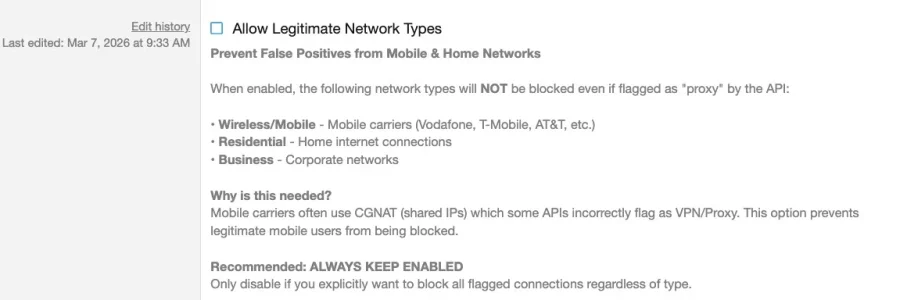
A quick check beween 1.1.1 to 1.1.3 reveals mainly one setting that seems to have changed in a critial way: Allow legitimate Network Types

The setting has existed before, but is seems to have changed it's meaning completly to the opposite in the new version:

1.1.3:

Bildschirm­foto 2026-11-02 um 17.03.53.webp

1.1.1:
Bildschirm­foto 2026-11-02 um 17.44.39.webp

I had disabled this setting until now - it seems that I now have to enable it to make use of my existing whitelist and allowed VPNs that were allowed before automatically?

The main issue I have mit IP Threat Manager at the moment in 1.1.1 are the logs, as they are a mixture between actual things happening and things that have historically happened months earlier. So it is often not possible to tell what has happened on first sight and even less so in list view.
Also it seems, that still logged in members are challenged or sometimes even blocked:
Bildschirm­foto 2026-11-01 um 18.13.09.webp
Bildschirm­foto 2026-11-02 um 00.42.23.webp

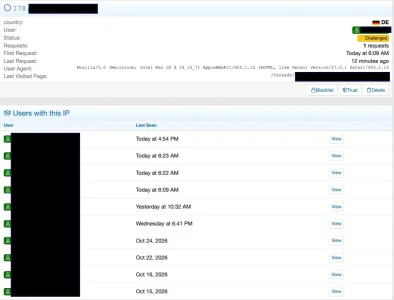
The detail view shows sometimes conflicting entries like "this IP is new with one request" while at the same time it has a history of logged in users:
Bildschirm­foto 2026-11-01 um 18.13.33.webp

I hope this will get somewhat better with 1.1.3. I'll probably truncate my blacklist with 340.000 entries, as there are a lot of historical events in it that contribute to that logfile confusion and some may be false positives today. Also, I do get the "outstanding jobs" warining in ACP more or less regularly, caused by IP Threat manager remidating the Blacklist. I've moved away from my shared hosting to a powerful VPS in the meantime and increased PHP execution time, so this is not the issue. But again, maybe 1.1.3 will bring improvements.

What I would like to see is improved log filtering / Analysis:

1. Possiblity to see not only the top ten countries but all including the option to see numbers and percentages blocked/blacklisted/active/challenged (and to sort by these values)
2. Same goes for ASNs and countries

This would massively help to understand the traffic better.

3. Challenging seems to be a bit of a life saver: It turned out that short of 75% of my guests that have been challenged seem not to solve the challenge, so are potentially bots. As I have massive blocking settings for countries and ASNs challenging is only done for countries and ASNs where genuine guests could come from at all.
Currently it is however hard to find out these numbers - a "challenge solve-rate" for all as well as per country and per ASN would be helpful here.

Overall, IP Threat Manager does an outstanding job! I think I barely have any bots left that reach the forum atm. And after investing the time to create the individual blacklists and whitelists it consumes not many API calls and runs more or less maintenance free. If I compare that with what people have to poke around with their Cloudflare rules that constantly need adjustment it seems that - at least at the moment - IP blocking is maybe more primitive but also more effective. Keep up the good work and thanks for this excellent add on!
 
Absolutely unbelievably fantastic! Thank you.

Words on a page cannot express how impressed I am with IP Threat Monitor, XenTR and @Osman's total dedication to their customers and products.

@smallwheels suggestions sound great. I went ahead with 1.1.3 because the human verification loop was a high priority as was blacklisting rather than blocking visitors from disallowed countries. I haven't had time yet to look for other issues but this thing just keeps getting better and better with each release.

10/10 recommended.
 
Hi @smallwheels,

Let me quickly go through the points you raised:
  1. Staging / Test Environment:
    Our licensing system currently treats separate subdomains (like staging.yoursite.com) as unauthorized hostnames. However, if you put your staging forum in a subdirectory under your licensed domain (for example yoursite.com/staging/ or yoursite.com/test/), or if you test locally (localhost, .local, .test), LicenseGuard fully allows it and installs without any problems.
  2. "Allow Legitimate Network Types" Option:
    You’re completely right — the wording and how the option worked changed between versions, which understandably caused confusion. In 1.1.3 it acted as the master toggle for the VPN provider whitelist. In v1.1.4 we’re splitting Mobile/Residential (CGNAT) protection and the VPN Provider Whitelist into two completely separate and much clearer settings.
  3. Logged-in Members Appearing in Logs as Challenged:
    Because the threat log keeps only one unique record per IP, when a guest or bot on a dynamic/mobile IP triggers a challenge, the status becomes “Challenged”. Later, when a registered member browses from that same dynamic IP pool, the log simply attaches their username to that existing IP row. This can create the impression that your member was challenged (in reality our self-healing routine unblocks exempt members right away). In v1.1.4 we’ll visually separate guest threat activity from member sessions in the logs so this is no longer confusing.
  4. ACP Job Load & v1.1.4 Analytics Features:
    On large databases with 340k+ entries we’ll optimize the RemediateBots job so it only looks at recent entries instead of cycling through the entire historical tables. And your suggestions — expanding beyond the Top 10 to full Country and ASN breakdowns with sortable counts/percentages, and especially the "Challenge Solve-Rate" metric are excellent!
 
Staging / Test Environment
I have it at a subdomain and a different vhost and sometimes a different host with own settings - I clearly prefer a clean separation of my test setup from my live setup. I think this is the more common approach and it would be good if it would be supported - in fact IP Threat Monitor is the only add on that I use that does not support this setup.

In v1.1.4 we’re splitting
Maybe a good opportunity to clean up two other settings as well: This...

Bildschirm­foto 2026-11-02 um 22.12.55.webp
... is from the early days of IP Threat Monitor and sets the Use of Proxycheck for all visitors. So it is a bit of a very central setting, but the title is a bit misleading as it refers to only the country flag, so a tiny side feature (that could be served and probably is served through the local Maxmind DB in the meantime anyway).

This...
Bildschirm­foto 2026-11-02 um 22.13.49.webp

... seems also outdated through the local MaxMind DBs that serve to identify ASNs and Countrys. So basically this setting should be completely redundant if one uses the local DBs. So at least the description should be adjusted.

This is somewhat funny:
Bildschirm­foto 2026-11-02 um 22.16.21.webp

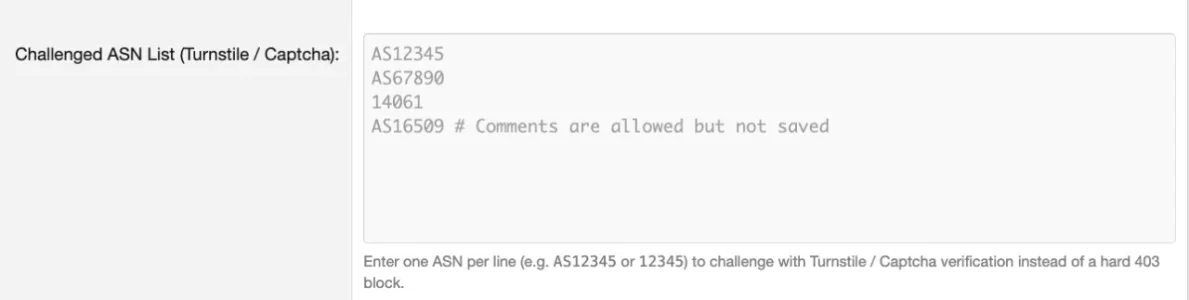
Comments are allowed but we won't save them. :D So what would comments in this area be good for?
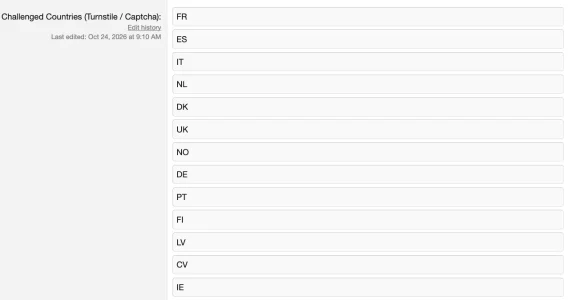
Regarding the country lists for blocking and challenging I have two possible ideas that rule out each other. Which is better (or if any is good at all) depends from the setup:

1. sort countries by alphabet when saving

you can only add countries at the bottom which leads to a pretty chaotic list over time, when you add countries later and makes it difficult to check which state a certain country has:

Bildschirm­foto 2026-11-02 um 22.16.59.webp

2. When country checks are enabled provide a list of all countries and country codes in alphabetical order and have a setting per country via pulldown how it shall be dealt with (whitelist/pass/block/challenge). Allow filtering the list for the status. This would be optimal for people that have settings for loads of countries and block or challenge most of them - makes it way easier not to miss a country.

I honestly don't know if 2. is a good idea or not. For me personally it would possibly be useful but then I am probably not the typical user.

expanding beyond the Top 10 to full Country and ASN breakdowns with sortable counts/percentages, and especially the "Challenge Solve-Rate" metric are excellent!
if those could become a traffic flowchart as well (like we have it for the status') this could be interesting. Possibly not all countries and ASNs, either like the top 10 as a standard and selectable countries as an alternative.


On large databases with 340k+ entries we’ll optimize the RemediateBots job so it only looks at recent entries instead of cycling through the entire historical tables.
One of the issues with older entries is that they are not updated - they are i.e. missing ASNs and sometimes show the wrong country.

Four things that I am wondering about:

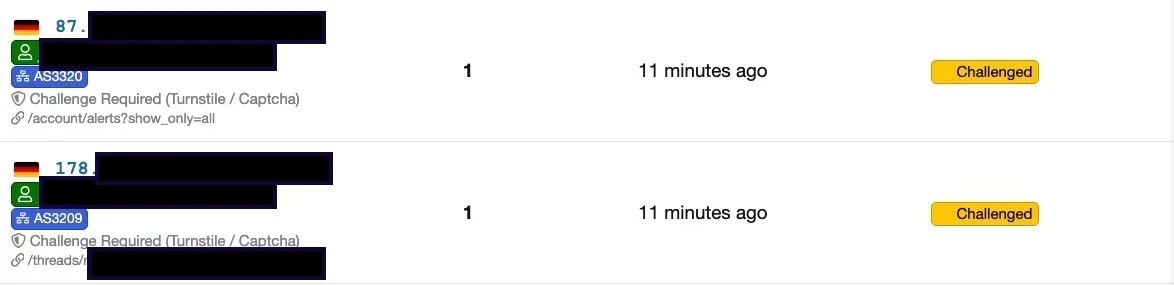
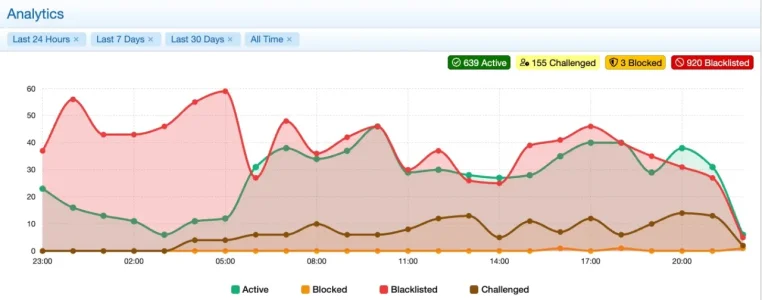
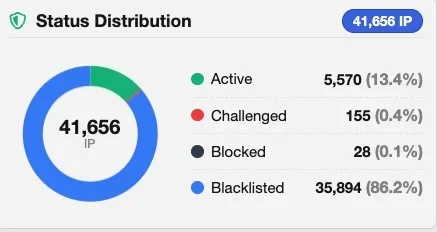
1. What does the status "challenged" mean here?
Bildschirm­foto 2026-11-02 um 22.10.48.webp
Is this a visitor, that either failed the challenge or did not click the "continue" button after the challenge, so basically "stuck in challenge status"?

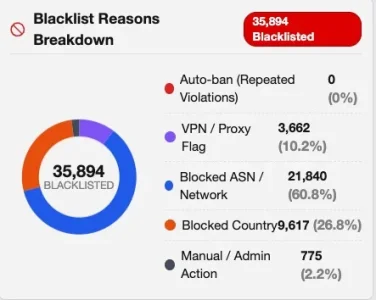
2. What is "manual/admin action" here?
Bildschirm­foto 2026-11-02 um 22.10.13.webp
Clearly, I did not block those manually and this category popped based on my memory only up after challenges were invented.

3. With a challenge, we have the status "challenged", "passed" and "failed/abandoned". What exactly does it mean when the log says "challenged" after a while and what is the difference to "failed/abandoned"? I am using CF Turnstyle, so the challenge is self-solving 99% percent of the time.

4. For how long is the challenge status saved? According to the chart it seems to be less than 24h, possibly 20h:
Bildschirm­foto 2026-11-02 um 22.12.22.webp
 
1. sort countries by alphabet when saving

you can only add countries at the bottom which leads to a pretty chaotic list over time, when you add countries later and makes it difficult to check which state a certain country has:
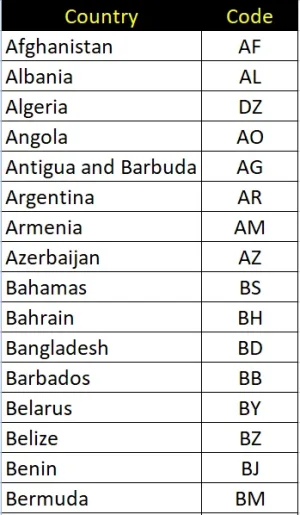
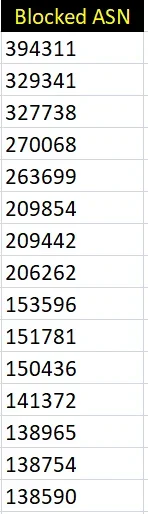
I maintain my list of 154 blocked countries and 84 blocked ASNs in an Excel spreadsheet where country can easily be arranged alphabetically and the ASNs numerically. Before making a new entry in IP Threat Monitor, I first check to make sure it is not already there.

1793673601360.webp 1793673741531.webp


I also see VPN users are now getting blocked where before they were just blacklisted. Like was done with a permanently blacklist country and ASN checkbox, the option to once again permanently blacklist VPN users would be nice too.


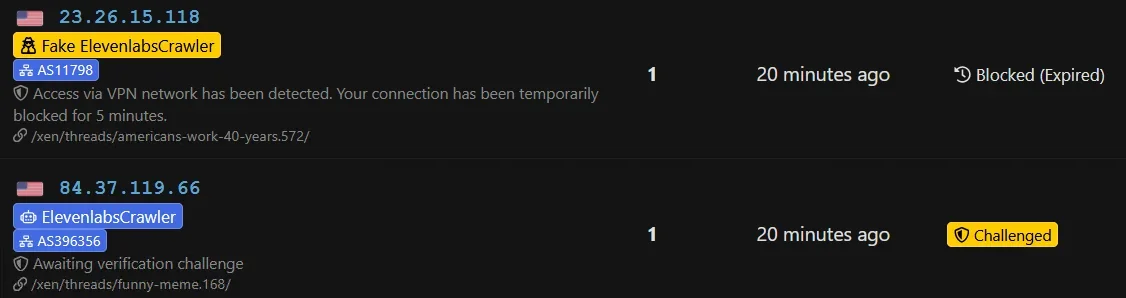
I've been invaded today from ElevenLabsCrawler and fake ElevenLabsCrawler using a VPN. I've blocked them in robots.txt (for what that's worth) but it would be nice to be able to add them in the Protected Search Engine Bots list unchecked so they don't go into the challenged or blocked bucket.

1793674341323.webp

1793674380490.webp

Same user agent string for both.


Good new today after 1.1.3, I'm not seeing any blocked countries show up in the active list anymore and they are getting blacklisted rather than challenged or blocked. Yay!

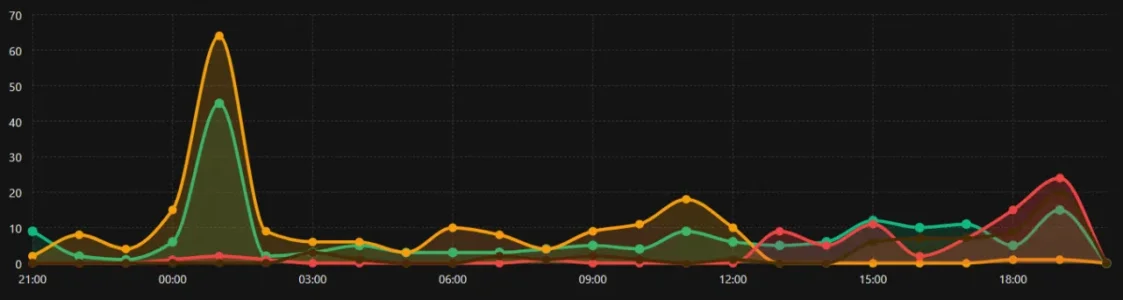
The only possible thing I might wish for is a change of color for the challenged visitors in the dashboard graph to like pink or something? They are very hard to see with a dark theme

1793675331197.webp
 
I maintain my list of 154 blocked countries and 84 blocked ASNs in an Excel spreadsheet where country can easily be arranged alphabetically and the ASNs numerically. Before making a new entry in IP Threat Monitor, I first check to make sure it is not already there.
I don't do that for countries (as my list is relatively stable and the total number of countries is somewhat limited) but maintain my to block ASNs in a text file along with additional information, one ASN per line, ordered by ASN-Number. Every couple of days I run a grep/awk over this file and paste the output into the ASN config-box in IP Threat Manager, overwriting the existing list. Simple and fast.

I also see VPN users are now getting blocked where before they were just blacklisted. Like was done with a permanently blacklist country and ASN checkbox, the option to once again permanently blacklist VPN users would be nice too.

I think blocking is the better way to it in most cases. While it may potentially rise the number of API requests to a moderate amount blackisting, being permanent (if you don't prone the blacklist regularly) has a huge disadvantage: If the IP in question will no longer belong to a VPN in future it will still be blocked when being part of the blacklist, so being a false positive. If you block it temporarily on the other hand it will reevaluated and if it is still considered to be used by a VPN any request will be blocked - so no worse than if it would be blacklisted but avoiding false positives.

I've been invaded today from ElevenLabsCrawler and fake ElevenLabsCrawler using a VPN. I've blocked them in robots.txt (for what that's worth) but it would be nice to be able to add them in the Protected Search Engine Bots list unchecked so they don't go into the challenged or blocked bucket.
robots.txt will probably be worthless for blocking them. You can block them via .htaccess, filtering for the useragent. I'd assume that is what IP Threat Manager uses as the first pattern as well. The "Protected Search Bots" option can never be comprehensive, it is intended as a white list rather than a black list.

What could be a nice feature however would be an option to block requests with a certain user agent with the ability to define the pattern freely (pretty much as you can currently do for VPNs). Would have the same effect as blocking them via .htaccess but more comfortable and with the disadvantage that blocking via .htaccess (or it's nginx-equivalent) is earlier in the process and consumes less resources.

This feature could be very nice for XF Cloud customers (as they have no possiblity to configure .htaccess) and also for less technical people (as dealing with .htaccess-configuration needs a bit of technical understanding and failures can be lethal).
 
Back
Top Bottom