[XTR] IP Threat Monitor

[XTR] IP Threat Monitor [Paid] 1.1.1

No permission to buy ($30.00)
All is well today but I have a question about the IP Threat Monitor cleanup cron job.

I wasn't sure it was working so I ran it manually. It cleared out the stale entries in challenged but the expired ones in blocked are a couple days old.

Is this how it is supposed to work?
Yes, that is exactly how it is designed to work, Elisabeth!

The challenged entries are temporary verification attempts; if someone abandons them for more than 15 minutes, the cron purges them immediately so dynamic IPs aren't trapped.

For blocked entries, once the blocked_until time expires, the IP is no longer restricted and can freely access the site again. However, the record itself is kept in your log table as a historical audit record so you can track past threats and statistics. Those are retained according to your Log Retention setting (default is 30 days, which you can adjust in the add-on options or clear via the Prune tool).

 
Is it possible to change the time the cleanup cron job runs? It won't let me change it and 8:00 PM removes things I still want to see. I'm in GMT -7. In the next release, maybe keep the 3:00 AM time the same but have it based on local time, not UTC?

Thanks!

1792816714164.webp
 
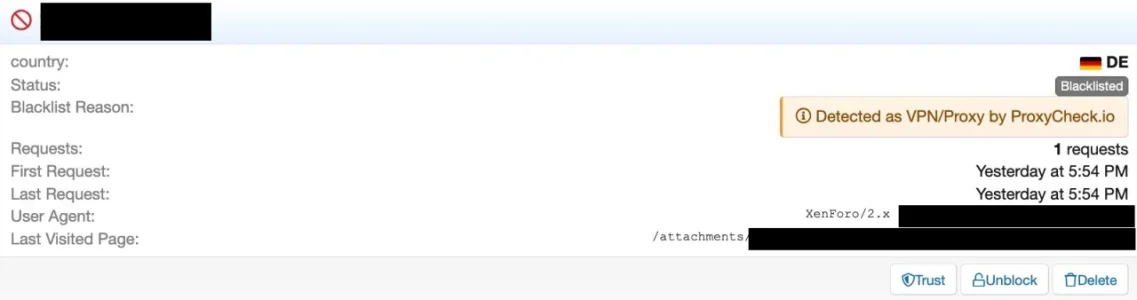
@Osman : I think we might need another update that needs some rework: I am currently preparing moving my forum to a VPS and did install a clone of my forum there for testing purposes. Much to my surprise some time later I found the IP of that VPS in the dashboard of Proxycheck, declared as VPN (which it clearly isn't), and, as a consequence, also blacklisted in IP Threat Manager:

Bildschirmfoto 2026-10-27 um 14.55.05.webp

What had happened is that I clicked on a thread in the cloned forum and this thread had a quote with a picture inside. The link in that quote to that picture used the full original URL and so there was a request sent from the VPS to my original forum. I asked the proxycheck support why my IP was falsely declared as a VPN and and on which foundation these declarations are made, given that the VPS had been set up freshly, had no history, the declaration of proxycheck came in real time when the request happened with the according date stamp for the declaration and there was no interaction with the VPS from proxycheck. The answer left me somewhat baffled:

When it comes to our v2 API, all hosting IP’s have been set as VPN’s.

This seems a bit of a bummer, leading potentially to quite a bunch of false positives. Though the reasoning behind it is somewhat understandable:

This is because when the v2 API was launched around 10 years ago our thought process was, if an IP is interacting with your website or service from a datacenter IP, it’s very (extremely likely) to be a VPN or a bot performing automated actions. Bot things undesirable if you want to block VPN’s you likely want both of those blocked.

But clearly, this seems quite some cheating, claiming to have exact information when in fact there is none at all. However, there is a way out:

Now though, in our newer v3 API which launched in a public beta in August 2025 and went stable in June this year, it has the capability to show both hosting and VPN’s separately and we no longer upgrade hosting addresses to VPN’s in the response, instead we only list an IP as a VPN if we’re 100% certain it’s a VPN, whether it’s also a hosting address or not.

Our own webpages (Web interface, lookup page, homepage etc) all now use our v3 API since the beginning of this year which is why there is a discrepancy when checking this IP address. In addition the v3 API gives a lot of VPN specific information now like who is actually operating the address behind the VPN.
So it would possibly be good to switch IP Threat Monitor from Api V2 to V3 and make use of the new possiblities. One question would be how to deal with unknown hosting IPs, that are not verified to be a Proxy/VPN/whatever in future.

On the other hand: I do effectively and deliberately block most server ranges with very few exceptions anyway. No complaints so far since using IP Threat Monitor. So probably not really a huge problem, especially given the exceptions IP Threat Monitor offers for Search Engines, Social Networks and logged in Users. I would not have noticed the issue it if not my own server was affected. Still, I find the "VPN" statement really misleading.
 
Last edited:
I think this tool is the solution for my forum, but I can not buy this.
Because paying with PayPal is not possible.
 
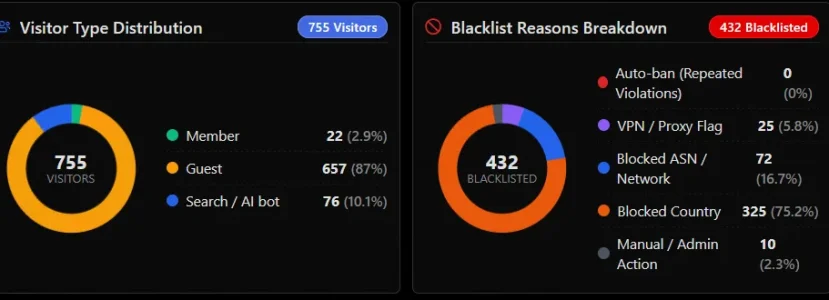
I have several countries in the blocked country list that also have multiple blocked ASNs. India, for example, is a blocked country with at least 6 blocked ASNs that still gets through and show up in my active list 5 to 10 times a day even with a blocked ASN. Indonesia is similar.

When I see India, Indonesia or Pakistan in my active list, I verify their corresponding ASN is also blocked. When it is and there's nothing else to left to do, I manually blacklist the offending IP address. I am manually blacklisting blocked countries and ASNs in this scenario 10 to 18 times a day.

I hope this the right way to go about this?

When I see other blocked countries show up in the active list, I check to see if their ASN is also blocked and if not add it to the list. In the last several days, I've added 20 new ASNs to the prohibited list from blocked countries that find their way through.

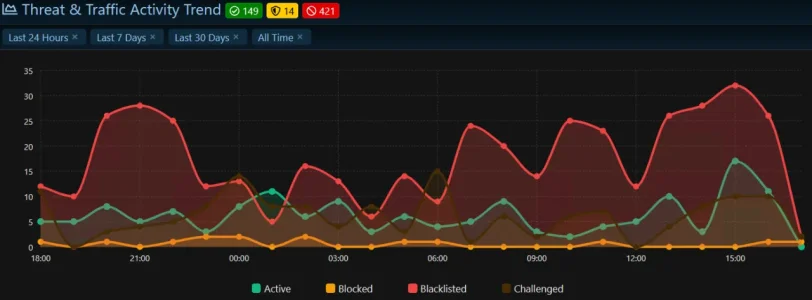
Site traffic has been low, under 1000 visitors/24 hours for the last few days so we aren't getting hammered like we were last week. I still think IP Threat Monitor is doing a fantastic job and keeping most of the unwanted things out of my forum. I cannot imagine being without it.

Last 24 hours
1793146327509.webp
1793147009705.webp
10 manual blacklists from blocked countries with blocked ASNs
 
Can the IP Threat Monitor be used to determine whether—and, if so, which—users are making an unusually high number of requests, such as viewing other users' profile information?
 
I am sorry for the delayed update. Version 1.1.2 will be released very soon. Thank you all for your valuable feedback; we have been working thoroughly on each of the points you raised.

Is it possible to change the time the cleanup cron job runs? It won't let me change it and 8:00 PM removes things I still want to see. I'm in GMT -7. In the next release, maybe keep the 3:00 AM time the same but have it based on local time, not UTC?

Thanks!

View attachment 348200
@Elisabeth_K (Regarding Cleanup Schedule):
Thank you so much for bringing this up. You were completely right; having the cleanup locked to UTC caused it to delete logs during the evening in your timezone (GMT -7), right when you were still reviewing them.

In version 1.1.2, we have added new settings under the options page that allow you to choose both your preferred cleanup time and your local timezone. You can now set it to run at 3:00 AM in your own local time, so your logs will not disappear while you still need them.


@smallwheels (Regarding ProxyCheck v2 vs v3 & VPN False Positives):
Thank you for sharing such detailed feedback and reaching out to the ProxyCheck team. You described the issue perfectly.

In version 1.1.2, we have completely upgraded our integration from ProxyCheck API v2 to API v3. With this upgrade, datacenter and hosting servers are recognized separately from actual VPNs. Hosting IPs will no longer be falsely flagged as VPNs, which will prevent false alarms on your own servers and testing environments.


@Elisabeth_K (Regarding Blocked Countries & ASNs in the Active List):
Having to manually blacklist IPs 10 to 18 times a day from countries you have already blocked is definitely frustrating and not how it should work.

In version 1.1.2, we have completely reworked the entry checks. Blocked countries and blocked ASNs are now stopped at the very front door the second they touch the site. They will no longer slip past to appear in your active visitors list, and you will not need to manually blacklist them anymore. The system will handle them automatically from now on.


@rhs (Regarding High Request Users & Profile Viewing):
Hello Reinhard, thank you for the question.

In the upcoming 1.1.2 version, you can already identify members making a high volume of requests:
  1. In the IP Threat Log, you can filter by User Type: Member to immediately see members with unusually high request counts and the last pages they visited.
  2. If a user exceeds the request threshold within a short time window, the system Rate Limiter will step in automatically.

While we already have a dedicated detector for rapid thread scraping, adding a specific detection rule targeted at mass profile viewing and profile scraping is a great idea, and we will consider including it in the 1.1.3 release.
 
Hosting IPs will no longer be falsely flagged as VPNs, which will prevent false alarms on your own servers and testing environments.
As in the past there did not occur major issues or negative effects with this (it took me more than eight months to recognize it at all and that was only by coincidence) while possibly there might be negative effects when in future no longer blocking server ranges automatically: Will we be able to identify server IP in the logs in future and possibly to have a setting for IP Threat Monitor to optionally act as with the old API in case the new API's outcome does work worse than the old one in terms of proteciton? I obviously don't know if this will be the case but in case it is it would be good to be able to fall back to the old behaviour.
 
@smallwheels:
You raised a very fair point, and I completely understand your concern.

The good news is that this is already built into 1.1.2!

In the options, we added a dedicated "Block Hosting / Datacenter Networks" toggle. If you prefer the old strict behavior, simply keep that option turned ON. It will continue to block server ranges just like before, but this time in the logs it will be accurately labeled as "Hosting / Network Provider" rather than a misleading "VPN".

So you won't lose any protection and you'll have full control over it!
 
Back
Top Bottom