Good to know, thanks.



But wow light db mode makes the forum so much faster.
XF Bot Guard 1.3.7
Release type: minor
XF Bot Guard 1.3.7 is a performance and resilience-focused release. It reduces database load on protected requests, strengthens bot-storm survival handling, adds faster geo lookups through compact cached geo data, improves Dashboard usefulness in Light-DB mode, adds soft country exclusions, and cleans up noisy Quick Settings and Health Check output.
Better survival during active bot storms
The Active Bot Storm quick...
Loving this add-on, such a lifesaver.
I was hoping for something like 'Soft country exclusions' too - wonderful.
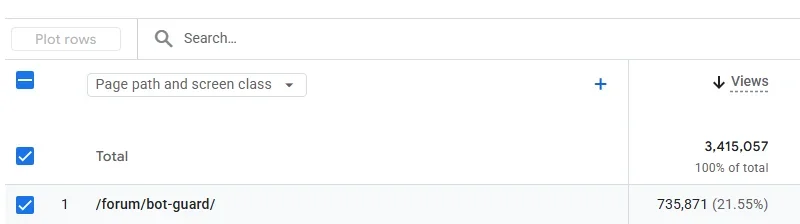
Are people seeing /bot-guard/ as their #1 in Google Analytics or is my bot problem particularly troublesome?
View attachment 340907


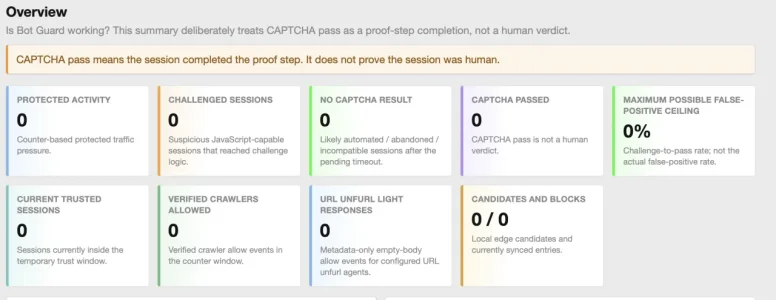
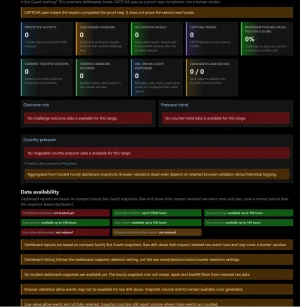
I have an issue with my dashboard atm:
View attachment 340962
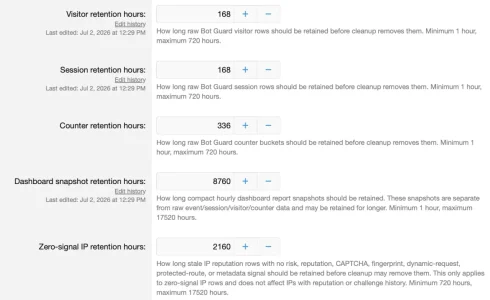
Indeed it lacks data since yesterday morning. I upgraded from 1.3.5 to 1.3.6 and then 1.3.7 yesterday at 12:00, since then, snapshots seem to have stopped being created. I did not activate db_light mode, the only change I made in terms of configuration was to somewhat limit the time how long data is preserved to half of the defaults as the database kept growing massively. However, the values set should still be more than plenty for the snapshots:
View attachment 340963

That's what mine looks like in regular mode.... not sure why but the last update seems to have messed that up.
umm... I do that where ?The latest update messed up crons. Please disable the mmdb refresh and geo cache crons, and the others will run again
Note: this is not for all users, mainly those in shared hosting where php time limit cannot be modified.
A fix is already done waiting on next release.
umm... I do that where ?
Done ! Thanks!Please go to Tools -> Cron entries -> then for each of XF Bot Guard MMDB refresh & XF Bot Guard geo index cache warm, on the far right there is an on/off toggle. Toggle them off.
Those are the crons which in the latest release required a longer timeout limit which, as it turns out, shared hosts often limit. Apologies, it's been well over a decade since I was on shared hosting myself, and didn't realise this would be an issue.
Once toggled off, the other Bot Guard crons will resume and all other things will return to normal.

Please go to Tools -> Cron entries -> then for each of XF Bot Guard MMDB refresh & XF Bot Guard geo index cache warm, on the far right there is an on/off toggle. Toggle them off.
Those are the crons which in the latest release required a longer timeout limit which, as it turns out, shared hosts often limit. Apologies, it's been well over a decade since I was on shared hosting myself, and didn't realise this would be an issue.
Once toggled off, the other Bot Guard crons will resume and all other things will return to normal.
Is that will update the dashboard?
Yes, to an extent. Light-DB does not populate the entire dashboard, because the data is no longer stored (as it is Light on DB). But it does store some, and so if you have none, you likely have the same issue there. Disabling those two crons until the next update will likely give you some data on the dashboard, after waiting the next hour for it to run etc.
Hmm... this was perfect 48 hours ago and not been touched since....
View attachment 341063
View attachment 341064
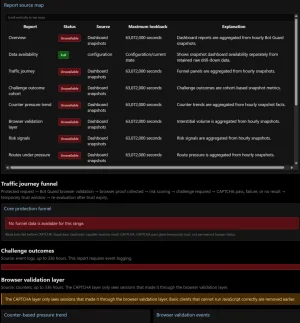
Healthchecks all good other than these two...
View attachment 341065
Confused so to why we go from lots of green to lots of redRunning 1.3.7
The latest update messed up crons. Please disable the mmdb refresh and geo cache crons, and the others will run again
Note: this is not for all users, mainly those in shared hosting where php time limit cannot be modified.
A fix is already done waiting on next release.
Please go to Tools -> Cron entries -> then for each of XF Bot Guard MMDB refresh & XF Bot Guard geo index cache warm, on the far right there is an on/off toggle. Toggle them off.
Those are the crons which in the latest release required a longer timeout limit which, as it turns out, shared hosts often limit. Apologies, it's been well over a decade since I was on shared hosting myself, and didn't realise this would be an issue.
Once toggled off, the other Bot Guard crons will resume and all other things will return to normal.

Recently installed this add-on and am extremely excited to try it out! For those of you running ads on your site, do you experience any drop in earnings by enabling this? I assume it's fine, but wanted to be sure that it wouldn't affect RPM much in the long-term!
We use essential cookies to make this site work, and optional cookies to enhance your experience.