XF Bot Guard

XF Bot Guard 1.4.1

No permission to download
Hey there,

It seems you may have run the cron manually. The cron itself configures a lock mechanism to ensure only one process may run at a time. It is possible that the cron may have already been running, so a lock was acquired already and your run was locked out.

p.s., it is not anything to worry about - if a lock fails (truely and repeatedly) then it falls back to DB-based reads. Security is not at all diminished or broken.

Is this a one-off? Or does it happen more than that?
Ahh just a one off. I;ve just spent the last hour setting up redis.. and enabling LightDB... baptism of fire :)
 
I think one more thing is missing on this addon @zeeb0t , adding countries, so we can see from which country we are getting the most bots.
 
I think one more thing is missing on this addon @zeeb0t , adding countries, so we can see from which country we are getting the most bots.

That does exist, but is not available as dashboard data whilst running running in light-db mode.
 
Will be possible to implement this feature even in light DB?

I will look into it and let you know.

Good news, with some work in the light-DB telemetry area I will be able to populate and render the country pressure map and table in the dashboard overview while operating light-DB mode. I will include it in the next release.
 
I keep getting the following error. What can I do to fix it?

Code:
RuntimeException: XF Bot Guard known crawler refresh failed: Known crawler range verification cache could not be invalidated. src/addons/Zee/BotGuard/Service/KnownCrawlerRefresher.php:579
Generated by: Unknown account Jul 9, 2026 at 9:08 AM
Stack trace
#0 src/addons/Zee/BotGuard/Service/KnownCrawlerRefresher.php(221): Zee\BotGuard\Service\KnownCrawlerRefresher->assertKnownCrawlerRangeDirectoryInvalidated()
#1 src/addons/Zee/BotGuard/Service/KnownCrawlerRefresher.php(39): Zee\BotGuard\Service\KnownCrawlerRefresher->seedSourcesIfNeeded()
#2 src/addons/Zee/BotGuard/Cron/KnownCrawlerRefresh.php(29): Zee\BotGuard\Service\KnownCrawlerRefresher->refreshAll(false, Object(Zee\BotGuard\Service\CronRunBudget))
#3 src/addons/Zee/BotGuard/Service/HealthCriticalMaintenance.php(194): Zee\BotGuard\Cron\KnownCrawlerRefresh::Zee\BotGuard\Cron\{closure}()
#4 src/addons/Zee/BotGuard/Cron/KnownCrawlerRefresh.php(26): Zee\BotGuard\Service\HealthCriticalMaintenance->runTrackedTask('known_crawler_s...', Object(Closure), 'cron', Object(Zee\BotGuard\Service\CronRunBudget))
#5 src/XF/Job/Cron.php(41): Zee\BotGuard\Cron\KnownCrawlerRefresh::run(Object(XF\Entity\CronEntry))
#6 src/XF/Job/Manager.php(275): XF\Job\Cron->run(8)
#7 src/XF/Job/Manager.php(205): XF\Job\Manager->runJobInternal(Array, 8)
#8 src/XF/Job/Manager.php(89): XF\Job\Manager->runJobEntry(Array, 8)
#9 job.php(46): XF\Job\Manager->runQueue(false, 8)
#10 {main}
 
I keep getting the following error. What can I do to fix it?

Code:
RuntimeException: XF Bot Guard known crawler refresh failed: Known crawler range verification cache could not be invalidated. src/addons/Zee/BotGuard/Service/KnownCrawlerRefresher.php:579
Generated by: Unknown account Jul 9, 2026 at 9:08 AM
Stack trace
#0 src/addons/Zee/BotGuard/Service/KnownCrawlerRefresher.php(221): Zee\BotGuard\Service\KnownCrawlerRefresher->assertKnownCrawlerRangeDirectoryInvalidated()
#1 src/addons/Zee/BotGuard/Service/KnownCrawlerRefresher.php(39): Zee\BotGuard\Service\KnownCrawlerRefresher->seedSourcesIfNeeded()
#2 src/addons/Zee/BotGuard/Cron/KnownCrawlerRefresh.php(29): Zee\BotGuard\Service\KnownCrawlerRefresher->refreshAll(false, Object(Zee\BotGuard\Service\CronRunBudget))
#3 src/addons/Zee/BotGuard/Service/HealthCriticalMaintenance.php(194): Zee\BotGuard\Cron\KnownCrawlerRefresh::Zee\BotGuard\Cron\{closure}()
#4 src/addons/Zee/BotGuard/Cron/KnownCrawlerRefresh.php(26): Zee\BotGuard\Service\HealthCriticalMaintenance->runTrackedTask('known_crawler_s...', Object(Closure), 'cron', Object(Zee\BotGuard\Service\CronRunBudget))
#5 src/XF/Job/Cron.php(41): Zee\BotGuard\Cron\KnownCrawlerRefresh::run(Object(XF\Entity\CronEntry))
#6 src/XF/Job/Manager.php(275): XF\Job\Cron->run(8)
#7 src/XF/Job/Manager.php(205): XF\Job\Manager->runJobInternal(Array, 8)
#8 src/XF/Job/Manager.php(89): XF\Job\Manager->runJobEntry(Array, 8)
#9 job.php(46): XF\Job\Manager->runQueue(false, 8)
#10 {main}

Can you please send me the support bundle by DM?
 
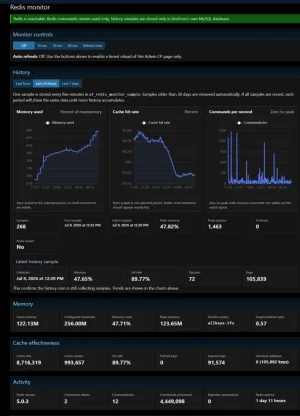
Oh yes... used redis already available on my server, and created this (my first "internal" XF addon, helped in a big way by AI)....

View attachment 341201

Very nice. I was thinking about creating an add-on for XenForo cache enablement, optimisaton, and reporting. It's a weak spot for XenForo, as you have identified / experienced.

But then, I am pretty busy with Bot Guard at the moment. I'd love to see where you go with this. If you want to chat about ideas / pick my brain on what I had in mind, happy to share. Because, I don't know I will get around to it anytime soon.
 
Interesting observation....

I can enter the Bot Guard ACP settings and switch it on/off...and enable "lightDB" mode....but if I attempt to make changes via quick settings, the "blocker" appears and those changes cannot be applied (even tho they already are, manually)
 
I got this error with the latest version:

  • RuntimeException: XF Bot Guard known crawler refresh failed: Known crawler range verification cache could not be invalidated.
  • src/addons/Zee/BotGuard/Service/KnownCrawlerRefresher.php:579

Code:
#0 src/addons/Zee/BotGuard/Service/KnownCrawlerRefresher.php(221): Zee\BotGuard\Service\KnownCrawlerRefresher->assertKnownCrawlerRangeDirectoryInvalidated()#1 src/addons/Zee/BotGuard/Service/KnownCrawlerRefresher.php(39): Zee\BotGuard\Service\KnownCrawlerRefresher->seedSourcesIfNeeded()
#2 src/addons/Zee/BotGuard/Cron/KnownCrawlerRefresh.php(29): Zee\BotGuard\Service\KnownCrawlerRefresher->refreshAll(false, Object(Zee\BotGuard\Service\CronRunBudget))
#3 src/addons/Zee/BotGuard/Service/HealthCriticalMaintenance.php(194): Zee\BotGuard\Cron\KnownCrawlerRefresh::Zee\BotGuard\Cron\{closure}()
#4 src/addons/Zee/BotGuard/Cron/KnownCrawlerRefresh.php(26): Zee\BotGuard\Service\HealthCriticalMaintenance->runTrackedTask('known_crawler_s...', Object(Closure), 'cron', Object(Zee\BotGuard\Service\CronRunBudget))
#5 src/XF/Job/Cron.php(41): Zee\BotGuard\Cron\KnownCrawlerRefresh::run(Object(XF\Entity\CronEntry))
#6 src/XF/Job/Manager.php(275): XF\Job\Cron->run(8)
#7 src/XF/Job/Manager.php(205): XF\Job\Manager->runJobInternal(Array, 8)
#8 src/XF/Job/Manager.php(89): XF\Job\Manager->runJobEntry(Array, 8)
#9 src/XF/Cli/Command/RunJobs.php(58): XF\Job\Manager->runQueue(false, 8)
#10 src/vendor/symfony/console/Command/Command.php(298): XF\Cli\Command\RunJobs->execute(Object(Symfony\Component\Console\Input\ArgvInput), Object(Symfony\Component\Console\Output\ConsoleOutput))
#11 src/vendor/symfony/console/Application.php(1040): Symfony\Component\Console\Command\Command->run(Object(Symfony\Component\Console\Input\ArgvInput), Object(Symfony\Component\Console\Output\ConsoleOutput))
#12 src/vendor/symfony/console/Application.php(301): Symfony\Component\Console\Application->doRunCommand(Object(XF\Cli\Command\RunJobs), Object(Symfony\Component\Console\Input\ArgvInput), Object(Symfony\Component\Console\Output\ConsoleOutput))
#13 src/vendor/symfony/console/Application.php(171): Symfony\Component\Console\Application->doRun(Object(Symfony\Component\Console\Input\ArgvInput), Object(Symfony\Component\Console\Output\ConsoleOutput))
#14 src/XF/Cli/Runner.php(115): Symfony\Component\Console\Application->run(Object(Symfony\Component\Console\Input\ArgvInput), Object(Symfony\Component\Console\Output\ConsoleOutput))
#15 cmd.php(17): XF\Cli\Runner->run()
#16 {main}
 
I can enter the Bot Guard ACP settings and switch it on/off...and enable "lightDB" mode....but if I attempt to make changes via quick settings, the "blocker" appears and those changes cannot be applied (even tho they already are, manually)

Are you saying it tries to block you for a reason? What is the reason it provided you with?
 
I keep getting the following error. What can I do to fix it?

I got this error with the latest version:

I can confirm I've had that a couple times too

If I am not mistaken, I would guess you are each running the activity-based cron runner setting in XenForo?

If so, I have identified the reason in that running mode this happens, and am preparing a patch.

p.s., the error itself is not user-facing, and does not impact protection. So, for now, please ignore it - it is not an actual 'error' in the sense I coded it this way. It doesn't appear to be failing for the reason I designed the lock check, and so is then acting noisily for a scenario it should be silent.
 
Are you saying it tries to block you for a reason? What is the reason it provided you with?
"Probable shared full-page cache HIT detected. XF Bot Guard may be
bypassed when protected HTML is served from cache before
XenForo/PHP/Bot Guard runs. Bot Guard emits no-store headers, but your
server, CDN, LiteSpeed, Cloudflare, Varnish, NGINX, CloudFront or
hosting cache may still be storing or serving HTML. Disable
full-page/shared HTML caching for Bot Guard-protected pages. Static
assets can remain cached. Evidence: Bot Guard route Request 1:
X-LiteSpeed-Cache: hit; Bot Guard route Request 2: X-LiteSpeed-Cache:
hit; Board/homepage Request 1: X-LiteSpeed-Cache: hit; Board/homepage
Request 2: X-LiteSpeed-Cache: hit"

The blocker only appears during the quick settings. Make those SAME settings in the Options, and there is no warning/blocker.

Litespeed is installed, but not set up for Bot Guard to function.
 
"Probable shared full-page cache HIT detected. XF Bot Guard may be
bypassed when protected HTML is served from cache before
XenForo/PHP/Bot Guard runs. Bot Guard emits no-store headers, but your
server, CDN, LiteSpeed, Cloudflare, Varnish, NGINX, CloudFront or
hosting cache may still be storing or serving HTML. Disable
full-page/shared HTML caching for Bot Guard-protected pages. Static
assets can remain cached. Evidence: Bot Guard route Request 1:
X-LiteSpeed-Cache: hit; Bot Guard route Request 2: X-LiteSpeed-Cache:
hit; Board/homepage Request 1: X-LiteSpeed-Cache: hit; Board/homepage
Request 2: X-LiteSpeed-Cache: hit"

The blocker only appears during the quick settings. Make those SAME settings in the Options, and there is no warning/blocker.

Litespeed is installed, but not set up for Bot Guard to function.

That difference is expected.

The XenForo ACP Options area is the advanced configuration interface, where settings can be changed directly without going through Bot Guard’s guided checks.

Quick Settings, on the other hand, is designed to apply the configuration in a guided way. As part of that process, it automatically runs the health check and warns you when it detects a condition that makes it unsafe to proceed.

In this case, you should not proceed with enabling Bot Guard until the caching issue has been resolved.

The health check received the following header on repeated requests:

Code:
X-LiteSpeed-Cache: hit

That means LiteSpeed is serving previously cached HTML before XenForo, PHP and Bot Guard have an opportunity to run.

When full-page caching is active, it can:

  • Bypass Bot Guard protection by serving cached protected pages directly.
  • Cache and repeatedly serve a Bot Guard interstitial.
  • Cause challenge or interstitial loops.
  • Serve one visitor’s generated page state to other visitors.

Bot Guard sends no-store and other cache-control headers, but the test results show that LiteSpeed is still returning full-page cache hits on both the Bot Guard route and the board homepage.

I recommend immediately disabling Bot Guard, disabling or excluding full-page HTML caching for the XenForo pages protected by Bot Guard, and then running Quick Settings (and/or checking Health check) again before re-enabling it.

Static assets such as CSS, JavaScript, fonts and images can remain cached. It is the shared/full-page HTML cache that is incompatible.

I would like to make Bot Guard tolerant of guest page caching in a future release, but the current version is not compatible with full-page caching.

 
Back
Top Bottom