XF Bot Guard

XF Bot Guard 1.4.1

No permission to download
What's worth mentioning is the order in which the add ons work: Based on my testing it seems, that IP Threat Monitor hits first and only if a visitor has managed to pass it Bot Guard comes into play. Fine for me. :) Even more curious on the statistics now as this way I could find out what amount of what IP Threat Monitor let's trough get's then caught by Bot Guard.

The only thing is, as you pointed out earlier... since you don't use Cloudflare to pass on the optional known bots header, it will likely detect and block SEO crawlers for you. Ideal would be that IP Threat can add a flag that I am able to 'trust' as known bots by an additional option.

Then we'd have a perfect little ecosystem running there.
 
Just a quick note: XF Surge Guard now excludes XF Bot Guard routes from its assessment - these two add-ons now play nicely together as a bundle... and are both free! Enjoy.
 
The only thing is, as you pointed out earlier... since you don't use Cloudflare to pass on the optional known bots header, it will likely detect and block SEO crawlers for you.
It does. I.e. I have this request in my web.log

17-22-253-147.applebot.apple.com - - [01/Jun/2026:12:07:19 +0200] "GET /forums/$some_subforum$/index.rss HTTP/1.1" 303 - "-" "Mozilla/5.0 (Macintosh; Intel Mac OS X 10_15_7) AppleWebKit/605.1.15 (KHTML, like Gecko) Version/17.4 Safari/605.1.15 (Applebot/0.1; +http://www.apple.com/go/applebot)" 948 5096

The request got challenged by bot guard with a score of 75.

Ideal would be that IP Threat can add a flag that I am able to 'trust' as known bots by an additional option.

Then we'd have a perfect little ecosystem running there.
This would indeed be perfect! @Osman : What do you think about that?
 
It does. I.e. I have this request in my web.log

17-22-253-147.applebot.apple.com - - [01/Jun/2026:12:07:19 +0200] "GET /forums/$some_subforum$/index.rss HTTP/1.1" 303 - "-" "Mozilla/5.0 (Macintosh; Intel Mac OS X 10_15_7) AppleWebKit/605.1.15 (KHTML, like Gecko) Version/17.4 Safari/605.1.15 (Applebot/0.1; +http://www.apple.com/go/applebot)" 948 5096

The request got challenged by bot guard with a score of 75.


This would indeed be perfect! @Osman : What do you think about that?

I have also messaged Osman directly. Let's do it, @Osman! :)
 
I've had 5000 visits in the last hour from anthropic bot (not with addon). From what i've read in this thread, this is someone pretending to be a anthropic bot? Is that right?
 
My question is, how do I create a whitelist for search bots? My Bingbot has been hit with a "Viewing Verification Challenge."

+++
Googlebot
Yandex Bot

Cloudflare is not used due to a block in Russia.
 
My question is, how do I create a whitelist for search bots? My Bingbot has been hit with a "Viewing Verification Challenge."

+++
Googlebot
Yandex Bot

Cloudflare is not used due to a block in Russia.
At the moment it seems as if you only could use whitelisting of IP-ranges which is cumbersome and clearly not a reliable option to do and maintain this manually.
 
After a couple of hours this is what I see in the logs on the basis of ~135 visiting IPs of guests (not logged in) in total that passed IP Threat Manager in that timeframe (so made it to the Bot Guard add on). I'd assume that IPs that are whitelisted in Threat Manager like Bingbot, Google Bot etc. come on top of that (which is quite a bunch as they visit my forum really frequently).

~350 entries for "decision = challenge"
~ 10 entries for "decision = fail"
~100 entries for "decision = allow" (captcha trust)
~200 entries for "decision = observe" (guests and logged in users)
32 of those entries for "decision = observe" / "browser_recollection_required"

Settings in Bot Guard are default, so limited to challenge suspicious guests only and leave logged in users alone. Captcha method is set to Cloudflare turnstyle.

So clearly, at the moment Bot Guard is blocking search engine bots (as we already know). In my case, with the Search Engine Crawlers coming frequently and using a lot of different IPs this could potentially easily be 100 to ~150 of those 350 visitors/IPs that were challenged. Other than that:

  • it seems that only less than a third of challenged the visitors even try to solve the captcha (as I understand the logs)
  • only very few actually fail at the captcha (unclear why)
  • based on wild guessing the 100 that solved the captcha successfully could equal real human guest visitors in the timeframe. Hard to tell.

So until now it is looking good apart from locking out the Search Engine Bots, which is kind of a show stopper, to be honest. But it is somewhat difficult to get a grip on it in the sense to be able to judge to which amount it over- or underblocks or if it is just right. Also, the log filtering could have some improvements, but for a first version it is fine (plus one should not complain about a free add on). Let's say there's some potential in terms of UX and UI. ;)
 
My suggestion would be its own whitelisting for search engine bots. I don’t use use cloudflare or the IP threat monitor.
 
I've had 5000 visits in the last hour from anthropic bot (not with addon). From what i've read in this thread, this is someone pretending to be a anthropic bot? Is that right?

It could be, or, it could be anthropic bot. My experience with AI scrapers - they scrape hard. So it may well just be anthropic. XF Bot Guard would shut it down, fast.
 
So until now it is looking good apart from locking out the Search Engine Bots, which is kind of a show stopper, to be honest.

My suggestion would be its own whitelisting for search engine bots. I don’t use use cloudflare or the IP threat monitor.

Thanks both - that feedback is fair.

Unfortunately, the IP Threat Monitor developer is not in a position to provide a clean integration point for XF Bot Guard, so relying on that add-on is not a practical solution.

More importantly, I agree with the broader point: expecting Cloudflare to be present was not a reasonable assumption. If that means legitimate search engine crawlers can be locked out, then that is absolutely a show-stopper for some forums.

As previously mentioned, I had already planned to add XF Bot Guard’s own “known good SEO bots” handling, controlled by its own option and enabled by default. I had previously indicated that I was not expecting to ship another release for a week or two, but given the feedback here, I am bringing this forward.

I am currently reviewing the branch for this now. I will be testing it thoroughly on my own forum with the Cloudflare feature disabled, and assuming it behaves correctly, I expect to include it in a new release very soon - likely within the next 24 hours.

I know that is a change from what I previously communicated, but I can see the current limitation is blocking would-be users in a way I do not want.
 
My question is, how do I create a whitelist for search bots? My Bingbot has been hit with a "Viewing Verification Challenge."

+++
Googlebot
Yandex Bot

Cloudflare is not used due to a block in Russia.

You won't need to. Soon (within 24hr) XF Bot Guard will manage this for you. Hang tight.
 
I know that is a change from what I previously communicated, but I can see the current limitation is blocking would-be users in a way I do not want.
It is a reasonable decision. And in the end a consequence of the XF add on system and it's shortcomings: It seems barely designed for add on devs to cooperate and build upon each other both rather for every dev building his own ecosystem on the XenForo stack. I have i.e. three or four add ons currently, tat all use the free maxmind db. All of them download it separately to their own specific location within Xenforo, so I have three or four copies of the same db locally. Pretty stupid when you think about it, but understandable from the perspective of a dev, given how the XF add on ecosystem works.
 
It is a reasonable decision. And in the end a consequence of the XF add on system and it's shortcomings: It seems barely designed for add on devs to cooperate and build upon each other both rather for every dev building his own ecosystem on the XenForo stack. I have i.e. three or four add ons currently, tat all use the free maxmind db. All of them download it separately to their own specific location within Xenforo, so I have three or four copies of the same db locally. Pretty stupid when you think about it, but understandable from the perspective of a dev, given how the XF add on ecosystem works.

I will say, @Osman is very good about it. He did respond, and there is an opportunity in the future that XF Bot Guard will work with IP Threat / trust it, in addition to options to handle it itself - just like Cloudflare option. Osman is just pushed for availability right now.

But going forward, XF Bot Guard will at minimum be able to trust good known SEO bots that publish their trusted IP ranges. This makes it auditable, trustable, and automatable. This is what is coming very soon.
 
@smallwheels, @Dragonfruit, @akok

I’m sharing a pre-release build of XF Bot Guard 1.0.7 for those who specifically requested better support for legitimate crawlers/fetchers without needing to rely on Cloudflare verified-bot headers.

I am already running this build in production, but before I package it as an official release, I’d appreciate some wider testing from sites that have been affected by search crawlers or fetchers being challenged incorrectly.

The build is attached to this post.

What this build adds​

The main new feature is a DB-backed verified crawler/fetcher allowlist.

Instead of trusting user-agent strings, reverse DNS, or spoofable request headers, XF Bot Guard can now allow requests where the request IP matches an official provider-published crawler/fetcher CIDR range.

In plain English:

Code:
Request IP is inside an official crawler/fetcher IP range
=
allow before Bot Guard challenge/risk scoring

This is designed to help legitimate crawlers get through Bot Guard safely, especially on sites that are not behind Cloudflare or similar infrastructure.

Included providers/sources​

This first version only includes strong, official, machine-readable IP/CIDR sources.

Included sources are:
  • Google common crawlers
  • Google special-case crawlers
  • Google user-triggered fetchers
  • Google-controlled user-triggered fetchers
  • Google user-triggered agents
  • Bingbot
  • Applebot
  • DuckDuckBot
This does not add support for user-agent-only bots, commercial SEO tools, AI crawlers, DNS-only verification, or manually maintained IP lists.

New option​

A new option has been added:
Code:
zeeBotGuardAllowVerifiedCrawlers
Admin label:
Code:
Allow verified search crawlers and fetchers
Default:
Code:
Enabled
This option is separate from the existing known-bot/header-based option:
Code:
zeeBotGuardAllowKnownBots
The existing option remains for upstream verified-bot headers. The new option is for local DB-backed IP range verification using official provider feeds.

How to check whether it is working​

Allowed crawler/fetcher visits under the new option are logged with this event type:
Code:
verified_crawler_allow
So, in the Bot Guard event log, look for:
Code:
verified_crawler_allow
The event metadata should include details such as:

Code:
{
"provider": "google",
"source_id": "google_common_crawlers",
"source_label": "Google common crawlers",
"cidr": "66.249.64.0/19",
"source_age_seconds": 3600,
"verification": "official_cidr_json"
}

This event is different from the older/header-based known crawler event:
Code:
known_crawler_allow
For this new 1.0.7 feature, the event you want is:
Code:
verified_crawler_allow

Health check​

After installing/upgrading, please check the XF Bot Guard health check.

The health check should now report the status of:
  • The verified crawler option
  • The known crawler source table
  • The known crawler range table
  • How many official sources are enabled
  • How many have refreshed successfully
  • Whether any sources have never refreshed
  • Whether any source data is stale
  • Whether any recent source refresh failed
The important thing to confirm is that the official IP sources imported successfully and that known crawler ranges are available.

If the health check says the option is enabled but no known crawler ranges are available, then the feature will not be able to allow any crawler/fetcher visits yet.

Refresh behaviour​

The official IP/CIDR feeds are refreshed automatically by a new cron entry:
Code:
zeeBgKnownCrawlerRefresh
The refresh is designed to be safe:
  • Successful refreshes replace ranges transactionally.
  • Temporary provider/API failures do not wipe existing known-good ranges.
  • Invalid or empty source updates are rejected.
  • Last-known-good data remains usable.
  • No remote HTTP or DNS checks happen during normal page requests.

What I’d like tested​

Please check:
  1. The add-on installs/upgrades cleanly.
  2. The health check shows the known crawler sources and ranges correctly.
  3. The new option is present and enabled by default.
  4. Legitimate Google/Bing/Apple/DuckDuckGo crawler or fetcher visits show as verified_crawler_allow.
  5. Normal unknown bots still go through the usual Bot Guard flow.
  6. There are no unexpected PHP errors, cron errors, or install/upgrade issues.

 

Attachments

The important thing to confirm is that the official IP sources imported successfully and that known crawler ranges are available.
Installed and literally seconds later Google Bot and Big Bot started to show up again. Health Check reports as well ok. (y)

Something with your versioning strings of the add on is messed up, as Auto Update Notifier claims there would be a 1.0.12 available for download:
Bildschirm­foto 2026-06-02 um 00.08.32.webp
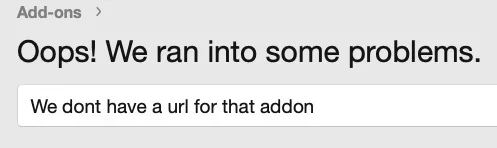
But the urls for release notes and download are not there anyway. ;)

Bildschirm­foto 2026-06-02 um 00.17.59.webp

Bildschirm­foto 2026-06-02 um 00.18.11.webp
 
Installed and literally seconds later Google Bot and Big Bot started to show up again. Health Check reports as well ok. (y)

Wonderful news! 🚀

Something with your versioning strings of the add on is messed up, as Auto Update Notifier claims there would be a 1.0.12 available for download:

I .... think we should just ignore this, for now. It is not a published update, as you know, and the add-on versioning is correct.

JSON:
{
    "version_id": 1000770,
    "version_string": "1.0.7"
}

This is probably just a weirdness as it is not yet an official update/release.
 
Back
Top Bottom