XF Bot Guard

XF Bot Guard 1.4.1

No permission to download
zeeb0t updated XF Bot Guard with a new update entry:

Release: 1.0.2

  • Members Online and Online statistics now exclude visitors who are currently being challenged by XF Bot Guard and have not yet passed verification.
  • Added a new “Bots” line below online statistics to show how many currently-online visitors are being held at the Bot Guard challenge.
  • Added a new admin option to enable or disable Bot Guard’s online-count adjustment. This is enabled by default.
  • Added automatic cleanup for temporary online-challenge tracking data to prevent...

Read the rest of this update entry...
 
Looks interesting. Right now I am using a bunch of CF security rules and XTR Threat Protection.

Could/should I disable all those and only use this add-on?
 
Looks interesting. Right now I am using a bunch of CF security rules and XTR Threat Protection.

Could/should I disable all those and only use this add-on?

I wouldn’t recommend disabling anything that is already working for you, at least not without proper testing first.

Bot Guard is designed to add another layer of protection at the XenForo/application level, but it is not intended to replace every other layer of your security stack overnight. Cloudflare, for example, sits at the edge and provides a lot more than just bot detection, so I would personally keep that in place regardless.

Also worth noting that this add-on is still in beta and I am actively porting more of my own production features into it. You could certainly test it in staging now, then move it into production once you are comfortable with how it behaves on your site.

For now, I would treat it as an additional layer rather than a reason to lower existing defences. Once it is out of beta and you have seen how it performs with your own traffic, then you can make a more informed call about whether to simplify anything else.
 
Last edited:
I am going to give it a rest for the weekend...

But coming up next week for XF Bot Guard: browser coherence and automation detection.

Some bots can run JavaScript, even browse nicely, but that does not mean their browser profile actually makes sense. The next layer will look for signs such as obvious WebDriver/automation indicators, along with mismatched browser entropy like timezone, language, platform, touch support, screen traits, and WebGL details.
 
so just wanted to mention here... the addon logs are not accessible from left menu from my understanding. only way to reach it appears to be from the addon page?

xf surge guard adds an option in left column but in addons section. that too probably should be moved to a better position like tools?
 
so just wanted to mention here... the addon logs are not accessible from left menu from my understanding. only way to reach it appears to be from the addon page?

xf surge guard adds an option in left column but in addons section. that too probably should be moved to a better position like tools?

Yep, correct.

At the moment the add-on logs are accessed from within the add-on listing page rather than the main left menu. I have it on my to-do list to align Surge Guard with Bot Guard so navigation is more consistent.

Also, quick heads-up: I noticed last night that Surge Guard can treat repeated visits to the Bot Guard CAPTCHA page as an error condition worth caching, which can then prevent access to the challenge page. It is a small but non-trivial incompatibility between the two add-ons.

I will patch Surge Guard and release a fix within the next 48 hours. Until then, I recommend disabling Surge Guard if you are using Bot Guard.
 
zeeb0t updated XF Bot Guard with a new update entry:

Release: v1.0.4

Browser Signal Hardening & CAPTCHA Trust Improvements​


This update improves XF Bot Guard’s browser verification and challenge handling without changing the core protection model.

Improved browser coherence checks​


XF Bot Guard now collects and evaluates a broader set of lightweight browser signals to better identify suspicious or automated traffic patterns. These checks help distinguish normal browser activity from sessions that appear inconsistent...

Read the rest of this update entry...
 
Can the Filter events box be made collapsible 😛

Also... It seems that after finishing captcha, user is being redirected to homepage and not the link that was originally clicked.
 
I am pleased with the v1.0.4 release.

This update introduced a significant browser entropy and coherence layer, making XF Bot Guard much harder to fool for more sophisticated scrapers that can execute JavaScript and present themselves as a real browser.

In other words: it is no longer enough for a visitor to simply look like a duck and walk like a duck - XF Bot Guard now checks whether it quacks like one too.

The new checks look for contradictions across browser identity, Client Hints, platform, touch support, screen profile, resource loading behaviour, language, timezone, request headers, automation markers, and other lightweight browser signals. None of these signals are treated as magic on their own, but together they make it much harder for fake or patched browser environments to blend in cleanly.

v1.0.4 also improved the post-CAPTCHA trust flow, so a legitimate visitor who successfully completes verification is no longer immediately challenged again simply because their previous risk score remained high. The configured trust window now behaves as intended.

Up next...

The focus now shifts from “does this browser look coherent?” to “can this browser proof be trusted, reused, or replayed?”

Upcoming work is going to focus on stronger collector authenticity, short-lived browser proof, better replay resistance, suspicion-triggered revalidation, and deeper route-aware behaviour checks.

That means XF Bot Guard will continue moving beyond simple one-off request scoring and further toward a proper XenForo-native anti-scraping layer that understands browser behaviour, session continuity, and suspicious browsing patterns over time.
 
Can the Filter events box be made collapsible 😛

Also... It seems that after finishing captcha, user is being redirected to homepage and not the link that was originally clicked.

Haha, yes! I will clean up the reporting page. Right now it is more diagnostic. I intend to make it more user-friendly, for sure. And good point re: the redirect to homepage. A simple thing to fix, super annoying for users. I will add it to my list! You will see it in the next release.
 
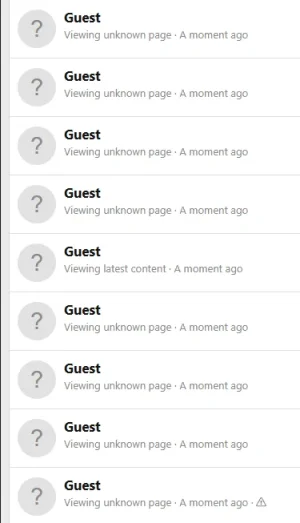
another query! so i now have pages and pages of guests viewing an unknown page now lol. not sure if it is possible to show bot guard page as a destination here? if it is indeed where they are.

1780189092242.webp
 
another query! so i now have pages and pages of guests viewing an unknown page now lol. not sure if it is possible to show bot guard page as a destination here? if it is indeed where they are.

View attachment 338870
That is almost certainly what they are looking at. Another simple one to tackle, again, will include in next release. Thanks for the heads up!
 
thanks! another query. if i am on cloudflare, should i enable this setting? Allow known verified crawler headers where determinable. does it require any of the cloudflare settings to be enabled as well?
i have a feeling this is going to fill up the database rather quickly on default settings lol.

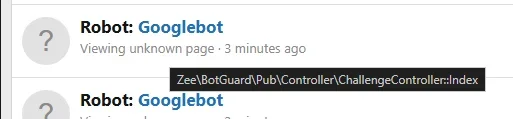
google and bing appears to be facing the captcha as well it seems!

1780189773681.webp
 
thanks! another query. if i am on cloudflare, should i enable this setting? Allow known verified crawler headers where determinable. does it require any of the cloudflare settings to be enabled as well?

i have a feeling this is going to fill up the database rather quickly on default settings lol.

Yes, you can enable it if your site is properly behind Cloudflare, but only if your origin server cannot be reached directly.

That part matters because this setting trusts request headers. If someone can bypass Cloudflare and connect directly to your server, they could potentially spoof those headers themselves. Ideally, your origin should be locked down so only Cloudflare can connect to it directly, for example via firewall rules, server rules, or similar.

There are two ways to set it up.

Option 1: Cloudflare managed bot headers​


If Cloudflare shows you the managed option (e.g., Enterprise users), go to:

Code:
Cloudflare → Rules → Managed Transforms

Then enable:

Code:
Add bot protection headers

Where your plan supports it, this can send Cloudflare bot headers to your server, including:

Code:
cf-verified-bot

XF Bot Guard can use that header when the option is enabled.

Option 2: Cloudflare Request Header Transform Rule​


If you do not have the managed bot headers option (e.g., non-enterprise), create a Request Header Transform Rule instead.

Go to:

Code:
Cloudflare → Overview → Create rule → Request Header Transform Rule

Use something like:

Code:
Rule name:
XF Bot Guard - known bot header

When:
All incoming requests

Or limit it to your forum hostname if preferred.

Then set a dynamic request header:

Code:
Header name:
x-known-bot-verified

Value:
to_string(cf.client.bot)

Save/deploy the rule, then enable:

Code:
Allow known verified crawler headers where determinable

in XF Bot Guard.

For normal visitors, that header should usually be:

Code:
false

For Cloudflare-known good crawlers, it should be:

Code:
true

Database/logging concern​


Yes, that is a fair concern.

XF Bot Guard is intentionally log-heavy during beta so decisions are explainable, but old event/session/visitor data is cleaned up according to the retention settings managed by the add-on cron jobs.

On busier forums, I recommend watching the Bot Guard tables for the first few days and lowering the event retention period if needed.

Ideally, your event retention should still be at least as long as your configured Trust duration after successful CAPTCHA, so the logs remain useful while a visitor is still inside the post-CAPTCHA trust window.

The logs are also used for scoring / analysis. By the time I bring this to a first stable release, it will include a DB redesign. So for now, just make sure if you change the settings, that logging is enabled, and the retention settings are sane.
 
google and bing appears to be facing the captcha as well it seems!

Yes, this is why you want to enable the Cloudflare setting. The current version of XF Bot Guard does not know how to "trust" a "known bot" yet. If you want that, please implement the Cloudflare option and setup procedures. I am going to publish the procedure to the FAQ also.
 
Yes, this is why you want to enable the Cloudflare setting. The current version of XF Bot Guard does not know how to "trust" a "known bot" yet. If you want that, please implement the Cloudflare option and setup procedures. I am going to publish the procedure to the FAQ also.

Also worth noting - with the option enabled (and header setup in Cloudflare) you will notice XenForo showing a bunch of Google / Bing etc. browsing normally, and apparently, some not (e.g. hitting the 'unknown' botguard CAPTCHA page...) this is actually intended. What you are seeing there is agents pretending to be Google/Bing etc. - Cloudflare telling Bot Guard which are legit, and Bot Guard bopping the rest on their heads.
 
i followed the guide and google/bing are now fine! thanks for the detailed guide.

You're welcome! p.s., personally, I have relaxed of my prior published security rules and I am letting XF Bot Guard handle the bots. It is doing a fine job of things at the moment. And the next release will then leave only the most sophisticated scrapers. It's getting close to a proper stable release, I think.

How are you finding things so far?
 
Back
Top Bottom
