
Yes.So, after the next version, I can use this to create just the thread with a "News Bot" xenForo account for all FP posts?
And the API provides links that I can embed in the WordPress template to link directly to the correct comment thread?

Yes.So, after the next version, I can use this to create just the thread with a "News Bot" xenForo account for all FP posts?
And the API provides links that I can embed in the WordPress template to link directly to the correct comment thread?

This sounds amazing. Any ETA?Yes.
Sorry no ETAThis sounds amazing. Any ETA?


It creates thread and sync comments. If you only want the link, you need to wait for next version.


Sorry no ETA

Huh? Which one is that?


You can use WordPress with any WordPress plugins/links. For widgets, currently this plugin supports one kind of widget: Threads.So, I'm very interested in purchasing this but I wanted to clarify if using this will allow me to use a WordPress site as a splash page for our XF forum where the splash page could have links to other parts of the WordPress site while having widgets that aggregate like the recent posts, social integrations, etc. like we currently have with our current site (bareefers.org).

You can control the target XenForo forum by specifying WordPress tag in the post. Currently, all WordPress accounts are created with Subscriber role (no posting permission). The staff will have to be assigned role manually.Does this mod allow you put WP created articles automatically into various forums of the same category.
For example: Blogpost about subject X goes into the forum about subject X? Blogpost about subject Y goes into forum about subject Y?
Secondly are the XF user roles imported into wordpress. We only want to allow our xf staff group to make wordpress posts.
It has been implemented and under testing alreadyOk thanks.
Is that a feature that will be implemented in the future? We have a growing premium usergroup that I do not wish to bother with advertisements on the blog for example. Same for staff obviously.

 ). Khi biết đc addon này mình rất thích và đã upgrade tài khoản bên xfrocks để download ngay! Nhưng mình có 1 số thắc mắc là mình có vào xem demo bên XFrocks thì thấy khi đã đăng nhập vào forum rồi thì khi qua trang chủ nó sẽ tự đăng nhập luôn, còn của mình thì nó ko chịu auto mà phải tiếp tục login lần nữa, lần đầu thì nó redirect đến trang forum yêu cầu xác nhận API. Nhưng sao bên demo ko thấy cái thủ tục đó?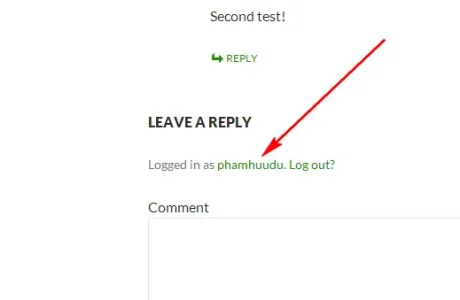
Please ask at my site if you don't want to use EnglishNgười Việt Nam với nhau thôi nói tiếng Việt luôn cho dễ hiểu nha, mình đang rất quan tâm đến 1 addon liên kết giữa WordPress và Forum (mình đang quản lý Việt Designer, không biết bác có biết site mình ko?
Vấn đề thứ 2 là mình xem ở phần comment WordPress bên bên demo thì thấy ở phần tên đăng nhập là link profile bên forum, còn của mình lại là link profile bên wordpress là sao nhỉ?
View attachment 71682
Vấn đề thứ 3 là mình ko hiểu làm cách nào để đồng bộ bài viết giữa Xen và WP nhỉ? Tại mình hơi gà nên xem phần option của plugin này thì thấy có nhiều option về đồng bộ bài viết giữa 2 bên, sao mình test nãy giờ vẫn ko thấy đồng bộ gì cả?
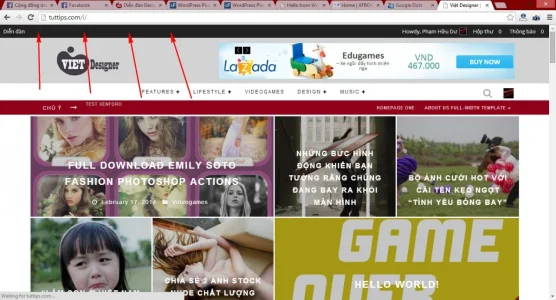
Vấn đề cuối là có cách nào thêm menu vào thanh topbar sau khi đã replace hoàn toàn của plugin này ko nhỉ? Tại chỉ thấy mỗi menu Forum thấy nó hơi trống trải?
View attachment 71683
Demo wp: http://tuttips.com/i/ demo xen: http://tuttips.com/i/forum , user: abc 123 password cũng abc 123 luôn. Bác có thể vào xem giúp mình ko ^^
Bác xem giúp nhé! Mà mình có add bác trên Facebook, nhưng chưa thấy bác confirm, hy vọng có thể làm quen giao lưu với bác
OkayPlease ask at my site if you don't want to use English

I guess I can put an option for thatI really like the option to replace the admin bar, but it would be awesome to show the "Dashboard" link would show for contributors, authors, editors, admins.
Also, it'd be cool to be able to mirror this bar on XenForo.
If the bar is covering your menu (it didn't when I visited your site), try to contact the theme author for help. The bar is a built-in WordPress element and it should work in all themes.Looks, too, like the bar is covering part of our menu: http://stratics.com
Thanks!I guess I can put an option for that
If the bar is covering your menu (it didn't when I visited your site), try to contact the theme author for help. The bar is a built-in WordPress element and it should work in all themes.

We use essential cookies to make this site work, and optional cookies to enhance your experience.