.block-container, .button, a.button, .blockMessage, .block-rowMessage, .block--messages .message, .block--messages .block-row, .carousel-item {
    border-radius: 0;
}
.p-nav-list .p-navEl.is-selected, .p-navgroup {
    border-top-left-radius: 0;
    border-top-right-radius: 0;
}
@media (min-width: 650px) {
    .block-container:not(.block-container--noStripRadius)>:first-child,.block-topRadiusContent,.block-container:not(.block-container--noStripRadius)>.block-body:first-child>.blockLink:first-child {
        border-top-left-radius: 0;
        border-top-right-radius: 0;
    }
    .block-container:not(.block-container--noStripRadius)>:last-child,.block-bottomRadiusContent,.block-container:not(.block-container--noStripRadius)>.block-body:last-child>.blockLink:last-child,.block-container:not(.block-container--noStripRadius)>.tabPanes:last-child>[role=tabpanel]>:last-child,.block-container:not(.block-container--noStripRadius)>.tabPanes:last-child>[role=tabpanel]>.block-body>:last-child {
        border-bottom-left-radius: 0;
        border-bottom-right-radius: 0;
    }
    .block-container:not(.block-container--noStripRadius)>.block-body:first-child>.dataList:first-child tbody:first-child .dataList-row:first-child>.dataList-cell:first-child,.block-topRadiusContent.dataList tbody:first-child .dataList-row:first-child>.dataList-cell:first-child,.block-topRadiusContent>.dataList:first-child tbody:first-child .dataList-row:first-child>.dataList-cell:first-child,.block-container:not(.block-container--noStripRadius)>.block-body:first-child>.dataList:first-child thead:first-child .dataList-row:first-child>.dataList-cell:first-child,.block-topRadiusContent.dataList thead:first-child .dataList-row:first-child>.dataList-cell:first-child,.block-topRadiusContent>.dataList:first-child thead:first-child .dataList-row:first-child>.dataList-cell:first-child {
        border-top-left-radius: 0;
    }
    .block-container:not(.block-container--noStripRadius)>.block-body:first-child>.dataList:first-child tbody:first-child .dataList-row:first-child>.dataList-cell:last-child,.block-topRadiusContent.dataList tbody:first-child .dataList-row:first-child>.dataList-cell:last-child,.block-topRadiusContent>.dataList:first-child tbody:first-child .dataList-row:first-child>.dataList-cell:last-child,.block-container:not(.block-container--noStripRadius)>.block-body:first-child>.dataList:first-child thead:first-child .dataList-row:first-child>.dataList-cell:last-child,.block-topRadiusContent.dataList thead:first-child .dataList-row:first-child>.dataList-cell:last-child,.block-topRadiusContent>.dataList:first-child thead:first-child .dataList-row:first-child>.dataList-cell:last-child {
        border-top-right-radius: 0;
    }
    .block-container:not(.block-container--noStripRadius)>.block-body:first-child>.formRow:first-child>dt,.block-topRadiusContent.formRow>dt,.block-topRadiusContent>.formRow:first-child>dt {
        border-top-left-radius: 0;
    }
    .block-container:not(.block-container--noStripRadius)>.block-body:first-child>.formRow:first-child>dd,.block-topRadiusContent.formRow>dd,.block-topRadiusContent>.formRow:first-child>dd {
        border-top-right-radius: 0;
    }
    .block-container:not(.block-container--noStripRadius)>.block-body:last-child>.dataList:last-child tbody:last-child .dataList-row:last-child>.dataList-cell:first-child,.block-bottomRadiusContent.dataList tbody:last-child .dataList-row:last-child>.dataList-cell:first-child,.block-bottomRadiusContent>.dataList:last-child tbody:last-child .dataList-row:last-child>.dataList-cell:first-child {
        border-bottom-left-radius: 0;
    }
    .block-container:not(.block-container--noStripRadius)>.block-body:last-child>.dataList:last-child tbody:last-child .dataList-row:last-child>.dataList-cell:last-child,.block-bottomRadiusContent.dataList tbody:last-child .dataList-row:last-child>.dataList-cell:last-child,.block-bottomRadiusContent>.dataList:last-child tbody:last-child .dataList-row:last-child>.dataList-cell:last-child {
        border-bottom-right-radius: 0;
    }
    .block-container:not(.block-container--noStripRadius)>.block-body:last-child>.formRow:last-child>dt,.block-bottomRadiusContent.formRow>dt,.block-bottomRadiusContent>.formRow:last-child>dt {
        border-bottom-left-radius: 0;
    }
    .block-container:not(.block-container--noStripRadius)>.block-body:last-child>.formRow:last-child>dd,.block-bottomRadiusContent.formRow>dd,.block-bottomRadiusContent>.formRow:last-child>dd {
        border-bottom-right-radius: 0;
    }
    .block-container:not(.block-container--noStripRadius)>.block-body:last-child .formSubmitRow:not(.is-sticky)>dt,.block-container:not(.block-container--noStripRadius)>.formSubmitRow:not(.is-sticky):last-child>dt,.block-bottomRadiusContent>.formSubmitRow:not(.is-sticky)>dt {
        border-bottom-left-radius: 0;
    }
    .block-container:not(.block-container--noStripRadius)>.block-body:last-child .formSubmitRow:not(.is-sticky)>dd,.block-container:not(.block-container--noStripRadius)>.formSubmitRow:not(.is-sticky):last-child>dd,.block-bottomRadiusContent>.formSubmitRow:not(.is-sticky)>dd {
        border-bottom-right-radius: 0;
    }
    .block-container:not(.block-container--noStripRadius)>.block-body:last-child .formSubmitRow:not(.is-sticky) .formSubmitRow-bar,.block-container:not(.block-container--noStripRadius)>.formSubmitRow:not(.is-sticky):last-child .formSubmitRow-bar,.block-bottomRadiusContent>.formSubmitRow:not(.is-sticky) .formSubmitRow-bar {
        border-bottom-left-radius: 0;
        border-bottom-right-radius: 0;
    }
}



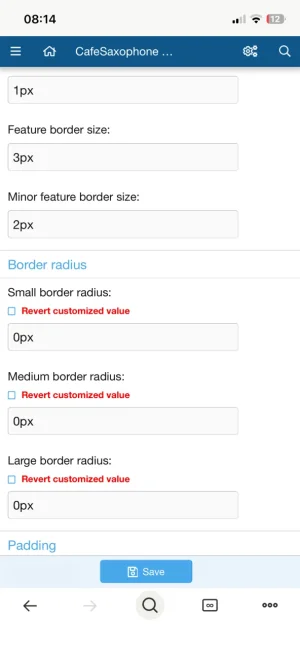


 Looks so much nicer like that and I thought it had to be a simple setting somewhere. Would look even better on Windows 10 with its square corners lol.


