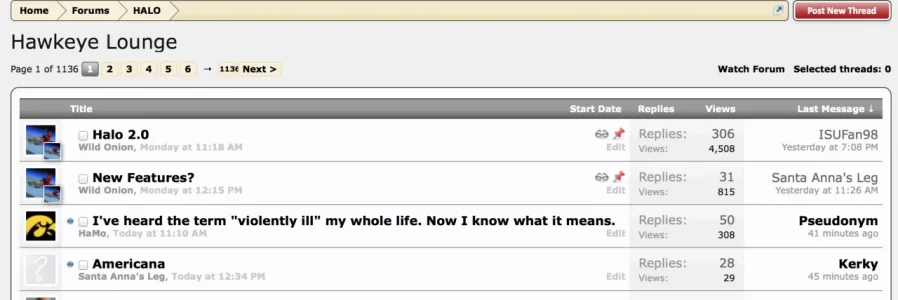
Wild Onion Member Licensed customer Jan 3, 2014 #1 I'm at my wits end here. I've played with the text styles in the Discussion List styles but I cannot get the "First Row" style to stop coming back as a bold font. Something is overriding that style property. Any ideas?
I'm at my wits end here. I've played with the text styles in the Discussion List styles but I cannot get the "First Row" style to stop coming back as a bold font. Something is overriding that style property. Any ideas?
P Paul B XenForo moderator Staff member Licensed customer Jan 3, 2014 #2 Use EXTRA.css: Code: .discussionListItems .unread .title a { font-weight: normal; } You may need to use higher specificity (or !important). Upvote 0 Downvote
Use EXTRA.css: Code: .discussionListItems .unread .title a { font-weight: normal; } You may need to use higher specificity (or !important).
Wild Onion Member Licensed customer Jan 3, 2014 #3 I added that to multiple styles, with the !important, and I still can't get it to work. Also, the "Last Message" column will go to normal, but the thread title stays bold. Upvote 0 Downvote
I added that to multiple styles, with the !important, and I still can't get it to work. Also, the "Last Message" column will go to normal, but the thread title stays bold.
P Paul B XenForo moderator Staff member Licensed customer Jan 3, 2014 #4 It works for me in the default style using !important. Upvote 0 Downvote
Wild Onion Member Licensed customer Jan 3, 2014 #5 I'm lost. I can't figure it out. Upvote 0 Downvote
P Paul B XenForo moderator Staff member Licensed customer Jan 3, 2014 #6 Can you post a screenshot of where it is you're trying to modify? Or a link to your site. Upvote 0 Downvote
Wild Onion Member Licensed customer Jan 3, 2014 #7 As you can see, the thread title is still bold, but the thread starter is normal. Attachments Screen Shot 2014-01-03 at 2.01.32 PM.webp 38.9 KB · Views: 21 Upvote 0 Downvote
P Paul B XenForo moderator Staff member Licensed customer Jan 3, 2014 #8 Is this for logged in or logged out users? Edit: Actually I've just checked and it works for both. I can't replicate the issue you have so it must be something to do with your custom style. Upvote 0 Downvote
Is this for logged in or logged out users? Edit: Actually I've just checked and it works for both. I can't replicate the issue you have so it must be something to do with your custom style.
Wild Onion Member Licensed customer Jan 3, 2014 #9 How are you able to see it outside of my custom style? Upvote 0 Downvote
P Paul B XenForo moderator Staff member Licensed customer Jan 3, 2014 #10 What I mean is the code I posted works on every style I have tried, so you are either entering it wrong or it's something to do with your style(s). Upvote 0 Downvote
What I mean is the code I posted works on every style I have tried, so you are either entering it wrong or it's something to do with your style(s).
Jeremy in memoriam 1991-2020 Licensed customer Jan 4, 2014 #11 If you'd like further help, a link to your site would be beneficial. Upvote 0 Downvote