
You are using an out of date browser. It may not display this or other websites correctly.
You should upgrade or use an alternative browser.
You should upgrade or use an alternative browser.
XF 2.0 Uninstalling legacy add-ons will leave orphaned data
- Thread starter AndyB
- Start date
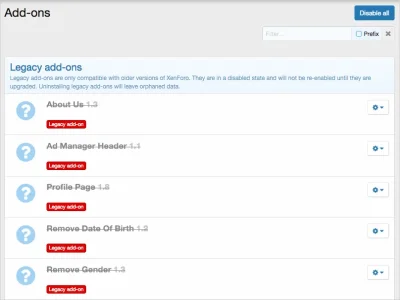


It won't. XF 1 Add-ons do have XF 1 uninstallation code which can't be executed in a XF 2 environment.
So what happens here surely "uninstall" means uninstall from the database (I assumed orphaned data was referring to orphaned files/folders in /library or /js etc.):
This notice should therefore be clearer and say to not leave orphaned data (in the database) you must have previously uninstalled in xf1.
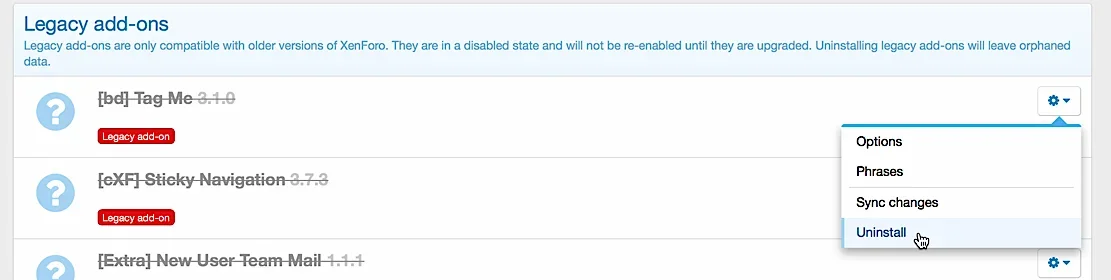
The add-on entry is removed and that's essentially it.
OK, that's not so good.
Here is a scenario:
- You don't uninstall an addon before upgrading to xf2 because you may want to upgrade the addon when it is released for xf2
- Later you find it won't be released for xf2
- So when you now uninstall (in xf2) orphaned data you don't want is left
I think that uninstall in xf2 should mean the same as it does in xf1, i.e. it removes data from the database.

Actually, I do need to correct myself. Any data that is stored in the DB in a way that's associated with the add-on (so things like options, permissions, templates, etc) will be removed. But uninstall code won't work, so any schema changes won't be removed and any other actions done by the uninstall code won't be triggered.The add-on entry is removed and that's essentially it.

Should people remove all Legacy add-ons before upgrading to x2? Is it better to start off with a blank slate when it comes to the add-ons?Actually, I do need to correct myself. Any data that is stored in the DB in a way that's associated with the add-on (so things like options, permissions, templates, etc) will be removed. But uninstall code won't work, so any schema changes won't be removed and any other actions done by the uninstall code won't be triggered.

It's really not a insurmountable issue for developers to resolve in future add on updates.
First, the new schema manager add on devs should be using his resiliency built in to cope with certain scenarios such as conflicting database tables and columns.
Second, the developer can write code in their updated add on to detect this and even repatriate the data from a now uninstalled add on if necessary (or just remove it).
Ultimately the advice will be to uninstall an add on before uogrwding if you know it will never be used. If you end up having to uninstall a legacy add on later, there's plenty of measures in place to cleanly and transparently resolve it.
First, the new schema manager add on devs should be using his resiliency built in to cope with certain scenarios such as conflicting database tables and columns.
Second, the developer can write code in their updated add on to detect this and even repatriate the data from a now uninstalled add on if necessary (or just remove it).
Ultimately the advice will be to uninstall an add on before uogrwding if you know it will never be used. If you end up having to uninstall a legacy add on later, there's plenty of measures in place to cleanly and transparently resolve it.
That only makes sense if a) you know you don't need the add on or, b) you know the add on most likely won't be upgraded in the future. Otherwise, just leave it and either wait until an update is available or eventually remove the add on.Should people remove all Legacy add-ons before upgrading to x2? Is it better to start off with a blank slate when it comes to the add-ons?
Thank you for the info!It's really not a insurmountable issue for developers to resolve in future add on updates.
First, the new schema manager add on devs should be using his resiliency built in to cope with certain scenarios such as conflicting database tables and columns.
Second, the developer can write code in their updated add on to detect this and even repatriate the data from a now uninstalled add on if necessary (or just remove it).
Ultimately the advice will be to uninstall an add on before uogrwding if you know it will never be used. If you end up having to uninstall a legacy add on later, there's plenty of measures in place to cleanly and transparently resolve it.
That only makes sense if a) you know you don't need the add on or, b) you know the add on most likely won't be upgraded in the future. Otherwise, just leave it and either wait until an update is available or eventually remove the add on.

Any data that is stored in the DB in a way that's associated with the add-on (so things like options, permissions, templates, etc) will be removed.
Excellent, so legacy add-on which do not have an uninstall.php file will be cleanly uninstalled.
I suggest the following phrase:
Uninstalling legacy add-ons will leave orphaned data.
be changed to something more descriptive, for example:
Uninstalling legacy add-ons may leave orphaned database tables and or schema changes.
Similar threads

- Replies
- 17
- Views
- 2K

- Question
- Replies
- 5
- Views
- 1K