
XF 2.3 Unable to upload RAW image formats (.NEF, .DNG, etc.) anywhere in XF/XFMG/XFRM despite allowed extensions

CrazyChef

Active member
Licensed customer
I'm running XenForo 2.3.9 with XFMG 2.3.9 and XFRM 2.3.8.

I'm trying to allow users to upload RAW camera files directly (.NEF, .DNG, .RAW, etc.), but the uploads never complete.

The upload simply sits at 0% indefinitely whether I try uploading:

  • to XFMG
  • as a normal forum attachment
  • or into XFRM
Things I've already verified:

  • upload_max_filesize = 256M
  • post_max_size = 256M
  • max_execution_time = 300
  • memory_limit = 511M
  • Cloudflare proxy disabled for testing
  • tested both Imagick and GD
  • RAW extensions are definitely allowed
  • no server error logs generated
  • no XenForo ACP errors generated
Interesting detail:
If I rename the exact same RAW file to .zip, it uploads instantly and successfully. The actual RAW extensions do not.

I've tested:

  • .NEF
  • .DNG
  • .RAW
All behave the same way.

In browser developer tools, I only see a local blob object generated from attachment_manager-compiled.js, but I never actually see a normal upload request reach the server.

Has anyone here successfully configured XenForo/XFMG/XFRM to allow direct RAW camera file uploads? Is there some additional MIME handling or uploader configuration needed beyond simply allowing the extensions?
 
I'm running XenForo 2.3.9 with XFMG 2.3.9 and XFRM 2.3.8.

I'm trying to allow users to upload RAW camera files directly (.NEF, .DNG, .RAW, etc.), but the uploads never complete.

The upload simply sits at 0% indefinitely whether I try uploading:

  • to XFMG
  • as a normal forum attachment
  • or into XFRM
Things I've already verified:

  • upload_max_filesize = 256M
  • post_max_size = 256M
  • max_execution_time = 300
  • memory_limit = 511M
  • Cloudflare proxy disabled for testing
  • tested both Imagick and GD
  • RAW extensions are definitely allowed
  • no server error logs generated
  • no XenForo ACP errors generated
Interesting detail:
If I rename the exact same RAW file to .zip, it uploads instantly and successfully. The actual RAW extensions do not.

I've tested:

  • .NEF
  • .DNG
  • .RAW
All behave the same way.

In browser developer tools, I only see a local blob object generated from attachment_manager-compiled.js, but I never actually see a normal upload request reach the server.

Has anyone here successfully configured XenForo/XFMG/XFRM to allow direct RAW camera file uploads? Is there some additional MIME handling or uploader configuration needed beyond simply allowing the extensions?
Adding the extensions alone usually isn’t enough for RAW formats like .NEF or .DNG. XenForo still attempts to validate/process them as image uploads and most servers don’t properly support RAW camera formats through GD/ImageMagick.

If it’s failing across XF, XFMG and XFRM then it points more towards server-side image handling/MIME validation rather than the extension list itself. RAW files are a bit awkward because browsers don’t really support them natively either.

I’d check
  • whether ImageMagick actually supports those formats
  • PHP fileinfo/MIME detection
  • ModSecurity rules
  • any add-on upload validation
  • whether the files work when uploaded as generic attachments instead of images
XFRM/XFMG can also have their own attachment constraints separate from the core XF attachment settings which catches people out sometimes.
 
I don't need the RAW files in XFMG (although that would be nice - imagick allows the format), just XFRM and as normal post attachments. I'm trying to use ChatGPT to figure this out. but it's been no real help.
 
This was generated by ChatGPT:

.NEF files hang at 0%, but same file renamed to .bin and .xyz uploads successfully. Network tab shows only a local blob: request with Content-Type: image/NEF; no real upload request is sent to XenForo. This happens in both Chrome and Firefox, across forum attachments and XFRM. Image optimization is off, image dimensions are blank, and the extension is allowed.
 
Last edited:
This was generated by ChatGPT:

After more testing, I’ve narrowed this down quite a bit.

The problem does NOT appear to be:
  • PHP upload limits
  • Cloudflare
  • ModSecurity
  • attachment permissions/extensions
  • GD vs Imagick
  • EXIF support
  • server upload handling
What I found is:
  • RAW files like .nef sit at 0% indefinitely
  • the upload never actually reaches the server
  • no /attachments/upload request is ever sent
  • no ACP/PHP/server errors are generated
In DevTools, the browser reports the file MIME as:

image/NEF

The exact same RAW file uploads instantly if renamed to:
  • .xyz
  • .bin
So this appears to be tied specifically to the RAW extension being treated as an image before upload.

I also inspected XenForo’s attachment_manager-compiled.js uploader code and found that files with MIME starting with image/ are routed through client-side image preprocessing before upload.

Since .NEF is being classified as image/NEF, XenForo appears to be treating it as a normal browser-renderable image upload instead of a generic downloadable file attachment.

That seems to explain why:
  • the upload stalls before transmission
  • the same file works immediately when renamed to a non-image extension
At this point, what is the officially supported way to allow RAW formats like .NEF, .DNG, .CR2, etc. to upload as downloadable attachments/resources without XenForo attempting browser-side image preprocessing?
 
Last edited:
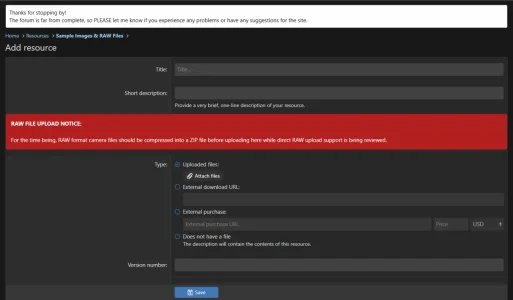
Thank you. We talking about the red banner.

Also I've signed up but not getting an email to confirm signup. I've checked spam Also.
That's odd - maybe it's a Yahoo thing? I'm using Sendgrid for my transactional emails and so far I've had no complaints. I'll send myself a test email right now - and you as well just to see what happens.
 
Back
Top Bottom