I have four questions, but first some context.
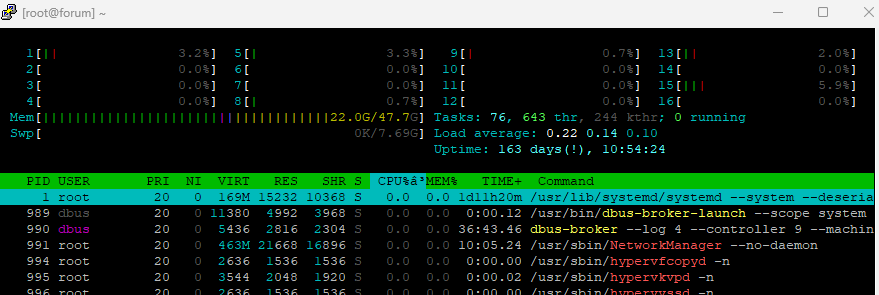
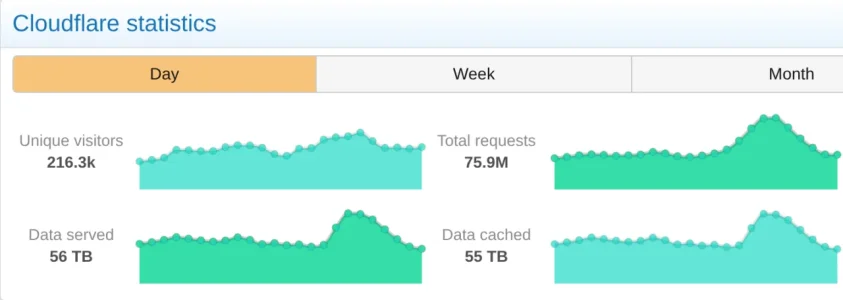
We were running 16 cores and 32 gb of RAM. We had an update to our product which many of our users were excited for. We went from a range of 8Mb/s for our low's and 300Mb/s for our high's to 3300Mb/s on our update launch day. 14 of our 16 cores were used up and all 32GB of RAM and our swap space used and obviously, it brought our site down. It was largely inaccessible at that point. We upgraded to the next tier for our hosting provider which is 32 cores and 64GB of RAM, 14 cores were used still that didn't really change and 36GB of RAM ended up being used after we reconfigured some settings to use the new resources. So we were close to having what we needed. The site became accessible, maybe 1 in every 15 page requests were a bit slow but not too bad and 1 in every like 200 would hang but refreshing would instantly load the page. We use Nginx, Memcached, Fastcgi, and Mysql.
My questions are:
1. Is this the nature of high traffic, is there something I could do to iron out the occasional slow request?
2. What does the hardware setup look like for other users and how much network traffic can it accommodate?
3. Was going down a result of some misconfiguration, could I be using our resources more efficiently, or to your knowledge were more resources always going to be required for the traffic we received?
4. How do you guys know what hardware is needed for your traffic and future traffic needs? Is it really just trial and error?
Final bonus question, is outbound network traffic transfer rates the best way to convey how much traffic we received or is there a better metric I should be using?
I understand these questions are difficult to answer without knowing our specific settings for configuration.... I'm not really looking for specific settings to change, just trying to get a feel for the hardware requirements for Larger Xenforo installations. I'd like to know if I'm doing SOMETHING wrong or if we are using typical hardware for our traffic.
We were running 16 cores and 32 gb of RAM. We had an update to our product which many of our users were excited for. We went from a range of 8Mb/s for our low's and 300Mb/s for our high's to 3300Mb/s on our update launch day. 14 of our 16 cores were used up and all 32GB of RAM and our swap space used and obviously, it brought our site down. It was largely inaccessible at that point. We upgraded to the next tier for our hosting provider which is 32 cores and 64GB of RAM, 14 cores were used still that didn't really change and 36GB of RAM ended up being used after we reconfigured some settings to use the new resources. So we were close to having what we needed. The site became accessible, maybe 1 in every 15 page requests were a bit slow but not too bad and 1 in every like 200 would hang but refreshing would instantly load the page. We use Nginx, Memcached, Fastcgi, and Mysql.
My questions are:
1. Is this the nature of high traffic, is there something I could do to iron out the occasional slow request?
2. What does the hardware setup look like for other users and how much network traffic can it accommodate?
3. Was going down a result of some misconfiguration, could I be using our resources more efficiently, or to your knowledge were more resources always going to be required for the traffic we received?
4. How do you guys know what hardware is needed for your traffic and future traffic needs? Is it really just trial and error?
Final bonus question, is outbound network traffic transfer rates the best way to convey how much traffic we received or is there a better metric I should be using?
I understand these questions are difficult to answer without knowing our specific settings for configuration.... I'm not really looking for specific settings to change, just trying to get a feel for the hardware requirements for Larger Xenforo installations. I'd like to know if I'm doing SOMETHING wrong or if we are using typical hardware for our traffic.