Traffic Counter & Forum Statistics (Real-Time, GeoIP, AMS)

Traffic Counter & Forum Statistics (Real-Time, GeoIP, AMS) 1.5.7

No permission to download
Supergatto updated Traffic Counter & Forum Statistics (Real-Time, GeoIP, AMS) with a new update entry:

Version 1.5.1 Release Notes

This update introduces a specific layout improvement for the PRO version, targeting the weekly statistics chart.

Changelog:

  • Mobile-Friendly Trend Chart: The 7-Day Trend chart now displays the daily total directly inside the vertical bars. This change ensures better readability and full compatibility when viewing the widget on smartphones and smaller screens.
Upgrade is recommended for all PRO users to enjoy the improved mobile experience...

Read the rest of this update entry...
 
I was interested but you lost me at PRO.
"We appreciate your feedback! The free version still provides deep insights into your forum's traffic. The PRO version is completely optional and intended for those who need advanced visual reporting and want to support our work. Give the free version a try, you might be surprised by how much it offers!"
 
  • Like
Reactions: CTS
Since 1.5.1 yesterday, my country flags stopped showing. On the full details page, the "Daily Geographic Origin (Top 10)" section has no data at all in it. It was working fine, flags and origins both.
 
Since 1.5.1 yesterday, my country flags stopped showing. On the full details page, the "Daily Geographic Origin (Top 10)" section has no data at all in it. It was working fine, flags and origins both.
"Hi! Thank you for the feedback. Based on your description, it's likely that the geographic data is missing because the daily log table was cleared during the update or due to a temporary permissions issue with the GeoIP database.

To resolve this, please try the following:

  1. Wait for new traffic: The 'Daily Geographic Origin' section only shows data from the last 24 hours. If the add-on was reinstalled or the logs were cleared, it will take a few hours to populate with new visitors.
  2. Check File Permissions: Ensure that the file /src/addons/Statistiche/_data/GeoLite2-Country.mmdb has read permissions (typically 0644) so the web server can access it.
  3. Verify Upgrade: Make sure you completed the add-on upgrade process within the XenForo AdminCP. This ensures the database schema is fully up to date.
If the flags still don't appear after a few hours of new traffic, please let us know!"
 
Supergatto updated Traffic Counter & Forum Statistics (Real-Time, GeoIP, AMS) with a new update entry:

[UPDATE] Advanced Traffic Statistics v1.5.7 - The "Synergy" Update! 🚀

We're excited to announce the release of version 1.5.5, an update that takes your forum monitoring to the next level, introducing exclusive integration and new proactive analytics.

🌟 What's new?

🧠 "Quiz System" Widget Integration
Are you a proud user of our Quiz System? Now you can showcase your community's activity directly in the statistics widget!

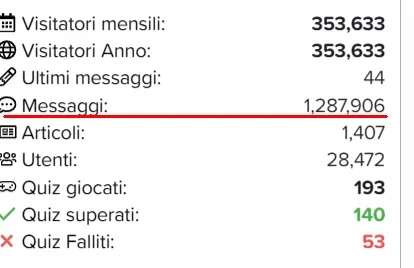
  • Total Attempts: Monitor your users' engagement.
  • Success Rate: View how many quizzes are passed or failed in real time.
...

Read the rest of this update entry...
 
I registered for pro and got the unlock code in the email, however even though its saved I am not seeing any of the pro features. Am I doing something wrong?

Thanks.
 
I registered for pro and got the unlock code in the email, however even though its saved I am not seeing any of the pro features. Am I doing something wrong?

Thanks.
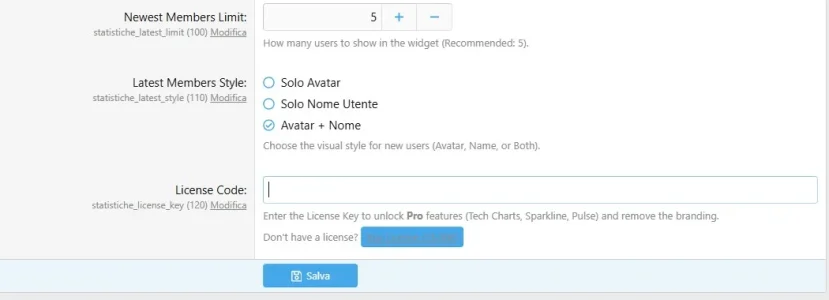
The code must be entered in the addon settings in this section. Check for extra spaces or other unnecessary characters. If necessary, clear the cache and try accessing from another computer or smartphone to see if the previous version is still stored.

If it still doesn't work,
2. Force cache refresh
Sometimes XenForo keeps the "Lite" version of the widget cached.
Go to Appearance -> Widgets.

Find the Statistics widget and click Save (without changing anything). This will force the widget to be regenerated with the new license.

If you still need help, please contact us at mygra18@gmail.com
 

Attachments

  • code.webp
    code.webp
    19.7 KB · Views: 3
Last edited:

📢 XenForo 2.3.8 Compatibility Confirmed!​

We are excited to announce that, following intensive production environment testing, Advanced Traffic Statistics (v1.5.7) is now fully compatible with the latest XenForo 2.3.8 release. 🚀

✅ What this means for you:​

  • Guaranteed Stability: All monitoring features, including technology charts and the GeoIP system, work flawlessly on the new XF 2.3.8 core. [cite: 2026-01-05]
  • No Conflicts: Our Listener, which now features crash protection [cite: 2026-01-05], interacts perfectly with the updated framework.
  • Optimized Performance: Database impact remains minimal thanks to the refined log management introduced in our latest builds.

🛠️ Upgrade Advice​

If you are planning to update your forum to 2.3.8, no manual changes to the add-on are required. Simply ensure you are running version 1.5.7 to benefit from the latest database protection and referer length fixes.
 
Just installed this and I do like how it works and displays.

Can I suggest that the options should include a toggle to display (or not) the bottom "View Full Report" button?

Since the report is already linked to "Forum Views", I prefer to remove the button on the bottom and rely solely on the "Forum Views" link in the addon.
 
Just installed this and I do like how it works and displays.

Can I suggest that the options should include a toggle to display (or not) the bottom "View Full Report" button?

Since the report is already linked to "Forum Views", I prefer to remove the button on the bottom and rely solely on the "Forum Views" link in the addon.
Glad you like the addon! Actually, you can already achieve this using the built-in permission system.
Go to Groups & permissions -> User group permissions, and look under the 'General permissions' section.

You will see a permission called 'View full statistics report'. If you set this to 'No' for specific groups, the 'View Full Report' button will be hidden for them, but they can still see the widget if the main 'View' permission is active. This is the cleanest way to manage it without extra settings!"
 
  • Like
Reactions: CTS
Appreciate the response.

I have experimented with that, and found thats too aggressive.

I do wish the report be available to usergroups that I gave permissions to (via the Forum Views link), but I wish the button to be removed from the display.

And changing the permissions at the moment either shows both, or blocks both.

I hate to do template edits, but that may be the direction I need to go.
 
Appreciate the response.

I have experimented with that, and found thats too aggressive.

I do wish the report be available to usergroups that I gave permissions to (via the Forum Views link), but I wish the button to be removed from the display.

And changing the permissions at the moment either shows both, or blocks both.

I hate to do template edits, but that may be the direction I need to go.

"I totally understand your point. You want to keep the data accessible via links but clean up the UI by removing the large button at the bottom.

You have two ways to achieve this:

1. Template Edit (Quickest way):If you are comfortable with a small template edit, you can simply comment out or remove the button code.

  • Go to Appearance -> Templates -> search for statistiche_widget_sidebar.
  • Look for the following block (usually at the bottom):

Code:
<xf:if is="$xf.visitor.hasPermission('general', 'view_report')">
   <a href="{{ link('statistiche/') }}" class="stat-footer-btn">
       <xf:fa icon="fa-list-alt" /> {{ phrase('statistiche_view_full_report') }}
   </a>
</xf:if>

  • Wrap it in &lt;xf:comment&gt; ... &lt;/xf:comment&gt; or delete it. This will hide the button but keep the "Forum Views" link working perfectly.
2. Upcoming Update:I agree that this should be easier. I will include a new "Show Footer Button" toggle in the Admin Options in the next release , so you won't have to worry about template edits during future updates.

Thank you for the feedback, it helps making the addon better!"
 
Back
Top Bottom