XF 2.2 Too many Guests

sufilala

Active member
Licensed customer
Hi all, happy 2025!

Our forum is small and never has over 20 registered users logged in, but recently it's been getting stuck due to 3000+ "Guests"/unregistered visitors arriving at the same time, which eventually triggers this error:
  • MySQL query error [1114]: The table 'xf_session_activity' is full
and the forum content becomes unavailable and displays a standard message on the front end about a problem generating content. Then it seems to resolve itself and the content comes back up, but this is happening more and more often - a few times a day now. I suspect content scrapers for AI but 🤷‍♀️ i just really want the forum to be stable again.

I've set the forum not to display to unregistered users, but that makes no difference

I've checked access logs - user agents and IP addresses are not showing any obvious (to me anyway) culprits whose IP I could block

I've looked up the database error and found various obscure suggestions but i hope there may be a better way to sort this out than fiddling with the database?

Any suggestions would be very much appreciates, thanks in advance
 
will not fix the underlying issue with too many bots.

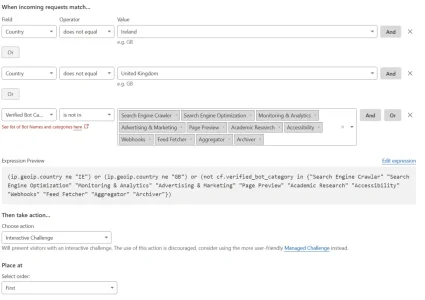
I too have been getting hammered with what I'm assuming is content scraping for AI training coming through thousands of residential proxies spread around the world. I've found it very difficult to block these, and while this probably isn't the best solution by any means, I'm now using this Cloudflare security rule to force an interactive challenge for everyone other than:

1. People in a couple of specific countries relevant to my user base, and
2. All verified - BUT NOT FKIN AI - bots

So far so good - once enabled, my guest count dropped from 1,900 guests to 61. "Real people" should should still be able to click through the challenge. Obviously anything being proxied through the whitelisted countries will still get through, but it'll do for now.


1753125480523.webp
 
Last edited:
I'm hoping this might be fixable without resorting to cloudflare, for various reasons i'd prefer not to use it.

Someone suggested adjusting a regular cron job to empty out that table more often https://xenforo.com/community/threads/the-table-xf_session_activity-is-full.228324/post-1750329 , that sounds like it might do the trick, but seems not to be possible in the admincp :(

I'd really appreciate to get this sorted out - it's a critical issue for our forum

reporting back:

the fix was to update the linux software and database :)
 
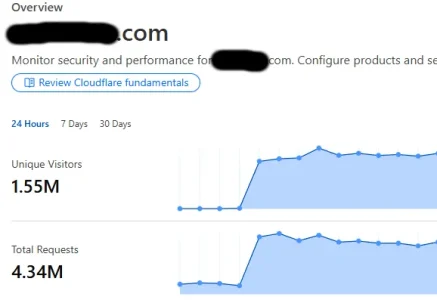
I was hit by a swarm of bots from Singapore , I had to put under attack mode in cloudflare because my server couldn't handle so many connections, a +900% increase in hours
 
I was hit by a swarm of bots from Singapore , I had to put under attack mode in cloudflare because my server couldn't handle so many connections, a +900% increase in hours

Few months ago I blocked Singapore due to large bot swarm and lost Google search pages because it seems some Google crawlers run from Singapore. It was bad took some time to recover.
 
I'm hoping this might be fixable without resorting to cloudflare, for various reasons i'd prefer not to use it.

Someone suggested adjusting a regular cron job to empty out that table more often https://xenforo.com/community/threads/the-table-xf_session_activity-is-full.228324/post-1750329 , that sounds like it might do the trick, but seems not to be possible in the admincp :(

I'd really appreciate to get this sorted out - it's a critical issue for our forum

In 2025 it is unthinkable to have an active hole and not to use cloudflare that, among other things, in the free version it goes more than good!
 
I was hit by a swarm of bots from Singapore , I had to put under attack mode in cloudflare because my server couldn't handle so many connections, a +900% increase in hours
Haha, I just had that Singaporean swarm on me for days. 1,200 visitors concurrently. 100's of IP's.
 
Last edited:
Is there a guide on how to implement cloudflare for this issue?
  1. Send all your traffic through CloudFlare (toggle to the "orange cloud" in your CF DNS settings)
  2. Lockdown ports 80 and 443 on your server to ONLY accept the IPv4 ranges of CloudFlare
    • Drop all other packets on your server at the firewall if they're not a CF IPv4
  3. Add a rule in CloudFlare security (assuming its Singapore for instance)
    • (ip.geoip.asnum in {16509 45102 136907} and not cf.client.bot)
Instead of the ASN's you could just do the wider country of "SG", but everything I read says Huawei, Amazon and Alibaba are the worst offenders. My attack was from Alibaba; but I did the other two as a preventative measure.

Once setup, adding the rule instantly stopped 1200 concurrent users; had a few hundred thousand block reports the first day, and within 3 days they're down to just 18,000 today; but #1 above stopped most; and if/when they hit my server IP directly the packets are dropped instantly because of #2 above (I have a mail server so they did get my IP through the MX record).

* above works with the free version of cloudflare *
 
Last edited:
Cloudflare WAF rule expression to allow all verified search engine bots (Google, Bing, DuckDuckGo, Yahoo, etc.) while serving a Managed Challenge to every human visitor:
  1. Go to Security > WAF > Custom rules in your Cloudflare dashboard.
  2. Click Create rule.
  3. Name the rule: Challenge Non-Bot Traffic.
  4. Click Edit expression and paste (not cf.client.bot).
  5. Under Choose action, select Managed Challenge (or Interactive Challenge).
  6. Click Deploy.

How It Works​

  • cf.client.bot: Cloudflare automatically verifies legitimate search engine crawlers (Googlebot, Bingbot, Yandex, DuckDuckGo) via reverse DNS checks and known IP validation.
  • not cf.client.bot: Catches all incoming traffic that is not on Cloudflare’s verified search engine bot list.
  • Managed Challenge: Humans running a standard browser will pass the Javascript/Turnstile verification transparently in the background, while automated scripts, scrapers, and headless browsers get stopped.


Here is the Cloudflare WAF expression to target all traffic coming from outside the US and Canada while preserving search engine crawlers:


(not ip.geoip.country in {"US" "CA"} and not cf.client.bot)

Setup Instructions​

  1. Go to Security > WAF > Custom rules in your Cloudflare dashboard.
  2. Click Create rule.
  3. Name the rule: Challenge Non-US/CA Traffic.
  4. Click Edit expression and paste the text above.
  5. Under Choose action, select Managed Challenge.
  6. Click Deploy.

If you run a North America site this is the 100% best rule to get rd of the noise , put it at rule #1
 
  • Don't Trust Inflated Guest Counts: If your "Who's Online" list still shows a high guest count after setting Cloudflare rules, those numbers are usually ghost sessions. XenForo holds stale connection logs in memory, meaning those guests aren't actually browsing your pages.
  • Use GA4 for Real-Time Accuracy: The most accurate way to verify actual human visitors on your site is the Realtime report in Google Analytics. GA4 requires JavaScript execution, so it ignores bots stopped at the edge.
  • Don't Whitelist Your Own IP: Turn off IP whitelisting for your own connection in Cloudflare. Browsing like a standard user ensures you experience the site exactly as your members do and helps identify if a security rule is accidentally blocking real traffic.
  • Start with Managed Challenges: When deploying new Cloudflare firewall rules, always set the action to Managed Challenge first rather than a hard block.
  • Monitor the Challenge Solve Rate (CSR): Evaluate the CSR in your Cloudflare dashboard after creating a rule:
    • High CSR (~100%): Indicates real human users are completing the challenge and getting through. Adjust the rule if legitimate traffic is getting caught.
    • Low/Zero CSR (~0%): Confirms automated bots or scrapers are getting blocked without impacting real visitors.
  • Guide: Recommended Cloudflare Rate Limiting Rules for XenForo
    When managing a high-traffic XenForo community, setting up targeted Rate Limiting Rules in Cloudflare is the single most effective way to prevent server strain, brute-force attacks, and rogue scrapers without disrupting real members.

    Core Principles for Rate Limiting​

    • Protect High-Cost Endpoints First: Focus rate limits on dynamic PHP actions that query the database heavily (like logins, searches, and posting endpoints).
    • Threshold Selection: Set thresholds high enough that real users clicking through threads rapidly won't trigger them, but low enough to stop automated scripts.
    • Start Gentle: Always use Managed Challenge or Block (for short durations, e.g., 10 minutes) when a rate limit is exceeded.
    • ecommended Rate Limiting for XenForo

      When setting up Cloudflare rate limits, focus on protecting dynamic PHP endpoints that hit the database heavily. A few specific targets to protect include:
      • /login/ – Prevents automated credential-stuffing and brute-force login attempts.
      • /search/ – Stops scrapers from spamming search queries and spiking database CPU usage.
      • job.php – Dumb scrapers love hammering job.php. Rate-limiting this path prevents botnets from triggering unnecessary framework checks and background queue processing.
      • /misc/style-variation (and /misc/style) – Crawlers will follow every theme-switch link in your footer, generating temporary session
      • junk. Rate-limiting this endpoint stops them in their tracks while letting real members switch themes without issue.
  • I put this guide together using a mix of real-world server logs from my own forum and some help from AI to organize and clean up the technical details. If you manage a site, AI is an incredible tool for breaking down raw traffic patterns, understanding complex server behavior, and writing precise Cloudflare WAF and rate-limiting rules. Hope this helps keep your boards running fast and clean!"
 
Back
Top Bottom