[TH] Log Out Link [Deleted]

Jon W

Well-known member
Waindigo submitted a new resource:

Log Out Link by Waindigo - Provides a Log Out button in the main navigation link bar

Description:

This add-on puts back the Log Out button removed in XenForo 1.2.

Installation:
  • Upload contents of upload folder to root directory, overwriting any existing files.
  • Install addon-Waindigo_LogOutLink.xml file.
Licence and support:

Distributed free for non-commercial use only. Please contact Waindigo to licence for commercial use. All copyright notices and references to Waindigo must remain intact. See...

Read more about this resource...
 
Why did you use template hooks?

I know they still work and all, but thought this would have been a great opportunity to use the new TM system.
 
Why did you use template hooks?

I know they still work and all, but thought this would have been a great opportunity to use the new TM system.

Wanted it to be backwards compatible with XenForo 1.1. Just in case someone wants two log out links. :P
 
Is it just the log out link or will it show up the confirm screen before log out?
 
When I go to install the add-on, I get this error: Please enter a valid callback method (Waindigo_LogOutLink_Listener_ControllerPreDispatch::controllerPreDispatch).
 
When I go to install the add-on, I get this error: Please enter a valid callback method (Waindigo_LogOutLink_Listener_ControllerPreDispatch::controllerPreDispatch).
Please make sure you have uploaded all the files correctly before running the installer.
 
Is there an easier way to install your add ons? In other words, your add on folders are all named The same thing ( i have another one of your add ons) and it wants to override one another when installing the logout button. I would like this add-on but its a tough one for me. Any help would be appreciated.
 
@tommydamic68 the mod is inside a folder with the name of the creator, so the structure is like /library/Waindigo/ThreadNavigation .
The reason why you get the message is caused by the fact that your program finds the folder named Waindigo but if it is a different addon it wont overwrite anything cause the next addon goes into /library/Waindigo/UserCriteria which is a totally different folder. You could try this on Linux and Windows for Deskto and it will behave the same way (at least it should by default).
 
Should I just say "yes" to ovewrite? I thought it would overwrite the files from his other mod.
 
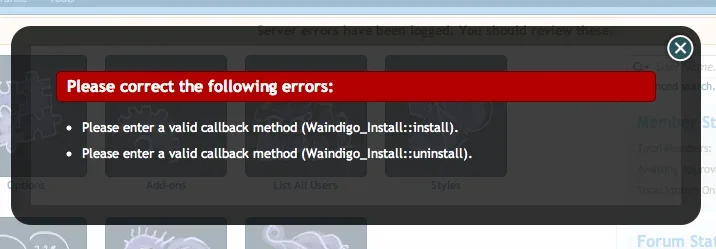
im getting this error message -
 

Attachments

  • Screen Shot 2013-09-04 at 5.46.28 AM.webp
    Screen Shot 2013-09-04 at 5.46.28 AM.webp
    15.8 KB · Views: 123
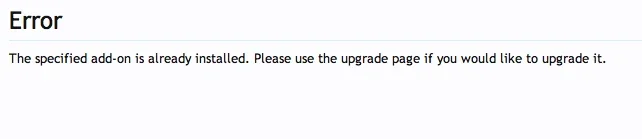
I dumped them in again ad still get this
 

Attachments

  • Screen Shot 2013-09-04 at 5.51.01 AM.webp
    Screen Shot 2013-09-04 at 5.51.01 AM.webp
    5.4 KB · Views: 123
Make sure you are uploading to the correct place. You need to upload everything inside the upload folder in the zip file to the root folder of your XenForo installation.

Once uploaded, make sure that there are several folders in the library/Waindigo folder, including Install and Listener.
 
Back
Top Bottom