Redirection script for SMF 2.0 [Deleted]

Mr. Jinx

Well-known member
Licensed customer
Mr. Jinx submitted a new resource:

Redirection script for SMF 2.0 - A script to redirect SMF to Xenforo URL's

Script to help you redirect from SMF 2.0 to Xenforo 1.5 / 2.x

There are a few things for this script to work correctly:
  • SMF 2.0 was using normal URLs, like "https://www.domain.com/smf/index.php?board=5.0"
    So "Search engine friendly URLs" and other SEO/Pretty URL's where not enabled. You will need to change the script if you where using one of those.
  • During the import to Xenforo, you choose to retain ID's
  • Both forums are installed in separate directories (or...

Read more about this resource...
 
Put it in the original location of your old SMF forum, overwriting the original index.php file.


The original location is the same location for new xenforo.....

Then you cant use it, as per the overview page.

Both forums are installed in separate directories (or domains) [/
 
So, question, I have the former smf installed in /forums/ I am not running XF in the root.
Any suggestions to get this to work?
 
I have the script redirecting /forums/ to the / root directory.
However when someone goes to an old bookmark for /forums/ it gives them an error. Is there a way to redirect someone if they go to /forums/ or /forums/index.php that it would put them at the root directory?
 
Redriecting /forum/ and /forum/index.php to / should work, at least it works for me.
For debugging, try setting mode to 0 in the script, then go to /forums/ and watch the output (you may have to use an incognito browser). What URL do you see?
Also, can you share the settings you used in the script?
 
Dumb question - what of the original SMF forum needs to exist for this to work? Database? Full forum installation?

Naturally it needs to be on the same server/domain, assuming you're re-using your domain name.

In my case I migrated to a new server, so I guess I need to copy over the full SMF forum folder and have the DB available and connected?

Or does this just intercept calls to the old site and sort out the new URL and forward? No SMF DB or application needed?
 
Once the XF import is complete - the source forum/installation (SMF) can be archived/deleted, it is no longer required.
 
This might be tricky when re-using the domain and paths of the old forum for the new.

Let's just say that the old SMF forum was in www.dotheton.com/forum, and the new XF site is in the new www.dotheton.com/forum

Does that mean the redirect script can't be used?

The actual paths on the server are different, so not a problem putting the SMF redirect script in the same path as the SMF forum would have been, but the domain www.dotheton.com resolves to the current /forum root.

SMF: /srv/www/dotheton.com/public_html/forum

XF: /var/www/html/dotheton.com/public_html/forum
 
Does that mean the redirect script can't be used?
Unfortunately, yes that is correct. You will need to create .htaccess redirects instead.
Something to replace /index.php?msg=* to /posts/$number/
I'm sure it is possible with .htaccess, but can't help you with that.

ps: during import you did choose to keep id's.
 
Yes - I did choose to keep ID's.

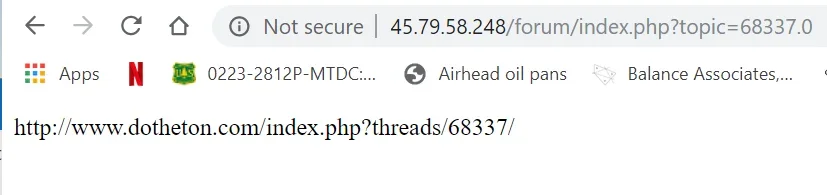
I adjusted the script a bit to produce the correct mapped URL, but it's displaying it, not actually redirecting.

For fun, I put the redirection script on my old server, and replaced the domain in an old URL with the IP address. It didn't redirect, but responded with a mapped URL in the browser window itself.


Capture2.webp
 
Last edited:
You probably didn't read through all options / variables?
$mode =0 means testing, so it only outputs the redirect. Try $mode = 2 for the real redirect.
 
OK - that works, but bottom line is if you use the same domain name for your old forum as the new one, which I expect 99% of people do, there's no way to make a redirect work anyhow.

Unless somehow there is a way to integrate your redirect script into the Xenforo index.php file to capture 'invalid' URL's and convert/redirect.
 
Although I don't think it's 99% using the same domain, you are probably right that it is the most common setup.
I created this script just for my situation and thought it would ber nice to share it with this community. It helped me and a few other people.
Somehow nobody shared their settings when converting SMF in the same domain, but there must be people out there running this setup.

However, this can certainly work with a .htaccess rule. Do you use Apache as web server @torontotim ?
I will see if I can find something.
 
Back
Top Bottom