
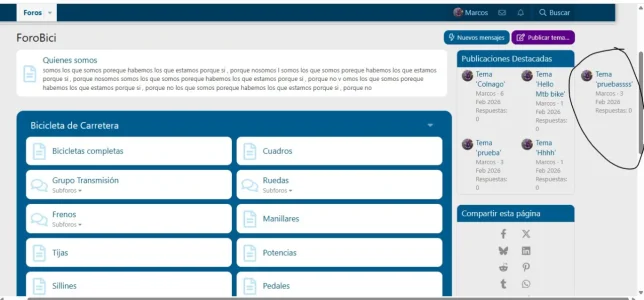
I was customizing the forum, and at some point I did something wrong... I just realized that this is appearing on the main page... Could someone guide me or tell me what I need to correct? I'm sure it's related to something at the bottom, which is where I was modifying things...
Code:
//Filter bar links

.filterBar a
{
    background:@xf-buttonTextColor;
    color:@xf-buttonBg;
}

.filterBar a:hover
{
    background:@xf-contentBg!important;
    color:@xf-textColor;
}

// Extra info - best to remove for cleaner display with columns - if you edit this you're on your own!

.node-stats,.node-extra,.node-statsMeta
{
    display:none
}
//Categories
.block--category
{
    background :@xf-borderColorHighlight;
    padding:10px 20px;
    border-radius:@xf-borderRadiusLarge
}

//Same background between the forum nodes in the list

.block--category .block-body

{    background:@xf-borderColorHighlight!important;
}

//Heading of each block
.block--category .block-header
{
    margin-bottom:0px;
    border-radius:0px;
    border-bottom:0
}

h3.block-header
{border-radius:@xf-borderRadiusLarge @xf-borderRadiusLarge 0px 0px}

// Adds the word subforums at top of box inside the node

.node-subNodesFlat:before
{
    content: " Subforums: ";
    color:xf-borderColorHighlight;
    font-weight:500
}

//Threads
.structItemContainer
{
    background:@xf-pageBg;
}

//BG of actual nodes and separation of nodes
.structItem,.node--forum,
.node--page,.node--link,
.node--search,.node--id196,.node--depth2
{
    background-color:@xf-contentBg;
    margin-bottom:10px;
    border-radius:@xf-borderRadiusMedium;
    border-top: 0px;
}

/*--------GRID-------------*/


.p-body-pageContent .block-container
{
    border:0;
    background:none;
}


.p-body-pageContent .block-container h2

{
    border-radius:@xf-borderRadiusMedium;
    margin-bottom:5px}

[data-template="forum_view" ] .p-body-pageContent .block .block-container .block-body:only-child

{
    display: block;
    background:@xf-pageBg;
}


//----------------DESKTOP only ------------------//
@media (min-width: @xf-responsiveMedium)
{

    //In forum list and forum view only. firefox causes issues hence nth child for subforums
    [data-template="forum_list" ] .p-body-pageContent,[data-template="forum_view" ] .p-body-pageContent .block:nth-child(1) .block-container
    {
        .node+.node
        {
            border-top:0
        }

        // for 3 columns change to  auto auto auto
         .block-body
        {
            display: grid;
            gap:0px 10px;
            grid-template-columns: auto auto;
            background:@xf-pageBg;
        }


    //end forumlist & forum_view
    }

    //for firefox when there is only one column and no other blocks removes nth child as with subforums above
    [data-template="forum_view" ] .p-body-pageContent .block:only-child .block-container .block-body
    {
        display: block;
    }

}

//--------------end desktop only -----------------//
//--------------do not edit the stuff above here except at your own risk--------------//

//----Optional subforums in box and columns: activate (uncomment) only if you have subforums in forum list---//

/*
//subforums in columns
.node-subNodeFlatList
{
    -webkit-column-width: 160px;
    -moz-column-width: 160px;
    column-width: 160px;
    -webkit-column-gap: 5px;
    -moz-column-gap:5px;eeeee
    column-gap: 5px;
}

//puts subforums in a box

.node-subNodesFlat
{
    padding:5px;
    border:1px solid @xf-paletteColor4;
    border-radius:@xf-borderRadiusSmall;
    margin-left:-50px;
    display:block;
}


.node-icon
{
    vertical-align:top;
    width:52px;
}

*/

//only activate if you have subforums but no description in forum list (see style properties nodes/forum list)

/*
.title-desc
{
    min-height:50px;
}
*/
/* Node Collapse */
.block--category
{
    .collapseTrigger
    {
        opacity: 0.5;
        transition: opacity 0.3s;
        margin-right: 10px;
        &.is-active:before
        {
            content: "\f205";
            transform: scale(-1, 1);
            margin-right: -8px;
        }
        &:before
        {
            content: "\f205";
            font-size: 80%;
        }
    }
    .block-container:hover .collapseTrigger
    {
        opacity: 1;
    }
}

.collapsible-nodes
{
        .block-header
        {
            display: flex;
        }
        .block-header--left
        {
            margin-right: auto;
            max-width: 100%;
        }
}

.p-header-nav {
    display: none !important;
}
.block-body
    {
            display: grid;
            gap:0px 10px;
            grid-template-columns: auto auto auto;
            background:@xf-pageBg;
        }

