XF 2.3 Post editor disappeared since upgrade

JoyFreak

Well-known member
Licensed customer
Since the upgrade, the post editor in threads, profiles, etc. (essentially anywhere an editor is used) has disappeared for some of my users.

I initially assumed it was related to a couple of add-ons, including @DragonByte Tech's Tweet/Bluesky Poster, which I also upgraded. That fixed the issue for some users, but there is still one particular user experiencing the same problem.

I have tried disabling all add-ons and still same issue.

I'm now concerned there may be others affected that I haven't heard from yet. Has anyone else experienced this issue since upgrading, or have any idea what might be causing it?
 
Are you able to login to an affected user's account and see if you can replicate it on their account? It could be a browser cache issue, if you use some kind of "Login as user" addon to login to their account and can't replicate it.

If you can replicate it on their account, check the browser console for any JS errors.

I presume nothing is showing in the server error log?
 
Are you able to login to an affected user's account and see if you can replicate it on their account? It could be a browser cache issue, if you use some kind of "Login as user" addon to login to their account and can't replicate it.

If you can replicate it on their account, check the browser console for any JS errors.

I presume nothing is showing in the server error log?
Yeah, I replicated it on their account using "Login as user". It seems to be working for them now. However, another user reported the same issue and now I am having the same issue on my account. I have no idea what is going on.

Nothing in the server error log.

Edit:

I have the following in the browser console:

Code:
Uncaught SyntaxError: Unexpected token '<'
action.min.js:1 Uncaught SyntaxError: Unexpected token '<'
message.min.js:1 Uncaught SyntaxError: Unexpected token '<'
captcha.min.js:1 Uncaught SyntaxError: Unexpected token '<'
editor-compiled.js:1 Uncaught SyntaxError: Unexpected token '<'
lets-give-this-a-go-then.1858/:1 Banner not shown: beforeinstallpromptevent.preventDefault() called. The page must call beforeinstallpromptevent.prompt() to show the banner.

Edit: I can't use inline moderation either. Clicking on a check box of a post/thread, does not bring up the inline moderation.
 
I have the following in the browser console:

Code:
Uncaught SyntaxError: Unexpected token '<'
action.min.js:1 Uncaught SyntaxError: Unexpected token '<'
message.min.js:1 Uncaught SyntaxError: Unexpected token '<'
captcha.min.js:1 Uncaught SyntaxError: Unexpected token '<'
editor-compiled.js:1 Uncaught SyntaxError: Unexpected token '<'
lets-give-this-a-go-then.1858/:1 Banner not shown: beforeinstallpromptevent.preventDefault() called. The page must call beforeinstallpromptevent.prompt() to show the banner.
Edit: I can't use inline moderation either. Clicking on a check box of a post/thread, does not bring up the inline moderation.
Understood. This means there's something else other than pure JSON in the output of whatever action you took when you got that error. Given there are no errors in the server log, the most likely cause is debug data being left in the code, such as \XF::dump() or similar.

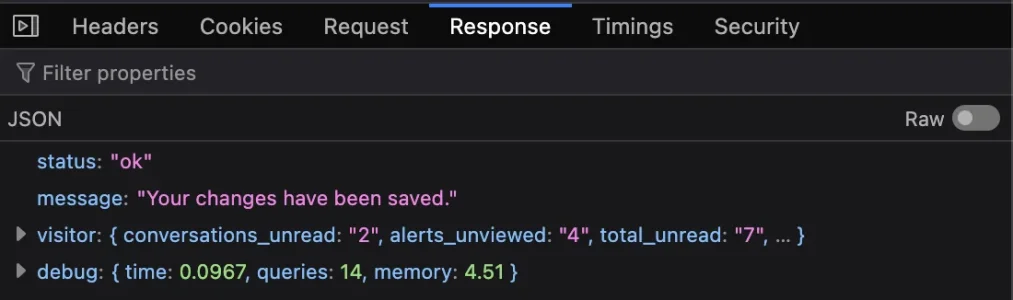
With the browser console open, go to the Network tab, then repeat the action that caused that error in the Console tab. Within the Network tab, click the "Response" sub-tab in the right-most pane. That will show something similar to this:

1789036239951.webp

For a healthy request, and a white background with raw text printed for invalid JSON. What's printed at the top of that output will be the clue to figuring out where the issue originates.
 
Understood. This means there's something else other than pure JSON in the output of whatever action you took when you got that error. Given there are no errors in the server log, the most likely cause is debug data being left in the code, such as \XF::dump() or similar.

With the browser console open, go to the Network tab, then repeat the action that caused that error in the Console tab. Within the Network tab, click the "Response" sub-tab in the right-most pane. That will show something similar to this:

View attachment 344451

For a healthy request, and a white background with raw text printed for invalid JSON. What's printed at the top of that output will be the clue to figuring out where the issue originates.
I can't replicate the issue because just before your post, I purged the cache via my host provider, CF and browser cache and it's fixed it for me. If it happens again, I will try your method. Could the disabling of exec have had anything to do with it?
 
I can't replicate the issue because just before your post, I purged the cache via my host provider, CF and browser cache and it's fixed it for me. If it happens again, I will try your method. Could the disabling of exec have had anything to do with it?
Without the output, I can't be entirely sure, but it's possible 🤔
 
Back
Top Bottom