
XF 2.1 Output display of custom field (multiple-choice drop down) as list view?

sbj

Well-known member
Licensed customer
Hey, I have a custom thread field which is a multiple-choice drop down. And when used it looks like the "Occupation" field looks in the screenshot.
Is it possible to make the output look like the "test" field, like in a list?

The "test" field is a multi-line textbox, so there I can enter words like I want with new lines. But that is not possible for dropdowns, as you select the choices.
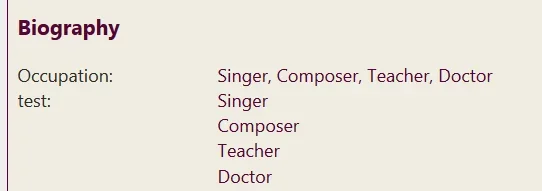
1583082261484.png

Fields have this in the options for each field:

1583082286179.png

but I am not sure how to use is. Or maybe it can be done via css?

Anyone has an idea? Thanks.
 
I don't think anything but custom development will help you as there is a trailing comma after the value that can't be modified with Value display HTML; it's in XF's core to put there and will most likely require custom development to remove (tried CSS and JS tricks to try and hide it, but it will always show as it's outputted after the 1st value, only if there is a value to proceed it).

 
  • Like
Reactions: sbj
For anyone coming to this now (6 years later :ROFLMAO:) I acheived something like this on 2.3 by:

Setting Value Display of the custom field to:
<span class="pp-pre-li-checkmark">✓</span>{$value}

Setting Wrapper Display of the custom field to:

<dl class="pp-characteristics-list pairs pairs--columns pairs--fixedSmall pairs--customField">
<dt>{$title}</dt>
<dd>
{$value}
</dd>
</dl>

And adding the following to extra.less:
// add space between blocks for each field
.pairs.pairs--customField > dd {
padding-top:7px;
padding-bottom:7px;
}

// each on it's own line
ol.listInline--customField {
display:block !important;
li {
display:block;
}
}

// remove comma between items
.listInline.listInline--customField > li:nth-last-child(n+2)::after {
content: "";
}

// add custom icon in "bullet point" style
.pp-pre-li-checkmark {
color: olive;
margin-right: 0.5rem;
}

Might not be the best way... I'm a XF noob still. But it worked.
 
Back
Top Bottom
