Notices - minimise THIS one - not dismiss

Morgain

Well-known member
Licensed customer
I'd really like to use some Notices which the user could toggle to minimise and back.
At the moment AFAIK we can only Dismiss and Recall globally - that is the whole lot whatever's there on our permissions get Hidden or Displayed as a group.

I was thinking of making a simplicity dashboard for new or nervous users.

Where the minimised button (?) goes is a puzzle right now - later for that.

Could anyone start me off with how to make a Notice minimise to a link?
 
Where it's always minimized by default until you click a button?

Admin CP -> Appearance -> Templates -> PAGE_CONTAINER

Add the red code:

Rich (BB code):
			<xen:if is="{$sidebar}">
				<div class="mainContainer">
					<div class="mainContent"></xen:if>
						
						<xen:include template="ad_above_top_breadcrumb" />
						
						<xen:if is="1">
							<a id="show_id" onclick="document.getElementById('spoiler_id').style.display=''; document.getElementById('show_id').style.display='none';" class="button">
								Show
							</a>

							<span id="spoiler_id" style="display: none">
								<a onclick="document.getElementById('spoiler_id').style.display='none'; document.getElementById('show_id').style.display='';" class="button">
									Hide
								</a>

								<p class="importantMessage">
									HIDDEN CONTENT HERE
								</p>
							</span>
						</xen:if>

						<xen:hook name="page_container_breadcrumb_top">
						<div class="breadBoxTop">
							<xen:if is="{$topctrl}"><div class="topCtrl">{xen:raw $topctrl}</div></xen:if>
							<xen:include template="breadcrumb"><xen:set var="$microdata">1</xen:set></xen:include>
						</div>
						</xen:hook>
						
						<xen:include template="ad_below_top_breadcrumb" />
					
						<xen:hook name="page_container_notices">
						<xen:include template="notices" />						
						</xen:hook>

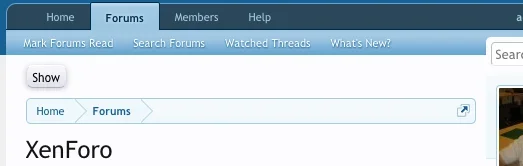
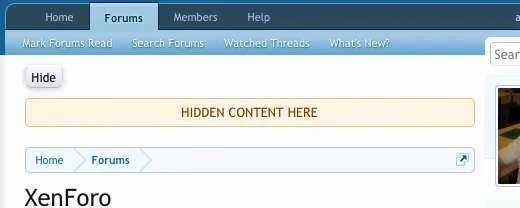
The result:

Screen shot 2013-05-31 at 1.10.07 PM.webp

Screen shot 2013-05-31 at 1.10.34 PM.webp
 
Back
Top Bottom