XF 2.3 Looking to Add a Header Image Above the Nav Bar

Agen78

Member
Licensed customer
Do I edit a template? use html or css?

Here are a few examples of what I'm looking to do.

Screenshot 2025-11-19 at 3.36.21 PM.webpScreenshot 2025-11-19 at 3.36.00 PM.webp
 
I'm ready with the code and I looked in the page container but no luck on where to put it.
Here's a standard usage pattern for putting a logo/header like those examples:

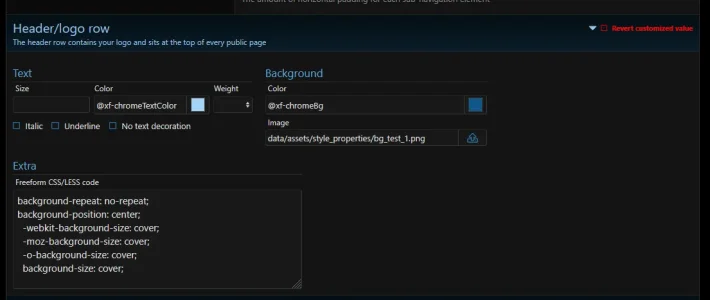
ACP > Appearance > Style Properties > [Choose Your Style] > Scroll down to "Header/Logo row" ... See example image below. You can upload the image you want from the "Image" input area. The CSS/LESS section can be used to further fine tune how to handle the image.

1763622412642.webp
 
You need to play with the PAGE_CONTAINER, I modified it there so I can customize further to our needs:

Look for this part:
Code:
<xf:set var="$srcset">{{ property('publicLogoUrl2x') ? base_url(property('publicLogoUrl2x')) . ' 2x' : '' }}</xf:set>

<header class="p-header" id="header">
    <div class="p-header-inner">
        <div class="p-header-content">

            <div class="p-header-logo p-header-logo--image">
                <a href="{{ ($xf.options.logoLink && $xf.homePageUrl) ? $xf.homePageUrl : link('index') }}">
                    <img src="{{ base_url(property('publicLogoUrl')) }}" srcset="{$srcset}" alt="{$xf.options.boardTitle}"
                        width="{{ property('publicLogoWidth') ?: '' }}" height="{{ property('publicLogoHeight') ?: '' }}" />
                </a>
            </div>

            <xf:ad position="container_header" />
        </div>
    </div>
</header>

Save a copy of the original code, then play with it to see how you'd like it customized.

 
You need to play with the PAGE_CONTAINER, I modified it there so I can customize further to our needs:

Look for this part:
Code:
<xf:set var="$srcset">{{ property('publicLogoUrl2x') ? base_url(property('publicLogoUrl2x')) . ' 2x' : '' }}</xf:set>

<header class="p-header" id="header">
    <div class="p-header-inner">
        <div class="p-header-content">

            <div class="p-header-logo p-header-logo--image">
                <a href="{{ ($xf.options.logoLink && $xf.homePageUrl) ? $xf.homePageUrl : link('index') }}">
                    <img src="{{ base_url(property('publicLogoUrl')) }}" srcset="{$srcset}" alt="{$xf.options.boardTitle}"
                        width="{{ property('publicLogoWidth') ?: '' }}" height="{{ property('publicLogoHeight') ?: '' }}" />
                </a>
            </div>

            <xf:ad position="container_header" />
        </div>
    </div>
</header>

Save a copy of the original code, then play with it to see how you'd like it customized.
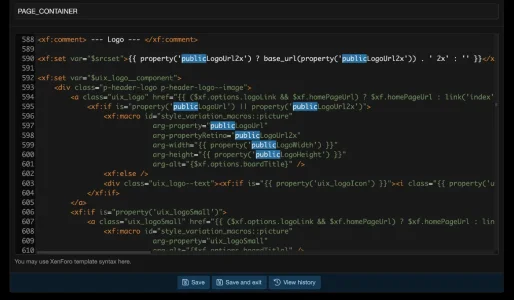
here I think

Screenshot 2025-11-20 at 12.05.26 AM.webp
 
Yup, that looks right. Save a copy and edit it to see how it works. That’s what I did until I got the header looking and functioning the way I wanted.
 
Back
Top Bottom