Installing/Setting Up CloudFlare Turnstile for Xenforo

Alfuzzy

Well-known member
Hello good folks,

Just realized XF 2.3 has native support for Cloudflare Turnstile CAPTCHA...and thought I would give it a try.

  • Have a CloudFlare account.
  • Created the CloudFlare Turnstile Widget.
  • Chose the settings for the Widget
  • Got the Turnstile Site Key & Secret Key.
  • Entered both Keys into XF AdminCP.
  • Saved Settings

Is there anything else that needs to be done for Cloudflare Turnstile to operate with XF?

Reason why I ask is...in the generic Cloudflare Turnstile install procedure there are two steps that aren't quite clear:

1. Client side integration code & Server Side integration code (and where this code would be placed).
2. For the Widget...you're asked if you want to go the "Implicit rendering" or "Explicit rendering" route.

But if all of this is handled automatically due to native CloudFlare Turnstile integration with Xenforo...cool!

Thus the question is...do I (or any Xenforo forum owner)...need to do anything else to get CloudFlare Turnstile to operate...other than entering both of the CloudFlare Turnstile Keys in the AdminCP (and saving the settings)?

Thanks:)

p.s. Apologies if this has already been asked & answered.
 
Thanks Alpha1 for the help. Looks like an interesting Add-On.

Before I do any installing...if the latest version of Xenforo natively supports Cloudflare Turnstile. If I enter the Site Key & Secret Key I got from Cloudflare (for Turnstile)...into the proper area in the Xenforo AdminCP (Setup >> Options >> Spam Management).

Is this all I need to do to get Cloudflare Turnstile to operate properly?

Thanks
 
Thanks Alpha1 for the help. Looks like an interesting Add-On.

Before I do any installing...if the latest version of Xenforo natively supports Cloudflare Turnstile. If I enter the Site Key & Secret Key I got from Cloudflare (for Turnstile)...into the proper area in the Xenforo AdminCP (Setup >> Options >> Spam Management).

Is this all I need to do to get Cloudflare Turnstile to operate properly?

Thanks
That should work, but honestly the Xenforo Cloudflare app is brilliant - makes it all a lot simpler. I've been using it quite a while and no issues at all.
 
Thanks Alvin63.

Here's the deal...and why I'm not sure if Cloudflare Turnstile is working.

  • I have the Cloudflare free account.
  • I got the Site Key & Secret Key for Turnstile.
  • I entered the Turnstile Site Key & Secret Key in the proper area of the XF AdminCP.
  • Saved the changes.

Reason why I'm not sure if Cloudflare Turnstile is working...my site is still getting hammered from AI Scraper Bots after activating Turnstile (1000's & 1000's of hits/hour from same/similar IP's around the world).

I thought Cloudflare Turnstile could handle high volume unwanted "Guest" website visits like this...especially if coming from the same/similar IP's.

Thanks
 
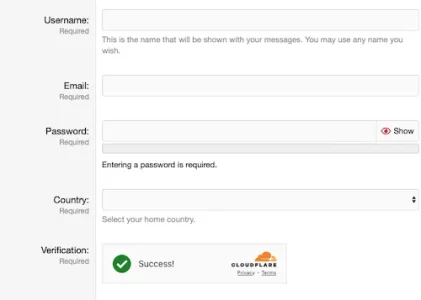
Have you checked if it's working? Use a private window and go to sign up as if you're a guest. You don't actually have to sign up - just look at the registratation window and see if a green tick appears where it says "Verification required". If a green tick appears then Cloudflare is working and next to that it will say "Cloudflare".

After I installed it, my spam approval queue was 0 and then just the occasional one. Bots - you might need something else as well.
 
Thanks much Alvin63 for the suggestion. I've been wanting to test if Cloudflare Turnstile was working...but wasn't sure how to go about it.

Following your instructions...here's a screenshot of what I'm seeing:

Screenshot 2026-01-17 at 12.26.47 PM.webp

Does this mean CloudFlare Turnstile is working?

Thanks

p.s. If CloudFlare Turnstile is working as it should...how come it's not stopping the AI Scraper Bots from accessing the website (1000's of hits/hour from the same IP's).

Are these AI Scraper Bots "smarter" than CloudFlare Turnstile...and that's why they're still getting thru?
 
from my understanding. out of the box, Turnstile is only used at the time of user registration and few other areas. it is not aimed at bot management. it absolutely does not stop ai bots from accessing your website.
 
Yes it's working and will help prevent fake registrations, but you need something else for bots. Others might know. There is Ozmodz spaminator which I have but there are other options as well. The Spaminator is for registration as well though, not for crawling.


If you use the Cloudflare app you should be able to block certain IP addresses I think. I also have various bad bots blocked in htacess.
 
from my understanding. out of the box, Turnstile is only used at the time of user registration and few other areas. it is not aimed at bot management. it absolutely does not stop ai bots from accessing your website.
Hmmm...that's a bummer.

I thought Turnstile was supposed to oversee any website visitors...and if they looked "shady"...Turnstile was supposed to challenge them with some sort of CAPTCHA...or simply refuse them access to the site.

Thanks for the reply.:)
 
Last edited:
Yes it's working and will help prevent fake registrations, but you need something else for bots. Others might know. There is Ozmodz spaminator which I have but there are other options as well. The Spaminator is for registration as well though, not for crawling.


If you use the Cloudflare app you should be able to block certain IP addresses I think. I also have various bad bots blocked in htacess.
Ok I see.

Thanks for confirming Turnstile is working. Bummer that Turnstile doesn't have any way of stopping these bots.

Yes I have tried blocking individual IP's (and IP ranges)...but these AI Scraper Bots keep rotating the IP's they use...thus the blocks only work for a short time. Sometimes they use 100 or more IP's at the same time...that's when I block an IP range. But then they shortly rotate to a slightly different IP address...and the "game" starts again. Lol

I could do Country blocks...but hate to do that if the website has registered users from that country/countries.

Thanks for the help.:)
 
Hmmm...that's a bummer.

I thought Turnstile was supposed to oversee any website visitors...and if they looked "shady"...Turnstile was supposed to challenge them with some sort of CAPTCHA...or simply refuse them access to the site.

Thanks for the reply.::
Only if they try and register. It will help in that way and reduce spam a lot. Bots crawling the site is something else.
 
Ok I see.

Thanks for confirming Turnstile is working. Bummer that Turnstile doesn't have any way of stopping these bots.

Yes I have tried blocking individual IP's (and IP ranges)...but these AI Scraper Bots keep rotating the IP's they use...thus the blocks only work for a short time. Sometimes they use 100 or more IP's at the same time...that's when I block an IP range. But then they shortly rotate to a slightly different IP address...and the "game" starts again. Lol

I could do Country blocks...but hate to do that if the website has registered users from that country/countries.

Thanks for the help.:)
Do you have a robots.txt?

Also, with some help on here, I added this to the end of ht.access: Which should help


BrowserMatchNoCase "Bytedance" bad_bot

BrowserMatchNoCase "Bytespider" bad_bot

BrowserMatchNoCase "Baiduspider" bad_bot

BrowserMatchNoCase "BIDUBrowser" bad_bot

Order Deny,Allow


Deny from env=bad_bot


A lot of those IP addresses will be for those bots most likely.
 
Do you have a robots.txt?

Also, with some help on here, I added this to the end of ht.access: Which should help


BrowserMatchNoCase "Bytedance" bad_bot

BrowserMatchNoCase "Bytespider" bad_bot

BrowserMatchNoCase "Baiduspider" bad_bot

BrowserMatchNoCase "BIDUBrowser" bad_bot

Order Deny,Allow


Deny from env=bad_bot


A lot of those IP addresses will be for those bots most likely.
As well as this in ht.access, I have this for robots.txt (If you don't already have robots.txt). Both might help.

User-agent: AspiegelBot
Disallow: /

User-agent: AhrefsBot
Disallow: /

User-agent: SemrushBot
Disallow: /

User-agent: DotBot
Disallow: /

User-agent: MauiBot
Disallow: /

User-agent: MJ12bot
Disallow: /

User-agent: ImageSift
Disallow: /

User-agent: AnthropicBot
Disallow: /

User-agent: Yandex
Disallow: /

User-agent: *
Disallow: /admin.php
Disallow: /account/
Disallow: /goto/
Disallow: /login/
Disallow: /register/
Disallow: /search/
Disallow: /help/
Disallow: /members/

Sitemap: https://www.thehamsterforum.com/sitemap.xml
 
Yes definitely have Robots.txt (probably have 30+ individual bots listed there). But of course Robots.txt only works if the bots choose to follow Robots.txt rules.

Yes also have some bots defined in .htaccess using the "Allow" or "Deny" rules.

The problem with the AI Scraper Bots I'm having issues with...they only show up in the Access Logs as "Guest". They are "unnamed" and have no URL associated with them...thus not sure how to block these "Zombie" bots.
 
if you want the easy/lazy way out, get your site on cloudflare, turn on all their AI bot blocking settings. if even that does not work, turn on i am under attack mode. the alternative is to find self managed software solutions providing similar capabilities. and keeping an eye on logs to keep adding new ip ranges to the block list. another possible option is to block incoming traffic from all countries not relevant to your community.
 
Back
Top Bottom