Installing/Setting Up CloudFlare Turnstile for Xenforo

With the Cloudflare app installed there are all kinds of goodies and extras - it shows which country the bots are from
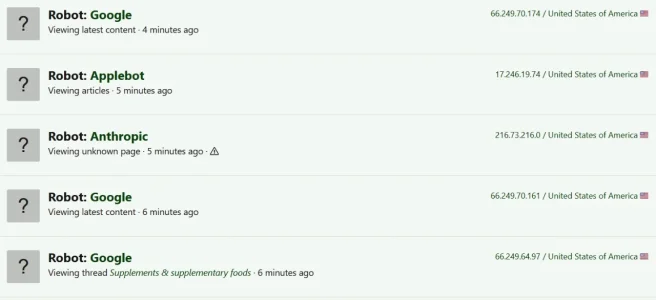
Robots.webp

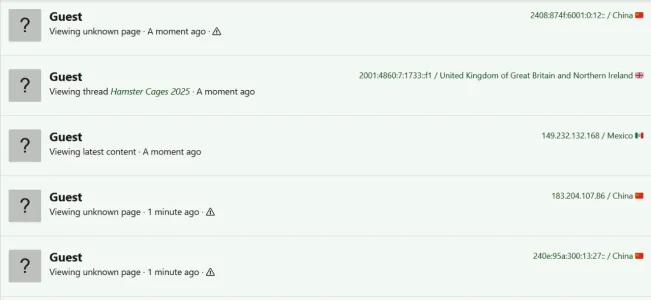
Likewise with guests

Guests.webp


There are also other addons people use to reduce bot crawling - someone else might have a tip there, or you might need to start a new thread about bots.
 
How many bots crawling at any one time? You won't get rid of them completely, but if it's thousands, some of the above might help.
Not sure exactly. I do know in the same hour of checking the Access Logs...could be up to 100+ similar IP's from the same geography in the world (same country).

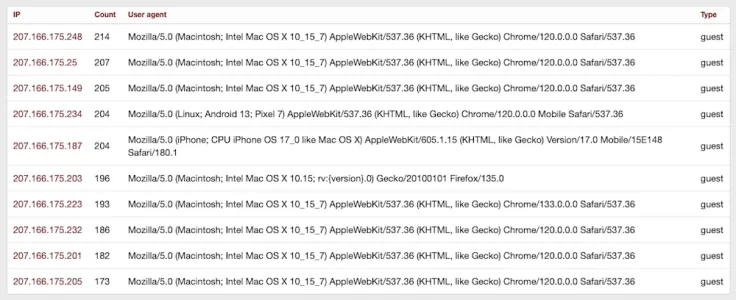
Here's an example. Notice how the IP address's are very similar (and this is just the top 10 IP's in terms of most hits from the same IP)...in the last hour. When this happens I block the IP range (last Octet). But then the AI Scraper Bots adjust the I{ they use...and the issue starts over.

Also notice how they all show up as "Guest". Thus harder to block them via robots.txt or .htaccess.

Screen Shot 2026-01-17 at 1.01.37 PM.webp
 
With the Cloudflare app installed there are all kinds of goodies and extras - it shows which country the bots are from

There are also other addons people use to reduce bot crawling - someone else might have a tip there, or you might need to start a new thread about bots.
Thanks much.

I actually do have an older version of the DigitalPoint Add-On for CloudFlare installed...but it's a much older version.

The newest version has much much more incorporated. So much stuff...it's almost overwhelming! Lol
 
if you want the easy/lazy way out, get your site on cloudflare, turn on all their AI bot blocking settings. if even that does not work, turn on i am under attack mode. the alternative is to find self managed software solutions providing similar capabilities. and keeping an eye on logs to keep adding new ip ranges to the block list. another possible option is to block incoming traffic from all countries not relevant to your community.
I do have a lot of the CloudFlare Spam & Bot settings activated.

I'm positive I have the AI Bot settings turned on (and some others)...including the setting for DDoS attacks. But I probably need to double check if I've missed anything.

Pretty sure I don't have the "I'm Under Attack" turned on. If I turned it on...I'd probably need to have it on a majority of the time...since it's rare when I check the Access Logs...to not have any Bot activity.

I've done a lot of internet searching on the topic...and I've tried a lot of things. Haven't found a solution yet that gets these bots under control.

As with many "nefarious" activities...the "Bad Guys" always seem to be 1-2 steps ahead of the "Good Guys"! Lol

Thanks
 
yeah so this appears to be bytedance. a company widely known to not respect site's robots.txt file.
When I track the individual IP locations (such as the IP's in the screenshot I posted above)...all of them point to Singapore as the IP location.

Not 100% sure if this is accurate (I haven't tried blocking all traffic from Singapore)...or if the AI Bots are hiding their true location.
 
I'm positive I have the AI Bot settings turned on (and some others)...including the setting for DDoS attacks. But I probably need to double check if I've missed anything.
In the admin panel, go to the Cloudflare section, settings, scroll down and you can check there if they're turned on.
yeah so this appears to be bytedance. a company widely known to not respect site's robots.txt file.
Bytedance also owns TikTok.
 
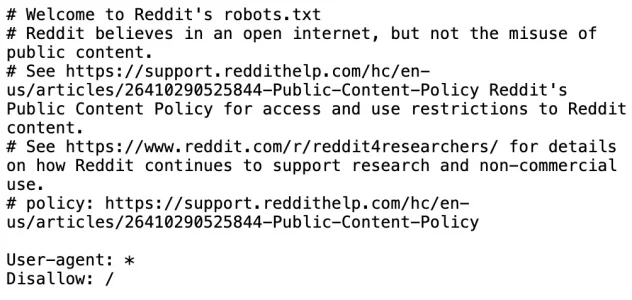
tbh, it is not only the small sites that are struggling. pretty much everyone is. reddit has this in their robots.txt file which is insane.

Code:
User-agent: *
Disallow: /

you have to decide what you want to sacrifice to keep your site working optimally. every fourth domain i visit these days appear to have cloudflare i am under attack option enabled. internet is pretty f'ed up since chatgpt became a thing.
 
In the admin panel, go to the Cloudflare section, settings, scroll down and you can check there if they're turned on.

Bytedance also owns TikTok.
Thanks much minihoot.

When you say "In the admin panel, go to the Cloudflare section"...are you referring to:

  • Going the Cloudflare website...then the Cloudflare Dashboard?
  • In the Xenforo AdminCP?
  • The DigitalPoint XF Add-On for Cloudflare?

Just wanted to be sure...been a lot of stuff mentioned in the thread...and want to go to the correct place.:)

Thanks
 
tbh, it is not only the small sites that are struggling. pretty much everyone is. reddit has this in their robots.txt file which is insane.

Code:
User-agent: *
Disallow: /

you have to decide what you want to sacrifice to keep your site working optimally. every fourth domain i visit these days appear to have cloudflare i am under attack option enabled. internet is pretty f'ed up since chatgpt became a thing.
100% agree...these AI Scraper Bots are causing all sorts of issues.

The reddit robots.txt is pretty serious (in theory it should be blocking Googlebot as well)....usually a bot no one usually wants to knowingly block!

But you know how it is...the Good Bots will obey robots.txt...and the Bad Bots won't.

And there are probably lots of small companies (even smart individuals)...who are trying to make $$$$$ selling scraped Website info to small/medium sized companies...who don't necessarily have the resources or expertise to scrape website info themselves.

Which only leads to greater greater proliferation of AI Bot Scrapers (making the situation worse).:(
 
When I track the individual IP locations (such as the IP's in the screenshot I posted above)...all of them point to Singapore as the IP location.

Not 100% sure if this is accurate (I haven't tried blocking all traffic from Singapore)...or if the AI Bots are hiding their true location.
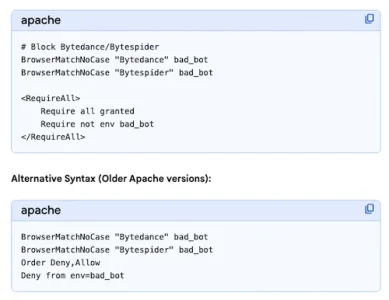
Probably Bytedance or Bytespider if Singapore. That's why blocking them in .htaccess works quite well.
 
reddit is essentially charging a fees from anyone who wants to index their content. google is paying the money so they have access to the content.
 
Not sure exactly. I do know in the same hour of checking the Access Logs...could be up to 100+ similar IP's from the same geography in the world (same country).

Here's an example. Notice how the IP address's are very similar (and this is just the top 10 IP's in terms of most hits from the same IP)...in the last hour. When this happens I block the IP range (last Octet). But then the AI Scraper Bots adjust the I{ they use...and the issue starts over.

Also notice how they all show up as "Guest". Thus harder to block them via robots.txt or .htaccess.

View attachment 332615
The Cloudflare app will show the IP's and country as well so you don't have to look them up.
 
Cool. I'll add them to the .htaccess...and see if Singapore IP Bot activity stops.

Thanks
This helped for me, thanks to help on here - thanks to @philmckrackon - at the end of .htaccess

BrowserMatchNoCase "Bytedance" bad_bot

BrowserMatchNoCase "Bytespider" bad_bot

BrowserMatchNoCase "Baiduspider" bad_bot

BrowserMatchNoCase "BIDUBrowser" bad_bot

Order Deny,Allow


Deny from env=bad_bot
 
Back
Top Bottom