Image Optimizer for XF 2.0

Image Optimizer for XF 2.0 [Paid] 3.0.1

No permission to buy ($29.00)
After installing this addon also, when a remote image is embedded (and converted as attachment using this addon https://xenforo.com/community/resources/7973/ )
Images are uploaded twice and other one always "Unassociated".
This is causing me new issue with XF 2.2.10 P1 :|
 
Based on testing, it doesn't work on profile posts and profile post comments.
 
Ok, had some kind of issue that we were able to fix. is there a way to restart it from the beginning?
 
Last edited:
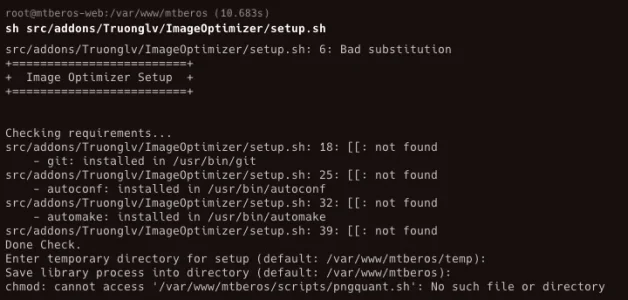
I run the .sh script and I get this at the end:
/home/bikov1/dev.lbs.co.il/src/addons/Truonglv/ImageOptimizer/scripts/pngquant.sh: line 13: ./configure: No such file or directory

Any meaning?
 
I run the .sh script and I get this at the end:
/home/bikov1/dev.lbs.co.il/src/addons/Truonglv/ImageOptimizer/scripts/pngquant.sh: line 13: ./configure: No such file or directory

Any meaning?
Do you have more error stack?
 
Do you have more error stack?
it's from the terminal, not from XF's error log. It was the last line:

Code:
[admin@server]$ sh src/addons/Truonglv/ImageOptimizer/setup.sh
+=========================+
+  Image Optimizer Setup  +
+=========================+


Checking requirements...
    - git: installed in /usr/bin/git
    - autoconf: installed in /usr/bin/autoconf
    - automake: installed in /usr/bin/automake
Done Check.
Enter temporary directory for setup (default: /home/user/domian.com/src/addons/Truonglv/ImageOptimizer/temp): imageoptitemp
imageoptitemp is not exists. Trying to create...
Save library process into directory (default: /home/user/domain.com/src/addons/Truonglv/ImageOptimizer): y
Cloning into 'pngquant'...
remote: Enumerating objects: 4713, done.
remote: Counting objects: 100% (127/127), done.
remote: Compressing objects: 100% (62/62), done.
remote: Total 4713 (delta 64), reused 116 (delta 63), pack-reused 4586
Receiving objects: 100% (4713/4713), 1.71 MiB | 18.27 MiB/s, done.
Resolving deltas: 100% (3082/3082), done.
Submodule 'lib' (https://github.com/ImageOptim/libimagequant.git) registered for path 'lib'
Cloning into '/home/user/domain.com/imageoptitemp/pngquant/lib'...
remote: Enumerating objects: 4903, done.
remote: Counting objects: 100% (784/784), done.
remote: Compressing objects: 100% (265/265), done.
remote: Total 4903 (delta 507), reused 744 (delta 482), pack-reused 4119
Receiving objects: 100% (4903/4903), 1.08 MiB | 5.64 MiB/s, done.
Resolving deltas: 100% (3233/3233), done.
Submodule path 'lib': checked out '0d4b90564a0fa9e0d83a345ecdc41de54cce33bf'
HEAD is now at 22918da Changelog
Previous HEAD position was 0d4b905 Bump deps
HEAD is now at a6cc4ad Bump
/home/user/domain.com/src/addons/Truonglv/ImageOptimizer/scripts/pngquant.sh: line 17: cd: imageoptitemp/pngquant: No such file or directory



Edit: I guess it's because I chose a different temp directory. Just had to press enter twice. Need to note this somewhere in the instructions since it's confusing.
 
So If I don't want GIFs to be optimized I just remove the binary path from the"gifsicle path"?
 
That’s right.
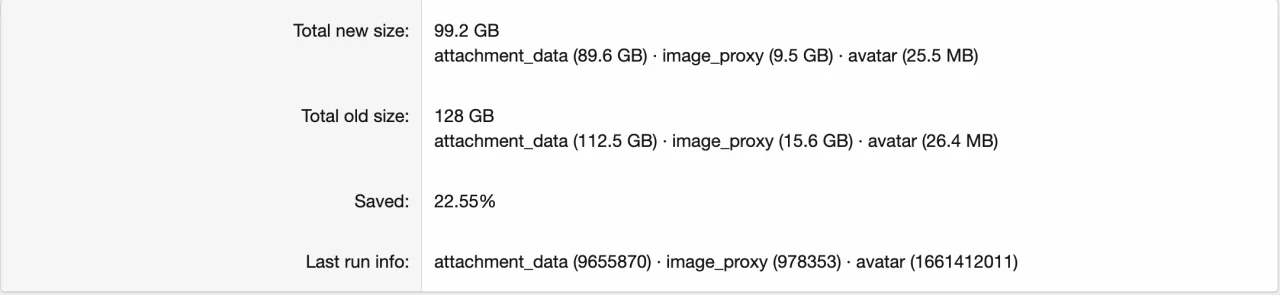
Thanks. If the log says "attachment_data (#84699)", is 84699 the number of the attachment or it doesn't mean anything really?
I mean, can I check the attachment navigating:
domain.com/attachments/84699/
?
 
Thanks. If the log says "attachment_data (#84699)", is 84699 the number of the attachment or it doesn't mean anything really?
I mean, can I check the attachment navigating:
domain.com/attachments/84699/
?
It is data_id of the table xf_attachment_data.
 
Back
Top Bottom