XF 2.3 How to center text

GW2

Well-known member
Licensed customer
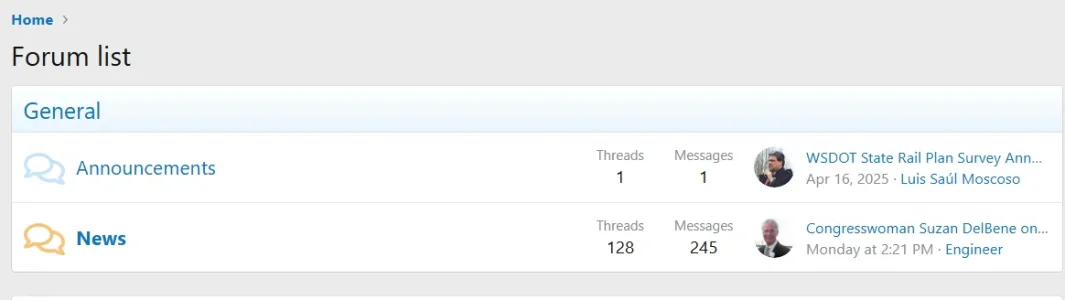
Where/how can I center align the word "General" on this category title (rather than left aligned)?
I am sure there is a simple solution...but I haven't found it. 😵‍💫
1780528897600.webp
 
Solution
Code edit of the template extra.less

This will center the titles, and is safe for if you want to keep a left aligned description (if there or added later):
CSS:
.block--category1 .block-header > a
{
    display: block;
    text-align: center;
}

But, this would work with just titles (no description, or else it will align the description center, too):
CSS:
.block--category1 .block-header
{
    text-align: center;
}

Examples doing this with two categories (1 and 4):
CSS:
.block--category1 .block-header > a, 
.block--category4 .block-header > a
{
    display: block;
    text-align: center;
}

CSS:
.block--category1 .block-header,
.block--category4 .block-header
{
    display: block;
    text-align: center;
}

To hit...

Code edit of the template extra.less

This will center the titles, and is safe for if you want to keep a left aligned description (if there or added later):
CSS:
.block--category1 .block-header > a
{
    display: block;
    text-align: center;
}

But, this would work with just titles (no description, or else it will align the description center, too):
CSS:
.block--category1 .block-header
{
    text-align: center;
}

Examples doing this with two categories (1 and 4):
CSS:
.block--category1 .block-header > a, 
.block--category4 .block-header > a
{
    display: block;
    text-align: center;
}

CSS:
.block--category1 .block-header,
.block--category4 .block-header
{
    display: block;
    text-align: center;
}

To hit them all (except descriptions):
CSS:
[class*="block--category"] .block-header > a {
    display: block;
    text-align: center;
}

Or (for descriptions, too):
CSS:
[class*="block--category"] .block-header {
    display: block;
    text-align: center;
}
 
  • Like
Reactions: GW2
Solution
Ahhh yes... extra.less
Thank you!! (y)
I particularly appreciate this information because I know next to nothing about CSS (or php) ...but am learning.
 
Last edited:
Back
Top Bottom